
1. Уводзіны
This manual provides essential information for the assembly, operation, maintenance, and troubleshooting of your Hbada E2 Ergonomic Office Chair. Please read these instructions carefully before use to ensure proper function and longevity of your chair.

Figure 1: Hbada E2 Ergonomic Office Chair, side view.
2. Інфармацыя па бяспецы
- Заўсёды ўважліва выконвайце інструкцыі па зборцы.
- Keep the chair away from direct heat sources to prevent material damage.
- Do not exceed the maximum weight capacity of the chair. Refer to specifications for details.
- Перад выкарыстаннем пераканайцеся, што ўсе шрубы і злучэнні надзейна зацягнуты, і перыядычна правярайце іх на наяўнасць няшчыльнасці.
- Выкарыстоўвайце крэсла на роўнай, устойлівай паверхні.
3. Налада і зборка
Assembly is required for this product. Detailed step-by-step assembly instructions and all necessary tools are included in the product packaging. Please refer to the separate assembly guide for a complete walkthrough. Ensure all components are present before beginning assembly.

Figure 2: Hbada E2 Ergonomic Office Chair, front view сабранага вырабы.
4. Інструкцыя па эксплуатацыі (рэгуляванне)
The Hbada E2 chair offers multiple adjustment features to customize your seating experience for optimal comfort and support.
4.1. Рэгуляванне падгалоўніка
The 3D adjustable headrest can be positioned to support your neck and head effectively.
- Вертыкальная рэгуляванне: Adjust the headrest up or down by up to 10 cm.
- Forward and Backward Adjustment: Move the headrest forward or backward by up to 3 cm.
- Кручэнне: Rotate the headrest up to 60 degrees to find your preferred angle.

Figure 3: Headrest adjustment capabilities.
4.2. Рэгуляванне паяснічнай падтрымкі
The 6-way adjustable lumbar support provides comprehensive lower back protection.
- Forward and Backward Adjustment: Adjust the lumbar support in 3 levels.
- Вертыкальная рэгуляванне: Move the lumbar support up or down.
- Left-Right Suspension: The floating structure adapts to your movements.

Figure 4: Lumbar support dynamic adjustment features.
4.3. Рэгуляванне падлакотнікаў
The 3D armrests can be adjusted to provide optimal elbow support.
- Рэгуляванне вышыні: Adjust armrest height by up to 7.5 cm.
- Forward and Backward Adjustment: Move armrests forward or backward by up to 5 cm.
- Кручэнне: Rotate armrests 40 degrees left and right.

Figure 5: Armrest adjustment options.
4.4. Recline Function and Locking
The chair features a reclining function with three lockable tilt angles.
- Recline up to 135 degrees.
- Lockable angles for 90° (comfortable office), 115° (leisure and entertainment), and 138° (short nap).

Figure 6: Three-level locking recline positions.
4.5. Wired Control Adjustment
The aluminum alloy wired control allows for easy adjustment without bending down.
- Simply toggle the adjuster for one-touch operation of chair functions.

Figure 7: Wired control for easy adjustments.
5. Тэхнічнае абслугоўванне
Regular maintenance ensures the longevity and optimal performance of your Hbada E2 chair.
- Уборка: For the mesh fabric, gently wipe with a damp cloth and mild soap. Avoid harsh chemicals. For the frame, use a soft, dry cloth.
- агляд: Перыядычна правярайце ўсе шрубы і балты, каб пераканацца, што яны зацягнуты. Пры неабходнасці падцягвайце.
- Ролікі: Трымайце колы чыстымі ад валасоў і смецця, каб забяспечыць плаўны рух.
- Пазбягайце перагрузкі: Do not place excessive weight on the chair or armrests beyond the specified capacity.
6. Выпраўленне непаладак
If you encounter any issues with your Hbada E2 chair, please refer to the following common solutions:
- Скрып крэслаў: Check and tighten all assembly bolts. A small amount of silicone spray on moving parts may help, but avoid contact with mesh or upholstery.
- Chair Not Adjusting: Ensure no obstructions are blocking the adjustment mechanisms. Verify that the wired control is functioning correctly.
- Ролікі не круцяцца плаўна: Clean any debris from the caster wheels. Ensure they are properly inserted into the chair base.
- Gas Lift Issues: If the chair does not hold its height, the gas lift may need replacement. Contact customer support for assistance.
For persistent issues or concerns not addressed here, please contact Hbada customer support.
7. Тэхнічныя характарыстыкі
| Асаблівасць | Дэталь |
|---|---|
| Марка | Хбада |
| Назва мадэлі | E2 |
| Колер | Белы |
| Памеры прадукту (Д х Ш х У) | 30.51" Г x 22.24" Ш x 18.11" У |
| Матэрыял | Alloy Steel (Frame), Mesh (Back, Seat), Foam (Fill) |
| Стыль спіны | Сетка |
| Arm Style | 3D Рэгуляваны |
| Падлік у становішчы лежачы | 3 |
| Уключаныя кампаненты | Падлакотнік, падушка |
| Рэкамендацыя па паверхні | Цвёрдая падлога, дыван |
| Вытворца | Хбада |
| Дата першай даступнасці | 18 снежня 2024 г |
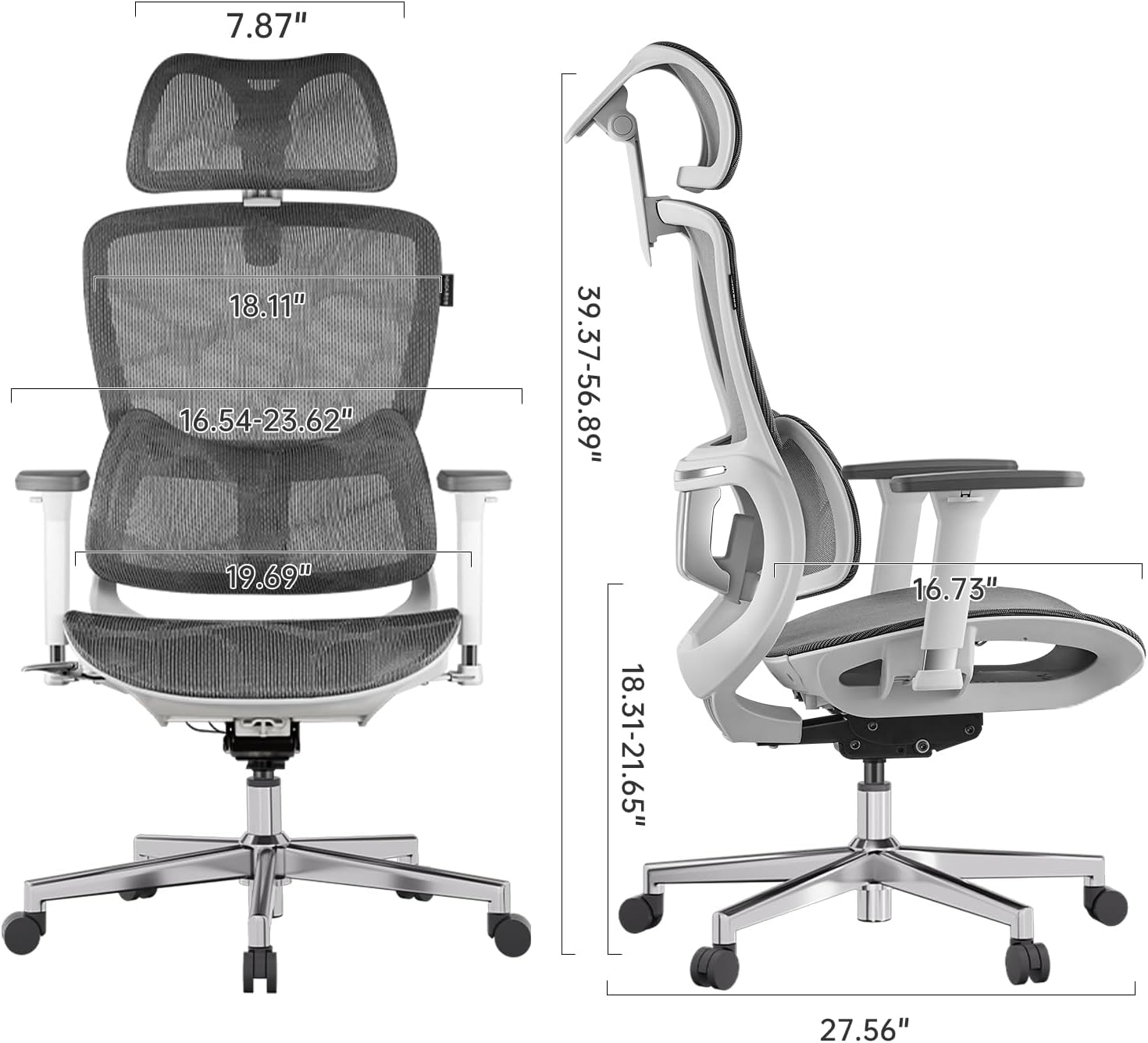
Figure 8: Detailed dimensions of the Hbada E2 Office Chair.
8. Гарантыя і падтрымка
Hbada is committed to providing high-quality products and customer satisfaction.
8.1. Палітыка вяртання
This product is eligible for returns within 30 days of purchase, subject to the retailer's return policy.
8.2. Планы абароны
Optional protection plans are available for purchase to extend coverage beyond the standard warranty:
- 2-гадовы план абароны: One-time payment of $44.99.
- 3-гадовы план абароны: One-time payment of $56.99.
- Поўная абарона: Monthly billing of $16.99, covering eligible past and future purchases.
These plans offer additional coverage and are separate from any manufacturer's warranty.
8.3. Падтрымка кліентаў
For product inquiries, assembly assistance, or warranty claims, please visit the official Hbada store or contact their customer service directly.

Figure 9: Hbada's commitment to customer service.
Наведайце ст Hbada Store для атрымання дадатковай інфармацыі.