
MechMaxx Farming HD Backup 1080P Camera System
MechMaxx Farming HD Backup 1080P Camera System User Manual
мадэль: Farming HD Backup 1080P Camera System
Марка: МехМакс
1. Уводзіны
This manual provides detailed instructions for the installation, operation, and maintenance of your MechMaxx Farming HD Backup 1080P Camera System. This system is designed to enhance visibility and safety for agricultural and heavy-duty commercial vehicles, offering a high-resolution 1080P camera and a 7-inch LCD monitor. Please read this manual thoroughly before using the product to ensure proper function and longevity.
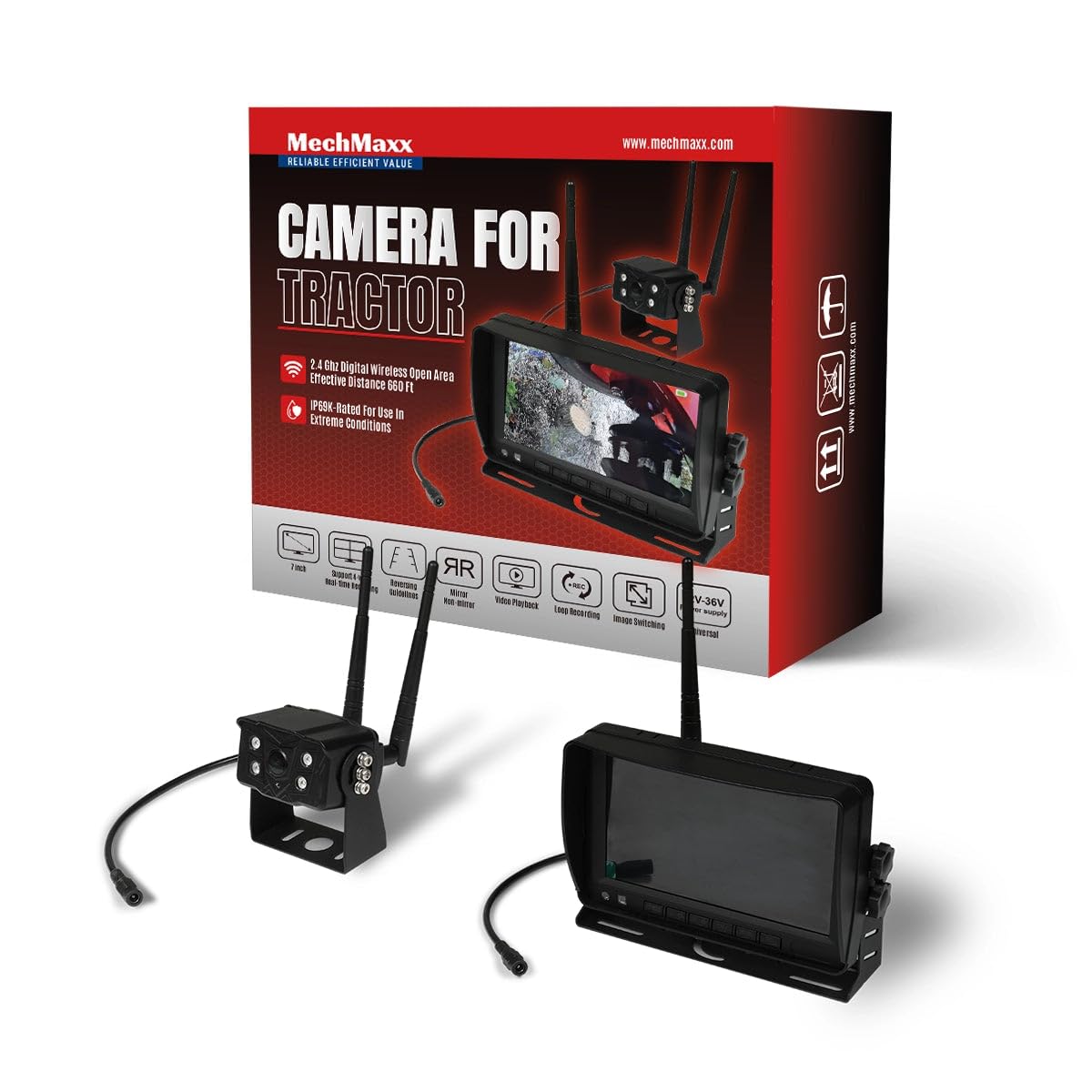
Figure 1: MechMaxx Farming HD Backup 1080P Camera System
2. Змесціва ўпакоўкі
Праверце, ці ўсе пералічаныя ніжэй прадметы ўваходзяць у вашу ўпакоўку:
- 7-цалевы ВК-манітор HD
- 1080P HD Camera Unit with IR Lights
- Power Cable for Monitor (Cigarette Lighter Adapter)
- Power Cable for Camera (Direct Battery Connection)
- Antennas for Wireless Transmission
- Мантажны кранштэйн для манітора
- Mounting Hardware (Screws, wrench)
- Пульт дыстанцыйнага кіравання
- Кіраўніцтва карыстальніка

Малюнак 2: Змест пакета
3. Усталёўка і налада
The MechMaxx camera system is designed for straightforward installation. Follow these steps for optimal performance.
3.1 Camera Unit Installation
- Мантаж: Securely attach the camera unit to the rear or desired location on your vehicle using the provided mounting hardware. Ensure a clear line of sight for the camera.
- Падключэнне антэны: Screw the antennas firmly onto the designated ports on the camera unit.
- Падключэнне сілкавання: Connect the camera's power cable to a 12-36V DC power source. This can be directly to the vehicle's battery or an ignition-switched power source.
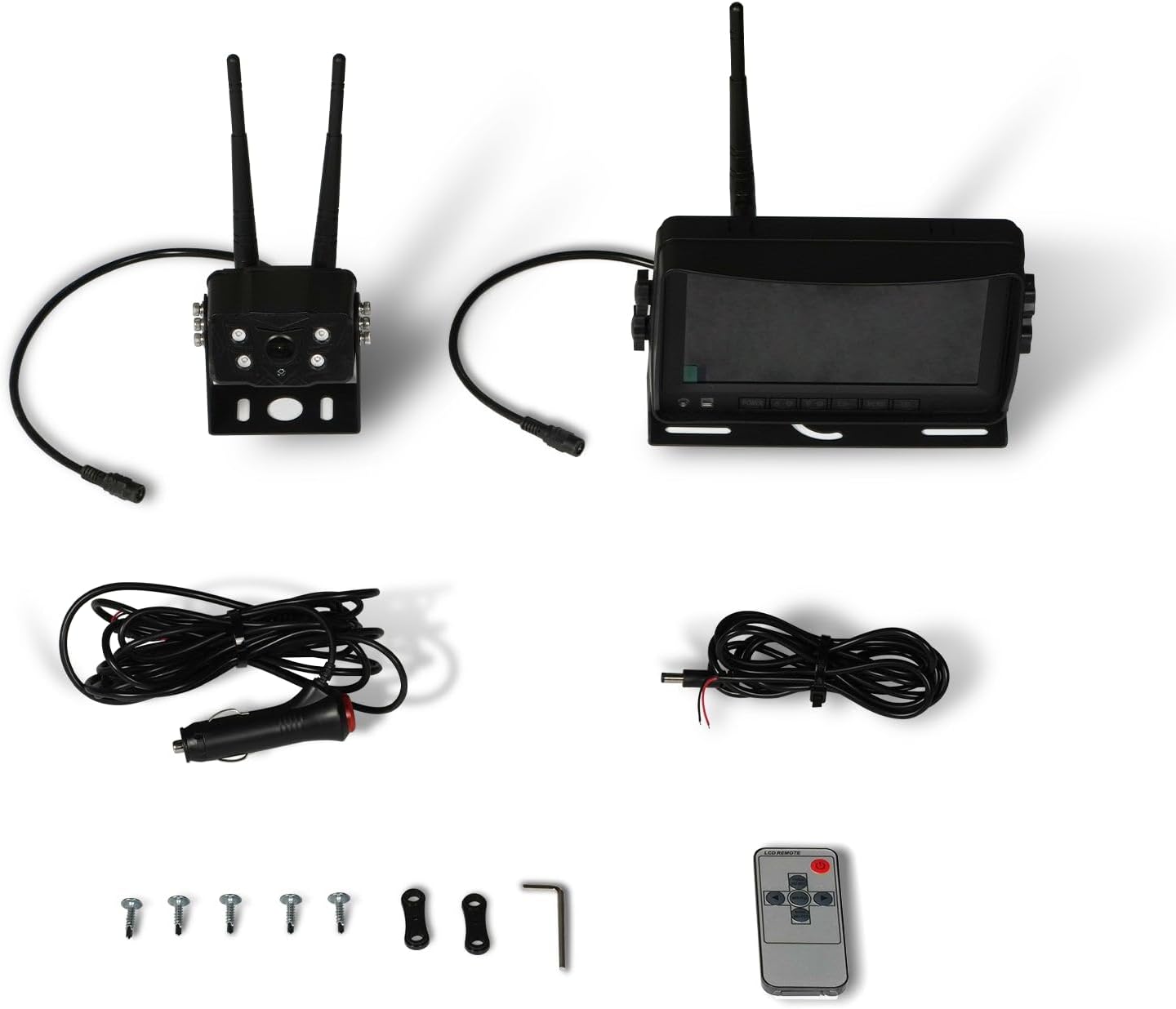
Figure 3: Camera Unit with Antennas

Figure 4: Camera Unit Detail
3.2 Устаноўка манітора
- Мантаж: Attach the 7-inch LCD monitor to your dashboard or windshield using the provided suction cup or surface mount bracket. Adjust the angle for optimal viewінж.
- Падключэнне сілкавання: Connect the monitor's power cable to your vehicle's cigarette lighter socket. The monitor will power on/off with the vehicle's ignition.

Figure 5: 7-inch LCD Monitor
3.3 Электрычная схема
The system offers a simple 1-step installation for power. The monitor can be powered via a cigarette lighter, and the camera can be wired directly to the vehicle's battery or an ignition-controlled fuse.

Figure 6: Simplified Wiring Diagram
4. Інструкцыя па эксплуатацыі
Once installed, the system is ready for use. The monitor will automatically display the camera feed when powered on.
4.1 Асноўныя аперацыі
- Уключэнне/выключэнне харчавання: The system powers on automatically with the vehicle's ignition. You can also use the power button on the monitor or remote control.
- ViewРэжымы працы: The 7-inch LCD provides a clear, full-color display. The camera offers a wide 120-degree field of view.
- Начное бачанне: The camera features strong IR lights for enhanced visibility in low-light conditions.
4.2 Элементы кіравання маніторам
The monitor includes buttons for various settings and adjustments. Refer to the on-screen menu for detailed options.
- Menu (M): Доступ да налад сістэмы.
- OK: Пацвердзіце выбар.
- CH (канал): Switch between multiple cameras if additional units are connected (not included in standard package).
- +/-: Adjust brightness, contrast, or navigate menu options.
5. Тэхнічнае абслугоўванне
To ensure the longevity and optimal performance of your camera system, follow these maintenance guidelines:
- Уборка: Regularly clean the camera lens and monitor screen with a soft, damp тканінай. Пазбягайце абразіўных ачышчальнікаў, якія могуць падрапаць паверхні.
- Праверка кабеля: Periodically check all cables and connections for wear, damage, or loose fittings. Secure any loose connections.
- Ахова навакольнага асяроддзя: While the camera is heavy-duty and designed for outdoor use, extreme weather conditions may affect performance. Ensure proper mounting to prevent vibration damage.
6. Выпраўленне непаладак
If you encounter issues with your MechMaxx camera system, refer to the following common problems and solutions:
| праблема | Магчымая прычына | Рашэнне |
|---|---|---|
| Няма малюнка на маніторы | Loose power connection; Camera/monitor not powered; Interference | Check all power connections; Ensure vehicle ignition is on; Reduce distance between camera and monitor or check for obstructions. |
| Дрэнная якасць выявы | Dirty lens; Low light conditions; Signal interference | Clean camera lens; Ensure IR lights are active in low light; Check for strong signal interference sources. |
| Манітор не ўключаецца | No power from cigarette lighter; Faulty power cable | Check vehicle's cigarette lighter fuse; Test power cable with another device if possible. |
If the problem persists after attempting these solutions, please contact MechMaxx customer support.
7. Тэхнічныя характарыстыкі
Key technical specifications for the MechMaxx Farming HD Backup 1080P Camera System:
| Асаблівасць | Дэталь |
|---|---|
| Памер экрана | 7 цалі |
| Тэхналогія адлюстравання | ВК |
| Тэхналогія аптычнага датчыка | CMOS |
| Тып аб'ектыва | Шырокі кут |
| Поле View | 120 градусаў |
| Тып раздыма | AHD |
| Тып ўстаноўкі | Павярхоўны мантаж |
| Сумяшчальныя прылады | Манітор |
| Вага прадмета | 12 фунта |
| Колер | Чорны |

Figure 7: Additional Specifications
8. Гарантыя і падтрымка
For warranty information, technical support, or service inquiries, please refer to the contact details provided with your product packaging or visit the official MechMaxx webсайт. Захоўвайце чэк аб куплі як пацвярджэнне пакупкі для гарантыйных прэтэнзій.