
SUVCON M02
SUVCON M02 4K Dash Cam User Manual
Мадэль: M02
Уводзіны
Thank you for choosing the SUVCON M02 4K Dash Cam. This manual provides detailed instructions for the installation, operation, and maintenance of your dash cam. Please read this manual thoroughly before using the product to ensure proper functionality and safety.
Важная інфармацыя па бяспецы
- Не карыстайцеся відэарэгістратарам падчас кіравання аўтамабілем. Змяняйце налады толькі тады, калі аўтамабіль бяспечна прыпаркаваны.
- Пераканайцеся, што відэарэгістратар надзейна замацаваны і не перашкаджае кіроўцу view або спрацоўвання падушкі бяспекі.
- Use only the original power cable provided to prevent damage to the device or vehicle.
- Avoid exposing the dash cam to extreme temperatures, direct sunlight for prolonged periods, or excessive moisture.
- Do not attempt to disassemble or repair the dash cam yourself. Contact customer support for assistance.
- Format the memory card regularly to ensure optimal performance and prevent data corruption.
Змест пакета
Калі ласка, праверце ўпакоўку на наяўнасць наступных прадметаў:
- SUVCON M02 4K Dash Cam (Front Camera)
- Rear Camera (if included in your package)
- Car Charger with Power Cable
- Мацаванне прысоскі
- Заціскі для кабеляў
- Кіраўніцтва карыстальніка
- 32GB MicroSD Card (if included in your package)
Прадукт скончаныview
Familiarize yourself with the components of your SUVCON M02 Dash Cam.
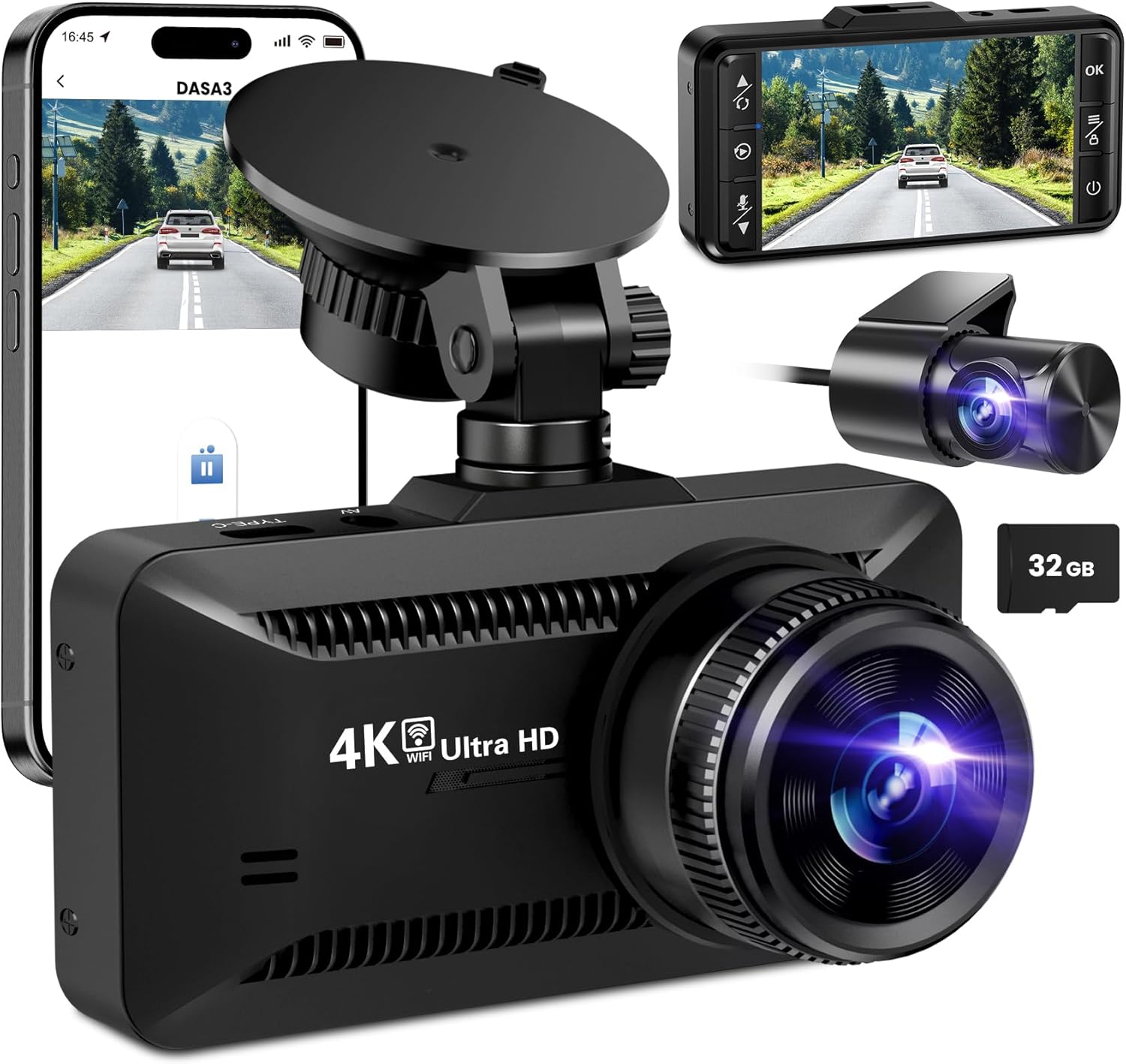
выява: The SUVCON M02 4K Dash Cam is shown with its main front camera unit, a separate rear camera, a smartphone displaying the dash cam's app interface, and a 32GB microSD card. The main unit features a prominent lens, a display screen on the back (not fully visible in this angle), and a suction cup mount. The rear camera is compact with its own lens. The smartphone screen shows a live view from the dash cam, indicating Wi-Fi connectivity.
Блок пярэдняй камеры
- Аб'ектыў: Captures 4K video.
- Экран дысплея: Для viewING жыць Footagе, прайграванне і навігацыя па меню.
- Кнопкі кіравання: Power, Menu, Up, Down, OK.
- Слот для карты MicroSD: Для ўстаўкі карты памяці.
- USB Power Port (Type-C): Для падключэння аўтамабільнай зараднай прылады.
- Rear Camera Port: For connecting the rear camera cable.
- Дынамік/мікрафон: Для запісу і прайгравання аўдыё.
Блок задняй камеры
- Аб'ектыў: Captures rear view відэа.
- Кабель: Connects to the main dash cam unit.
Настройка і ўстаноўка
1. Устаўка карты MicroSD
- Пераканайцеся, што відэарэгістратар выключаны.
- Знайдзіце слот для карты MicroSD на бакавой частцы відэарэгістратара.
- Insert the MicroSD card with the gold contacts facing the back of the dash cam until it clicks into place.
- To remove, gently push the card in until it clicks, then release.
Заўвага: A Class 10 or higher MicroSD card (up to 128GB recommended) is required. Format the card in the dash cam's settings before first use.
2. Мантаж Dash Cam
- Ачысціце лабавое шкло, дзе вы плануеце ўсталяваць відэарэгістратар.
- Прымацуйце прысоску да відэарэгістратара.
- Press the suction cup firmly against the windshield, ideally behind the rearview люстэрка і павярніце рычаг, каб зафіксаваць яго.
- Adjust the angle of the dash cam lens to ensure it captures the road ahead clearly, avoiding obstruction from the hood or dashboard.
3. Падключэнне сілкавання
- Connect the small end of the car charger cable to the USB Type-C port on the dash cam.
- Plug the larger end of the car charger into your vehicle's 12V power outlet (cigarette lighter socket).
- Route the power cable neatly along the edge of the windshield and dashboard using the provided cable clips to avoid obstructing your view.
4. Усталёўка задняй камеры (дадаткова)
- Connect the rear camera cable to the dedicated rear camera port on the main dash cam unit.
- Route the cable from the front unit to the rear of the vehicle, typically along the headliner and side panels.
- Mount the rear camera on the rear windshield using its adhesive or screws, ensuring a clear view дарогі ззаду.
- Connect the red wire of the rear camera cable to the vehicle's reverse light positive wire if you wish to enable parking assist lines when reversing.
Інструкцыя па эксплуатацыі
Уключэнне/выключэнне харчавання
- Аўтаматычна: The dash cam will automatically power on and begin recording when connected to power and the vehicle engine starts. It will power off automatically when the engine is turned off.
- Кіраўніцтва: Press and hold the Power button to manually turn the dash cam on or off.
рэжымы запісу
- цыклічны запіс: The dash cam records video in continuous loops (e.g., 1, 3, or 5 minutes). When the memory card is full, the oldest unlocked files будзе перазапісана.
- G-сенсор (экстраны запіс): The built-in G-sensor detects sudden impacts or collisions. When triggered, the current video segment is automatically locked and saved to prevent it from being overwritten by loop recording.
- Манітор паркоўкі: With a hardwire kit (sold separately) or continuous power, the dash cam can monitor your vehicle while parked. If a vibration or impact is detected, it will automatically record a short video.
Навігацыя па меню
Use the control buttons on the dash cam to navigate the menu:
- Кнопка меню: Press to enter the settings menu. Press again to switch between video settings, system settings, and playback mode.
- Кнопкі ўверх/ўніз: Перамяшчайцеся па параметрах меню.
- Кнопка ОК: Confirm selection or start/stop recording in recording mode.
Падключэнне да Wi-Fi і выкарыстанне праграм
The SUVCON M02 features Wi-Fi connectivity for easy access to recordings and settings via a smartphone app.
- Download the recommended app (e.g., "DASA3" or similar, check packaging for exact app name) from your smartphone's app store.
- On the dash cam, enable Wi-Fi from the system settings. The dash cam's Wi-Fi SSID and password will be displayed on the screen.
- On your smartphone, go to Wi-Fi settings and connect to the dash cam's Wi-Fi network using the provided password.
- Open the app. You can now view жывы footage, download recorded videos, change settings, and format the SD card directly from your phone.
Прайграванне
- On Dash Cam: In recording mode, press the Menu button twice to enter playback mode. Use Up/Down buttons to select files and OK to play.
- Праз прыкладанне: Connect your smartphone via Wi-Fi and use the app's playback feature to view і спампаваць відэа.
- На камп'ютары: Remove the MicroSD card from the dash cam and insert it into a computer's card reader. Videos can be played using standard media players.
Тэхнічнае абслугоўванне
Чыстка відэарэгістратара
- Выкарыстоўвайце мяккую, сухую тканіну для чысткі корпуса відэарэгістратара.
- Для чысткі аб'ектыва выкарыстоўвайце сурвэтку для чысткі аб'ектыва і спецыяльны раствор для чысткі аб'ектыва, каб пазбегнуць драпін.
- Не выкарыстоўвайце абразіўныя ачышчальнікі або растваральнікі.
MicroSD Card Formatting
It is recommended to format the MicroSD card every 2-4 weeks to maintain optimal recording performance and prevent data corruption. This can be done through the dash cam's menu settings or via the smartphone app.
Абнаўленне прашыўкі
Periodically check the SUVCON official website for available firmware updates. Firmware updates can improve performance, add new features, or fix bugs. Follow the instructions provided with the firmware file старанна.
Ліквідацыю непаладак
| праблема | Магчымае рашэнне |
|---|---|
| Відэарэгістратар не ўключаецца. |
|
| Відэарэгістратар перастае запісваць або завісае. |
|
| Відэа фуtagе размытае або невыразнае. |
|
| Праблемы з падключэннем да Wi-Fi. |
|
Тэхнічныя характарыстыкі
| Асаблівасць | Дэталь |
|---|---|
| мадэль | М02 |
| Марка | SUVCON |
| Дазвол відэазахопу | 4K (Front), 1080P (Rear, if applicable) |
| Асаблівасці | G-Sensor, Loop Recording, Parking Monitor, Wi-Fi Connectivity |
| Тэхналогія падлучэння | Wi-Fi |
| Тып мацавання | Dashboard Mount (Suction Cup) |
| Захоўванне | MicroSD Card (Class 10 or higher, up to 128GB recommended) |
| Крыніца харчавання | Аўтамабільная зарадная прылада (12 В) |
| Памеры прадукту | 2.54 x 2.54 x 2.54 см (прыблізна, згодна з дадзенымі аб прадукце) |
Гарантыя і падтрымка кліентаў
For warranty information, technical support, or any inquiries regarding your SUVCON M02 Dash Cam, please refer to the warranty card included in your package or visit the official SUVCON website. Please have your model number (M02) and purchase details ready when contacting support.
Webсайт: www.suvcon.com (Напрample URL, please refer to actual product documentation)
электронная пошта: support@suvcon.com (Напрample Email, please refer to actual product documentation)
Звязаныя дакументы - М02
 |
GT806 3-Channel Dash Cam User Manual Explore the features and setup of the GT806 3-Channel Dash Cam, offering 2.5K+1080P+1080P recording, Wi-Fi connectivity, G-sensor, night vision, and 24-hour parking monitoring. Supports up to 256GB storage. |
 |
Cobra SC201 Dual View Відэарэгістратар Full HD: кіраўніцтва карыстальніка і функцыі Падрабязнае кіраўніцтва карыстальніка для Cobra SC201 Dual View Відэарэгістратар Full HD. Даведайцеся пра ўстаноўку, асноўныя функцыі, інтэграцыю праграм Drive Smarter і iRadar, функцыі бяспекі, налады і ліквідацыю непаладак. |
 |
Інструкцыя па эксплуатацыі відэарэгістратара SUVCON D370S Падрабязная інструкцыя па эксплуатацыі відэарэгістратара SUVCON D370S 4K, якая ахоплівае ўстаноўку, функцыі, налады, выкарыстанне Wi-Fi і GPS, ліквідацыю непаладак і інфармацыю аб гарантыі. |
 |
AX2V DV-690WM 1080P Full HD Wireless Dash Cam User Manual User manual for the AX2V DV-690WM 1080P Full HD Wireless Dash Cam. Learn about features, installation, specifications, app usage, and troubleshooting for this car dashboard camera. |
 |
Кіраўніцтва карыстальніка відэарэгістратара ROVE R2-4K PRO: функцыі, налада і падтрымка Падрабязнае кіраўніцтва карыстальніка для відэарэгістратара ROVE R2-4K PRO. Даведайцеся пра ўстаноўку, функцыі, налады, падключэнне да Wi-Fi, рэжымы паркоўкі, ліквідацыю непаладак і гарантыйную інфармацыю для пашыранага відэарэгістратара вашага аўтамабіля. |
 |
Кіраўніцтва карыстальніка двухканальнай відэарэгістратара WOLFBOX X3 2.5K | Усталёўка, функцыі і падтрымка Падрабязнае кіраўніцтва карыстальніка для двухканальнай відэарэгістратара WOLFBOX X3 2.5K. Ахоплівае ўстаноўку, такія функцыі, як ADAS, Wi-Fi, GPS, сэнсарны экран, ліквідацыю непаладак і многае іншае для павышэння бяспекі транспартнага сродку і запісу. |
Ask a question about this manual
Ask about setup, troubleshooting, compatibility, parts, safety, or missing instructions. Manuals+ will review the question and use this page’s manual context to help answer it.