
1. Уводзіны
This manual provides detailed instructions for the ATTACK SHARK X68 HE 60% Gaming Keyboard. Designed for high-performance gaming, this keyboard features magnetic switches, rapid trigger technology, and extensive customization options. Please read this manual thoroughly to ensure proper use and to maximize your gaming experience.

Выява 1.1: Канецview of the ATTACK SHARK X68 HE keyboard showcasing its magnetic switches, 0.01mm RT accuracy, adjustable actuation point, 0.125ms latency, Snap Tap, RGB lighting, and PC/Mac compatibility.
2. Асаблівасці прадукту
- Magnetic Switches (Hall Effect Technology): Provides precise and consistent key presses with high durability.
- Частата апытання 8000 Гц: Delivers an ultra-fast 0.125ms response time for competitive gaming.
- 0.01mm Rapid Trigger (RT) Accuracy: Allows for instant key reset and re-press, enhancing responsiveness.
- Рэгуляваная кропка спрацоўвання: Customize the key press distance from 0.1mm to 3.4mm to suit your playstyle.
- Snap Tap and Dynamic Keystroke: Advanced features for precise control and rapid input.
- Поўная RGB-падсветка: Over 20 preset light effects with customizable colors and patterns.
- Web Праграмнае забеспячэнне драйвера: Comprehensive customization available via a web-based driver, compatible with Windows and Mac.
- Трывалая канструкцыя: Features PBT keycaps, an aluminum alloy plate, and PORON foam for enhanced sound and feel.
- Кампактны макет 60%: Space-saving design without compromising essential gaming functions.

Image 2.1: Detail showing the 8000Hz polling rate, providing a 0.125ms response time for faster performance.
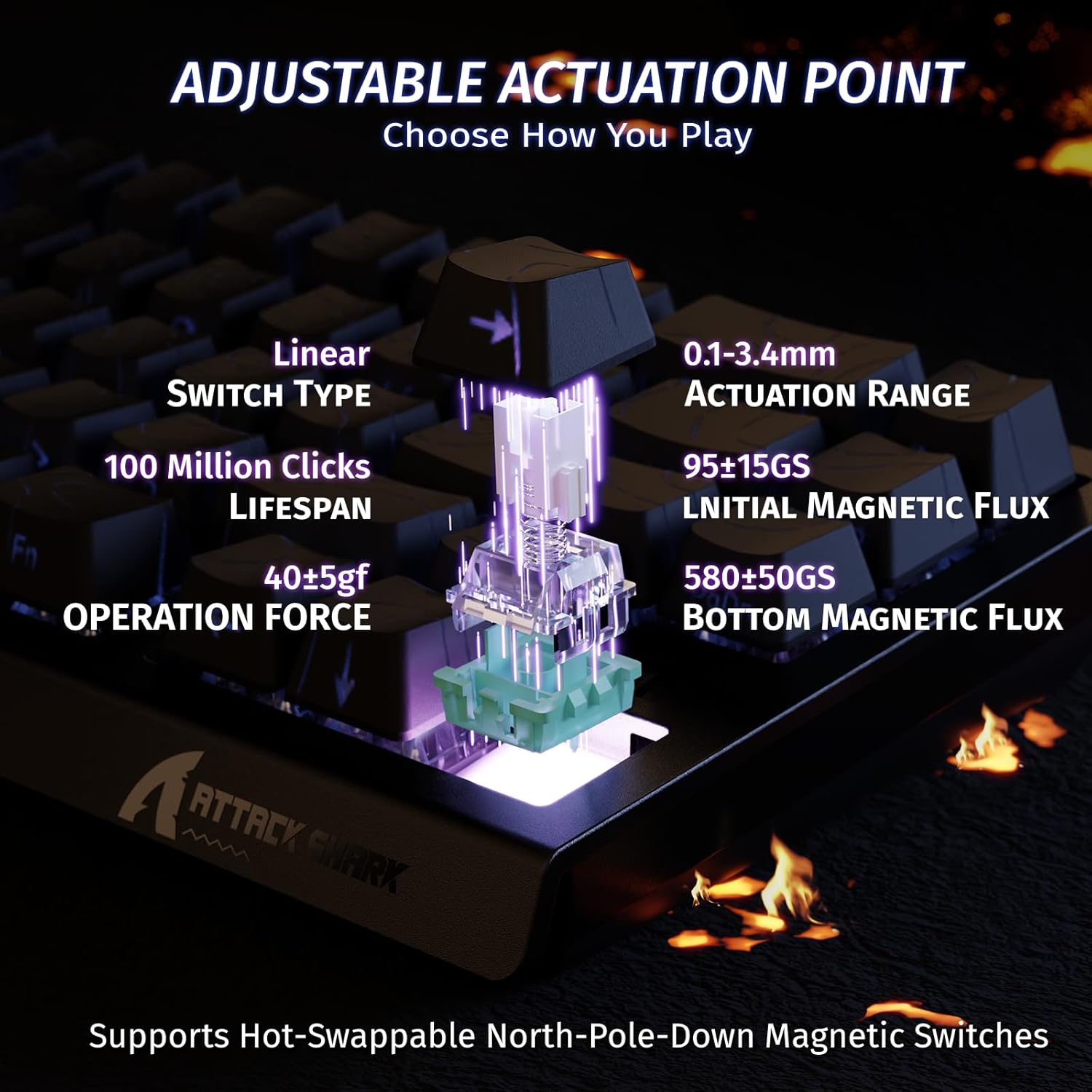
Image 2.2: Visual representation of the adjustable actuation point, allowing users to set the key press distance between 0.1mm and 3.4mm.

Image 2.3: The keyboard illuminated with full RGB light effects, demonstrating the variety of 20+ preset lighting options.

Image 2.4: An exploded diagram of the X68 HE keyboard, showing its internal layers including PBT keycaps, top case, aluminum alloy plate, PCB, PORON foam, ATTACK SHARK magnetic switches, and bottom case.
3. Настройка
3.1 Падключэнне клавіятуры
- Знайдзіце порт USB-C на задняй панэлі клавіятуры.
- Connect the provided USB-C cable to the keyboard.
- Plug the other end of the USB-C cable into an available USB port on your computer (PC or Mac).
- Клавіятура будзе аўтаматычна распазнана вашай аперацыйнай сістэмай.
3.2 Сумяшчальнасць сістэмы
The ATTACK SHARK X68 HE keyboard is compatible with Windows and Mac operating systems. No additional drivers are required for basic functionality, but the web driver is recommended for full customization.
4. Інструкцыя па эксплуатацыі
4.1 Асноўныя функцыі клавіш
The keyboard features a standard QWERTY layout with 61 keys. All keys function as labeled. For secondary functions (e.g., F-keys, media controls), use the Fn клавішу ў спалучэнні з адпаведнай клавішай.
4.2 Кіраванне RGB-падсветкай
The keyboard offers various RGB lighting effects. Use the following key combinations to adjust:
- Fn + ↑: Increase Backlit Brightness
- Fn + ↓: Decrease Backlit Brightness
- Fn + ←: Decrease Backlit Speed
- Fn + →: Increase Backlit Speed
- fn+alt: Switch Light Mode
- Fn + Enter: Switch Light Color
- Fn + Backspace: Turn Light On/Off

Image 4.1: Detail of the pattern shine-through keycaps with side-printed characters, aiding in visibility of secondary functions.
4.3 Web Налада драйвера
For advanced customization, including adjusting actuation points, setting Rapid Trigger sensitivity, configuring Snap Tap, and creating macros, use the ATTACK SHARK web driver. Access the web driver through your internet browser. The web driver allows for:
- Key remapping and combination settings.
- Macro creation and management.
- Dynamic Keystroke (DKS) settings.
- Adjusting Trigger Sensitivity Level (TGL).
- Snap Tap configuration.
- Zero Deadzone settings.
- Абнаўленне прашыўкі.

Image 4.2: Screenshot of the web driver interface, demonstrating options for key settings, stroke settings, shaft settings, and advanced settings for comprehensive customization.

Image 4.3: Illustration of 0.01mm RT accuracy and 128kHz scan rate, showing the advantage of Rapid Trigger over regular switches in games like Valorant, CSGO, APEX, and osu!.
5. Тэхнічнае абслугоўванне
5.1 Чыстка клавіятуры
- Адключыце клавіятуру ад кампутара перад чысткай.
- Use a soft, dry cloth to wipe down the keycaps and chassis.
- Для ўстойлівага бруду падыдзе злёгкуamp можна выкарыстоўваць тканіну з мяккім мылам, сачыце за тым, каб вадкасць не патрапіла на клавіятуру.
- Выкарыстоўвайце сціснутае паветра, каб выдаліць пыл і смецце паміж клавішамі.
5.2 Агульны догляд
- Пазбягайце ўздзеяння на клавіятуру экстрэмальных тэмператур, прамых сонечных прамянёў або высокай вільготнасці.
- Не разлівайце вадкасці на клавіятуру. У выпадку разліву неадкладна адключыце яе і дайце цалкам высахнуць перад паўторным падключэннем.
- Пазбягайце падзення клавіятуры і моцных удараў.
6. Выпраўленне непаладак
If you encounter any issues with your ATTACK SHARK X68 HE keyboard, please refer to the following common solutions:
- Клавіятура не рэагуе: Пераканайцеся, што кабель USB-C надзейна падключаны як да клавіятуры, так і да кампутара. Паспрабуйце іншы порт USB або кабель.
- RGB-падсветка не працуе: Check the lighting control key combinations (Fn + Backspace to toggle, Fn + Alt to change mode). Ensure the web driver settings haven't disabled lighting.
- Keys not registering correctly: Ensure the keyboard is clean and free of debris. If using the web driver, check actuation point settings and perform calibration if available.
- Software/Web Праблемы з драйверамі: Пераканайцеся, што ваша інтэрнэт-злучэнне стабільнае падчас доступу да web driver. Try clearing your browser cache or using a different browser. Check the ATTACK SHARK official website for any announcements or updated web driver links.
- Нечаканая паводзіна: Disconnect and reconnect the keyboard. If the issue persists, a factory reset (if available via web driver) might be necessary.
7. Тэхнічныя характарыстыкі
| Асаблівасць | Дэталь |
|---|---|
| Марка | АТАКА АКУЛА |
| Нумар мадэлі | X68 ЁН |
| Тэхналогія падлучэння | USB-C (правадны) |
| Апісанне клавіятуры | Гульнявая |
| Рэкамендуемае выкарыстанне | Daily Use, Gaming, Programming, Business |
| Тып ключа Пераключальнік | Linear Magnetic Switches |
| Пункт спрацоўвання | Adjustable (0.1mm - 3.4mm) |
| Rapid Trigger Accuracy | 0.01 мм |
| Хуткасць сканавання | 128 кГц |
| Стаўка апытання | 8000 Гц |
| Падсвятленне RGB | Yes (20+ preset effects) |
| мова | English (QWERTY Layout) |
| Колькасць ключоў | 61 |
| Сумяшчальная аперацыйная сістэма | Windows, Mac |
| Матэрыял | Polybutylene Terephthalate (PBT Keycaps) |
| UPC | 752010391158 |
8. Гарантыя і падтрымка
8.1 Інфармацыя аб гарантыі
This product comes with an Importer Guaranteed warranty. Please retain your proof of purchase for any warranty claims. For specific warranty terms and conditions, refer to the documentation provided at the time of purchase or contact your retailer.
8.2 Тэхнічная падтрымка
For technical assistance, software updates, or advanced customization, please visit the official ATTACK SHARK website and access their web driver or support resources. The web driver includes integrated memory for saving your settings.