
1. Прадукт скончыўсяview
The EWEADN G98 RGB Gaming Keyboard is a wired membrane keyboard designed for an enhanced gaming and typing experience. It features a compact 96% layout with 98 keys, including a dedicated number pad and a versatile media knob. The keyboard offers vibrant RGB backlighting and an ergonomic design for comfortable long-term use.
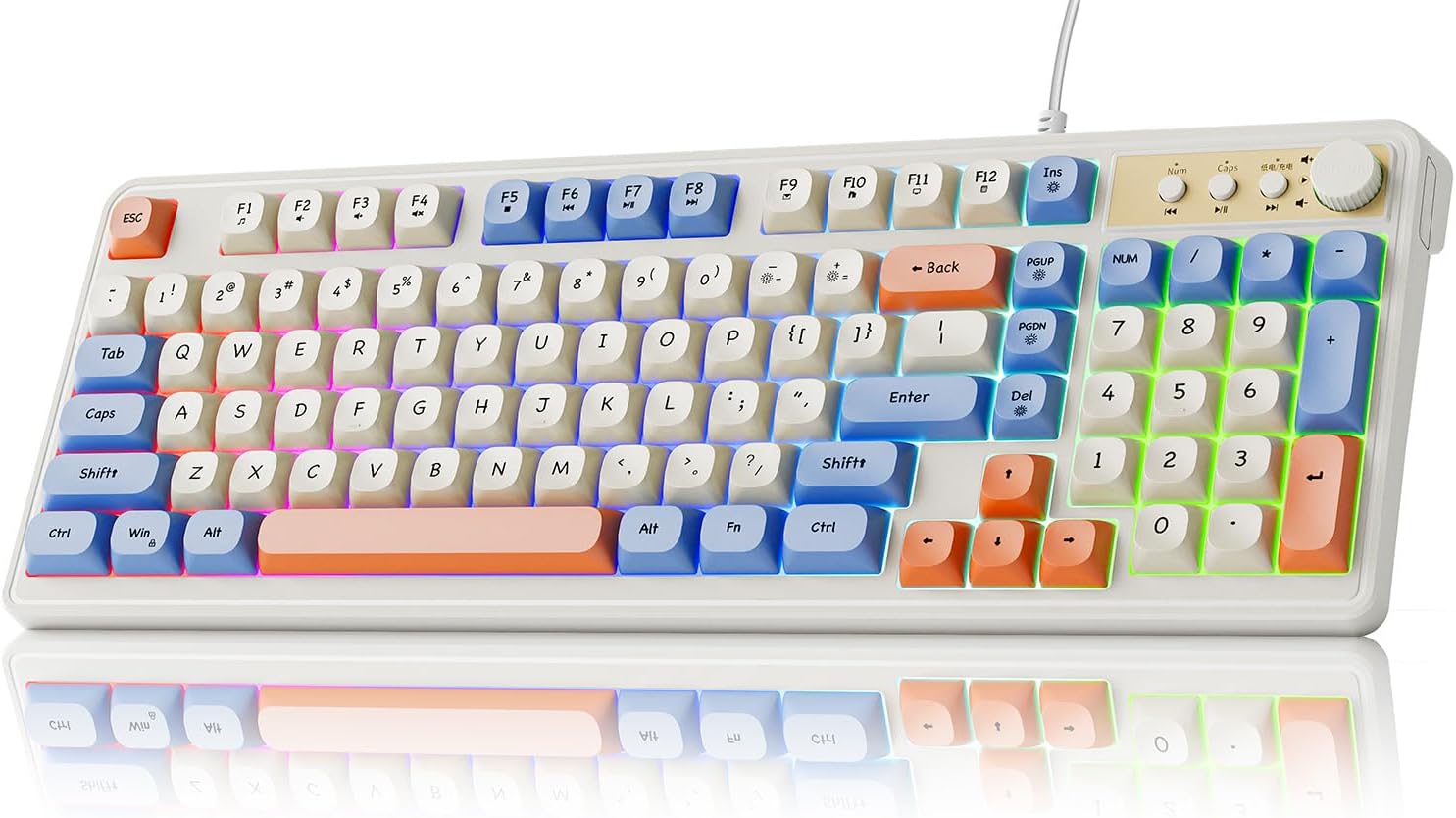
Figure 1.1: EWEADN G98 RGB Gaming Keyboard (White & Blue variant).
2. Кіраўніцтва па наладцы
Follow these steps to set up your EWEADN G98 RGB Gaming Keyboard:
- Распакуйце клавіятуру: Асцярожна дастаньце клавіятуру з упакоўкі.
- Падключэнне да прылады: Locate the USB-A cable attached to the keyboard. Plug the USB-A connector into an available USB port on your computer (PC, Laptop, or Tablet).
- Ўстаноўка драйвера: The keyboard is plug-and-play and typically does not require additional driver installation. Your operating system should automatically recognize the device.
- Адрэгулюйце кут нахілу клавіятуры: Utilize the dual-stage adjustable feet on the underside of the keyboard to set your preferred typing angle for optimal comfort. The keyboard features an 11° tilt angle for a natural wrist position.

Figure 2.1: Connecting the keyboard to a computer via USB cable.
3. Інструкцыя па эксплуатацыі
3.1. Media Knob Functionality
The 2-in-1 function knob located on the top right of the keyboard provides convenient control over media and backlighting:
- Рэгулятар гучнасці: Павярніце ручку па гадзіннікавай стрэлцы, каб павялічыць гучнасць, і супраць гадзіннікавай стрэлкі, каб паменшыць гучнасць.
- Выключыць/уключыць гук: Націсніце кнопку, каб уключыць або выключыць гук.
- Backlight Mode/Brightness: The knob can also be used to switch backlight modes and adjust brightness. Refer to the RGB Backlighting section for specific controls.

Малюнак 3.1: падрабязна view of the multi-function knob and media control buttons.
3.2. Мультымедыйныя спалучэнні клавіш
The keyboard includes dedicated multimedia shortcut keys for quick access to common functions:
- Папярэдняя песня: Press the button to the left of the knob.
- Прайграванне/Паўза: Press the middle button next to the knob.
- Наступная песня: Press the button to the right of the knob.

Figure 3.2: Location of multimedia shortcut keys (F1-F12).
3.3. Кіраванне падсветкай RGB
Customize your keyboard's RGB backlighting with the following key combinations:
- FN + INS: Toggle Backlight On/Off.
- FN + DEL: Switch between different Backlight Modes.
- FN + -: Decrease Light Speed.
- FN + =+: Increase Light Speed.
- FN + PGUP: Increase Backlight Brightness.
- FN + PGDn: Decrease Backlight Brightness.

Figure 3.3: Key combinations for controlling RGB backlighting.
3.4. Пераключэнне N клавіш
The EWEADN G98 supports N-key rollover, which means that every key press is registered independently, regardless of how many keys are pressed simultaneously. This feature prevents ghosting and ensures accurate input during fast typing or intense gaming sessions.

Figure 3.4: N-key rollover ensures all simultaneous key presses are registered.
4. Тэхнічнае абслугоўванне
Правільнае абслугоўванне забяспечвае даўгавечнасць і аптымальную прадукцыйнасць вашай клавіятуры:
- Чыстка клавіятуры: Regularly clean the keyboard surface and between the keycaps using a soft, dry cloth or a can of compressed air to remove dust and debris.
- Сыход за каўпачкамі клавіш: The keyboard features durable ABS ball keycaps. Avoid using harsh chemicals or abrasive materials when cleaning them, as this may damage the finish.
- Кабельнае кіраванне: Ensure the wired connection cable is not kinked or strained to prevent internal damage.

Figure 4.1: The keyboard features durable ABS Ball Keycaps.
5. Выпраўленне непаладак
If you encounter issues with your EWEADN G98 keyboard, refer to the following common problems and solutions:
| праблема | Магчымая прычына | Рашэнне |
|---|---|---|
| Клавіятура не адказвае | Слабае падключэнне USB, няспраўны порт USB, праблема з драйверам. | Ensure the USB cable is securely plugged into both the keyboard and the computer. Try a different USB port. Restart your computer. |
| RGB backlighting not working | Backlight turned off, brightness set to minimum. | Прэса FN + INS to toggle the backlight. Increase brightness using FN + PGUP. |
| Media knob not functioning correctly | Software conflict, temporary glitch. | Ensure no other media control software is interfering. Restart your computer. If the issue persists, contact customer support. |
| Клавішы заліпаюць або не рэагуюць | Debris under keycaps, excessive dust. | Clean the keyboard thoroughly using compressed air. If necessary, gently remove keycaps (refer to maintenance section) and clean underneath. |
Калі праблема не знікне пасля спробы вырашэння гэтых праблем, звярніцеся да раздзела «Гарантыя і падтрымка» для атрымання дадатковай дапамогі.
6. Тэхнічныя характарыстыкі
Detailed specifications for the EWEADN G98 RGB Gaming Keyboard:
| Нумар мадэлі | EWEADN-G98 |
| Марка | SEUNKWANG (Manufacturer: EWEADN) |
| Памеры прадукту | 16.1 х 6.1 х 1.4 цалі (40.9 х 15.5 х 3.6 см) |
| Вага прадмета | 1.74 фунта (0.79 кг) |
| Тэхналогія падлучэння | Правадны (USB-A) |
| Апісанне клавіятуры | Гульнявая, мембранная |
| Раскладка клавіш | 96% (98-key) with Number Pad |
| Тып клавішы | ABS Ball Keycaps |
| Падсвятленне | RGB (16.8 мільёнаў колераў) |
| Асаблівасці | Backlit, Ergonomic, Lightweight, Silent, Media Knob, Adjustable Feet, N-key Rollover |
| Сумяшчальныя прылады | Laptop, PC, Tablet (Windows, Mac, Xbox compatible) |
| Рэкамендуемае выкарыстанне | Business, Gaming, Programming |
7. Гарантыя і падтрымка
7.1. Палітыка вяртання
This product is typically eligible for a 30-day return or replacement policy from the date of purchase. Please refer to the retailer's specific return policy for detailed terms and conditions.
7.2. Падтрымка кліентаў
For any questions, technical assistance, or warranty claims, please contact SEUNKWANG customer support:
- Праз Amazon: Наведайце ст Крама SEUNKWANG на Amazon and click the "Ask a question" option on the seller's page.
- электронная пошта: Вы таксама можаце звязацца па электроннай пошце па адрасе zack@eweadn.cn.

Figure 7.1: Contact options for customer support.