
KESIEME YYK
KESIEME YYK Intelligent Touch Screen Open Ear Earbuds User Manual
Model: YYK
1. Уводзіны
Welcome to the KESIEME YYK Intelligent Touch Screen Open Ear Earbuds user manual. This guide provides detailed instructions on how to set up, operate, maintain, and troubleshoot your new open-ear headphones. Please read this manual thoroughly before using the product to ensure optimal performance and longevity.
Прадукт скончаныview
The KESIEME YYK earbuds feature an innovative open-ear design for comfort and situational awareness, advanced Bluetooth 5.4 connectivity for stable audio, and a charging case with an intelligent touch screen for intuitive control and real-time information display.
Што ў скрынцы
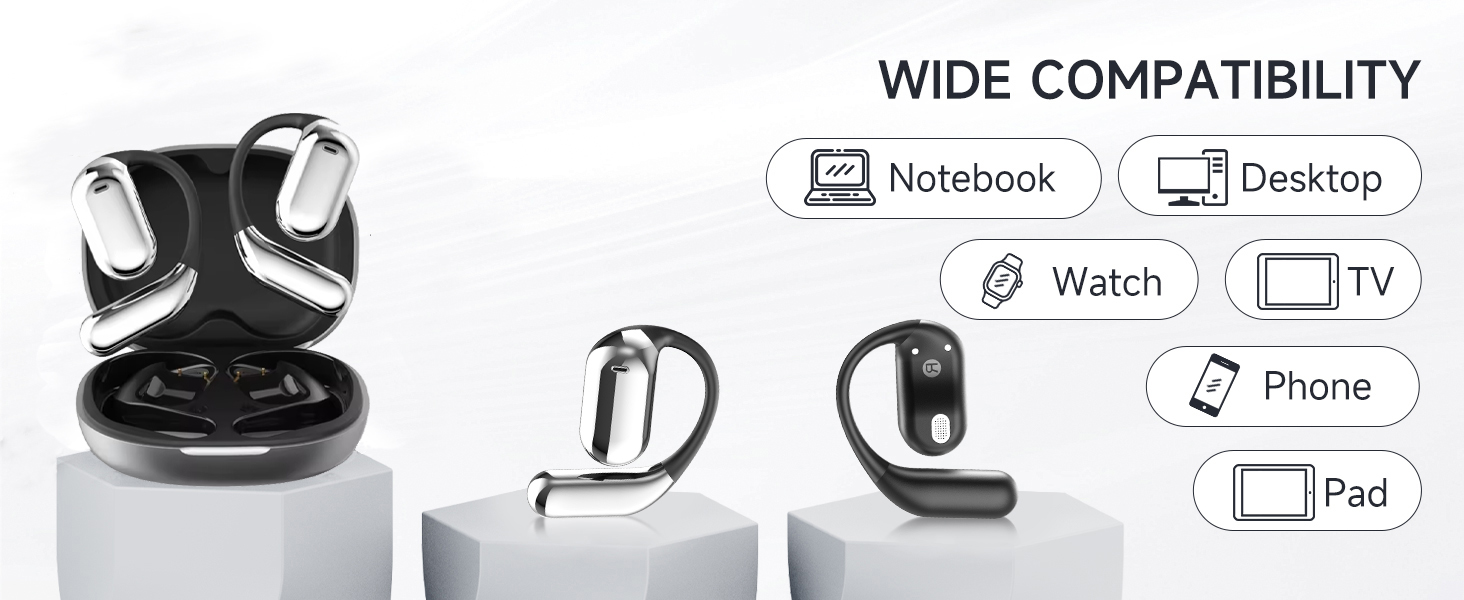
Image: Contents of the KESIEME YYK Earbuds box.
- Open Air Conduction Earphones (2)
- Чахол для зарадкі (1)
- Кіраўніцтва карыстальніка (1)
- Зарадны кабель Type-C (1)
2. Асаблівасці прадукту
Дызайн з адкрытым вухам

Image: Comparison of open-ear design versus traditional in-ear headphones.
The KESIEME YYK earbuds feature a true open-ear design, resting gently and securely on the top of your ear. This design avoids insertion into the ear canal, reducing pressure and allowing for greater comfort during extended wear. It also enhances situational awareness, allowing you to hear your surroundings while enjoying audio.
Падключэнне Bluetooth 5.4

Выява: Перавагі тэхналогіі Bluetooth 5.4.
Equipped with the latest Bluetooth 5.4 technology, these earbuds offer a stable and fast wireless connection. This ensures uninterrupted music playback and calls, with a connection range of up to 33 feet (10 meters). The dual-channel transmission improves stability and reduces power consumption.
Прэміум якасць гуку

Image: 14.2mm dynamic speaker driver for sound quality.
Experience clear and powerful audio with dual 14.2mm air conduction dynamic drivers. These drivers deliver high-fidelity sound with crisp highs and impactful lows, providing an immersive listening experience while minimizing sound leakage.
Extended Playtime & Digital Display
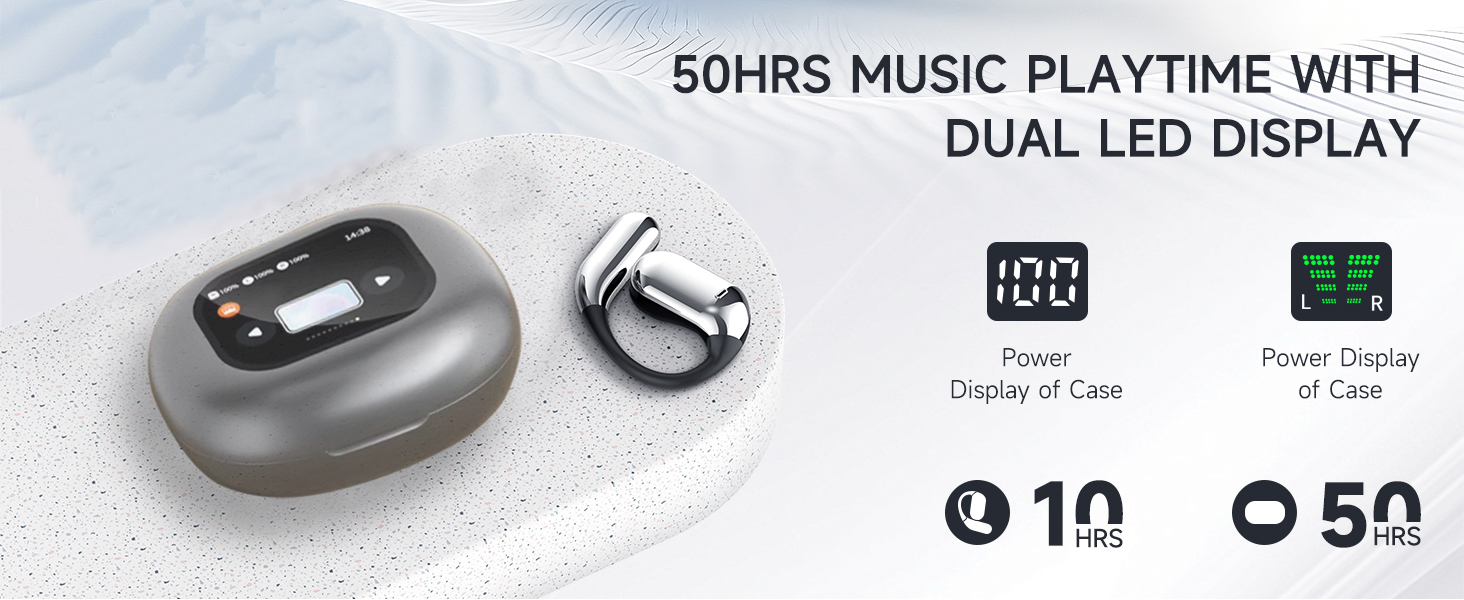
Image: Battery life and LED display features.
The earbuds provide up to 20 hours of playtime on a single charge. The charging case extends the total listening time to approximately 50 hours. The smart LED power display on the case shows the remaining battery level for both the case and individual earbuds in real-time.
Comfortable and Lightweight Fit

Image: Ergonomic design for comfort and fit.
Designed for ultimate comfort, the earbuds feature ergonomic ear hooks made from skin-friendly, ultra-lightweight materials. This ensures a secure fit without discomfort, even during active use like running or fitness activities.
Intelligent Touch Screen Case
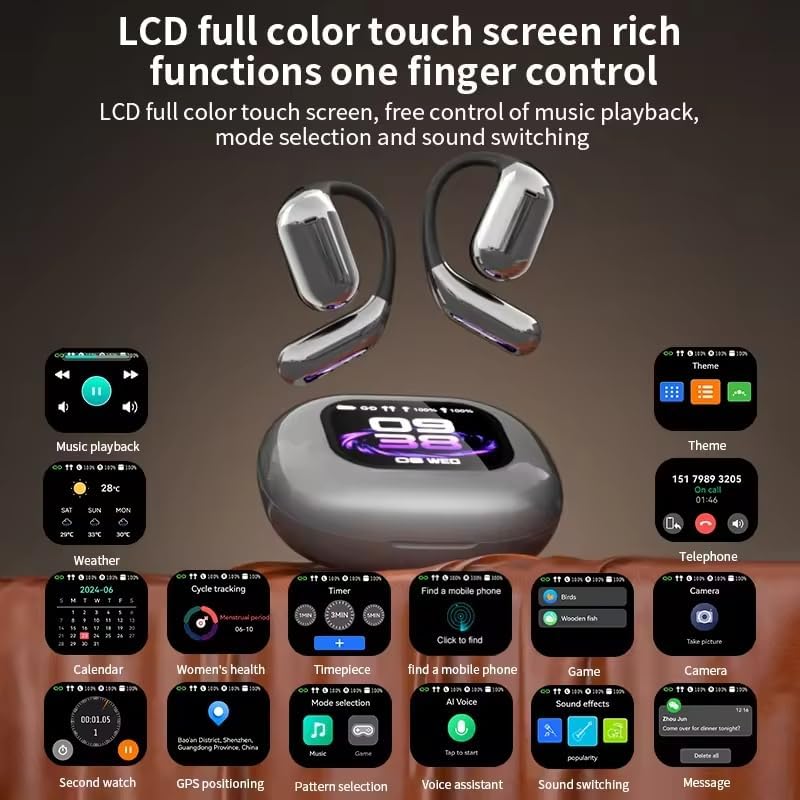
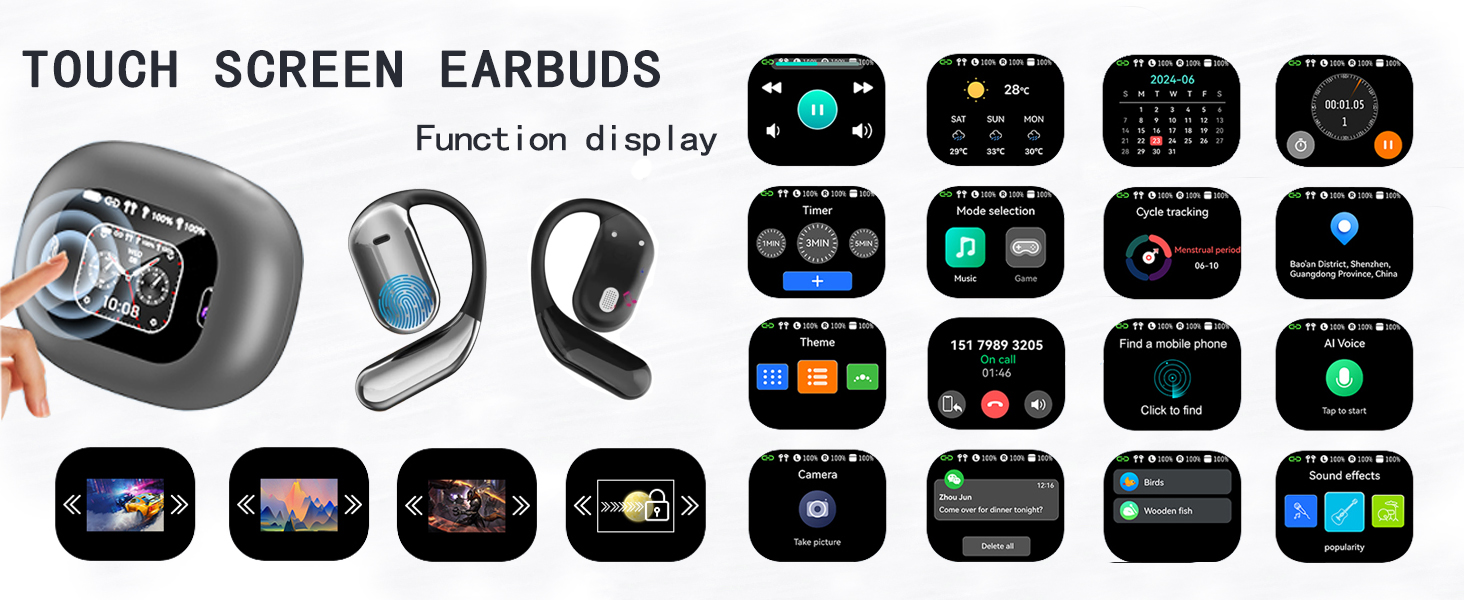
Image: Touch screen case displaying various functions.
The charging case features an LCD full-color touch screen, providing convenient access to various functions. This includes music playback control, mode selection, sound switching, weather information, calendar, timer, and more, all controlled with a single finger.
3. Настройка
Зарадка прылады
Before first use, fully charge the earbuds and the charging case. Connect the provided Type-C charging cable to the charging port on the case and a compatible USB power source. The LED display on the case will indicate the charging status and battery levels.
Інструкцыі па спалучэнні
- Адкрыйце зарадны кейс. Навушнікі аўтаматычна ўключацца і пяройдуць у рэжым спалучэння.
- На вашай прыладзе (смартфоне, планшэце, камп'ютары) уключыце Bluetooth і знайдзіце даступныя прылады.
- Select 'KESIEME YYK' from the list of found devices to connect.
- Once connected, a voice prompt will confirm successful pairing. The earbuds will automatically reconnect to the last paired device when taken out of the case.
Інструкцыі па нашэнні
Малюнак: Пакрокавая інструкцыя па нашэнні навушнікаў.
- Дастаньце абодва навушнікі з зараднага чахла.
- Gently hang the end of each earphone onto your ear bone.
- Turn the earphone and slide it behind your ear.
- Adjust the ear hook and pull it down for a secure and comfortable fit.
4. Інструкцыя па эксплуатацыі
Асноўныя сэнсарныя элементы кіравання
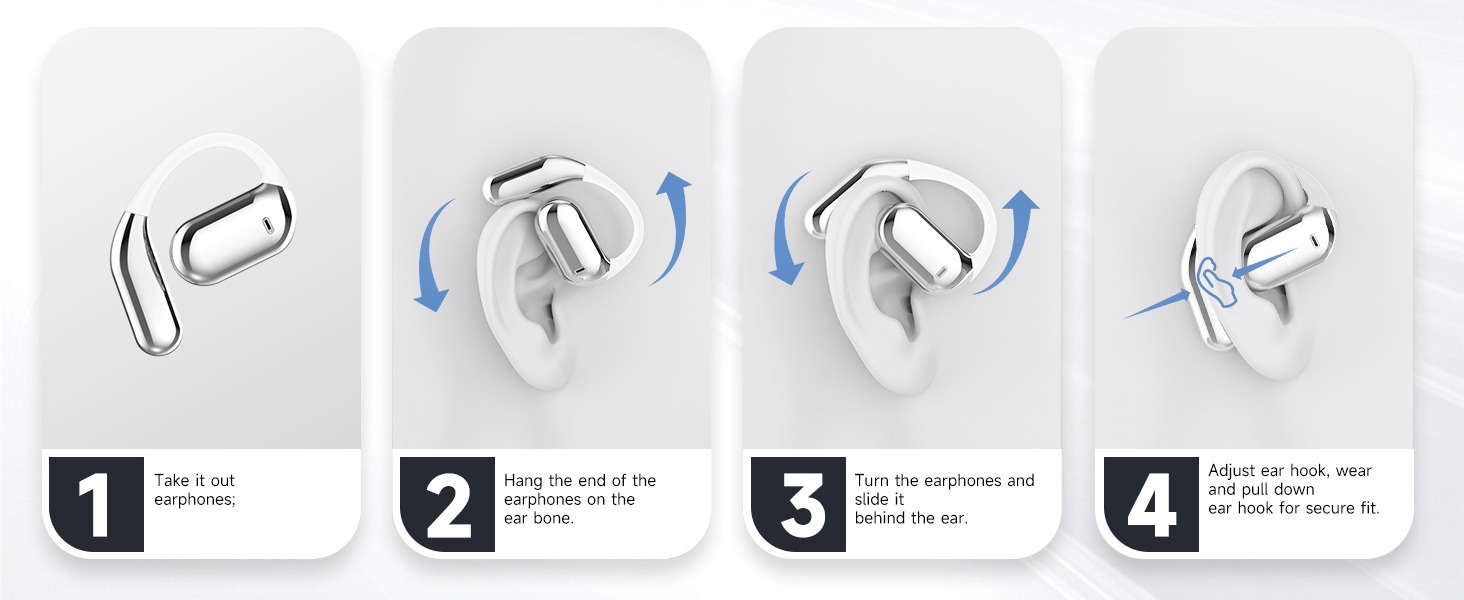
Image: Earbud touch control functions.
| Дзеянне | Кантроль | Навушнік-укладыш (Л/П) |
|---|---|---|
| Павялічыць гучнасць | Двайны дотык | Налева або направа |
| Памяншэнне гучнасці | Двайны дотык | Налева або направа |
| Прайграванне/Паўза | Адзін націск | Налева або направа |
| Адказаць на званок | Адзін націск | Налева або направа |
| Папярэдняя песня | Доўгі націск (1 с) | налева |
| Наступная песня | Доўгі націск (1 с) | правільна |
| Reject Call/Hang Up | Доўгі націск (1 с) | Налева або направа |
| Актывацыя галасавога памочніка (Siri) | Трайны кран | Налева або направа |
| Скід навушнікаў | Double Tap + Long Press (2s) | Left & Right Simultaneously |
Парады па ўцяпленні: To reset earbuds, disconnect from the phone and quickly press the left button 5 times at the same time to reset.
Touch Screen Case Operation
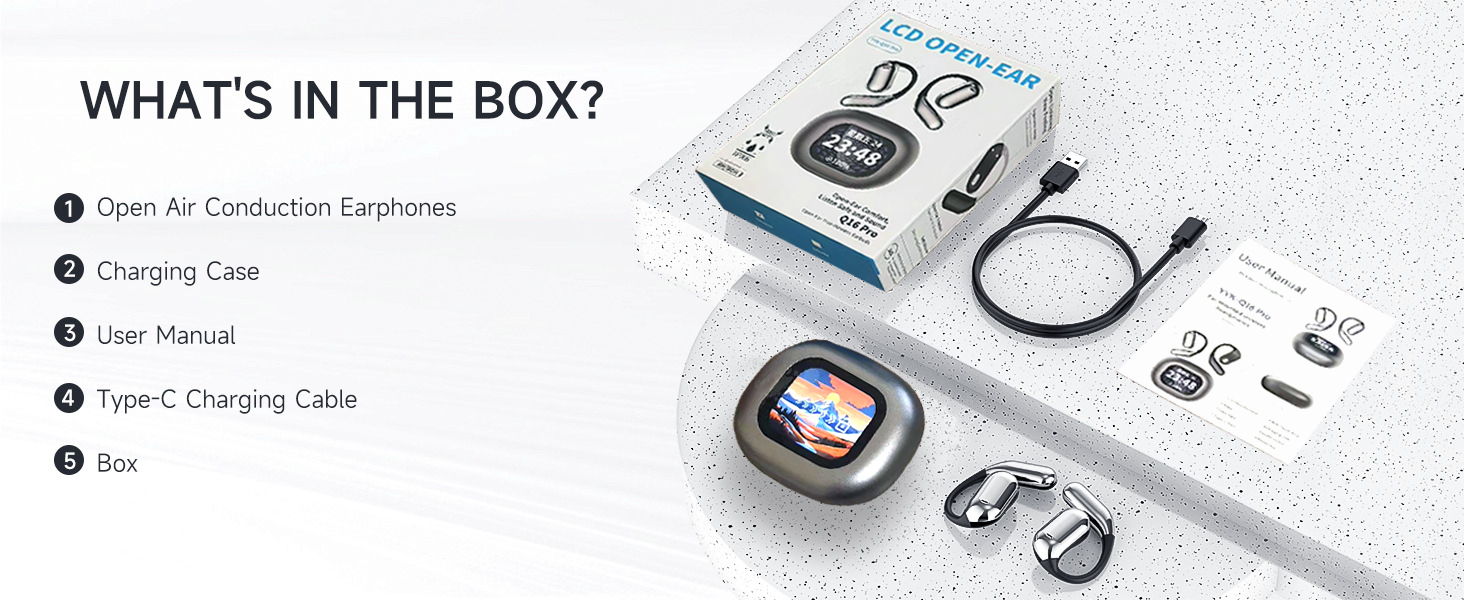
Image: Touch screen case displaying various functions.
The charging case features a responsive touch screen interface. Swipe left or right to navigate through different functions and tap to select. Functions include:
- Прайграванне музыкі: Control tracks and volume.
- Надвор'е: View бягучыя ўмовы надвор'я.
- Каляндар: Access date and time information.
- Адсочванне цыклу: Monitor fitness data.
- Таймер: Set countdowns or use as a stopwatch.
- Выбар рэжыму: Switch between different audio modes.
- Тэма: Customize the screen display.
- тэлефон: View call history or dial.
- Find a Mobile Phone: Знайдзіце спалучаны тэлефон.
- AI Voice: Актывуйце галасавога памочніка.
- Гульня: Access simple games.
- Камера: Remote control for your phone's camera.
- Гукавыя эфекты: Адрэгулюйце audio profiles.
- паведамленне: View апавяшчэнні.
Шырокая сумяшчальнасць
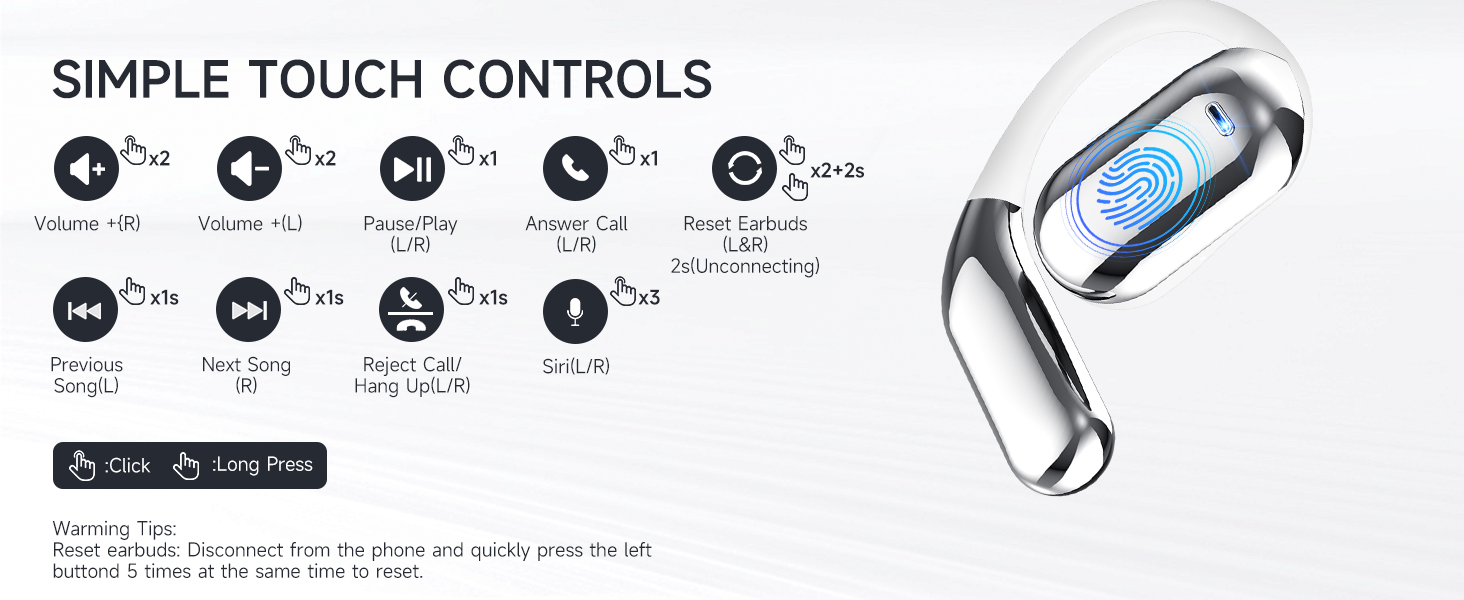
Image: Device compatibility.
The KESIEME YYK earbuds are compatible with a wide range of Bluetooth-enabled devices, including:
- Смартфоны
- Таблеткі
- Ноўтбукі
- Настольныя кампутары
- Разумныя гадзіны
- Smart TVs (with Bluetooth audio support)
5. Тэхнічнае абслугоўванне
Уборка
- Рэгулярна працірайце навушнікі і зарадны футляр мяккай, сухой тканінай без ворса.
- Не выкарыстоўвайце абразіўныя ачышчальнікі, спірт або хімічныя растваральнікі.
- Пераканайцеся, што зарадныя кантакты на навушніках і ў футляры чыстыя і сухія.
Захоўванне
- Захоўвайце навушнікі-ўкладышы ў зарадным чахле, калі яны не выкарыстоўваюцца, каб абараніць іх і падтрымліваць зарад.
- Пазбягайце захоўвання пры экстрэмальных тэмпературах (высокай або нізкай тэмпературы) або высокай вільготнасці.
- Захоўваць у месцах, недаступных дзецям і хатнім жывёлам.
6. Выпраўленне непаладак
Агульныя праблемы і рашэнні
| праблема | Магчымая прычына | Рашэнне |
|---|---|---|
| Навушнікі не спалучаюцца | Навушнікі не ў рэжыме спалучэння, Bluetooth на прыладзе выключаны, па-за зонай дзеяння. | Ensure earbuds are out of the case and charged. Turn Bluetooth on your device. Move closer to the device. Try resetting the earbuds. |
| Працуе толькі адзін навушнік | Адзін навушнік не зараджаны, няправільна спалучаны або праблема з падключэннем. | Place both earbuds back in the case, close it, then reopen. Ensure both are charged. Try resetting the earbuds. |
| Дрэнная якасць гуку | Low battery, interference, earbud placement. | Charge earbuds. Move away from sources of interference. Adjust earbud position for optimal sound. |
| Чахол для зарадкі не зараджаецца | Cable issue, power source issue, dirty charging port. | Try a different Type-C cable or power adapter. Clean the charging port. |
| Сэнсарныя элементы кіравання не рэагуюць | Часовы збой праграмнага забеспячэння, брудны датчык. | Clean the touch sensor area. Place earbuds back in case and take them out again. Restart your connected device. |
Скід навушнікаў
If you experience persistent connection issues or other malfunctions, you can reset the earbuds:
- Disconnect the earbuds from all paired devices in your device's Bluetooth settings.
- Дастаньце абедзве ўкладышы з зарадкі.
- Quickly tap the touch sensor on the left earbud 5 times simultaneously.
- Place the earbuds back into the charging case and close the lid for a few seconds.
- Open the case and attempt to pair them again with your device.
7. Тэхнічныя характарыстыкі
| Асаблівасць | Спецыфікацыя |
|---|---|
| Назва мадэлі | Open Ear Earbuds (YYK) |
| Марка | КЕСІЭМЕ |
| Тэхналогія падлучэння | Бесправадная сувязь (Bluetooth) |
| Версія Bluetooth | 5.4 |
| Дыяпазон Bluetooth | 33 футаў (10 метраў) |
| Памер аўдыё драйвера | 14.2 міліметра |
| Тып аўдыё драйвера | Дынамічны драйвер |
| Дыяпазон частот | 20 Гц - 20 000 Гц |
| Імпеданс | 32 Ом |
| Тэрмін службы батарэі (навушнікі) | Да 20 гадзін |
| Агульны час прайгравання (з кейсам) | Да 50 гадзін |
| Метад кантролю | Дакранацца |
| Узровень воданепранікальнасці | Водатрывалы |
| Вага прадмета | 0.19 кілаграма (6.7 унцыі) |
| Памеры прадукту | 6 х 4.2 х 1.5 цалі |
| Размяшчэнне вушэй | Адкрытае вуха |
| Формаў-фактар | Адкрытае вуха |
8. Інфармацыя па бяспецы
- Не разбірайце і не мадыфікуйце прадукт.
- Пазбягайце ўздзеяння экстрэмальных тэмператур, прамых сонечных прамянёў або агню на выраб.
- Do not immerse the earbuds or charging case in water. While water-resistant, they are not waterproof.
- Выкарыстоўвайце толькі зарадны кабель, які ўваходзіць у камплект, або яго сертыфікаваны эквівалент.
- Пазбягайце праслухоўвання на высокім узроўні гучнасці на працягу доўгага часу, каб прадухіліць пашкоджанне слыху.
- Будзьце ўважлівыя да навакольнага асяроддзя пры выкарыстанні адкрытых навушнікаў, асабліва ў дарожным руху або небяспечных умовах.
9. Гарантыя і падтрымка
KESIEME products are designed for reliability and performance. For warranty information, technical support, or customer service inquiries, please refer to the contact details provided on the product packaging or visit the official KESIEME webсайт. Калі ласка, захавайце пацвярджэнне пакупкі для прэтэнзій па гарантыі.
Ask a question about this manual
Ask about setup, troubleshooting, compatibility, parts, safety, or missing instructions. Manuals+ will review the question and use this page’s manual context to help answer it.