
1. Уводзіны
Thank you for choosing the Generic Ka-6660 Vertical Wireless and Bluetooth Mouse. This ergonomic mouse is designed to provide comfort and precision for extended use, reducing wrist strain. It offers versatile connectivity options (2.4GHz wireless and Bluetooth) and adjustable DPI settings for various tasks. Please read this manual carefully to ensure proper setup and operation.
2. Змесціва ўпакоўкі
- 1 x Ka-6660 Vertical Wireless Mouse
- 1 х USB-прыёмнік
- 1 x USB Charging Cable (not explicitly listed but implied by 'rechargeable')
3. Прадукт скончыўсяview
Familiarize yourself with the mouse's components and their functions.

Figure 3.1: Ka-6660 Vertical Mouse with Labeled Buttons
- Кнопка пераключэння DPI: Adjusts the cursor sensitivity (DPI).
- Левая кнопка: Стандартная функцыя левага кліку.
- Правая кнопка: Стандартная функцыя правай кнопкі мышы.
- Кола пракруткі: Пракручвае дакументы і web старонкі.
- Кнопка "Наперад": Перамяшчаецца наперад web браўзэры або file даследчыкі.
- Кнопка "Назад": Пераходзіць назад у web браўзэры або file даследчыкі.

Малюнак 3.2: Агульныя звесткі View of the Ka-6660 Vertical Mouse

Figure 3.3: Ka-6660 Vertical Mouse and USB Receiver
4. Настройка
4.1. Зарадка мышы
The Ka-6660 mouse features a rechargeable battery. Connect the mouse to a USB power source (e.g., computer USB port, USB wall adapter) using the provided USB charging cable. The mouse can be used while charging.
4.2. Падключэнне праз бесправадную сетку 2.4 ГГц
- Знайдзіце USB-прыёмнік, які знаходзіцца ў адсеку ў ніжняй частцы мышы.
- Устаўце USB-прыёмнік у свабодны порт USB на вашым кампутары.
- Уключыце мыш з дапамогай перамыкача ON/OFF, размешчанага ўнізе.
- Мышка павінна аўтаматычна падключыцца да вашай прылады.
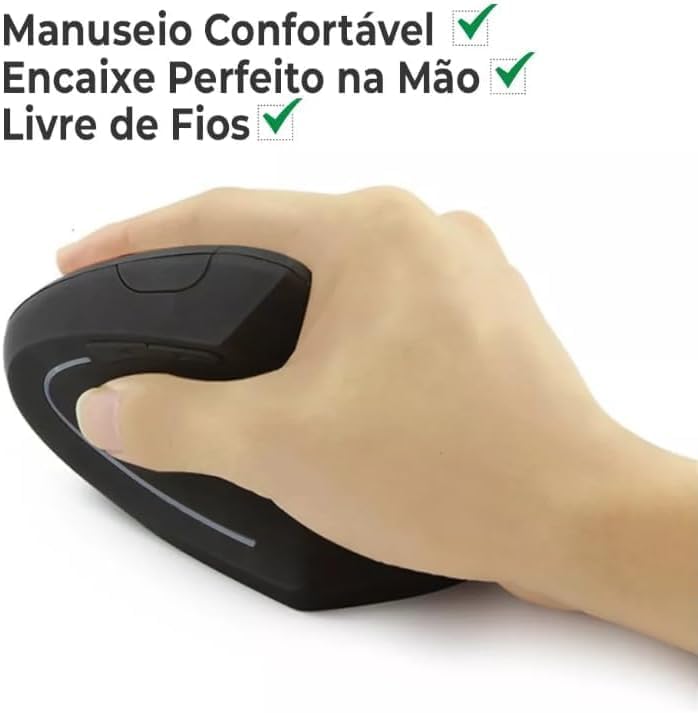
Figure 4.1: Nano Receiver Storage
4.3. Падключэнне праз Bluetooth
- Уключыце мыш з дапамогай перамыкача ON/OFF.
- Switch the connectivity mode to Bluetooth (refer to the mouse's mode switch, if available, or consult device-specific pairing instructions).
- На вашай прыладзе (ноўтбуку, планшэце, смартфоне) перайдзіце ў налады Bluetooth і ўключыце Bluetooth.
- Пошук new devices. The mouse should appear as "Ka-6660" or similar.
- Select the mouse to pair. Follow any on-screen prompts.
5. Інструкцыя па эксплуатацыі
5.1. Рэгуляванне DPI
Press the DPI switch button (located on the top of the mouse) to cycle through different sensitivity levels. The mouse supports up to 2400 DPI, allowing you to adjust cursor speed for various tasks, from precise graphic design to fast-paced gaming.
5.2. Функцыі кнопак
The mouse features 6 buttons: Left, Right, Scroll Wheel, DPI Switch, Forward, and Backward. The Forward and Backward buttons are typically used for navigation in web браўзэры або file explorers. Some operating systems or applications may allow for customization of these buttons.
5.3. Ergonomic Use
The vertical design of the Ka-6660 mouse promotes a natural handshake position, which can help reduce wrist pronation and muscle strain associated with traditional mice. Maintain a relaxed grip and allow your arm to move freely from the shoulder.

Figure 5.1: Ergonomic Grip on the Vertical Mouse
5.4. Функцыя бясшумнага кліку
The mouse is designed with silent click buttons, minimizing noise during use. This feature is beneficial in quiet environments or for users who prefer a less audible click.
6. Тэхнічнае абслугоўванне
6.1. Уборка
Каб ачысціць мыш, акуратна працярыце яе паверхню мяккай губкайamp cloth. Avoid using harsh chemicals or abrasive materials, as these can damage the finish. Ensure no liquid enters the mouse's internal components.
6.2. Сыход за батарэяй
Каб падоўжыць тэрмін службы батарэі, пазбягайце частай поўнай разрадкі мышы. Зараджайце мыш, калі з'яўляецца індыкатар нізкага зараду батарэі. Захоўвайце мыш у прахалодным, сухім месцы, калі яна не выкарыстоўваецца працяглы час.
7. Выпраўленне непаладак
7.1. Мыш не рэагуе
- Пераканайцеся, што мыш уключана.
- Праверце ўзровень зарада батарэі і пры неабходнасці зарадзіце.
- For 2.4GHz wireless, ensure the USB receiver is securely plugged into a working USB port. Try a different USB port.
- Каб падключыць Bluetooth, пераканайцеся, што Bluetooth уключаны на вашай прыладзе, і мыш правільна спалучана. Паспрабуйце паўтарыць спалучэнне.
- Перазагрузіце камп'ютар або прыладу.
7.2. Перарывістае падключэнне
- Ensure the mouse is within the operating range (up to 10 meters).
- Мінімізуйце перашкоды ад іншых бесправадных прылад.
- Праверце ўзровень батарэі.
7.3. Cursor Movement is Erratic
- Clean the optical sensor at the bottom of the mouse.
- Выкарыстоўвайце мыш на чыстай, небліскучай паверхні або кілімку для мышы.
- Adjust DPI settings to a lower sensitivity if needed.
8. Тэхнічныя характарыстыкі
| Асаблівасць | Дэталь |
|---|---|
| Марка | Радавыя |
| мадэль | Ka-6660 |
| Тэхналогія падлучэння | Бесправадная сетка 2.4 ГГц, Bluetooth |
| Тэхналогія выяўлення руху | Аптычны |
| Максімальная адчувальнасць | 2400 DPI (кропак на цалю) |
| Колькасць кнопак | 6 |
| Працоўны дыяпазон | Да 10 метраў |
| Крыніца харчавання | Акумулятарная батарэя |
| стыль | Vertical, Ergonomic |
| Матэрыял | АБС |
| Сумяшчальныя прылады | Personal Computer (Windows, macOS, Linux), Laptops, Tablets, Smartphones (Android, iOS) |
| Рэкамендуемае выкарыстанне | Офіс, гульні |
9. Відэа пра прадукт
Watch this video for a visual demonstration of the mouse's ergonomic design and silent click feature.
Video: Demonstration of the Ka-6660 Vertical Mouse's ergonomic benefits and quiet operation.
10. Гарантыя і падтрымка
This product comes with a 30-day warranty from the date of purchase. For any issues or support inquiries, please contact your retailer or the manufacturer directly. Keep your purchase receipt as proof of warranty.