
Уводзіны
This manual provides comprehensive instructions for the installation, operation, and maintenance of the Yolin EBike Display Meter YL81F K5. The YL81F color LCD display offers various functions to enhance your riding experience, including battery level display, boost gear adjustment, speed display (real-time, maximum, average), mileage display (single and total), power push control, headlight control, error code display, and customizable parameter settings.
Інфармацыя па бяспецы
Always ensure your e-bike is powered off before installing or removing the display. Do not attempt to disassemble the display unit. Keep the display away from extreme temperatures and direct sunlight for prolonged periods. Ensure all connections are secure and waterproof to prevent damage from moisture.
Змест пакета
Праверце наяўнасць усіх кампанентаў у камплекце:
- Yolin YL81F K5 EBike Display Meter
- 5-pin waterproof male connector cable (150mm exposed length)
- Handlebar mounting bracket (fits 22.2 mm, 25.4 mm, and 31.8 mm handlebars)
Настройка і ўстаноўка
Follow these steps for proper installation of your YL81F K5 display:
- Мантаж дысплея:
Select a suitable position on your e-bike handlebar. The flexible bracket accommodates handlebar sizes of 22.2 mm, 25.4 mm, and 31.8 mm. Securely attach the display bracket to the handlebar using the provided screws. Ensure the display is firmly in place and does not obstruct your view або кіраванне роварам.

Image: YL81F K5 display mounted on an e-bike handlebar, demonstrating its typical installation position and clear visibility of the screen.
- Падключэнне кабеляў:
Locate the 5-pin waterproof male connector on the display cable. Connect this to the corresponding female connector on your e-bike's wiring harness. Ensure the connection is firm and fully seated to maintain its waterproof integrity.

Выява: Падрабязны view of the 5-pin waterproof connector, highlighting its design for secure and moisture-resistant connections.
- Сумяшчальнасць харчавання:
The YL81F display is compatible with 24V, 36V, 48V, and 60V e-bike battery systems. Ensure your e-bike's battery voltage matches one of these specifications.
- Першапачатковае ўключэнне:
After installation, power on your e-bike. The display should illuminate and show the default screen. If it does not, recheck all connections.
Інструкцыя па эксплуатацыі
The YL81F K5 display provides various functions accessible via its K5 buttons.
Паказаць надview:

Выява: Падрабязны view of the YL81F K5 display, illustrating its vibrant color screen and the integrated K5 button controls.
- Уключэнне/выключэнне харчавання: Press and hold the power button (usually the middle button on the K5 control) to turn the display on or off.
- Boost Gear Adjustment: Use the '+' and '-' buttons on the K5 control to adjust the assist level (boost gear). The current level will be indicated on the screen.
- Дысплей хуткасці: The display shows real-time speed. You can cycle through maximum speed (MAX) and average speed (AVG) by short-pressing a specific button (refer to on-screen prompts or specific button functions).
- Дысплей прабегу: View single trip mileage (TRIP) and total mileage (ODO). A short press of a button typically switches between these modes.
- Кіраванне фарамі: Press the headlight button (if available on K5 control) to turn the e-bike's headlights on or off. An indicator on the display will confirm the status.
- Адлюстраванне кода памылкі: In case of a system malfunction, the display will show an error code. Refer to the Troubleshooting section for common codes and solutions.
- Налады параметраў: Access the settings menu by long-pressing a specific button combination (e.g., '+' and '-' simultaneously). Here you can adjust parameters such as wheel diameter, speed limit, and unit settings (km/h or mph).
Персаналізаваныя элементы кіравання:
The YL81F display allows for customization of key bike parameters. This includes setting the wheel diameter for accurate speed and mileage readings, and adjusting the speed limit according to local regulations or personal preference. The vibrant color screen provides clear visibility of all data, including real-time trip and total mileage logging, and voltagэлектронны дысплей.
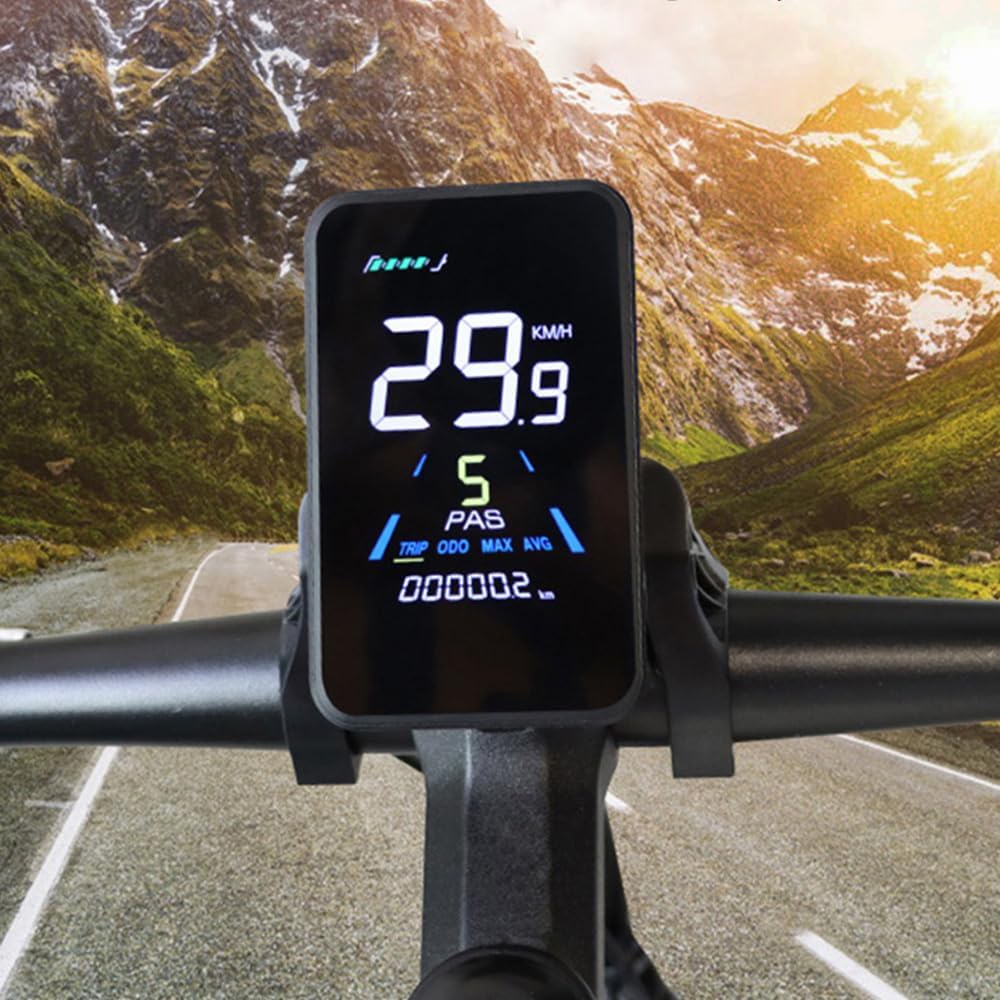
Image: The YL81F K5 display illuminated in a low-light setting, showcasing its clear and vibrant color screen with speed and mileage information.
Тэхнічнае абслугоўванне
Proper maintenance ensures the longevity and optimal performance of your YL81F K5 display.
- Уборка: Выкарыстоўвайце мяккі, damp cloth to wipe the display screen and housing. Avoid abrasive cleaners or solvents that could damage the screen or plastic.
- Праверка злучэння: Periodically inspect the 5-pin waterproof connector for any signs of wear, corrosion, or loose connections. Ensure it remains securely seated.
- Ахова навакольнага асяроддзя: While the display is designed to withstand harsh conditions, avoid prolonged exposure to direct sunlight, extreme heat, or heavy rain when the e-bike is not in use.
- Абнаўленні прашыўкі: Праверце вытворцы website or contact customer service for information on potential firmware updates that may improve performance or add features.
Ліквідацыю непаладак
This section addresses common issues you might encounter with your YL81F K5 display.
| праблема | Магчымая прычына | Рашэнне |
|---|---|---|
| Дысплей не ўключаецца. | Loose connection, low battery, incompatible voltage. | Check all cable connections, ensure battery is charged, verify battery voltagэлектронная сумяшчальнасць (24-60 В). |
| Incorrect speed/mileage readings. | Incorrect wheel diameter setting. | Access parameter settings and adjust the wheel diameter to match your e-bike's wheel size. |
| Адлюстраваны код памылкі. | System malfunction, sensor issue. | Note the error code and consult the manufacturer's support or online resources for specific code meanings and solutions. Often, restarting the e-bike can clear temporary errors. |
| Кнопкі не рэагуюць. | Dirt/debris, internal fault. | Clean around the buttons. If the issue persists, contact customer support. |
Тэхнічныя характарыстыкі
Key technical specifications for the Yolin YL81F K5 EBike Display Meter:
- мадэль: YL81F K5
- Тып дысплея: Каляровы ВК
- тtage Сумяшчальнасць: 24В, 36В, 48В, 60В
- Тып раздыма: 5-pin waterproof male connector
- Cable Length (exposed): 150 мм
- Руль Clamp дыяметр: 22.2 мм, 25.4 мм, 31.8 мм
- матэрыял: ABS, LCD, Tempered Glass, Nylon Bracket
- Памеры (прыблізна): 95 мм (В) х 59.86 мм (Ш)
- Sensor Types Supported: Speed Sensor, Current Sensor, GPS Sensor
- Увод чалавечага інтэрфейсу: Гузікі
- вытворца: ЁЛІН

Image: Technical drawing illustrating the precise dimensions of the YL81F K5 display unit and its mounting bracket.
Інфармацыя аб гарантыі
The Yolin EBike Display Meter YL81F K5 comes with a 1 гады гарантыі ад вытворцы. This warranty covers defects in materials and workmanship under normal use. It does not cover damage caused by misuse, accidents, unauthorized modifications, or improper installation.
For warranty claims, please retain your proof of purchase and contact customer support with details of the issue.
Падтрымка і кантакт
For further assistance, technical support, or inquiries regarding your Yolin YL81F K5 display, please contact our online customer service. When contacting support, please be prepared to provide the serial number of your display (located on the back of the unit) and details of your original purchase.

Выява: Задняя частка view of the YL81F K5 display, indicating the specific location where the serial number is printed.
Важная заўвага: As mentioned in the product description, the YL81F LCD display has various communication protocols. To ensure plug-and-play compatibility, it is highly recommended to contact customer service before or after purchase and provide information about your original display.