
1. Уводзіны
This manual provides comprehensive instructions for the Mycket portable DAB/DAB+/FM radio, Model D009. It covers setup, operation, maintenance, and troubleshooting to ensure optimal performance and longevity of your device. Please read this manual carefully before using the product.
The Mycket D009 radio features advanced signal reception technology for clear audio, Bluetooth 5.0 for wireless streaming, USB playback, AUX-in connectivity, a dual alarm clock, and a sleep timer. Its integrated rechargeable battery offers portability for use in various environments.
2. Інструкцыі па тэхніцы бяспекі
- Не падвяргайце прыладу ўздзеянню дажджу, вільгаці або экстрэмальных тэмператур.
- Не кідайце прыладу і не падвяргайце яе моцным ударам.
- Не разбірайце і не спрабуйце рамантаваць прыладу самастойна. Звяртайцеся да кваліфікаванага персаналу па любыя паслугі па абслугоўванні.
- Трымайце прыладу далей ад крыніц цяпла, такіх як радыятары, абагравальнікі, пліты або іншыя прыборы (у тым ліку ampLifiers), якія вырабляюць цяпло.
- Use only the specified charging cable and power adapter (5V via USB) to charge the device.
- Ensure proper ventilation around the device during operation and charging.
- Утылізуйце батарэі і электронныя кампаненты адказна ў адпаведнасці з мясцовымі правіламі.
3. Прадукт скончыўсяview
3.1 Змест пакета
- 1 x Mycket Portable DAB Radio (Model D009)
- 1 х USB-кабель для зарадкі
- 1 х Кіраўніцтва карыстальніка
3.2 Схема і элементы кіравання прыладай
Familiarize yourself with the main components and controls of your Mycket radio.

Малюнак 1: Фронт view of the Mycket D009 portable DAB radio, showing the speaker grille, LCD display, control buttons (MODE, OK, O/M, FAV, 1-4), and the telescopic antenna extended. The right side shows the DC 5V USB-C port, reset button, and headphone jack.
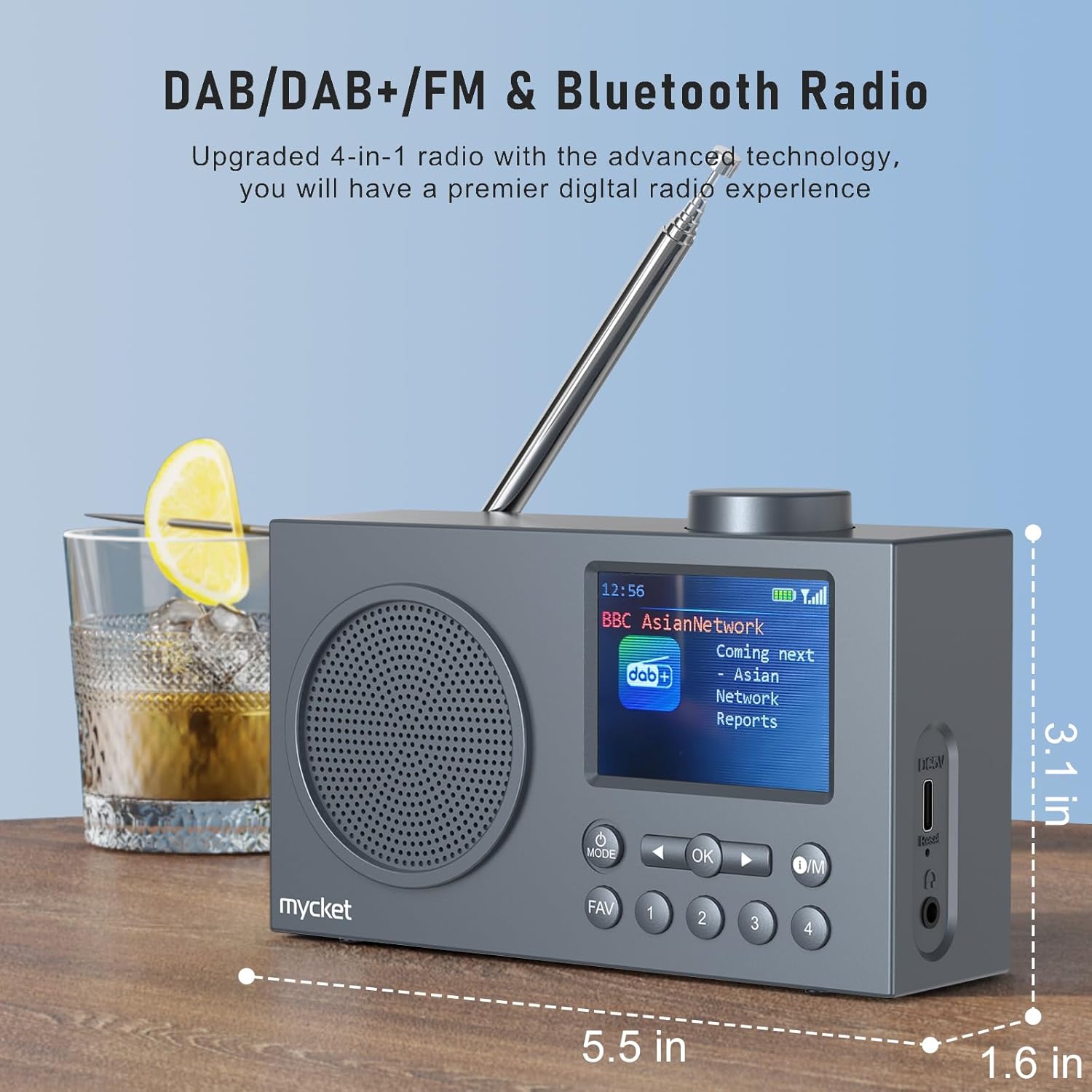
Малюнак 2: Збоку view of the Mycket D009 radio illustrating its compact dimensions: approximately 5.5 inches (length), 1.6 inches (width), and 3.1 inches (height). The image also highlights its DAB/DAB+/FM and Bluetooth capabilities.
- Дысплей: 2.4-inch TFT color display for station information, time, and settings.
- Дакладчык: Integrated Hi-Fi speaker for audio output.
- Тэлескапічная антэна: For optimal radio signal reception.
- Кнопка MODE: Switches between DAB, FM, Bluetooth, USB, and AUX modes.
- Кнопка ОК: Пацвярджае выбар або ўваходзіць у меню.
- Кнопка O/M: Power On/Off and Menu access.
- Кнопка FAV: Accesses favorite presets.
- Лічбавыя кнопкі (1-4): Direct access to stored presets.
- Кнопкі навігацыі (злева/справа): Navigates menus or tunes stations.
- Рэгулятар гучнасці: Рэгулюе гучнасць гуку.
- DC 5V USB-C Port: Для зарадкі ўнутранай батарэі.
- Кнопка скіду: Resets the device (use a thin object to press).
- Гняздо для навушнікаў 3.5 мм: Для прыватнага праслухоўвання.
4. Настройка
4.1 Зарадка акумулятара
The radio is equipped with a built-in 2200mAh lithium battery. Before first use, fully charge the device.
- Connect the provided USB charging cable to the DC 5V USB-C port on the side of the radio.
- Падключыце другі канец USB-кабеля да сумяшчальнага адаптара харчавання USB (не ўваходзіць у камплект) або да USB-порта кампутара.
- The charging indicator on the display will show the charging status. A full charge typically takes approximately 2.5 hours and provides up to 12 hours of playback time at 70% volume.

Малюнак 3: The Mycket D009 radio display showing a full battery indicator, emphasizing its long playback time on a single charge.
4.2 Рэгуляванне антэны
For optimal radio reception, fully extend the telescopic antenna. Adjust its position for the best signal quality.
4.3 Першапачатковае ўключэнне
Націсніце і ўтрымлівайце А/М button to power on the radio. The display will light up, and the device will typically start in the last used mode or initiate a DAB scan if it's the first use.
5. Інструкцыя па эксплуатацыі
5.1 Пераключэнне рэжымаў
Націсніце РЭЖЫМ button repeatedly to cycle through available modes: DAB, FM, Bluetooth, USB, and AUX.
5.2 Праца з радыё DAB/DAB+
- Пераключыцеся ў рэжым DAB з дапамогай РЭЖЫМ кнопка.
- The radio will automatically perform a full scan for available DAB/DAB+ stations upon first use or if no stations are found. To initiate a manual scan, press and hold the OK button, then select "Full Scan" from the menu.
- Once the scan is complete, use the navigation buttons (Left/Right) to browse through the list of available stations.
- Прэса OK выбраць і праслухаць станцыю.

Малюнак 4: The Mycket D009 radio display showing a DAB station and highlighting the auto-scan and 40 preset features (20 DAB & 20 FM).
5.2.1 Storing DAB Presets
The radio supports up to 20 DAB presets.
- Tune to the desired DAB station.
- Press and hold one of the number buttons (1-4) або АБРАШАНАЕ button to save the current station to a preset slot. Follow the on-screen prompts to select a slot if using the FAV button.
- To recall a preset, briefly press the corresponding number button or the АБРАШАНАЕ button and select from the list.
Праца з радыё 5.3 FM
- Пераключыцеся ў рэжым FM з дапамогай РЭЖЫМ кнопка.
- To auto-scan for FM stations, press and hold the OK кнопка. Радыё пачне пошук і захавае даступныя станцыі.
- To manually tune, use the navigation buttons (Left/Right) to adjust the frequency.
- Прэса OK to confirm the station.
5.3.1 Storing FM Presets
The radio supports up to 20 FM presets, similar to DAB presets.
- Настройцеся на патрэбную FM-станцыю.
- Press and hold one of the number buttons (1-4) або АБРАШАНАЕ button to save the current station.
- To recall a preset, briefly press the corresponding number button or the АБРАШАНАЕ button and select from the list.
5.4 Bluetooth 5.0 Спалучэнне
Connect your smartphone or tablet to the radio via Bluetooth for wireless audio streaming.
- Пераключыцеся ў рэжым Bluetooth з дапамогай РЭЖЫМ button. The radio display will show "Bluetooth Pairing" or similar.
- На мабільнай прыладзе ўключыце Bluetooth і знайдзіце даступныя прылады.
- Select "Mycket D009" from the list of devices.
- Once paired, the radio will confirm the connection, and you can play audio from your device through the radio.

Малюнак 5: The Mycket D009 radio displaying "Playing" in Bluetooth mode, next to a smartphone showing "Mycket D009" as a connected Bluetooth device.
5.5 Прайграванне з USB
Прайграванне аўдыё ў фармаце MP3 files непасрэдна з USB-дыска.
- Устаўце USB-дыск з MP3 files у порт USB.
- Пераключыцеся ў рэжым USB з дапамогай РЭЖЫМ кнопка.
- The radio will automatically detect and begin playing MP3 files. Use the navigation buttons to skip tracks.
5.6 Падключэнне да ўваходу AUX
Connect external audio devices using a 3.5mm audio cable (not included).
- Connect one end of a 3.5mm audio cable to the AUX-in port on the radio.
- Падключыце другі канец да раздыма для навушнікаў або аўдыёвыхаду вашай знешняй прылады.
- Пераключыцеся ў рэжым AUX з дапамогай РЭЖЫМ кнопка.
- Кіруйце прайграваннем са знешняй прылады.
5.7 Функцыя будзільніка
Наладзьце да двух незалежных сігналізацый.
- Націсніце і ўтрымлівайце А/М кнопку для ўваходу ў меню.
- Navigate to "Alarm Settings" using the navigation buttons and press OK.
- Выберыце Будзільнік 1 або Будзільнік 2.
- Set the alarm time, source (DAB, FM, or Buzzer), and volume.
- Пацвердзіце налады, націснуўшы OK.
5.8 Функцыя таймера сну
Усталюйце радыё на аўтаматычнае выключэнне праз пэўны перыяд часу.
- Націсніце і ўтрымлівайце А/М кнопку для ўваходу ў меню.
- Navigate to "Sleep Timer" and press OK.
- Select the desired duration (e.g., 15, 30, 60 minutes).
- The radio will automatically power off after the set time.
5.9 Выкарыстанне навушнікаў
Connect 3.5mm headphones to the headphone jack for private listening. The internal speaker will be muted automatically.
6. Тэхнічнае абслугоўванне
- Уборка: Для чысткі вонкавага корпуса радыё выкарыстоўвайце мяккую сухую тканіну. Не выкарыстоўвайце абразіўныя ачышчальнікі або растваральнікі.
- Сыход за батарэяй: Каб падоўжыць тэрмін службы батарэі, пазбягайце частай поўнай разрадкі батарэі. Рэгулярна зараджайце прыладу, нават калі яна не выкарыстоўваецца працяглы час.
- захоўванне: Захоўвайце радыёпрыёмнік у прахалодным, сухім месцы, удалечыні ад прамых сонечных прамянёў і экстрэмальных тэмператур.
7. Выпраўленне непаладак
| праблема | Магчымая прычына | Рашэнне |
|---|---|---|
| Няма харчавання / радыё не ўключаецца. | Акумулятар разраджаны. | Зараджайце радыё з дапамогай USB-кабеля, які ўваходзіць у камплект. |
| Слабы прыём радыё (DAB/FM). | Antenna not fully extended or positioned correctly. Weak signal area. | Fully extend and adjust the telescopic antenna. Try moving the radio to a different location. Perform a full scan for stations. |
| Збой спалучэння Bluetooth. | Radio not in Bluetooth mode. Device too far. Bluetooth not enabled on external device. | Ensure the radio is in Bluetooth mode. Keep devices within range (approx. 10 meters). Enable Bluetooth on your external device and search for "Mycket D009". |
| Няма гуку з дынаміка. | Гучнасць занадта нізкая. Падключаны навушнікі. | Increase the volume. Disconnect headphones if not intended for private listening. |
| Прайграванне з USB не працуе. | USB drive not inserted correctly. Incompatible file фармат. | Ensure USB drive is fully inserted. Check that fileяны ў фармаце MP3. |
| Прылада не рэагуе. | Часовы збой праграмнага забеспячэння. | Press the reset button on the side of the radio using a thin object (e.g., a paperclip). |
8. Тэхнічныя характарыстыкі
| Марка | Мікет |
| мадэль | D009 |
| Рэжымы радыё | DAB, DAB+, FM |
| Версія Bluetooth | 5.0 |
| Параметры прайгравання | FM, DAB, DAB+, Bluetooth, USB MP3, AUX-in |
| Выходная магутнасць дынаміка | 5 ват |
| Дынамік | 4 Ω10 W 78 mm x 1 |
| Дысплей | 2.4-цалевы TFT каляровы LCD |
| Прасэты | 40 (20 DAB, 20 FM) |
| Тып батарэі | Built-in Lithium-ion (18650) |
| Ёмістасць батарэі | 2200 mAh (3.7V - 2.2 Ah) |
| Час прайгравання | Approx. 8-9 hours at 70% volume (up to 12 hours) |
| Час зарадкі | Прыбл. 2.5 гадзіны |
| Увод магутнасці | 5В праз USB |
| Памеры (прадукт) | Прыблізна 14 см (Д) х 4 см (Ш) х 7.8 см (В) |
| Выхадныя злучэнні | Гняздо для навушнікаў 3.5 мм |
9. Гарантыя і падтрымка
Mycket products are designed for reliability and performance. This product comes with:
- 12-месячная гарантыя: Enjoy a hassle-free 12-month warranty from the date of purchase.
- Падтрымка кліентаў: For any questions, issues, or support needs, please contact Mycket customer service.
Калі ласка, захавайце доказы пакупкі для прэтэнзій па гарантыі.