
GOODaaa PN-W22PLUS
GOODaaa Solar Charger Power Bank PN-W22PLUS User Manual
Model: PN-W22PLUS
Уводзіны
This manual provides comprehensive instructions for the safe and efficient use of your GOODaaa Solar Charger Power Bank, Model PN-W22PLUS. This portable power bank features a high-capacity 36800mAh battery, five integrated solar panels for supplemental charging, built-in charging cables, wireless charging capability, and dual LED flashlights. Designed for outdoor enthusiasts, it offers multiple charging options for various electronic devices.

Image: The GOODaaa Solar Charger Power Bank PN-W22PLUS, showcasing its five unfolded solar panels, built-in cables, wireless charging pad, and illuminated dual LED flashlights. The device is black with orange accents.
Кампаненты прадукту
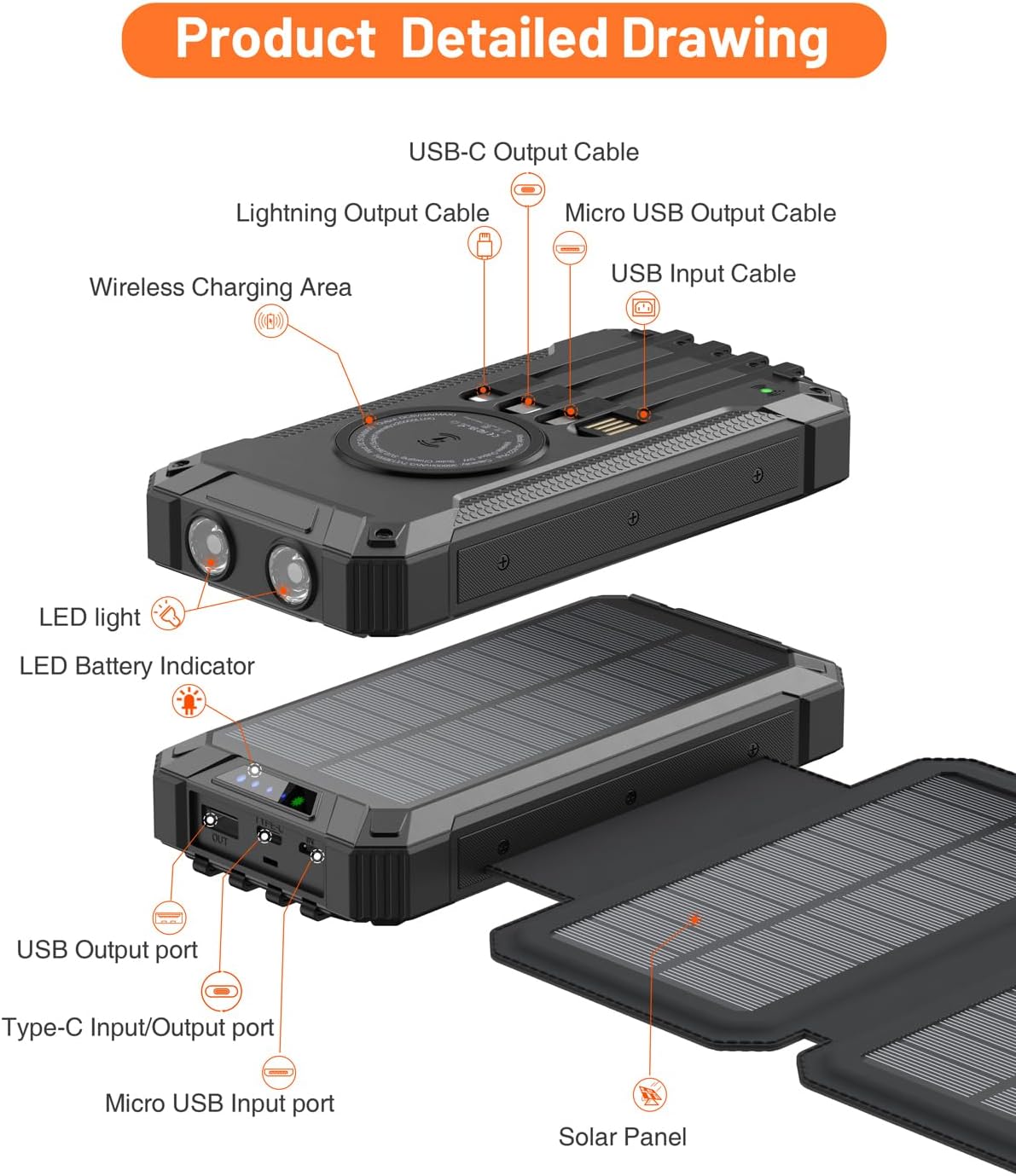
Familiarize yourself with the various parts of your power bank:
- Main Power Bank Unit: Contains the 36800mAh battery, wireless charging pad, and control buttons.
- Складаныя сонечныя панэлі: Five integrated panels for solar energy collection.
- Built-in Output Cables: Includes Lightning, USB-C, and Micro USB cables for direct device charging.
- Выхадныя парты USB: Additional USB-A and USB-C ports for external cable connections.
- Парты ўводу: USB-C and Lightning input ports for charging the power bank itself.
- Dual LED Flashlights: Located on the front edge for illumination.
- Кнопка харчавання: Activates the device and controls flashlight modes.
- Святлодыёдны індыкатар батарэі: Displays remaining battery capacity and charging status.
- Заціск для карабіна: For attaching the power bank to backpacks or gear.

Image: A detailed diagram illustrating the various components of the power bank, including the wireless charging area, built-in Lightning, USB-C, and Micro USB output cables, USB input cable, USB output port, Type-C input/output port, Micro USB input port, LED lights, LED battery indicator, and solar panels.
Настройка
Пачатковая зарадка паўэрбанка
Before first use, fully charge the power bank using a wall adapter. This ensures optimal battery performance.
- Locate the input ports on the side of the power bank, protected by a silicone cover.
- Connect a compatible USB-C or Lightning cable (a USB-C to USB-C cable is included) to the power bank's input port.
- Connect the other end of the cable to a wall adapter (not included) and plug it into a power outlet.
- The LED battery indicator lights will illuminate, showing the charging progress. All indicator lights will be solid when fully charged.
Note: Solar charging is primarily for emergency use and to maintain battery charge. For a faster and more efficient initial charge, always use a wall adapter.

Image: The power bank illustrating two charging methods: USB charging from a wall outlet using a USB-C cable, and solar charging with its five panels unfolded under sunlight.
Інструкцыя па эксплуатацыі
Charging External Devices (Wired)
The power bank offers multiple options for wired charging:
- Выкарыстанне ўбудаваных кабеляў: Pull out the appropriate built-in cable (Lightning, USB-C, or Micro USB) and connect it directly to your device.
- Выкарыстанне выходных партоў USB: Connect your device's charging cable to one of the USB-A or USB-C output ports on the power bank.
The power bank can charge up to five devices simultaneously using a combination of built-in cables and external ports.

Image: The power bank connected to several mobile phones and tablets via its integrated cables (Lightning, USB-C, Micro USB) and external USB ports, demonstrating its multi-device charging capability.
Charging External Devices (Wireless)
For devices that support wireless charging:
- Place your wireless-charging-compatible device directly onto the wireless charging pad located on the power bank's surface.
- Ensure the device is centered on the pad for optimal charging. The power bank will automatically begin wireless charging.

Image: A smartphone placed on the wireless charging pad of the power bank, indicating active wireless charging with a visual effect.
Solar Charging the Power Bank
The five foldable solar panels allow for supplemental charging when a wall outlet is unavailable:
- Unfold all five solar panels completely.
- Place the power bank in direct sunlight. The green LED indicator will light up, confirming that solar charging is active.
- For best results, position the panels perpendicular to the sun's rays.
Important: Solar charging is slower than wall charging and is intended for emergency power or to extend battery life during prolonged outdoor activities. It may take 8-10 hours in direct sunlight to fully charge the power bank via solar panels. Cloud cover will significantly reduce charging efficiency.

Image: The power bank with its five solar panels fully extended, placed outdoors on a rock to maximize exposure to sunlight for charging.
Using the Dual LED Flashlights
The integrated flashlights provide illumination in low-light conditions:
- Каб уключыць/выключыць: Націсніце і ўтрымлівайце кнопку харчавання прыблізна 3 секунды.
- Каб пераключаць рэжымы: Once the flashlight is on, short press the power button to cycle through different modes (e.g., High, Medium, Low, Strobe, SOS).
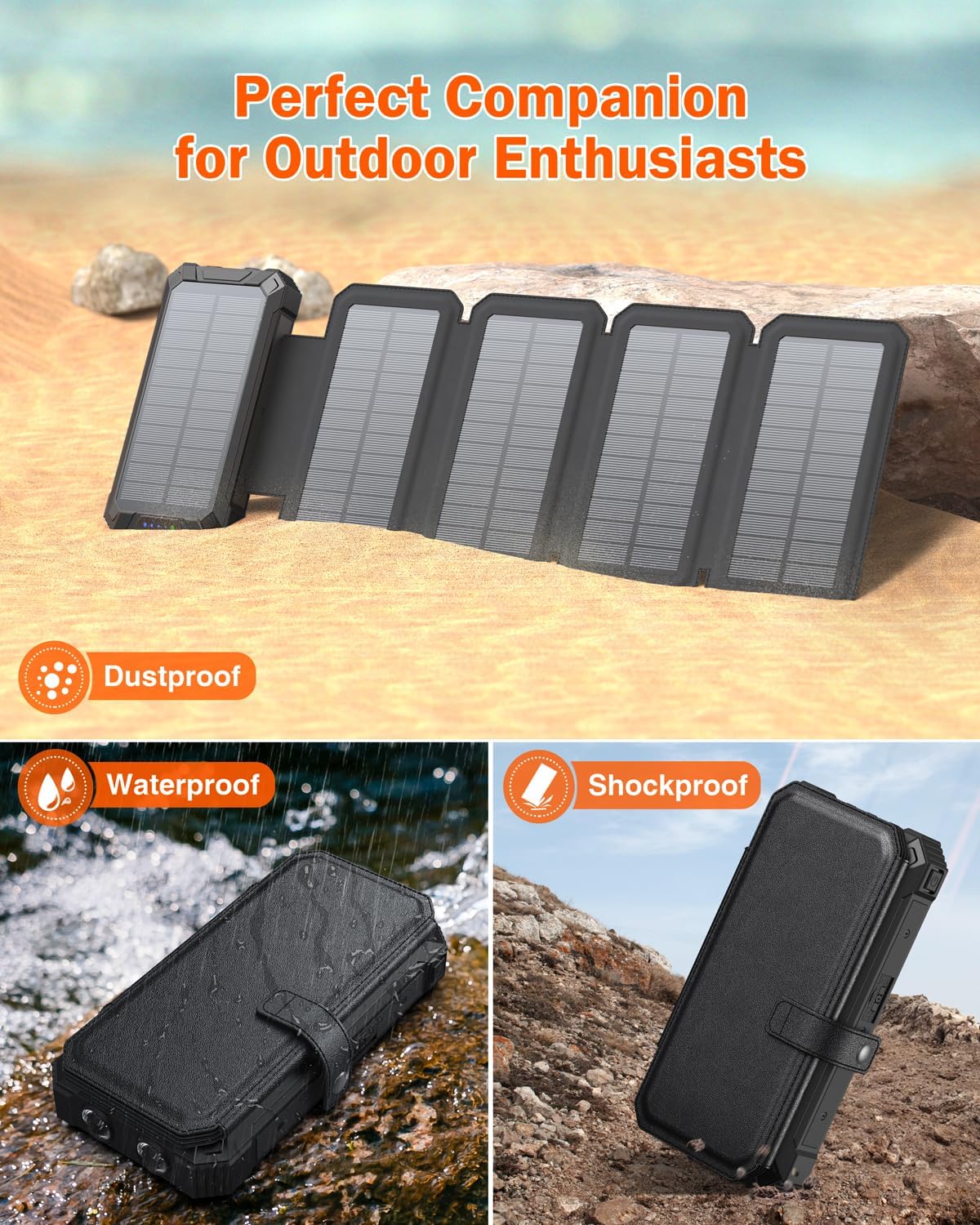
Image: The power bank's dual LED flashlights providing strong illumination in a dark environment, with smaller inset images showing its practical applications during camping, reading, and hiking.
Тэхнічнае абслугоўванне
Proper care ensures the longevity and performance of your power bank:
- Уборка: Працірайце прыладу мяккай сухой тканінай. Пазбягайце выкарыстання агрэсіўных хімічных рэчываў або абразіўных матэрыялаў.
- захоўванне: Store the power bank in a cool, dry place away from direct sunlight and extreme temperatures. If storing for extended periods, ensure it is charged to about 50-75% capacity.
- Сыход за батарэяй: To prolong battery life, avoid fully discharging the power bank regularly. Recharge it before it completely runs out of power.
- Абарона: The power bank features silicone covers for its ports, offering resistance against drops, dust, and water. Ensure these covers are properly sealed when not in use to maintain protection.
Выява: Складаная выяваasing the power bank's robust design, including its shockproof casing, water resistance (splashed with water), and dustproof features, suitable for outdoor use.
Ліквідацыю непаладак
Калі ў вас узніклі праблемы з вашым знешнім акумулятарам, звярніцеся да наступных распаўсюджаных рашэнняў:
- Прылада не зараджаецца:
- Ensure the power bank is sufficiently charged. Check the LED battery indicators.
- Пераканайцеся, што зарадны кабель надзейна падключаны як да паўэрбанка, так і да прылады.
- If using built-in cables, ensure they are fully extended and properly seated in your device's port.
- If using wireless charging, ensure your device is compatible and correctly positioned on the charging pad.
- Try a different charging cable or port to rule out a faulty connection.
- Павольная сонечная зарадка:
- Solar charging is inherently slower than wall charging. Ensure the panels are in direct, unobstructed sunlight.
- Angle the panels directly towards the sun for maximum efficiency.
- Cloudy weather, shade, or indoor lighting will significantly reduce solar charging speed. Solar charging is best used for supplemental power or emergency situations, not as a primary charging method.
- Ліхтарык не працуе:
- Пераканайцеся, што знешні акумулятар мае дастатковы зарад.
- Press and hold the power button for 3 seconds to activate the flashlight. If it doesn't turn on, try charging the power bank.
Тэхнічныя характарыстыкі
| Марка | GOODaaa |
| Нумар мадэлі | PN-W22PLUS |
| Ёмістасць батарэі | 36800 Міліamp Гадзіны (мАг) |
| Памеры прадукту | 7.48 х 4.56 х 2 цалі |
| Вага прадмета | 1.3 фунта |
| Тып раздыма | USB тыпу A, USB тыпу C |
| Асаблівасці | Flashlight, Wireless Charging, Five Solar Panels, Built-in Cables (Lightning, USB-C, Micro USB), Water/Dust/Shock Resistant |
| Колер | Чорны |
| Патрабуюцца батарэі | 2 батарэйкі 12 В (у камплекце) |
Гарантыя і падтрымка
Your GOODaaa Solar Charger Power Bank PN-W22PLUS comes with a 3-гадовая гарантыя замены. For any product inquiries, technical support, or warranty claims, please contact GOODaaa customer service through the retailer's platform or visit the official GOODaaa webсайт для кантактнай інфармацыі.
Калі ласка, захавайце пацвярджэнне пакупкі для пацверджання гарантыі.