
1. Уводзіны
This manual provides detailed instructions for the setup, operation, maintenance, and troubleshooting of your Transformers TF-Crystal 85 Keys Mechanical Keyboard. Please read this manual thoroughly before using the product to ensure proper functionality and longevity.
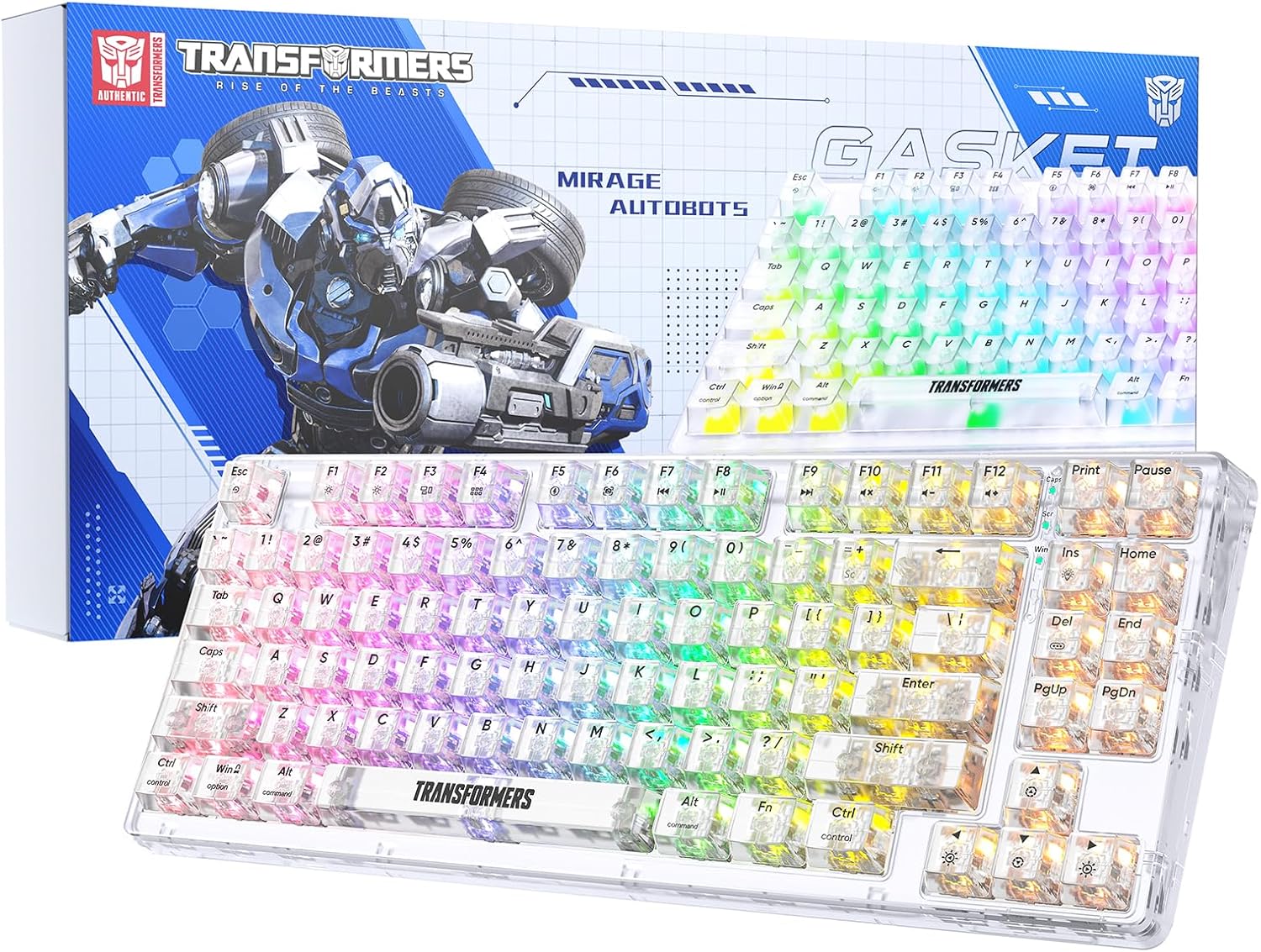
Image 1.1: Transformers TF-Crystal 85 Keys Mechanical Keyboard with its packaging, showcasing the transparent design and RGB lighting.
2. Прадукт скончыўсяview
2.1 Асноўныя магчымасці
- Раскладка з 85 клавішамі: Compact 75% design retaining essential functions, arrow, and navigation keys.
- Трохрэжымнае падключэнне: Supports Bluetooth 5.0, 2.4GHz wireless, and USB-C wired connections.
- Гарачая замена друкаванай платы: Compatible with most 3-pin and 5-pin mechanical switches, allowing for easy customization and replacement.
- Linear Switches: Pre-lubricated switches with a 50 million keystroke lifespan for durability and smooth operation.
- Структура пракладкі: Incorporates high-quality gasket materials and a silicone pad to absorb vibrations and reduce typing noise.
- Customizable RGB Backlight: Features 20 built-in backlight modes, 16.8 million color options, and dynamic music rhythm effects.
- Programmable Driver: Enables macro customization, key function remapping, and advanced lighting control.
- Доўгі тэрмін службы батарэі: Equipped with a 4000mAh battery, providing up to 240 hours of continuous use in 2.4GHz mode without backlighting.
- Шырокая сумяшчальнасць: Supports Mac, Windows, iOS, Android, PC, Laptop, Smartphone, Tablet, Switch, Xbox, and PlayStation.
- Празрысты дызайн: Features transparent keycaps and base for enhanced aesthetic appeal.
3. Настройка
3.1 Зарадка клавіятуры
Before initial use, fully charge the keyboard. Connect the provided USB-C cable to the keyboard's USB-C port and the other end to a powered USB port (e.g., computer, wall adapter). The charging indicator will show the charging status.
3.2 Падключэнне праз бесправадны рэжым 2.4 ГГц
- Locate the 2.4GHz USB receiver, typically stored in a compartment on the keyboard.
- Падключыце USB-прыёмнік да вольнага порта USB на вашым кампутары.
- Toggle the mode switch on the keyboard to the 2.4G становішча.
- The keyboard will automatically connect to your device.
3.3 Connecting via Bluetooth 5.0 Mode
- Toggle the mode switch on the keyboard to the BT становішча.
- Націсніце і ўтрымлівайце fn+1 (або fn+2, fn+3) for 3-5 seconds until the indicator light flashes rapidly, indicating pairing mode.
- На вашай прыладзе (камп'ютары, планшэце, смартфоне) уключыце Bluetooth і пачніце пошук новых прылад.
- Select "TF-Crystal 85" from the list of available devices to pair.
- Once paired, the indicator light will stop flashing and remain solid. You can pair up to three Bluetooth devices using fn+1, fn+2, і fn+3.
3.4 Connecting via USB-C Wired Mode
- Падключыце кабель USB-C з камплекта да порта USB-C клавіятуры.
- Падключыце другі канец кабеля USB-C да даступнага порта USB на вашым кампутары.
- The keyboard will automatically switch to wired mode and function without battery power.

Image 3.1: Diagram illustrating the three connection modes: Bluetooth 5.0, 2.4GHz wireless, and USB-C wired, compatible with various devices.
4. Інструкцыя па эксплуатацыі
4.1 Пераключэнне паміж рэжымамі
Use the physical switch located on the keyboard to select between BT (Bluetooth), 2.4G (2.4GHz wireless), and USB-C (wired) modes.
4.2 Кіраванне падсветкай RGB
Клавіятура мае наладжвальную RGB-падсветку. Для рэгулявання выкарыстоўвайце наступныя камбінацыі клавіш:
- Fn + Ins: Cycle through 20 different backlight effects.
- Fn + Del: Switch backlight colors within certain modes.
- Fn + ↑ / ↓: Рэгулюйце яркасць падсветкі (5 узроўняў).
- Fn + ← / →: Adjust backlight effect speed (5 levels).
- Fn + Esc (hold for 3s): Reset backlight settings to default.

Image 4.1: Visual guide for controlling RGB backlight effects, brightness, and speed using Fn key combinations.
4.3 Programmable Driver Usage
The keyboard includes a programmable driver for advanced customization. This driver allows you to:
- Рэдагаванне макрасаў: Record and edit complex key sequences.
- Key Redefinition: Customize the function of individual keys.
- RGB Effect Customization: Fine-tune lighting modes, colors, and speeds, including music rhythm lighting effects.
Refer to the software's dedicated user interface for detailed instructions on using these features.

Image 4.2: Screenshot of the programmable driver interface, showing options for macro editing, RGB effects, and key redefinition.
4.4 Перамыкачы з магчымасцю гарачай замены
The TF-Crystal 85 keyboard features a hot-swappable PCB, allowing you to change mechanical switches without soldering. This supports most 3-pin and 5-pin mechanical switches.
- Выключыце клавіятуру або адлучыце яе ад прылады.
- Выкарыстоўвайце прыкладзены здымнік для клавіш, каб акуратна зняць патрэбную клавішу.
- Use the provided switch puller to gently grip the switch from its top and bottom clips, then pull it straight up to remove it.
- Сумясціце кантакты новага перамыкача з адтулінамі на друкаванай плаце. Пераканайцеся, што кантакты размешчаны прама.
- Gently press the new switch into place until it clicks securely. Do not force it.
- Заменіце каўпачок клавішы.

Image 4.3: Illustration of the hot-swappable feature, showing how to remove and insert 3-pin/5-pin switches and the linear switch specifications.
5. Тэхнічнае абслугоўванне
5.1 Чыстка клавіятуры
- Перад чысткай адключыце клавіятуру ад усіх крыніц харчавання.
- Выкарыстоўвайце мяккую безворсовую тканіну, злёгку dampпрамыйце вадой або мяккім ачышчальным растворам, каб праціраць клавішы і корпус.
- Для выдалення пылу і смецця паміж клавішамі выкарыстоўвайце сціснутае паветра або невялікую шчотку.
- Avoid using harsh chemicals or abrasive materials that could damage the keyboard's surface.
5.2 Сыход за акумулятарам
- Пазбягайце частай поўнай разрадкі акумулятара.
- Захоўвайце клавіятуру ў прахалодным, сухім месцы, калі яна не выкарыстоўваецца працяглы час.
- If the keyboard will not be used for a long time, charge it to about 50% before storage.
6. Выпраўленне непаладак
| праблема | Магчымая прычына | Рашэнне |
|---|---|---|
| Клавіятура не рэагуе ў бесправадным рэжыме. | Low battery, incorrect mode selected, receiver not connected, Bluetooth not paired. | Charge the keyboard. Ensure the mode switch is set correctly (2.4G or BT). Re-insert the 2.4G receiver. Re-pair Bluetooth. |
| Клавішы не рэгіструюцца або ўводзяцца два разы. | Faulty switch, debris under keycap, software issue. | Clean under the keycap. Try hot-swapping the switch with a known working one. Restart your computer. |
| RGB backlight not working or incorrect. | Backlight turned off, incorrect settings, software conflict. | Адрэгулюйце яркасць з дапамогай Fn + ↑. Cycle modes with Fn + Ins. Reset backlight with Fn + Esc (утрымліваць 3 секунд). Check programmable driver settings. |
| Keyboard not charging. | Faulty USB-C cable, power source issue, keyboard port damage. | Try a different USB-C cable. Use a different USB port or power adapter. Ensure the cable is fully inserted. |
7. Тэхнічныя характарыстыкі
| Асаблівасць | Дэталь |
|---|---|
| Нумар мадэлі | TF-Crystal 85 |
| Раскладка клавіш | 85 клавіш (75% кампактнасці) |
| Сувязь | Bluetooth 5.0, бесправадная сувязь 2.4 ГГц, правадны USB-C |
| Тып перамыкача | Pre-lubricated Linear Mechanical Switches |
| Тэрмін службы пераключальніка | 50 мільёнаў націсканняў клавіш |
| Гарачая замена | Так (сумяшчальнасць з 3/5-кантактнымі раз'ёмамі) |
| Падсвятленне | RGB (20 modes, 16.8 million colors) |
| Ёмістасць батарэі | 4000 мАг |
| Battery Life (2.4G, no light) | Да 240 гадзін |
| Battery Life (Backlit ON) | Прыкладна 22 гадзіны |
| Памеры (Д х Ш х У) | 34.7 см х 14 см х 4.5 см |
| Сумяшчальнасць | Mac, Windows, iOS, Android, PC, Laptop, Smartphone, Tablet, Switch, Xbox, PlayStation |

Image 7.1: Visual representation of the keyboard's battery life: 240 hours with backlight off, 22 hours with backlight on, powered by a 4000mAh battery.
8. Гарантыя і падтрымка
Transformers is committed to providing exceptional customer service. If you encounter any problems with your TF-Crystal 85 Keys Mechanical Keyboard, our after-sales support team is available to assist you. This includes technical support, exchanges, or installation guidance.
Please contact our customer service for assistance. We guarantee a hassle-free service experience.