
AIKELA YX01,YK01
AIKELA Bluetooth Speaker with Video Scrolling Remote and Phone Stand User Manual
Brand: AIKELA | Model: YX01, YK01
Уводзіны
Thank you for choosing the AIKELA Bluetooth Speaker with Video Scrolling Remote and Phone Stand. This multi-functional device is designed to enhance your media experience by providing amplified sound, a stable viewing platform, and convenient remote control. Whether you're watching videos, listening to podcasts, or making hands-free calls, this product offers a seamless and enjoyable experience.

The AIKELA Bluetooth Speaker with Phone Stand and its accompanying remote control.
Змест пакета
Калі ласка, праверце ўпакоўку на наяўнасць наступных прадметаў:
- Bluetooth Speaker with Phone Stand x 1
- Пульт дыстанцыйнага кіравання x 1
- Кабель Type-C x 1
- Кіраўніцтва карыстальніка х 1

Visual representation of all items included in the product package.
Асаблівасці прадукту
- Small But Powerful Sound: The upgraded wireless Bluetooth speaker delivers clear, loud sound for music, movies, videos, and podcasts. It includes a built-in microphone for crisp hands-free calls, which can also assist individuals with hearing loss.
- Video Scrolling Remote: A dedicated Bluetooth remote allows for easy scrolling, pausing, playing videos, and adjusting phone volume. This feature is ideal for platforms like YouTube, TikTok, or Netflix, freeing your hands during various activities.
- Рэгуляваная падстаўка для тэлефона: The stand features a weighted base with non-slip silicone to securely hold your phone. Its adjustable angle ensures optimal viewing, whether on a desk, kitchen counter, or bedside table.
- Portable & Long-Lasting: With a foldable, lightweight design, the speaker is easy to transport. Its rechargeable battery provides up to 10 hours of use on a single 1.5-hour charge, making it suitable for home, office, or travel.

The product combines a Bluetooth speaker, phone stand, built-in microphone, and remote control.

Атрымлівайце асалоду ад amplified sound for media and clear hands-free calls.

The phone stand is adjustable and foldable for convenience.

The speaker offers up to 10 hours of battery life on a 1.5-hour charge.
Кіраўніцтва па ўстаноўцы
1. Зарадка прылады
Before first use, fully charge the AIKELA Bluetooth Speaker using the provided Type-C cable. Connect the cable to the speaker's charging port and a compatible USB power source.
2. Уключэнне / выключэнне харчавання
Locate the ON/OFF button on the speaker. Press and hold to power on or off the device.
3. Bluetooth Pairing (Speaker)
- Ensure the speaker is powered on and in pairing mode (indicated by a blinking blue LED light).
- On your smartphone or tablet, go to Bluetooth settings.
- Пошук available devices and select "YX01" (or similar name) to connect.
- Once connected, the LED light will become solid blue.
4. Bluetooth Pairing (Remote Control)
- Slide the ON/OFF button on the back of the remote control to the ON position.
- On your smartphone or tablet, go to Bluetooth settings.
- Пошук available devices and select "YK01 (Remote Control)" to connect.
- Пасля падключэння пульт гатовы да выкарыстання.
5. iOS Specific Setup for Remote Control
For iOS devices, you must enable AssistiveTouch for the remote control to function correctly with video scrolling and other gestures. Follow these steps:
- Перайсці да Налады.
- Выберыце Даступнасць.
- Націсніце Дакранацца.
- Уключыце AssistiveTouch.
- Забяспечыць Perform Touch Gestures уключаны.
- Адрэгулюйце Адчувальнасць адсочвання to 20%-30% for optimal performance.

Step-by-step guide for enabling AssistiveTouch on iOS devices to use the remote control.
6. Adjusting the Phone Stand
The phone stand is designed to be adjustable for various viewing angles. Gently adjust the hinges to achieve your desired height and tilt. Ensure your device is securely placed on the stand's non-slip surface. The stand is compatible with most 4"-13" smartphones, tablets, and e-readers.
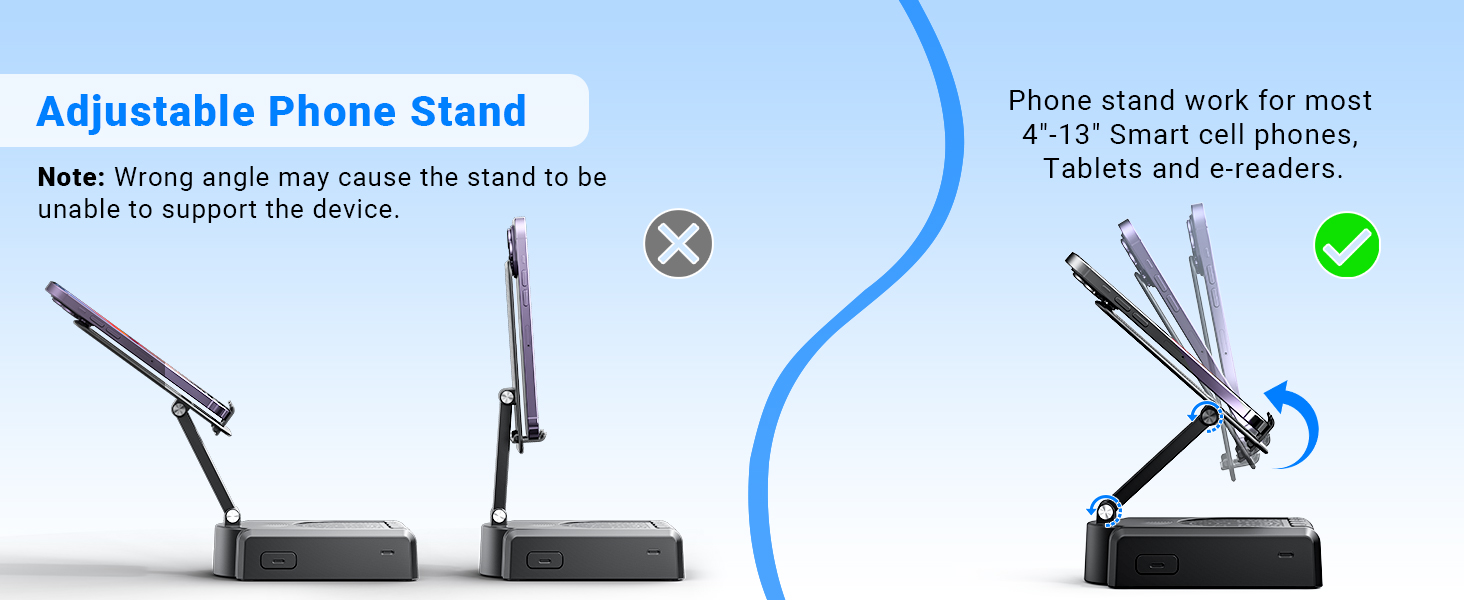
Demonstration of the adjustable angles of the phone stand.
Інструкцыя па эксплуатацыі
Элементы кіравання дынамікамі
The speaker features intuitive buttons for basic functions:
- ВКЛ/ВЫКЛ: Уключыце або выключыце прыладу.
- Паўза/Прайграванне/Адказаць/Пакласці трубку: Control media playback and phone calls.
- Папярэдні/Том-: Skip to the previous track or decrease volume.
- Далей/Том+: Skip to the next track or increase volume.
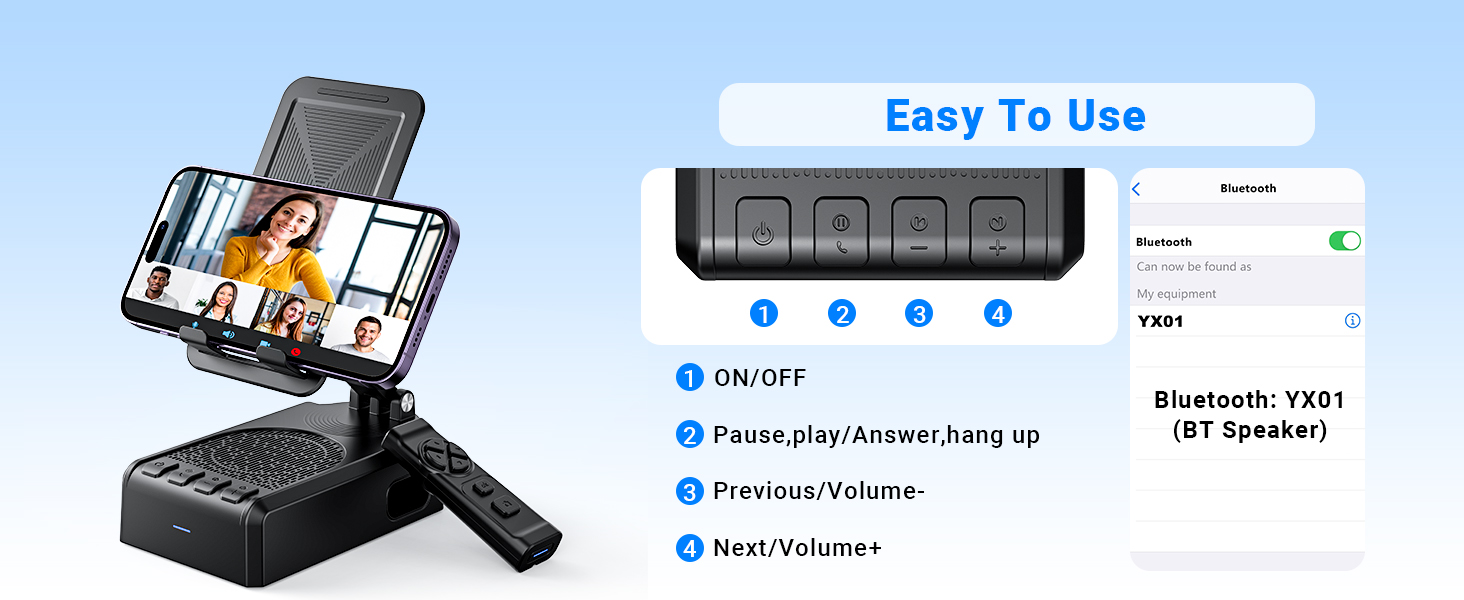
Скончанаview кнопак кіравання дынамікам і іх функцый.
Функцыі дыстанцыйнага кіравання
The Bluetooth remote control provides convenient hands-free operation for various applications:
- Single click (Up/Down arrows): Scroll up/down in apps like TikTok or YouTube.
- Single click (Left/Right arrows): Swipe left/right (e.g., for next/previous video).
- Long press (Left/Right arrows): Adjust volume (Volume- / Volume+).
- OK button (center): Прайграванне/прыпыненне мультымедыя.
- Double click (OK button): Single 'like' in social media apps.
- Long press 3s (OK button): Continuous likes (in TikTok live state).
- Кнопка камеры: Exit continuous likes (in TikTok live state).
Note: The remote control is not compatible with music software or Kindle devices.
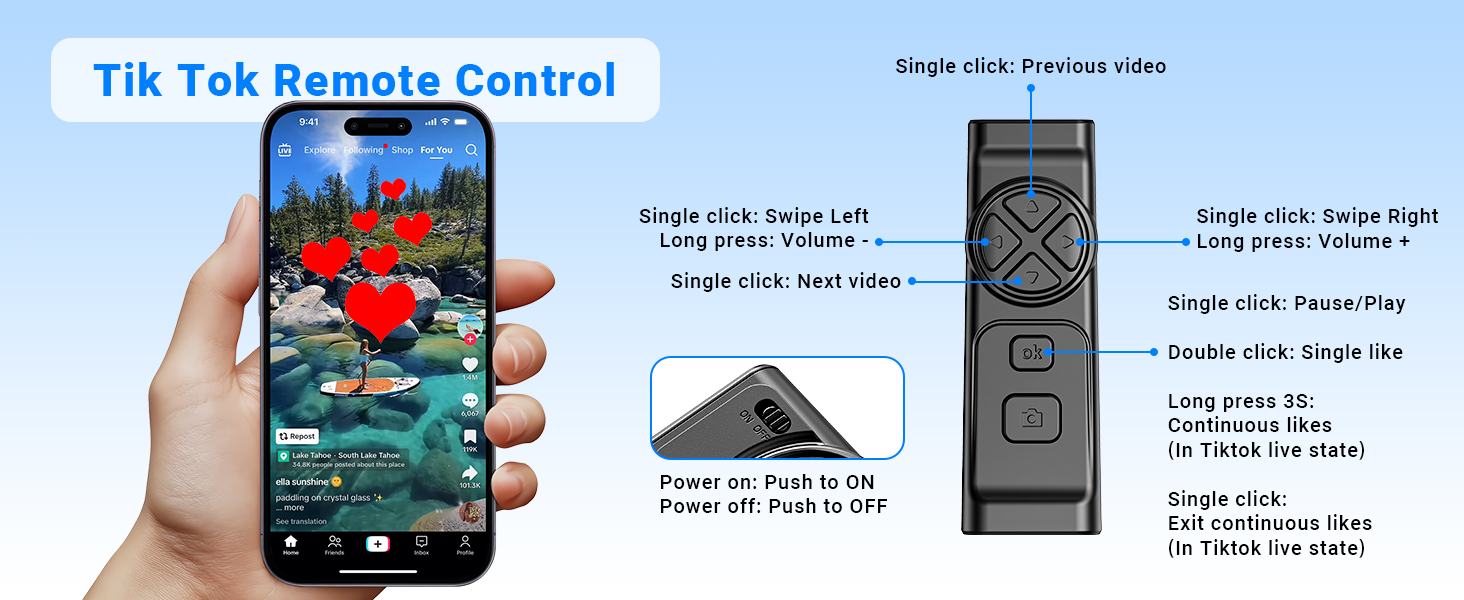
Detailed functions of the remote control for video scrolling and interaction.
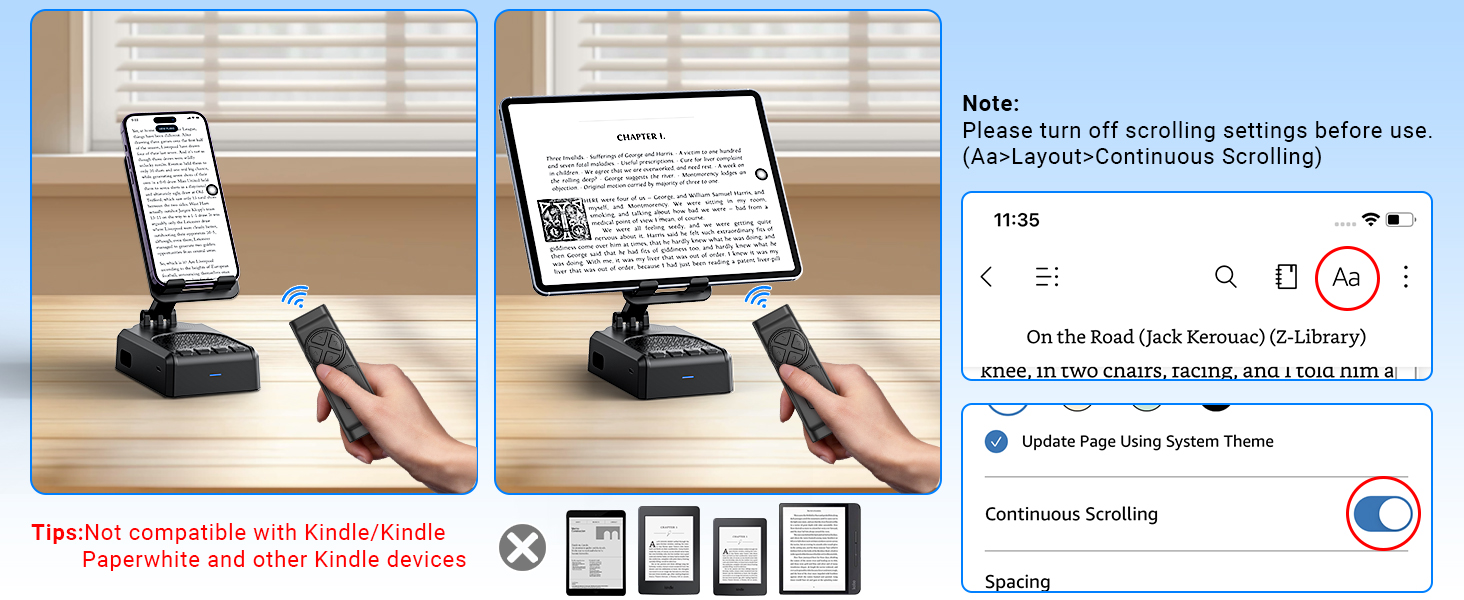
Important note regarding the remote control's compatibility with certain applications and devices.
Догляд і абслугоўванне
- Трымайце прыладу сухім. Не падвяргайце яе ўздзеянню вільгаці або экстрэмальных тэмператур.
- Працірайце прыладу мяккай сухой тканінай. Пазбягайце выкарыстання агрэсіўных хімікатаў або абразіўных ачышчальнікаў.
- Калі прылада не выкарыстоўваецца, захоўвайце яе ў прахалодным сухім месцы.
- Не кідайце прыладу і не падвяргайце яе моцным ударам.
Ліквідацыю непаладак
Remote Control Issues (iOS)
праблема: The remote control cannot scroll through videos on an iOS device.
рашэнне: Ensure AssistiveTouch is properly configured. Go to Налады > Спецыяльныя магчымасці > Сэнсарны > AssistiveTouch. Turn on AssistiveTouch, then turn on Perform Touch Gestures, and adjust the Адчувальнасць адсочвання to 20%-30%.
праблема: Remote control still not working after enabling AssistiveTouch.
рашэнне:
- Verify the remote control is powered on (slide the button on the back to ON).
- Confirm the remote is paired with your phone via Bluetooth. Check your phone's Bluetooth settings.
- If issues persist, try disabling and re-enabling the AssistiveTouch function.
Visual guide for troubleshooting remote control issues on iOS devices.
Low Volume on Android Devices
праблема: The speaker volume is too low on an Android device.
рашэнне: After connecting the speaker via Bluetooth, go to your phone's Bluetooth settings, find the connected speaker (e.g., YX01), tap the gear icon or settings icon next to it, and ensure 'Sync volume with phone' or 'Media volume sync' is enabled.

Instructions for adjusting volume sync settings on Android devices.
Тэхнічныя характарыстыкі
| Асаблівасць | Спецыфікацыя |
|---|---|
| Назва мадэлі | YX01, YK01 |
| Тып дынаміка | Партатыўны дынамік |
| Асаблівасці | Bass Boost, Built-In Microphone, Lightweight, Portable, Stereo Pairing |
| Сумяшчальныя прылады | Android phone, Samsung, Tablet, iPad, iPhone |
| Колькасць адзінак | 1.0 Граф |
| Канфігурацыя канала аб'ёмнага гуку | 1.0 |
| Колер | Чорны |
| Тэрмін службы батарэі | 10 гадзін |
| Памеры прадукту | 5.7" Г x 2.08" Ш x 3.34" У |
| Вага прадмета | 0.36 кілаграма (12.6 унцыі) |
| Воданепранікальны | Хлусня |
| Час зарадкі | 1.5 гадзін |
| Тып гарантыі | Абмежаваны |
| Максімальны радыус дзеяння (Bluetooth) | 393 Inches (10 Meters) |
| Колькасць элементаў | 1 |
| Метад кантролю | Пульт дыстанцыйнага кіравання, сэнсарны |
| Тэхналогія бесправадной сувязі | Bluetooth |
| Крыніца харчавання | Харчаванне ад батарэі |
| Колькасць батарэек | Патрабуюцца батарэі 2 А (у камплекце) |
| Тып аўдыё драйвера | Дынамічны драйвер |
| Колькасць мікрафонаў | 1 |
| Пратакол злучэння | Bluetooth |
| стыль | Сучасны |
| Вытворца | АЙКЭЛА |
| Максімальная выхадная магутнасць дынаміка | 1 ват |
| Рэжым выхаду гуку | Стэрэа |
| Тып мацавання | Настольнае мацаванне |
Гарантыя і падтрымка
AIKELA provides 12 months of support for your Speaker Stand. If you encounter any problems or have questions, please contact customer service. For quick assistance, use the 'Find Order - Contact Seller' option on your purchase platform.
Ask a question about this manual
Ask about setup, troubleshooting, compatibility, parts, safety, or missing instructions. Manuals+ will review the question and use this page’s manual context to help answer it.