
1. Уводзіны
This manual provides essential information for the proper use and maintenance of your BNCF Bpad 10 Android 14 Tablet. Please read it thoroughly before operating your device to ensure optimal performance and longevity. The Bpad 10 is designed for a seamless user experience, powered by a Snapdragon 685 processor and running Android 14.
2. Змесціва ўпакоўкі
Праверце, ці ёсць ва ўпакоўцы вашага прадукту ўсе пералічаныя ніжэй элементы:
- BNCF Bpad 10 Tablet
- Кіраўніцтва карыстальніка
- Charging Adapter (5V/2A)
- Type-C Cable (5V/2A)
- Штыфт для выкіду SIM-карты

Figure 2.1: Package Contents and Tablet Components Overview
3. Прадукт скончыўсяview
The BNCF Bpad 10 features a sleek design with strategically placed components for ease of use.

Figure 3.1: BNCF Bpad 10 Tablet Front and Rear View
3.1 Фізічныя кампаненты
- Слот MicroSD: Для пашыранага захоўвання.
- Порт тыпу C: Для зарадкі і перадачы дадзеных.
- Кнопкі гучнасці: Адрэгулюйце гучнасць гуку.
- Кнопка харчавання: Уключыць/выключыць прыладу або заблакіраваць/разблакіраваць экран.
- Дакладчыкі: Два стэрэадынамікі для вываду гуку.
- Мікрафон: Для галасавога ўводу.
- Задняя камера: Асноўная камера для фота і відэа.
- Пярэдняя камера: Для відэазванкоў і сэлфі.
4. Настройка
4.1 Першапачатковая зарадка
Before first use, fully charge your BNCF Bpad 10 tablet using the provided Type-C cable and charging adapter. Connect the Type-C cable to the tablet's charging port and the adapter to a power outlet. The charging indicator will show the charging status.
4.2 Уключэнне/выключэнне
- Каб уключыць: Press and hold the Power Button until the BNCF logo appears on the screen.
- Каб выключыць: Press and hold the Power Button until the power options menu appears, then select 'Power Off'.
- Каб перазапусціць: Press and hold the Power Button until the power options menu appears, then select 'Restart'.
4.3 Пачатковая канфігурацыя
Upon first power-on, the tablet will guide you through the initial setup process. This includes selecting your language, connecting to a Wi-Fi network, setting up your Google account, and configuring security options like facial recognition.
5. Інструкцыя па эксплуатацыі
5.1 Функцыі Android 14
Your Bpad 10 runs on Android 14, offering enhanced multitasking, security, and user-friendly features:
- Распазнаванне твараў: Securely unlock your device using your face.
- Падзелены экран: Use two applications simultaneously by dividing the screen.
- Smart Projection: Cast your tablet's screen to compatible external displays.
- Здымак экрана трыма пальцамі: Capture screenshots quickly by swiping down with three fingers.
- Бацькоўскі кантроль: Manage and monitor device usage for children.
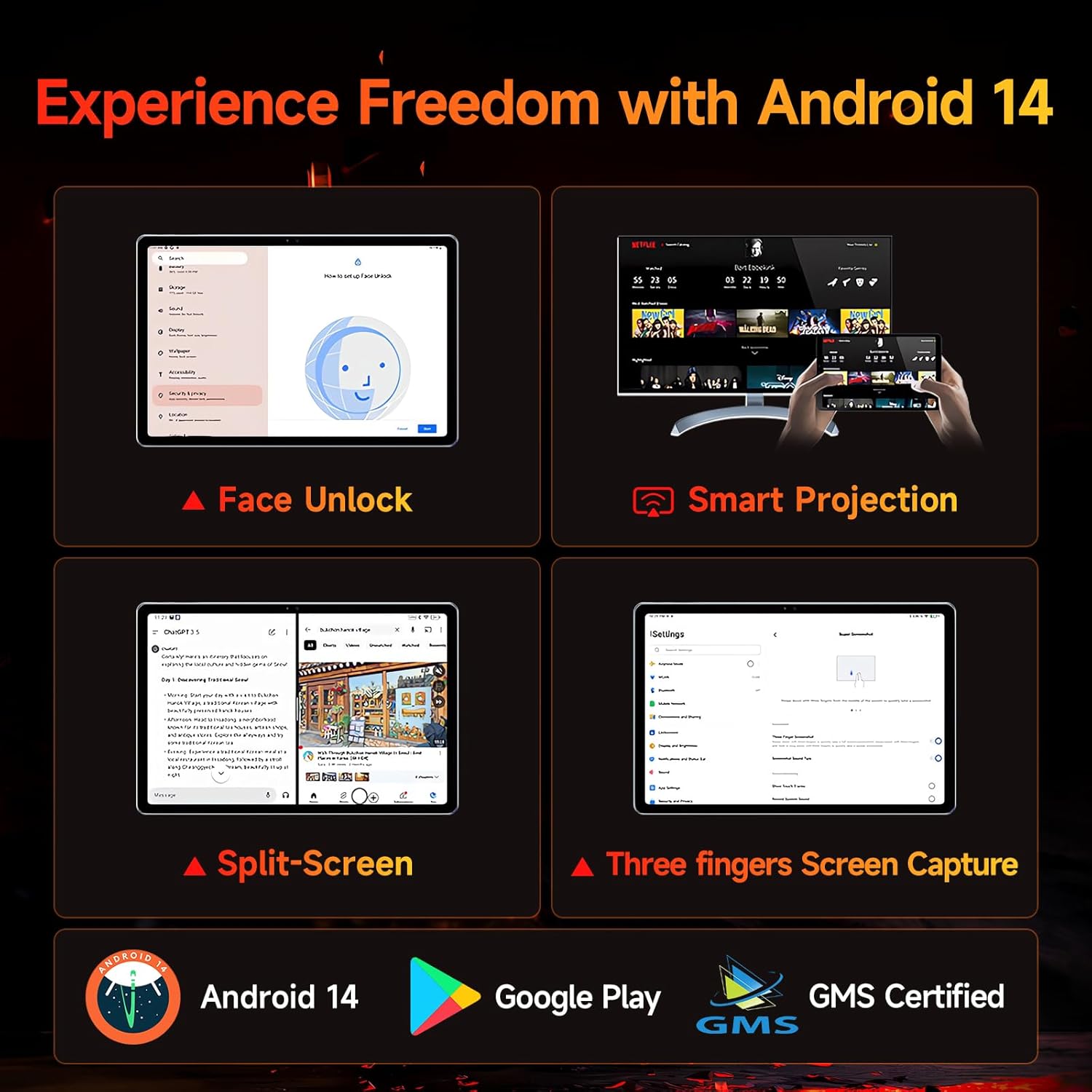
Figure 5.1: Android 14 User Interface and Features
5.2 Прадукцыйнасць
The Bpad 10 is equipped with a 6nm Snapdragon 685 processor (2.8GHz) and Adreno 610 GPU, ensuring efficient performance for various tasks. A 6-Axis Gyro Sensor enhances gaming and video recording stability.

Figure 5.2: Snapdragon 685 Processor Details
5.3 Дысплей і аўдыё
Experience clear visuals and immersive sound with the Bpad 10:
- Дысплей: 10.1-inch FHD IPS screen with 1920x1200 resolution and a 60Hz refresh rate. It features 400 Nits brightness and Incell technology for improved touch accuracy.
- Уайдвайн L1: Supports HD streaming on platforms like Netflix and Prime Video.
- Аўдыё: Dual stereo speakers provide a cinematic audio experience.

Figure 5.3: Display and Widevine L1 Capabilities
5.4 Камеры
The tablet is equipped with 5MP front and 5MP rear cameras, suitable for capturing photos, 4K videos, and conducting HD video calls.
5.5 Падключэнне
Stay connected with the following features:
- Wi-Fi: Supports 2.4G/5G dual-band Wi-Fi for stable internet access.
- Bluetooth 5.0: Для падключэння бесправадных аксесуараў.
- GPS: Для навігацыйных і геалакацыйных службаў.
- Датчык Хола: Enables smart on/off functionality with compatible covers.
5.6 Storage and Battery
The Bpad 10 offers ample storage and long-lasting power:
- Аператыўная памяць: 12 ГБ (4 ГБ фізічнай + 8 ГБ віртуальнай) для бесперабойнай шматзадачнасці.
- ПЗУ: 128GB UFS storage, expandable up to 1TB via MicroSD card.
- акумулятар: 6500mAh battery supporting 18W PD fast charging for extended use.

Figure 5.4: Storage and Battery Specifications
6. Тэхнічнае абслугоўванне
To ensure the longevity and optimal performance of your BNCF Bpad 10 tablet, follow these maintenance guidelines:
- Уборка: Для чысткі экрана і корпуса выкарыстоўвайце мяккую тканіну без ворса. Пазбягайце абразіўных матэрыялаў або агрэсіўных хімічных рэчываў.
- тэмпература: Operate the tablet within recommended temperature ranges. Avoid extreme heat or cold.
- Ўздзеянне вады: Keep the tablet away from water and high humidity. It is not waterproof.
- захоўванне: Store the tablet in a dry, cool place when not in use.
- Абнаўленні праграмнага забеспячэння: Regularly check for and install system updates to ensure security and performance improvements.
7. Выпраўленне непаладак
If you encounter issues with your BNCF Bpad 10, refer to the following common troubleshooting steps:
| праблема | Магчымае рашэнне |
|---|---|
| Планшэт не ўключаецца | Пераканайцеся, што акумулятар зараджаны. Падключыце зарадную прыладу і пачакайце некалькі хвілін, перш чым зноў спрабаваць уключыць прыладу. Калі прылада не рэагуе, выканайце прымусовы перазапуск, утрымліваючы кнопку харчавання 10-15 секунд. |
| Павольнае выкананне | Close unnecessary background applications. Clear cache for frequently used apps. Restart the tablet. Ensure sufficient storage space is available. |
| Праблемы з падключэннем да Wi-Fi | Restart your Wi-Fi router. Forget the network on your tablet and reconnect. Ensure the tablet is within range of the Wi-Fi signal. |
| Экран не рэагуе | Restart the tablet. Ensure the screen is clean and free from moisture or debris. |
| Акумулятар хутка разраджаецца | Reduce screen brightness. Close background apps. Disable unused features like Bluetooth or GPS. Check for apps consuming excessive power in battery settings. |
8. Тэхнічныя характарыстыкі
Key technical specifications for the BNCF Bpad 10 tablet:
| Асаблівасць | Спецыфікацыя |
|---|---|
| Памер экрана | 10.1 цалі |
| Дазвол экрана | 1920 x 1200 пікселяў (FHD) |
| Аперацыйная сістэма | Android 14 |
| Працэсар | Qualcomm Snapdragon 685 (2.8GHz) |
| АЗП | 12 ГБ (4 ГБ + 8 ГБ віртуальнай памяці) |
| Памер флэш-памяці | 128 GB UFS (Expandable to 1TB) |
| Камеры | 5 МП спераду, 5 МП ззаду |
| Ёмістасць батарэі | 6500 мАг |
| Зарадка | Хуткая зарадка PD магутнасцю 18 Вт |
| Бесправадны тып | 802.11b/g (2.4G/5G WiFi), Bluetooth 5.0 |
| Вага прадмета | 1.07 фунта (прыблізна 485 г) |
| Памеры прадукту | 7.9 х 4.9 х 0.3 цалі (прыблізна 20.1 х 12.4 х 0.76 см) |
| Колер | Шэры |
9. Гарантыя і падтрымка
BNCF is committed to providing quality products and customer satisfaction.
9.1 Гарантыйная палітыка
BNCF offers a one-year warranty for its products. For tablets purchased from the BNCF Official Flagship Store, customers benefit from a 12-month free repair warranty and lifetime technical support.
9.2 Падтрымка кліентаў
If you encounter any issues or have inquiries regarding your BNCF Bpad 10 tablet, please contact BNCF customer service. You can expect a response within 24 hours. They can assist with troubleshooting, returns, or exchange services.
- Кантакты: Please refer to the contact information provided on the BNCF official webсайт або ваша платформа для пакупак.
- Частыя пытанні:
- Are you specialized in tablets? Yes, BNCF is dedicated to designing and manufacturing innovative tablets, prioritizing quality, performance, and user experience.
- What is the RMA policy for this tablet? We offer a one-year warranty. You can expect a response from us within 24 hours for any issues or inquiries.
- If my products have issues, what should I do? Please leave us a message, and we will use our expertise to solve the problem for you, or provide a return or exchange service.