
1. Прадукт скончыўсяview
The Mastech MS850D is a 6000-count True RMS auto-ranging digital multimeter designed for precise electrical measurements. It is suitable for professionals, technicians, and enthusiasts, offering a wide range of functions for various electrical applications.

Малюнак 1: Спераду view of the Mastech MS850D Digital Multimeter, displaying a measurement of 198.7 mV.
Асноўныя характарыстыкі:
- 6000 Counts Auto Ranging: Provides precise measurements across various ranges automatically.
- Сапраўднае RMS: Забяспечвае дакладныя паказанні для несінусаідальных формаў хвалі пераменнага току.
- Comprehensive Measurement Capabilities: Меры AC/DC Voltage, AC/DC Current, Resistance, Capacitance, Frequency, and Temperature.
- Сертыфікат бяспекі: CAT III 600V rating for safe use in electrical testing environments.
- Зручныя функцыі: Includes Buzzer/Continuity, Diode Test, Transistor Test (optional), MAX/MIN, REL, Non-Contact Voltage (NCV) Detection, Live Wire Recognition, Data Hold, Flashlight, and Auto Power Off.
- Кампактны дызайн: Ergonomic dimensions (150mm x 75mm x 47mm) and lightweight (284g) for easy handling.
2. Змесціва ўпакоўкі
Праверце, ці ўсе пералічаныя ніжэй прадметы ўваходзяць у вашу ўпакоўку:
- 1 x Mastech MS850D-6000 Counts True RMS Auto Ranging Digital Multimeter
- 1 x Temperature probe
- 1 x Pair of Test leads
- 2 x Batteries (AAA type, 1.5V)
- 1 х Кіраўніцтва карыстальніка
3. Інфармацыя па бяспецы
ПАПЯРЭДЖАННЕ: To avoid electric shock or personal injury, read all safety information before using this product. Use the multimeter only as specified in this manual; otherwise, the protection provided by the multimeter may be impaired.
- Заўсёды пераканайцеся, што мультыметр знаходзіцца ў добрым працоўным стане перад выкарыстаннем.
- Не наносіце больш за намінальны аб'ёмtage, as marked on the multimeter, between the terminals or between any terminal and earth ground. The MS850D is rated for CAT III 600В.
- Будзьце асцярожныя пры працы з voltagвышэй за 30 В пераменнага току (RMS), 42 В пікавага або 60 В пастаяннага току. Гэтыя аб'ёмыtagуяўляюць небяспеку паражэння.
- Do not use the multimeter if the test leads are damaged or if the meter appears damaged.
- Ensure the rotary switch is in the correct position for the measurement you intend to make.
- Ніколі не падключайце тэставыя провады да раз'ёмніка voltage source when the rotary switch is set to current, resistance, or continuity mode.
- Замяняйце батарэю і засцерагальнікі толькі на пазначаныя тып і намінальны ток.
- Do not operate the multimeter in explosive gas, vapor, or dusty environments.
- Падчас вымярэнняў трымайце пальцы за ахоўнымі накладкамі на вымяральных зондах.
4. Настройка
4.1 Устаноўка батарэі
The MS850D multimeter requires two 1.5V AAA batteries for operation. To install or replace batteries:
- Ensure the multimeter is powered off and disconnect all test leads.
- Знайдзіце вечка батарэйнага адсека на задняй панэлі мультыметра.
- Выкарыстоўвайце адвёртку, каб адкруціць шрубу, якая мацуе вечка батарэйнага адсека.
- Remove the cover and insert the two AAA batteries, observing the correct polarity (+ and -).
- Усталюйце крышку батарэі і закруціце шрубу.
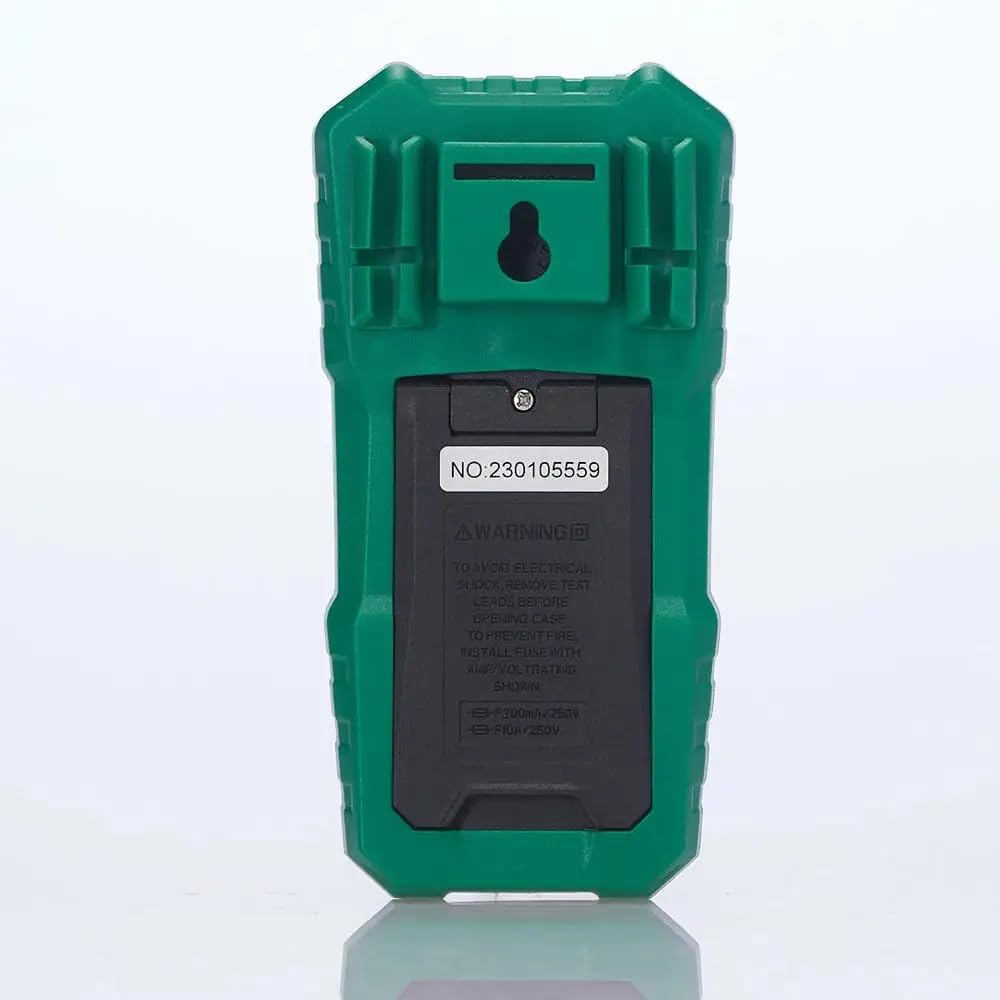
Малюнак 2: Задняя частка view of the multimeter, illustrating the battery compartment and safety warnings.
4.2 Падключэнне вымяральных правадоў
Правільнае падключэнне вымяральных правадоў мае важнае значэнне для дакладных і бяспечных вымярэнняў.
- Устаўце чорны тэставы провад у COM (Агульны) уваходны раз'ём.
- Для большасці аб'ёмаўtage, resistance, continuity, capacitance, frequency, and temperature measurements, insert the red test lead into the VΩmA ўваходны гняздо.
- For current measurements up to 600mA, insert the red test lead into the VΩmA ўваходны гняздо.
- For current measurements between 600mA and 10A, insert the red test lead into the 10А МАКС ўваходны гняздо.

Малюнак 3: Пад вуглом view of the multimeter, highlighting the input jacks for test leads.
5. Інструкцыя па эксплуатацыі
This section details how to use the Mastech MS850D for various measurements.
5.1 Уключэнне/выключэнне
Rotate the central dial from the "OFF" position to any desired measurement function to power on the multimeter. To power off, rotate the dial back to the "OFF" position.
5.2 Rotary Switch Functions
The rotary switch selects the primary measurement function:
- V~ (AC Voltagд): Вымярае аб'ём пераменнага токуtage.
- V- (DC Voltagд): Вымярае аб'ём пастаяннага токуtage.
- Hz/% (Frequency/Duty Cycle): Measures frequency and duty cycle.
- Ω (Resistance): Measures electrical resistance.
- Continuity/Diode: Checks for circuit continuity and tests diodes.
- NCV/Live: Бескантактавы выпtage detection and Live Wire recognition.
- °C/°F (Temperature): Measures temperature using the included probe.
- hFE (Тэст транзістараў): Measures transistor gain (requires optional socket).
- μA~ / μA- (AC/DC Microampэры): Мікрамерыampраней ток.
- mA~ / mA- (AC/DC Milliampэры): Measures milliampраней ток.
- A~ / A- (AC/DC Ampэры): Меры ampere current (up to 10A).
5.3 Функцыі кнопак
- ВЫБРАЦЬ (SEL): Toggles between different functions within a single rotary switch position (e.g., AC/DC voltage, continuity/diode, °C/°F).
- ТРЫМАЦЬ: Зафіксуе бягучае паказанне на дысплеі. Націсніце яшчэ раз, каб адпусціць.
- MIN/MAX/REL:
- Press once to enter MIN/MAX mode. The multimeter will record the minimum and maximum values. Press again to cycle between MIN, MAX, and current reading.
- Long press to activate REL (Relative) mode. This subtracts the current reading from all subsequent readings, useful for measuring changes.
- Flashlight Button (often combined with backlight): Activates the built-in flashlight for illuminating the measurement area.
5.4 Specific Measurement Procedures
5.4.1 томtagВымярэнне (пераменны/пастаянны ток)
- Усталюйце паваротны перамыкач у становішча V~ для AC voltagе або V- для DC томtage. Use the SEL button to switch between AC and DC if the position combines them.
- Падключыце чорны тэставы провад да COM гняздо і чырвоны вымяральны провад да VΩmA дамкрат.
- Падключыце вымяральныя зонды паралельна да ланцуга або кампанента, які трэба вымераць.
- Прачытайце тtage значэнне на дысплеі.
5.4.2 Вымярэнне току (пераменны/пастаянны)
УВАГА: Never connect the multimeter in parallel with a voltage source when measuring current. Always connect in series with the load.
- Determine if the current is AC or DC.
- Set the rotary switch to the appropriate current range (μA, mA, or A). Use the SEL button to switch between AC and DC.
- Падключыце чорны тэставы провад да COM дамкрат.
- For currents up to 600mA, connect the red test lead to the VΩmA jack. For currents up to 10A, connect the red test lead to the 10А МАКС дамкрат.
- Open the circuit where the current is to be measured and connect the multimeter in series.
- Прачытайце бягучае значэнне на дысплеі.
5.4.3 Вымярэнне супраціўлення
- Усталюйце паваротны перамыкач у Ω становішча.
- Падключыце чорны тэставы провад да COM гняздо і чырвоны вымяральны провад да VΩmA дамкрат.
- Перад вымярэннем супраціўлення пераканайцеся, што ланцуг або кампанент абясточаны.
- Падключыце вымяральныя зонды да кампанента.
- Прачытайце значэнне супраціву на дысплеі.
5.4.4 Тэст бесперапыннасці
- Усталюйце паваротны перамыкач у Continuity/Diode position. Use SEL to select continuity mode (usually indicated by a speaker icon).
- Падключыце чорны тэставы провад да COM гняздо і чырвоны вымяральны провад да VΩmA дамкрат.
- Падключыце вымяральныя зонды да ланцуга або кампанента.
- Калі супраціўленне ніжэй за прыблізна 50 Ом, прагучыць зумер, які сведчыць пра адсутнасць цеплаправоднасці.
5.4.5 Дыёдны тэст
- Усталюйце паваротны перамыкач у Continuity/Diode position. Use SEL to select diode mode (usually indicated by a diode symbol).
- Падключыце чорны тэставы провад да COM гняздо і чырвоны вымяральны провад да VΩmA дамкрат.
- Падключыце чырвоны зонд да анода, а чорны зонд да катода дыёда. На дысплеі будзе адлюстроўвацца прамая напруга.tagэлектронная кропля.
- Памяняйце месцамі щупы. На дысплеі павінна адлюстроўвацца «OL» (разамкнуты контур), калі дыёд спраўны.
5.4.6 Вымярэнне ёмістасці
- Усталюйце паваротны перамыкач у Ёмістасць position (often combined with Hz/% or other functions, use SEL to select).
- Падключыце чорны тэставы провад да COM гняздо і чырвоны вымяральны провад да VΩmA дамкрат.
- Ensure the capacitor is fully discharged before measurement to prevent damage to the multimeter.
- Падключыце вымяральныя зонды да вывадаў кандэнсатара.
- Прачытайце значэнне ёмістасці на дысплеі.
5.4.7 Вымярэнне частоты
- Усталюйце паваротны перамыкач у Гц/% position. Use SEL to select frequency mode.
- Падключыце чорны тэставы провад да COM гняздо і чырвоны вымяральны провад да VΩmA дамкрат.
- Падключыце вымяральныя зонды да крыніцы сігналу.
- Прачытайце значэнне частаты на дысплеі.
5.4.8 Вымярэнне тэмпературы
- Усталюйце паваротны перамыкач у ° C / ° F position. Use SEL to switch between Celsius and Fahrenheit.
- Падключыце тэмпературны датчык да COM і VΩmA гнязда, выконваючы палярнасць, калі яна пазначана зондам.
- Размясціце кончык тэмпературнага зонда на аб'екце, тэмпературу якога трэба вымераць, або побач з ім.
- Прачытайце значэнне тэмпературы на дысплеі.
5.4.9 Бескантактны выпtage (NCV) Выяўленне
- Усталюйце паваротны перамыкач у НЦВ/Жывы эфір становішча.
- Move the top front part of the multimeter close to the conductor or outlet.
- The multimeter will emit an audible beep and the NCV indicator light will flash if AC voltage is detected, with the frequency of beeps and flashes increasing with voltagэлектронная сіла.
6. Тэхнічнае абслугоўванне
Правільнае абслугоўванне забяспечвае даўгавечнасць і дакладнасць вашага мультыметра.
6.1 Ачыстка
- Працярыце корпус рэкламайamp тканіна і мяккі мыйны сродак. Не выкарыстоўвайце абразівы або растваральнікі.
- Keep the input terminals free of dirt and moisture.
6.2 Замена батарэі
Refer to Section 4.1 for detailed instructions on battery replacement. Replace batteries when the low battery indicator appears on the display.
6.3 Замена засцерагальніка
If the current measurement function fails, the fuse may need replacement. The MS850D uses two fuses:
- F1: F300mA/250V (for mA/μA range)
- F2: F10A/250V (for 10A range)
Каб замяніць засцерагальнікі:
- Ensure the multimeter is powered off and disconnect all test leads.
- Адкрыйце вечка батарэйнага адсека (гл. раздзел 4.1).
- Carefully remove the old fuse(s) and replace with new fuses of the exact same type and rating.
- Усталюйце крышку батарэі і закруціце шрубу.
7. Выпраўленне непаладак
If you encounter issues with your Mastech MS850D, refer to the following common problems and solutions:
| праблема | Магчымая прычына | Рашэнне |
|---|---|---|
| Няма дысплея або дысплей цьмяны | Акумулятары разрядились або разрядились | Замяніце батарэйкі (гл. раздзел 4.1). |
| Няправільныя паказанні | Incorrect function selected; Loose test leads; Damaged test leads; Out of range measurement | Verify rotary switch position; Ensure test leads are securely connected; Inspect test leads for damage; Check if the measurement is within the multimeter's specified range. |
| Вымярэнне току не працуе | Перагарэў засцерагальнік | Replace the appropriate fuse (refer to Section 6.3). |
| Адлюстравана "OL" (перагрузка) | Measurement exceeds the selected range or multimeter's maximum capacity | Select a higher range if available, or confirm the measurement is within the multimeter's limits. |
8. Тэхнічныя характарыстыкі
Detailed technical specifications for the Mastech MS850D Digital Multimeter:

Figure 4: Detailed specifications and packaging information for the Mastech MS850D.
| Вымярэнне | Дыяпазон | Дакладнасць |
|---|---|---|
| DC Voltage | 600mV, 6V, 60V, 600V | ±(0.8%+5) |
| Пераменнага токуtage | 600mV, 6V, 60V, 600V | ±(1.0%+10) |
| Пастаянны ток | 600μA, 6000μA, 60mA, 600mA, 6A, 10A | ±(2.0%+5) (μA/mA), ±(3.0%+5) (A) |
| Ток пераменнага току | 600mA, 6A, 10A | ±(2.5%+5) (mA), ±(3.0%+5) (A) |
| Супраціў | 600Ω, 6KΩ, 60KΩ, 600KΩ, 6MΩ, 60MΩ | ±(1.0%+5) (600Ω-6MΩ), ±(1.2%+5) (60MΩ) |
| Ёмістасць | 60nF, 600nF, 6μF, 60μF, 600μF, 6mF, 60mF, 100mF | ±(4.0%+25) (60nF-600μF), ±(5.0%+25) (6mF-100mF) |
| Частата | 10Hz, 100Hz, 1KHz, 10KHz, 100KHz, 1MHz, 10MHz | ±(0.5%+4) |
| тэмпература | -20°C to 0°C, 0°C to 400°C, 400°C to 1000°C | ±(4°C), ±(3.0%+3), ±(2.0%+3) |
| Дысплей | 6000 графаў | |
| Рэйтынг бяспекі | CAT III 600В | |
| Крыніца харчавання | 2 батарэйкі 1.5 В ААА | |
| Памеры (Д х Ш х У) | 150 мм x 75 мм x 47 мм (прыблізна) | |
| Вага | 284 г (прыблізна) | |
9. Гарантыя і падтрымка
The Mastech MS850D Digital Multimeter is manufactured by Mastech and imported by REES52. For warranty information, technical support, or service inquiries, please refer to the warranty card included with your product or contact the seller/manufacturer directly.
Калі ласка, захавайце доказы пакупкі для прэтэнзій па гарантыі.
- вытворца: Мастэк
- Імпарцёр: REES52
- Нумар мадэлі: MS850D