
1. Уводзіны
This manual provides essential information for the installation, operation, maintenance, and troubleshooting of your ENERMAX Revolution III 850W Fully Modular PC Power Supply. Please read this manual thoroughly before installation and retain it for future reference.

Figure 1: ENERMAX Revolution III 850W Power Supply
2. Асноўныя магчымасці
- Адпаведнасць ATX 3.1: Adheres to the latest Intel ATX 3.1 specifications, ensuring compatibility with current and future components. The 850W model includes a native 600W 12V-2x6 connector for reliable power delivery to high-end GPUs.
- Высокая эфектыўнасць: 80 PLUS Gold certified, achieving up to 93% efficiency at 50% load. This reduces energy consumption and heat generation, contributing to more efficient system performance.
- Superior Performance for High-End GPUs: Accommodates up to 200% power excursion, allowing stable operation with demanding graphics cards.
- Silent Operation and Durability: Features 100% industrial-grade Japanese capacitors for high-end performance and longevity. The built-in 120mm Fluid Dynamic Bearing (FDB) fan provides ultra-quiet operation, even under heavy loads.
- Optimized Safety: Includes multiple protection circuitries: Over Current Protection (OCP), Over Voltage Абарона (OVP), пад выпtage Protection (UVP), Over Power Protection (OPP), Short Circuit Protection (SCP), and Over Temperature Protection (OTP). Certified for use at altitudes up to 5000m.
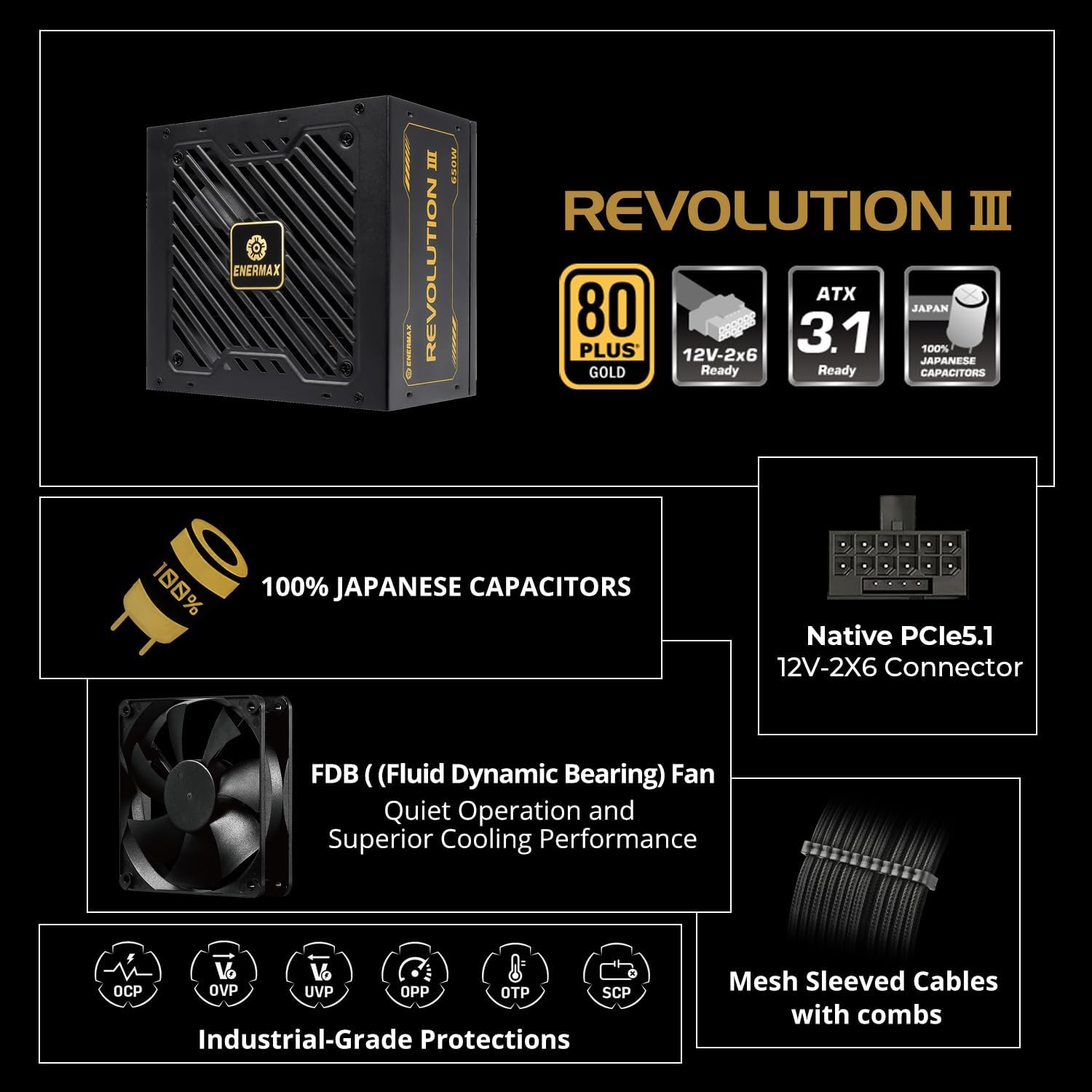
Малюнак 2: Закончанаview Асноўныя характарыстыкі

Figure 3: ATX 3.1 Ready with 12V-2x6 Connector
Video 1: Enermax Revolution III ATX 3.1 Power Supply Overview. This video highlights the ATX 3.1 compliance and key features of the power supply.
3. Настройка і ўстаноўка
3.1 Меры бяспекі
- Ensure your system is completely powered off and unplugged from the wall outlet before installation.
- Зніміце статычную электрычнасць, дакрануўшыся да заземленага металічнага прадмета, перш чым дакранацца да кампанентаў.
- Не адкрывайце блок харчавання. Высокая гучнасцьtages прысутнічаюць ўнутры.
3.2 Этапы ўстаноўкі
- Усталюйце блок харчавання: Secure the ENERMAX Revolution III 850W PSU into the designated power supply bay of your PC case using the provided screws.
- Падключэнне харчавання матчынай платы: Connect the 24-pin ATX motherboard cable to the corresponding port on your motherboard and the PSU.
- Падключэнне харчавання працэсара: Connect the 8-pin (4+4 pin) CPU power cable(s) to your motherboard and the PSU.
- Падключэнне харчавання відэакарты: For graphics cards requiring a 12V-2x6 connector, use the native 600W cable. For other GPUs, use the appropriate PCIe (6+2 pin) cables. Ensure all connections are secure.
- Падключэнне перыферыйных прылад: Connect SATA power cables to your storage drives (HDDs, SSDs) and Molex cables to any other peripherals as needed.
- Кабельнае кіраванне: Utilize the fully modular design and mesh-sleeved cables to organize your cables for optimal airflow and a clean build.
- Уключэнне: Once all connections are secure, connect the AC power cord to the PSU and a wall outlet. Flip the power switch on the PSU to the 'On' position.

Figure 4: Modular Connector Layout

Figure 5: Premium Mesh-Sleeved Cables
4. Інструкцыя па эксплуатацыі
After successful installation, your ENERMAX Revolution III 850W Power Supply is ready for operation. The unit is designed for continuous, stable power delivery.
- Уключэнне/выключэнне харчавання: Use the main power switch located on the rear of the PSU to turn the unit on or off. Always ensure the system is properly shut down via the operating system before switching off the PSU.
- Праца вентылятара: The 120mm FDB fan operates intelligently, adjusting its speed based on the power supply's temperature and load. This ensures optimal cooling while maintaining quiet operation.
5. Тэхнічнае абслугоўванне
To ensure the longevity and optimal performance of your power supply, periodic maintenance is recommended.
- Уборка: Regularly clean the fan grill and ventilation openings of the power supply to prevent dust buildup. Use compressed air or a soft brush. Ensure the system is powered off and unplugged before cleaning.
- Праверка кабеля: Periodically check all modular cable connections to ensure they are seated firmly.
- Асяроддзе: Operate the power supply in a well-ventilated area, away from excessive heat, humidity, or dust.
6. Выпраўленне непаладак
Калі ў вас узніклі праблемы з блокам харчавання, звярніцеся да наступных распаўсюджаных крокаў па ліквідацыі непаладак:
- Няма харчавання:
- Праверце, ці надзейна падключаны шнур харчавання пераменнага току як да блока харчавання, так і да разеткі.
- Ensure the main power switch on the PSU is in the 'On' position.
- Праверце працаздольнасць разеткі, падключыўшы да яе іншую прыладу.
- Нестабільнасць сістэмы/выпадковыя адключэнні:
- Ensure all modular cables are correctly and firmly seated in both the PSU and the components.
- Пераканайцеся, што патрабаванні да харчавання вашай сістэмы не перавышаюць магутнасць блока харчавання ў 850 Вт.
- The PSU's built-in protection circuitries (OCP, OVP, UVP, OPP, SCP, OTP) may trigger a shutdown to protect components if an anomaly is detected. If this occurs, identify and resolve the underlying issue (e.g., short circuit, excessive load).
- Залішні шум вентылятара:
- Clean the fan and ventilation areas to remove any dust buildup.
- Ensure the PSU is operating within its normal temperature range. High temperatures can cause the fan to spin faster.
Калі пасля выканання гэтых крокаў праблемы не знікнуць, звярніцеся ў службу падтрымкі кліентаў.
7. Тэхнічныя характарыстыкі
| Асаблівасць | Дэталь |
|---|---|
| Назва мадэлі | REVOLUTION III 850 |
| Нумар мадэлі тавару | EP-RV3-850G-FR |
| Марка | Enermax |
| Ватtage | 850 ват |
| Формаў-фактар | ATX |
| Дызайн блока харчавання | Поўны модульны |
| Сертыфікацыя эфектыўнасці | Золата 80 PLUS |
| Спосаб астуджэння | Air (120mm FDB Fan) |
| Памеры прадукту | 5.51 х 5.91 х 3.39 цалі |
| Вага прадмета | 5.1 фунта |
| Сумяшчальныя прылады | Працоўны стол |
| Тып раздыма | ATX, PCI Express (Native 12V-2x6) |
| Кандэнсатары | 100% Japanese Industrial-Grade |
| Protection Circuitries | OCP, OVP, UVP, OPP, SCP, OTP |
8. Гарантыя і падтрымка
8.1 Інфармацыя аб гарантыі
The ENERMAX Revolution III 850W Power Supply comes with a Гарантыя 10 год з даты пакупкі. Гэтая гарантыя распаўсюджваецца на дэфекты матэрыялаў і вырабу пры нармальным выкарыстанні. Калі ласка, захавайце пацвярджэнне пакупкі для прэтэнзій па гарантыі.
8.2 Падтрымка кліентаў
For technical assistance, warranty claims, or any questions regarding your ENERMAX product, please visit the official Enermax website or contact their customer support department. Refer to the product packaging or Enermax's official webсайт для атрымання самай актуальнай кантактнай інфармацыі.