
1. Прадукт скончыўсяview
The SVITOO P10 is a 10.1-inch Android 15 tablet designed for versatile use, from entertainment to productivity. It features a Unisoc A75 8-core CPU, 12GB RAM, and 128GB internal storage, expandable via TF card. The tablet includes a 1280x800 IPS HD display, a 6000mAh battery, and supports Widevine L1 for high-quality streaming.

Выява 1.1: Канецview of the SVITOO P10 Tablet's main features, including Android 15, 12GB RAM, 128GB Storage, 6000mAh battery, Unisoc A75 8-Core CPU, Mali-G57 GPU, 5MP cameras, Digital Amplifier, 10.1-inch IPS display, 16:10 Golden Ratio, Straight Edge design, and Light Teal color.
2. Пачатковая налада
2.1 Unpacking and Charging
Carefully remove all components from the packaging. Before first use, fully charge the tablet using the provided charger. The 6000mAh battery ensures extended usage.
2.2 Уключэнне/выключэнне
- To power on: Press and hold the Power button until the SVITOO logo appears.
- Каб выключыць прыладу: націсніце і ўтрымлівайце кнопку харчавання, а затым абярыце з прапанаваных опцый «Выключыць прыладу».
- Каб перазапусціць: націсніце і ўтрымлівайце кнопку харчавання, затым абярыце «Перазагрузка» з прапанаваных опцый.
2.3 Пачатковая канфігурацыя
Upon first power-on, the tablet will guide you through the initial setup process for Android 15. This includes selecting your language, connecting to a Wi-Fi network, setting up your Google account, and configuring security options.

Image 2.1: The SVITOO P10 Tablet showcasing the Android 15 operating system, highlighting features such as Parallel View for optimized landscape experience, Parental Control for managing screen time, and a convenient Taskbar for multitasking.
2.4 Налада распазнавання твараў
The SVITOO P10 supports facial recognition for convenient unlocking. To set this up:
- Перайсці да Налады > Бяспека і прыватнасць > Распазнаванне асобы.
- Follow the on-screen instructions to register your face. Ensure good lighting and hold the tablet at eye level.
- Once registered, you can unlock your tablet by simply looking at the front camera.
Video 2.1: A demonstration of the SVITOO P10 Tablet, showcasing its design, Android 15 operating system, 16:10 aspect ratio, 1280x800 resolution, Unisoc T606 CPU performance, 12GB RAM, 128GB storage, 1TB maximum expansion, facial recognition, and Widevine L1 support for streaming.
3. Кіраванне планшэтам
3.1 Дысплей і карыстальніцкі інтэрфейс
The SVITOO P10 features a 10.1-inch IPS HD display with a resolution of 1280x800 pixels and a 16:10 aspect ratio, providing clear visuals for various applications. Android 15 offers a customizable interface, allowing you to personalize your lock screen, wallpaper, and interactive animations.

Image 3.1: The SVITOO P10 Tablet highlighting its 10.1-inch IPS display and 1280x800 resolution, demonstrating its suitability for immersive movie viewing and smooth tablet usage powered by the Unisoc A75 8-Core CPU and Mali-G57 GPU.
3.2 Прадукцыйнасць і захоўванне
Powered by a Unisoc A75 8-core CPU (model T606) and 12GB of RAM, the tablet handles multitasking and applications efficiently. It comes with 128GB of internal storage, which can be expanded up to 1TB using a TF (microSD) card.
3.3 Падключэнне
- Wi-Fi: Supports 802.11ac for fast and stable internet connection.
- Bluetooth: Equipped with Bluetooth 5.0 for connecting wireless accessories like headphones and keyboards.
- Сотавы: The tablet supports 5G cellular technology. (Note: SIM card and cellular plan required for mobile data access).
- USB: Features 1 USB 2.0 port for data transfer and charging.
- Аўдыё: Includes a 3.5mm audio jack for headphones.

Image 3.2: The SVITOO P10 Tablet emphasizing its storage capabilities with 12GB RAM and 128GB internal storage, expandable up to 1TB via Micro SD. It also highlights connectivity features like Bluetooth 5.0 and dual-band WiFi (5+2.4 GHz).
3.4 Multimedia and Applications
The tablet is GMS certified, ensuring access to a wide range of Google services and applications from the Play Store. With Widevine L1 support, you can stream high-definition content from popular platforms like Netflix, Hulu, and Amazon Prime Video.
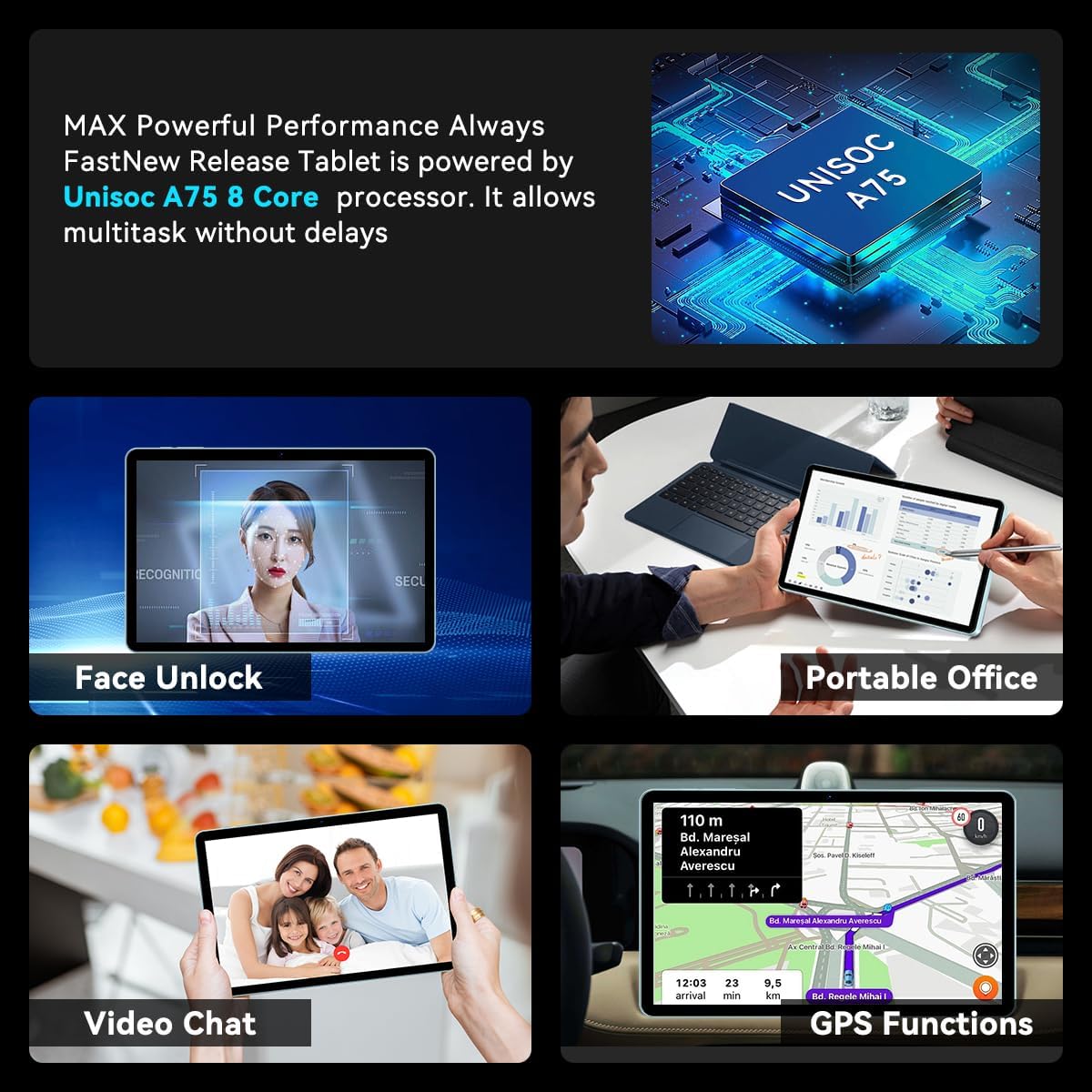
Image 3.3: The SVITOO P10 Tablet demonstrating its GMS certification, allowing access to a variety of applications and services. The image shows the tablet running a video streaming application, indicating its multimedia capabilities.
3.5 Дадатковыя магчымасці
- Камеры: Equipped with two rear-facing cameras for photography and video recording.
- GPS: Integrated GPS functionality for navigation and location-based services.
- OCR: Supports Optical Character Recognition (OCR) for text recognition from images.

Image 3.4: The SVITOO P10 Tablet illustrating its diverse functionalities, including Face Unlock for security, use as a Portable Office device, capabilities for Video Chat, and integrated GPS Functions for navigation.
4. Тэхнічнае абслугоўванне і догляд
4.1 Сыход за акумулятарам
- Пазбягайце экстрэмальных тэмператур, якія могуць пагоршыць тэрмін службы батарэі.
- Не дапускайце поўнай разрадкі акумулятара. Зараджайце яго, пакуль ён не дасягне 0%.
- Выкарыстоўвайце толькі арыгінальныя або сертыфікаваныя сумяшчальныя зарадныя прылады.
4.2 Чыстка планшэта
- Для чысткі экрана і корпуса выкарыстоўвайце мяккую тканіну без ворса.
- Для ўстойлівых плям злёгкуampпрацярыце тканіну вадой або сродкам для чысткі экранаў, прызначаным для электронікі.
- Пазбягайце выкарыстання агрэсіўных хімікатаў, абразіўных матэрыялаў або празмернай вільготнасці.
5. Выпраўленне непаладак
5.1 Агульныя праблемы і рашэнні
- Планшэт не ўключаецца: Пераканайцеся, што акумулятар зараджаны. Падключыце зарадную прыладу і пачакайце некалькі хвілін, перш чым зноў уключыць прыладу.
- Збоі або завісанні праграм: Close background applications. Clear the app's cache (Settings > Apps > [App Name] > Storage > Clear cache). If the issue persists, restart the tablet.
- Праблемы з падключэннем да Wi-Fi: Ensure Wi-Fi is enabled. Restart your router and the tablet. Forget the network and reconnect.
- Павольная прадукцыйнасць: Close unused apps. Clear unnecessary files and data. Consider a factory reset as a last resort (back up your data first).
6. Тэхнічныя характарыстыкі
| Асаблівасць | Дэталь |
|---|---|
| Марка | СВІТОО |
| Назва мадэлі | P10 |
| Аперацыйная сістэма | Android 15 |
| Працэсар | Unisoc T606 (ARM Cortex-A75*2 + ARM Cortex-A55*6), 1.6 GHz |
| Аператыўная памяць | 12 ГБ |
| Ёмістасць захоўвання | 128 GB (Expandable up to 512 GB via TF card) |
| Памер экрана | 10.02 цалі |
| Дазвол дысплея | 1280x800 IPS HD |
| Суадносіны бакоў экрана | 16:10 |
| Частата абнаўлення дысплея | 60 Гц |
| Ёмістасць батарэі | 6000 mAh (22.8 Watt Hours Lithium Ion) |
| Бесправадныя тэхналогіі | Bluetooth 5.0, 802.11ac Wi-Fi |
| Сотавая тэхналогія | 5G |
| Парты USB | 1 (USB 2.0) |
| Аўдыёраз'ём | 3.5 мм |
| Заднія камеры | 2 |
| Асаблівасці | Widevine L1, GPS-Enabled, OCR, Facial Recognition |
| Памеры (Д х Ш х Г) | 27.9 Д х 17 Ш х 0.8 сантыметраў |
| Вага прадмета | 1.03 кілаграма |
| Колер | Шэры |
7. Гарантыя і падтрымка
For warranty information and customer support, please refer to the documentation included with your purchase or visit the official SVITOO webсайт. Захоўвайце пацвярджэнне пакупкі для прэтэнзій па гарантыі.