
Edifier es20
Кіраўніцтва карыстальніка партатыўнай Bluetooth-калонкі Edifier
Мадэль: ES20
Your comprehensive guide to setting up, operating, and maintaining your Edifier ES20 Portable Bluetooth Speaker.
Прадукт скончаныview
The Edifier ES20 is a compact and powerful portable Bluetooth speaker designed for both indoor and outdoor use. It features IP67 waterproof and dustproof capabilities, ensuring durability in various environments. With Bluetooth V5.4 connectivity, it offers stable wireless audio and supports stereo pairing for an enhanced sound experience. The speaker also includes a built-in microphone for hands-free calls and customizable ambient lighting.
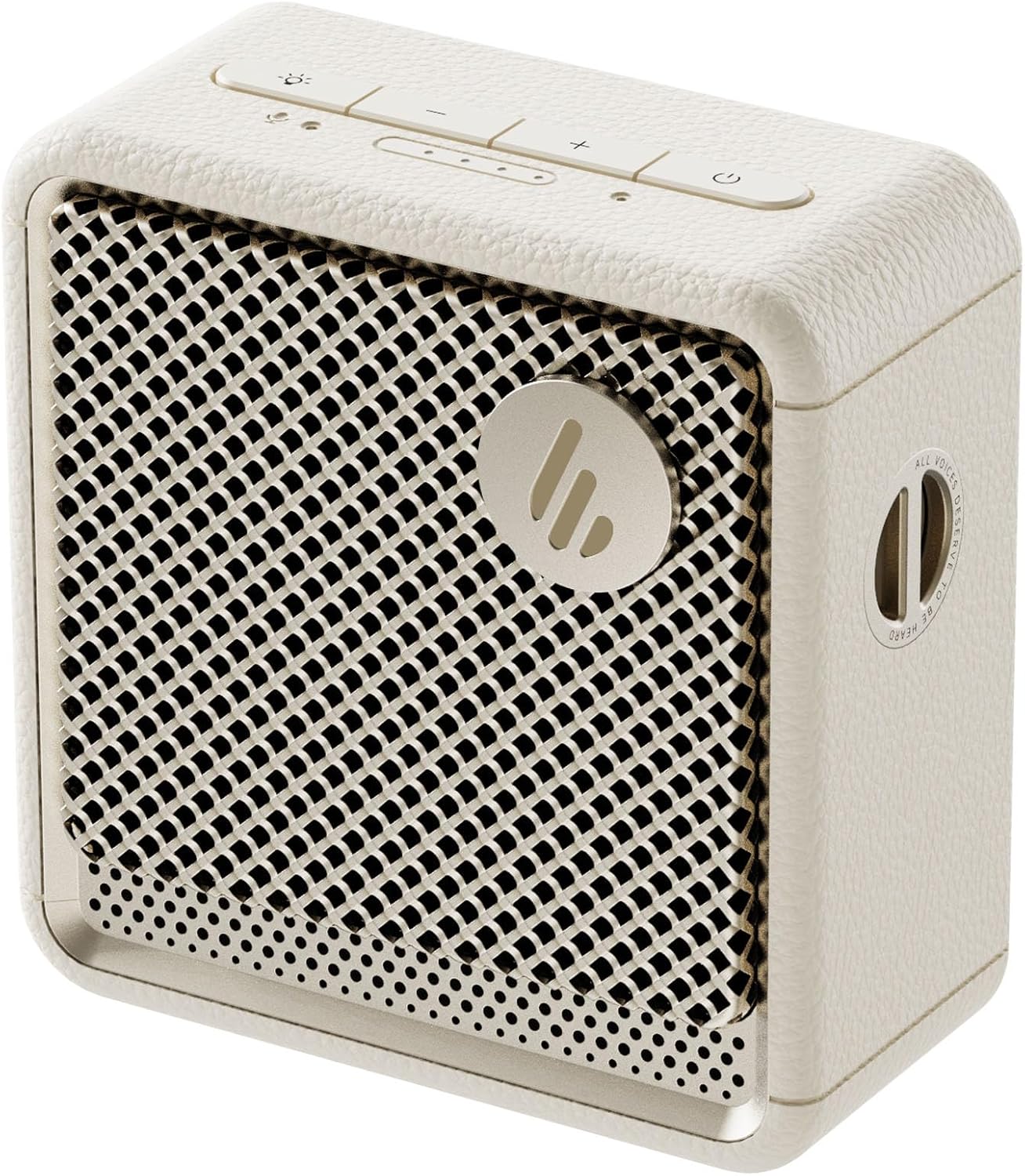
Выява: спераду view of the Edifier ES20 Portable Bluetooth Speaker in Ivory, showcasinдзякуючы кампактнаму дызайну і рашотцы дынаміка.

Image: The Edifier ES20 speaker placed on a desk, demonstrating its suitability for home or office environments.
Асноўныя функцыі ўключаюць у сябе:
- Прэміум якасць гуку: 6W (RMS) output with a 1.7'' full-range driver and 2'' passive bass radiators for rich, punchy sound.
- Bluetooth V5.4 & Stereo Pairing: Seamless wireless connectivity and the ability to pair two speakers for stereo sound.
- Воданепранікальнасць і пыланепранікальнасць IP67: Designed to withstand splashes, rain, and dust, making it ideal for outdoor use.
- Long Lasting Playtime: Да 15 гадзін прайгравання ад адной зарадкі.
- Навакольнае асвятленне: Features a customizable ambient light system for enhanced atmosphere.
- Убудаваны мікрафон: High-sensitivity microphone for clear hands-free communication.
- Лёгка кіраваць: Intuitive top-mounted buttons and control via the EDIFIER ConneX app.
Кіраўніцтва па ўстаноўцы
Што ў скрынцы
Перад пачаткам працы пераканайцеся, што ўсе кампаненты прысутнічаюць ва ўпакоўцы:
- Edifier ES20 Portable Bluetooth Speaker
- Папружка
- Кароткае кіраўніцтва
- Кабель USB-C да USB-C
- Важныя інструкцыі па бяспецы

Image: A visual representation of the Edifier ES20 speaker and its included accessories, such as the strap, charging cable, and documentation.
Зарадка дынаміка
The ES20 speaker comes with a built-in rechargeable battery. Before first use, it is recommended to fully charge the speaker.
- Connect the provided USB-C to USB-C cable to the charging port on the speaker.
- Падключыце другі канец кабеля да сумяшчальнага адаптара харчавання USB (не ўваходзіць у камплект) або да USB-порта кампутара.
- The battery indicator lights on the top panel will illuminate to show charging progress. All lights will be solid when fully charged.
Першапачатковае спалучэнне Bluetooth
Follow these steps to connect your ES20 speaker to a Bluetooth device for the first time:
- Пераканайцеся, што дынамік зараджаны і ўключаны. Індыкатар Bluetooth будзе міргаць, паказваючы, што ён знаходзіцца ў рэжыме спалучэння.
- На вашай прыладзе (смартфоне, планшэце, ноўтбуку) уключыце Bluetooth і знайдзіце даступныя прылады.
- Select "EDIFIER ES20" from the list of found devices.
- Once connected, the Bluetooth indicator light on the speaker will remain solid.
For advanced features and easier control, download the EDIFIER ConneX app from your device's app store.

Image: Screenshots illustrating the EDIFIER ConneX mobile application, which provides additional control and customization options for the speaker.
Інструкцыя па эксплуатацыі
Функцыі кнопак
The ES20 speaker features intuitive top-mounted buttons for easy control:

Image: A detailed diagram outlining the functions of each button on the top panel of the ES20 speaker, including power, volume, playback, and lighting controls.
| Кнопка/індыкатар | Функцыя |
|---|---|
| Кнопка харчавання | Press and hold for 1.5s to power on/off. Short press to play/pause. |
| Павелічэнне гучнасці (+) | Кароткае націск, каб павялічыць гучнасць. |
| Volume Down (-) | Кароткі націск, каб паменшыць гучнасць. |
| Кнопка рэжыму/святла | Short press to cycle through sound effects. Press and hold for 1.5s to cycle through ambient light modes. |
| Кнопка Bluetooth | Short press to disconnect current Bluetooth device. Press and hold for 1.5s to enter Bluetooth pairing mode. Double press to enable/disable stereo pairing. |
| Індыкатар зарада батарэі | Паказвае бягучы ўзровень зарада батарэі. |
| Індыкатар рэжыму | Blue for Bluetooth mode, White for Bluetooth stereo pairing mode. |
Спалучэнне стэрэа Bluetooth
You can pair two ES20 speakers together for a true wireless stereo experience. This requires two ES20 units.
- Ensure both ES20 speakers are powered on and not connected to any other Bluetooth devices.
- On one speaker (this will be the primary speaker), double-press the Bluetooth button. The Bluetooth indicator will flash rapidly.
- The primary speaker will automatically search for and connect to the second ES20 speaker.
- Once connected, the Bluetooth indicator on both speakers will remain solid, and you will hear an audible confirmation.
- Now, connect your device to the primary ES20 speaker via Bluetooth as you normally would.

Image: Two ES20 speakers, one black and one ivory, positioned to illustrate Bluetooth stereo pairing, with a smartphone displaying music playback.
Bluetooth Multi-Point Connectivity
The ES20 supports connecting to two Bluetooth devices simultaneously, allowing for seamless switching between audio sources.
- Connect the first device to the ES20 speaker via Bluetooth.
- Once connected, put the speaker back into pairing mode (press and hold the Bluetooth button for 1.5s).
- Connect the second device to the ES20 speaker.
- The speaker will now be connected to both devices. To switch audio playback, simply pause playback on the active device and start playback on the other.

Image: A visual representation of the ES20 speaker connected to multiple smartphones, highlighting its Bluetooth multi-point connectivity feature.
Сістэма навакольнага асвятлення
The ES20 features an ambient light system with multiple modes to enhance your listening experience or provide utility.
- Дыханне: Light gently fades in and out.
- Вясёлка: Цыклічна пераключаецца паміж колерамі.
- Статычны: A single, constant color.
- Glittering and Colorful: Dynamic, multi-color effects.
- Аварыйнае святло: Flashing red light for signaling.
To change the ambient light mode, press and hold the Mode/Light button for 1.5 seconds.

Image: The ES20 speaker showcasing its ambient light system, with icons representing different light effects like breathing, rainbow, static, glittering, and emergency light.
Некалькі гукавых эфектаў
Optimize your audio experience by selecting from four preset sound modes:
- Музыка: Збалансаваны прафесійны гукfile для праслухоўвання музыкі ў цэлым.
- Гульня: Enhanced audio cues for gaming.
- фільм: Optimized for dialogue and cinematic soundscapes.
- Адкрыты: Палепшаная гучнасць і басы для адкрытай прасторы.
To cycle through sound effects, short press the Mode/Light button.

Image: The ES20 speaker set in a natural environment, surrounded by icons representing its various sound effect modes: Music, Game, Movie, and Outdoor.
Убудаваны MEMS-мікрафон
The ES20 includes a high-sensitivity MEMS microphone with intelligent noise cancellation, allowing for clear hands-free calls when connected to your smartphone.

Image: The ES20 speaker positioned next to a smartphone showing an active call screen, illustrating the use of its built-in MEMS microphone for hands-free communication.
Тэхнічнае абслугоўванне
Уборка
- Use a soft, dry cloth to clean the surface of the speaker.
- Не выкарыстоўвайце абразіўныя ачышчальнікі, воск або растваральнікі, бо яны могуць пашкодзіць пакрыццё.
- For the speaker grille, use a soft brush to gently remove dust or debris.
Waterproof and Dustproof Care (IP67)
While the ES20 is IP67 rated for water and dust resistance, proper care is essential to maintain its integrity:
- Перад тым, як падвяргаць дынамік уздзеянню вады або пылу, пераканайцеся, што вечка зараднага порта шчыльна зачынена.
- Do not intentionally submerge the speaker beyond 1 meter (3 feet) or for longer than 30 minutes.
- Пасля кантакту з вадой, асабліва салёнай або хлараванай, прамыйце дынамік прэснай вадой і дайце яму цалкам высахнуць перад зарадкай або выкарыстаннем.
- Пазбягайце працяглага ўздзеяння на дынамік экстрэмальных тэмператур або прамых сонечных прамянёў.

Image: The black version of the ES20 speaker partially submerged in water, illustrating its IP67 waterproof and dustproof protection rating.
Сыход за батарэяй
- Каб падоўжыць тэрмін службы батарэі, пазбягайце частай поўнай разрадкі дынаміка.
- Charge the speaker regularly, even if not in use, to prevent deep discharge.
- Захоўвайце дынамік у прахалодным, сухім месцы, калі ён не выкарыстоўваецца працяглы час.

Image: A circular graphic depicting the 15-hour playtime of the ES20 speaker, with the speaker itself at the center.
Ліквідацыю непаладак
| праблема | Магчымая прычына | Рашэнне |
|---|---|---|
| Дынамік не ўключаецца. | Нізкі ўзровень зарада батарэі; кнопка харчавання націснута няправільна. | Charge the speaker fully. Press and hold the power button for 1.5 seconds. |
| Немагчыма спалучыцца з прыладай Bluetooth. | Speaker not in pairing mode; Device Bluetooth off; Speaker too far from device; Interference. | Ensure speaker is in pairing mode (flashing Bluetooth light). Turn device Bluetooth off/on. Move speaker closer to device. Avoid strong Wi-Fi signals or other Bluetooth devices. |
| Няма гуку або нізкі ўзровень гучнасці. | Volume too low on speaker or device; Paused playback; Incorrect audio output selected on device. | Increase volume on both speaker and device. Ensure music is playing. Check device's audio output settings. |
| Скажэнне гуку. | Занадта высокая гучнасць; слабы сігнал Bluetooth. | Lower the volume. Move speaker closer to the Bluetooth device. |
| Памылка стэрэаспалучэння. | Only one speaker in pairing mode; Speakers too far apart. | Ensure both speakers are powered on and not connected to other devices before initiating stereo pairing. Keep speakers within close proximity during pairing. |
If the issue persists, try resetting the speaker by holding the power button for 10 seconds, or consult the EDIFIER ConneX app for further assistance.
Тэхнічныя характарыстыкі
Detailed technical specifications for the Edifier ES20 Portable Bluetooth Speaker:

Image: A comprehensive table listing the technical specifications of the ES20 speaker, including output power, frequency response, dimensions, and weight.
| Асаблівасць | Дэталь |
|---|---|
| Назва мадэлі | ES20 |
| Тып дынаміка | Партатыўны дынамік |
| Агульная выхадная магутнасць | 6 Вт (RMS) |
| Блокі драйвераў | Full-range: φ43mm, Passive bass radiator: φ55mm |
| АЧХ | 93 Гц – 19 кГц |
| Стаўленне сігнал / шум | ≥85 дБ (A) |
| Версія Bluetooth | V5.4 |
| Кодэкі | SBC |
| Пратакол злучэння | Bluetooth, EDIFIER ConneX App |
| Тэрмін службы батарэі | 15 гадзін |
| Рэйтынг IP | IP67 (воданепранікальнасць і пыланепранікальнасць) |
| Памеры прадукту (Ш × У × Г) | 90.4mm × 93.7mm × 49.7mm (3.55"D x 3.68"W x 1.95"H) |
| Вага нета | 326 г (1.01 фунта) |
| Метад кантролю | Дакранацца |

Image: The ES20 speaker with its dimensions (width, height, depth) clearly marked, providing a visual reference for its compact size.
Гарантыя і падтрымка
The Edifier ES20 Portable Bluetooth Speaker comes with a limited warranty. Please refer to the "Warranty Card" included in your product packaging for detailed terms and conditions.
For technical support, troubleshooting assistance beyond this manual, or warranty claims, please visit the official Edifier website or contact their customer service. The EDIFIER ConneX app may also provide direct support options or frequently asked questions.
Больш падрабязную інфармацыю і рэсурсы падтрымкі можна знайсці на Крама Edifier на Amazon.
Ask a question about this manual
Ask about setup, troubleshooting, compatibility, parts, safety, or missing instructions. Manuals+ will review the question and use this page’s manual context to help answer it.