1. Уводзіны
This manual provides instructions for the ECONTROLLY RC-974R replacement infrared remote control. This remote is designed to be compatible with various Pioneer AV Receiver models, offering a straightforward solution for controlling your audio-video system without the need for complex programming.
Сумяшчальныя мадэлі AV-рэсівераў Pioneer:
- VSX-LX504
- VSX-LX104
- VSX-LX304
- VSX-935
- VSX-934
- VSX-LX504-S
- VSX-LX504-B
- VSX-LX304-B
The RC-974R operates using infrared technology and is pre-programmed for immediate use with the listed models. No additional setup or code entry is required.
2. Настройка
2.1 Устаноўка батарэі
The remote control requires two AAA ALKALINE batteries for operation. Batteries are not included with the remote control.
- Знайдзіце батарэйны адсек на задняй частцы пульта дыстанцыйнага кіравання.
- Зрушыце вечка батарэйнага адсека ўніз або ў кірунку, паказаным стрэлкай, каб адкрыць яго.
- Insert two AAA ALKALINE batteries, ensuring the positive (+) and negative (-) terminals align correctly with the markings inside the compartment.
- Зачыніце вечка батарэйнага адсека, зрушыўшы яго назад да пстрычкі.
Important: Do not use rechargeable batteries. Only AAA ALKALINE batteries are recommended for optimal performance and to prevent potential damage to the remote control.

Выява: Задняя частка view of the RC-974R remote control, illustrating the location of the battery compartment for battery insertion.
3. Кіраванне пультам дыстанцыйнага кіравання
To operate your Pioneer AV Receiver, point the RC-974R remote control directly at the receiver's infrared sensor. Ensure there are no obstructions between the remote and the receiver.
3.1 Асноўныя функцыіview
The RC-974R remote control features a comprehensive set of buttons for various functions. Refer to the image below for a visual guide to the button layout.
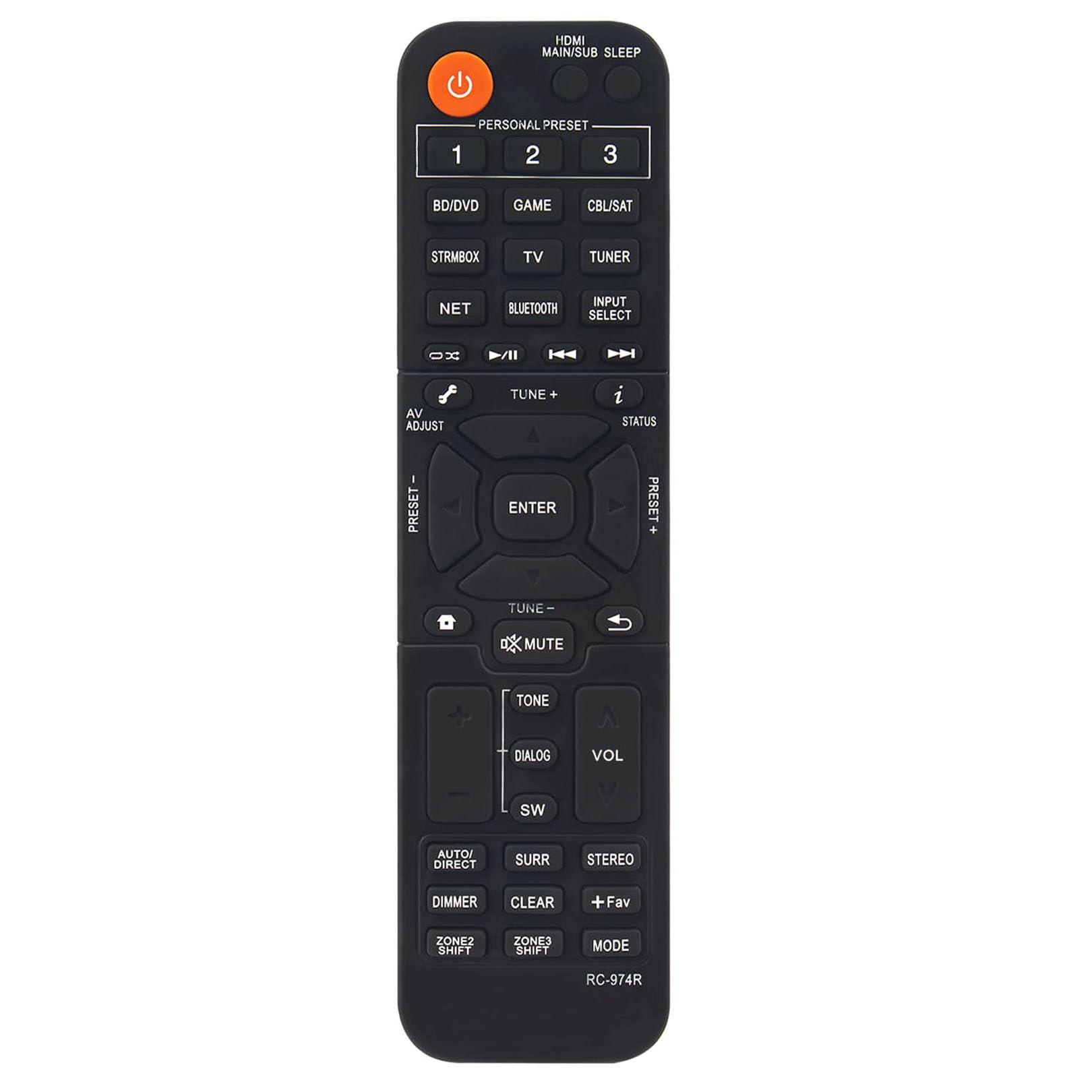
Выява: спераду view of the ECONTROLLY RC-974R remote control, displaying the full button layout and labels.
- Кнопка харчавання (аранжавая): Уключае або выключае AV-рэсівер.
- HDMI MAIN/SUB SLEEP: Controls HDMI output and sleep timer functions.
- PERSONAL PRESET (1, 2, 3): Accesses stored personal settings or favorite configurations.
- Input Select Buttons (BD/DVD, STRMBOX, TV, NET, BLUETOOTH, GAME, CBL/SAT, TUNER): Selects the desired input source for the AV Receiver.
- Navigation Cluster (Up, Down, Left, Right, ENTER): Выкарыстоўваецца для навігацыі па меню і выбару.
- AV ADJUST: Adjusts audio/video settings.
- TUNE +/-: Adjusts radio frequencies or other tuning parameters.
- СТАТУС: Displays current status information on the receiver's display.
- МУК: Выключэнне або ўключэнне гуку.
- ТОН: Accesses tone control settings (bass/treble).
- ДЫЯЛОГ: Паляпшае выразнасць дыялогаў.
- SW (Subwoofer): Adjusts subwoofer level.
- ГУЧНАСЦЬ +/-: Павялічвае або памяншае агульную гучнасць.
- AUTO/DIRECT: Switches between automatic sound modes and direct audio playback.
- SURR (Surround): Cycles through various surround sound modes.
- СТЭРЭА: Selects stereo audio mode.
- ДЫММЕР: Рэгулюе яркасць дысплея прыёмніка.
- ЯСНА: Clears current selections or settings.
- +Fav: Adds or accesses favorite settings.
- Рэжым: Cycles through different operational modes.
- ZONE2 SHIFT / ZONE3 SHIFT: Controls multi-zone audio output if supported by your receiver.
4. Тэхнічнае абслугоўванне
4.1 Ачыстка
Для чысткі пульта дыстанцыйнага кіравання выкарыстоўвайце мяккую сухую тканіну. Для ўстойлівага бруду злёгкуampПрацярыце тканіну вадой або мяккім неабразіўным ачышчальнікам. Не выкарыстоўвайце агрэсіўныя хімікаты, растваральнікі або абразіўныя матэрыялы, бо яны могуць пашкодзіць паверхню пульта дыстанцыйнага кіравання або ўнутраныя кампаненты.
4.2 Замена батарэі
Replace the batteries when the remote control's response becomes sluggish or stops working. Always replace both AAA ALKALINE batteries at the same time. Do not mix old and new batteries, or different types of batteries.
4.3 Захоўванне
Калі пульт не выкарыстоўваецца працяглы час, выміце батарэйкі з яго, каб прадухіліць уцечку і магчымае пашкоджанне. Захоўвайце пульт у прахалодным, сухім месцы, удалечыні ад прамых сонечных прамянёў і экстрэмальных тэмператур.
5. Выпраўленне непаладак
If you experience issues with your RC-974R remote control, please refer to the following common problems and solutions:
- Пульт дыстанцыйнага кіравання не адказвае:
- Праверце, ці правільна ўстаўлены батарэйкі з захаваннем палярнасці (+/-).
- Replace the batteries with fresh AAA ALKALINE batteries.
- Ensure there is a clear line of sight between the remote control and the AV Receiver's infrared sensor. Remove any obstructions.
- Make sure you are within the effective operating range of the remote control (typically up to 20 feet).
- Перарывісты рэжым:
- Гэта часта сведчыць аб нізкім узроўні зараду батарэі. Заменіце батарэі.
- Ensure no strong light sources (like direct sunlight or fluorescent lights) are interfering with the infrared signal.
6. Тэхнічныя характарыстыкі
| Нумар мадэлі | RC-974R |
| Памеры прадукту | 6.95 х 1.79 х 0.56 цалі |
| Вага прадмета | 1.76 унцыі |
| Асаблівасць | Pre-Programmed (No programming required) |
| Колер | Чорны |
| Максімальная колькасць падтрымоўваных прылад | 1 (AV-рэсівер Pioneer) |
| Сумяшчальныя прылады | Pioneer Home Theater AV Receivers |

Image: RC-974R remote control with its approximate length (6.9 inches) and width (1.77 inches) indicated.
7. Гарантыя і падтрымка
For warranty information or technical support regarding your ECONTROLLY RC-974R remote control, please contact the seller or manufacturer directly through your purchase platform. Keep your purchase receipt or order details handy as proof of purchase.