
Большасць Дарвін
Majority Darwin Bluetooth Alarm Clock with 10W Wireless Charging
Model: Darwin | Brand: Majority
Уводзіны
This manual provides detailed instructions for the operation and maintenance of your Majority Darwin Bluetooth Alarm Clock. This device integrates an FM radio, dual alarm clock, 10W wireless charging, and ambient lighting to enhance your bedside experience.
Інфармацыя па бяспецы
- Перад выкарыстаннем уважліва прачытайце ўсе інструкцыі.
- Трымайце прыладу далей ад вады і вільгаці.
- Не падвяргайце ўздзеянню экстрэмальных тэмператур.
- Не спрабуйце разбіраць або рамантаваць прыладу самастойна. Звярніцеся да кваліфікаванага абслугоўваючага персаналу.
- Ensure proper ventilation when using the wireless charging function.
Змест пакета
Праверце, ці ёсць усе прадметы ў скрынцы:
- Majority Darwin Bedside Clock
- Сеткавы адаптар сілкавання
- Кіраўніцтва карыстальніка

Image: Package contents of the Majority Darwin alarm clock, including the clock, power adapter, and user manual.
Прадукт скончаныview
Familiarize yourself with the main components and control buttons of your Darwin alarm clock.
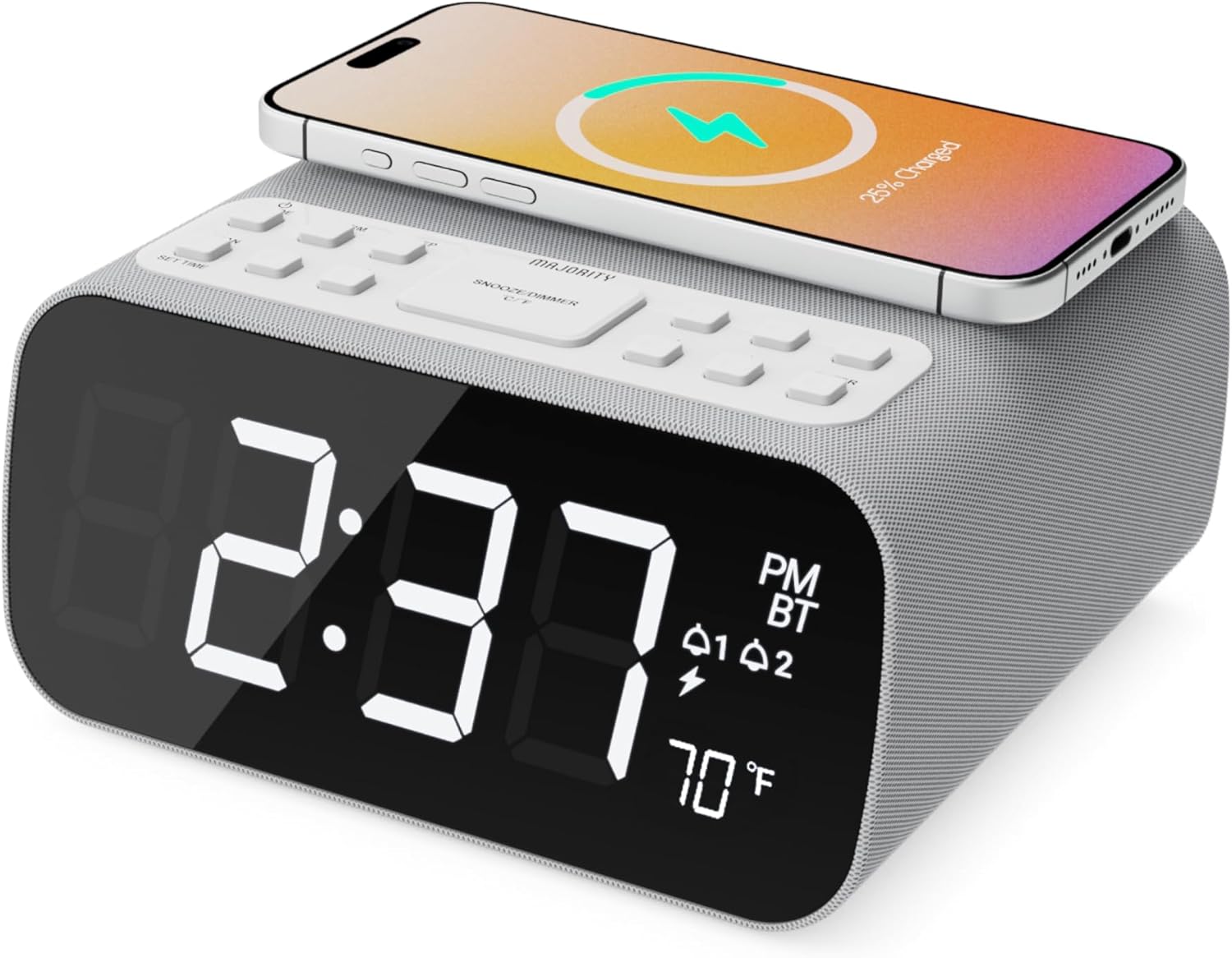
Выява: спераду view of the Majority Darwin alarm clock showing the large digital display, wireless charging pad on top, and control buttons.

Выява: Збоку view of the Majority Darwin alarm clock highlighting the control panel with buttons for time, alarm, volume, and light settings.
Элементы кіравання на верхняй панэлі
- Бесправадная зарадная пляцоўка: Place compatible devices here for 10W wireless charging.
- Кнопка адкладу/светлавы рэжым: Short press to snooze alarm; long press to adjust display brightness or cycle through ambient light colors.
- Time/Date Set Button: Press to enter time/date setting mode.
- Кнопкі сігналізацыі 1/2: Press to activate/deactivate Alarm 1 or Alarm 2. Long press to set alarm time.
- Volume/Tune Buttons: Adjust volume or tune FM radio stations.
- Кнопка рэжыму: Switch between FM Radio, Bluetooth, and White Noise modes.
Rear Panel Controls & Ports
- Уваход пастаяннага току 12 В: Connect the mains power adapter here.
- Порт для зарадкі USB: For charging additional devices via USB cable.
- Батарэйны адсек: For backup batteries (not for primary power).
- Display Dimmer Slider: Manually adjust the brightness of the main time display.
- Рэгулятар начнога святла: Adjust brightness of the ambient light.
Настройка
Падключэнне сілкавання
Connect the provided mains power adapter to the DC 12V input port on the rear of the alarm clock and plug it into a wall outlet. The display will light up.
For battery backup, open the battery compartment on the bottom and insert 2 x AAA batteries (not included). This will retain time settings during a power outage but will not power the display or charging functions.
Выява: Задняя частка view of the Majority Darwin alarm clock with the power adapter connected to the DC 12V input.
Першапачатковая ўстаноўка часу
- Доўгі націск Усталяваны час/дата button on the top panel. The hour digits will start flashing.
- Выкарыстоўвайце Volume/Tune кнопкі для рэгулявання гадзіны.
- Націсніце Усталяваны час/дата зноў націсніце кнопку, каб пацвердзіць гадзіны і перайсці да налады хвілін.
- Выкарыстоўвайце Volume/Tune кнопкі для налады хвілін.
- Repeat this process for setting the year, month, and day.
- Націсніце Усталяваны час/дата button one last time to save all settings.
Інструкцыя па эксплуатацыі
Time Display & Dimmer
The large LED display shows the current time.
Ручное зацямненне: Выкарыстоўвайце Display Dimmer Slider on the rear panel to manually adjust the brightness of the time display.
Аўтаматычнае зацямненне: The device features an auto-dimming function that adjusts display brightness at fixed time intervals (e.g., dimming at night, brightening during the day).

Выява: спераду view of the Majority Darwin alarm clock displaying time, AM/PM, and temperature, highlighting the dual alarm icons.
Налада будзільніка
The Darwin alarm clock supports two independent alarms (Alarm 1 and Alarm 2).
- Long press either the Трывога 1 or Трывога 2 button. The hour digits for that alarm will flash.
- Выкарыстоўвайце Volume/Tune кнопкі, каб усталяваць патрэбную гадзіну будзільніка.
- Націсніце адпаведную Сігналізацыя зноў націсніце кнопку, каб пацвердзіць гадзіны і перайсці да налады хвілін.
- Выкарыстоўвайце Volume/Tune кнопкі, каб усталяваць патрэбныя хвіліны будзільніка.
- Націсніце Сігналізацыя button again to select the alarm source (FM radio or built-in tone). Use Volume/Tune кнопкі для выбару.
- Націсніце Сігналізацыя button again to set the alarm volume.
- Націсніце Сігналізацыя button one last time to activate the alarm. An alarm icon will appear on the display.
Deactivating an Alarm: Short press the corresponding Трывога 1 or Трывога 2 button to turn it off. The alarm icon will disappear.
Функцыя адкладання
When an alarm sounds, short press the Адкласці/запальваць button on the top panel to temporarily silence the alarm for 9 minutes. The alarm will sound again after the snooze period.
Праца FM-радыё
- Націсніце Рэжым кнопку, пакуль на дысплеі не з'явіцца надпіс «FM».
- Выкарыстоўвайце Volume/Tune кнопкі, каб уручную наладзіць патрэбную FM-станцыю.
- Auto Scan & Store Presets: Доўгі націск Рэжым button to automatically scan and save available FM stations as presets.
- Кароткае націсканне Рэжым кнопку для пераключэння паміж захаванымі прэсетамі.
Bluetooth Pairing & Playback
- Націсніце Рэжым button until "BT" appears on the display and the Bluetooth indicator starts flashing.
- On your smartphone or other Bluetooth device, enable Bluetooth and search for "Majority Darwin".
- Select the device to pair. Once connected, the Bluetooth indicator on the alarm clock will stop flashing.
- You can now play audio from your device through the alarm clock's speaker. Use the Volume/Tune buttons on the alarm clock or your device to adjust volume.

Image: A smartphone displaying music playback, connected via Bluetooth to the Majority Darwin alarm clock.
Бесправадная зарадка
The top surface of the alarm clock features a 10W wireless charging pad.
- Place your Qi-compatible smartphone directly onto the wireless charging pad.
- Ensure the phone is centered on the charging symbol for optimal charging.
- A charging indicator (e.g., a lightning bolt icon) may appear on your phone's screen or the alarm clock's display to confirm charging.
Порт для зарадкі USB: An additional USB port on the rear allows you to charge other devices using a USB cable.
Image: The Majority Darwin alarm clock with a smartphone placed on top, indicating active wireless charging.
Night Light / Ambient Light
The alarm clock features an ambient light ring around its base.
- Доўгі націск Адкласці/запальваць button to turn the ambient light on/off.
- Кароткае націсканне Адкласці/запальваць button to cycle through different color modes (e.g., red, green, blue, purple, white, color cycle).
- Выкарыстоўвайце Дыммер начнога святла on the rear panel to adjust the brightness of the ambient light.

Image: The Majority Darwin alarm clock illuminated with a vibrant ambient light from its base.
White Noise Function
The device includes various white noise sounds to aid relaxation and sleep.
- Націсніце Рэжым button until the white noise mode is activated (indicated by a specific icon or text on the display).
- Выкарыстоўвайце Volume/Tune buttons to adjust the volume of the white noise.
- Кароткае націсканне Рэжым button again to cycle through different white noise sounds (e.g., nature sounds, fan noise).
Тэхнічнае абслугоўванне
- Працірайце прыладу мяккай сухой тканінай. Не выкарыстоўвайце абразіўныя ачышчальнікі або растваральнікі.
- Трымайце вентыляцыйныя адтуліны свабоднымі.
- If not in use for an extended period, disconnect from power and remove backup batteries.
Ліквідацыю непаладак
No Power / Display Off
- Пераканайцеся, што адаптар сілкавання надзейна падключаны як да прылады, так і да спраўнай разеткі.
- Праверце, ці працуе разетка.
Бесправадная зарадка не працуе
- Пераканайцеся, што ваша прылада сумяшчальная з Qi.
- Make sure your phone is centered on the charging pad.
- Remove any thick phone cases or metallic objects between the phone and the charging pad.
Праблемы спалучэння Bluetooth
- Ensure the alarm clock is in Bluetooth pairing mode (BT flashing).
- Make sure your device's Bluetooth is enabled and searching.
- Паспрабуйце адлучыць прыладу і зноў падлучыць яе.
- Ensure no other devices are currently connected to the alarm clock via Bluetooth.
Будзільнік не гучыць
- Праверце, ці ўключаны сігнал трывогі (на дысплеі бачны значок сігналізацыі).
- Праверце наладу гучнасці будзільніка.
- Ensure the correct alarm time is set.
Тэхнічныя характарыстыкі
| Асаблівасць | Дэталь |
|---|---|
| Марка | Большасць |
| Назва мадэлі | Дарвін |
| Выхад для бесправадной зарадкі | 10 Вт |
| Выходная магутнасць дынаміка | 12 ват |
| Тэхналогія падлучэння | Bluetooth |
| Крыніца харчавання | Mains Power (Battery Backup) |
| Памеры прадукту | 13.07 х 8.22 х 6.09 цалі |
| Вага прадмета | 1.42 фунта (645 грамаў) |
| Асаблівасці | Adjustable Volume, Dual Alarm, Bluetooth, Wireless Charging, FM Radio, Dimmable Display, Ambient Night Light, White Noise |
Гарантыя і падтрымка
The Majority Darwin Bluetooth Alarm Clock comes with a standard manufacturer's warranty. Please refer to the warranty card included in your package for specific terms and conditions.
For technical support, troubleshooting, or warranty claims, please visit the official Majority webсайт або звярніцеся ў службу падтрымкі кліентаў.
Online resources and FAQs may also be available on the product support page.
Ask a question about this manual
Ask about setup, troubleshooting, compatibility, parts, safety, or missing instructions. Manuals+ will review the question and use this page’s manual context to help answer it.