
Gravity C29
Gravity C29 Rugged Smart Watch User Manual
Мадэль: C29
Уводзіны
The Gravity C29 Rugged Smart Watch is designed for durability and performance in challenging environments. This manual provides comprehensive instructions for setting up, operating, and maintaining your smartwatch, ensuring you get the most out of its advanced features, including health tracking, sports modes, and smart connectivity.
Што ў скрынцы
- Gravity C29 Smart Watch
- Зарадны кабель
- Кіраўніцтва карыстальніка (гэты дакумент)
Прадукт скончаныview
The Gravity C29 features a robust design with a 1.52-inch HD TFT display, built to withstand shock, dust, and water. It includes physical buttons for power and sport modes, alongside a responsive touchscreen for navigation.

Выява: спераду view of the Gravity C29 Rugged Smart Watch, showcasing its robust design, circular display, and side buttons.

Image: The Gravity C29 Smart Watch display, highlighting its 1.52-inch HD screen with clear visibility even in bright conditions.
Настройка
1. Зарадка разумнага гадзінніка
Before first use, fully charge your Gravity C29 Smart Watch. Connect the magnetic charging cable to the charging points on the back of the watch and plug the USB end into a power adapter (not included) or a computer's USB port. A full charge typically takes approximately 2 hours.
2. Downloading the Da Fit App
To unlock all features and synchronize data, download the "Da Fit" app from your smartphone's app store (App Store for iOS, Google Play Store for Android). The watch is compatible with Android 9.0+ and iOS 9.0+.
3. Спалучэнне са смартфонам
- Пераканайцеся, што Bluetooth уключаны на вашым смартфоне.
- Адкрыйце праграму Da Fit і выконвайце інструкцыі на экране, каб стварыць уліковы запіс або ўвайсці ў сістэму.
- In the app, navigate to the "Device" section and tap "Add Device" or "Bind Device".
- Select "C29" from the list of available devices.
- Пацвердзіце запыт на спалучэнне як на гадзінніку, так і на смартфоне.
Once paired, the watch will automatically synchronize time and data with your phone.
Інструкцыя па эксплуатацыі
Базавая навігацыя
- Сэнсарны экран: Правядзіце пальцам улева/управа, уверх/уніз, каб перамяшчацца па меню і апавяшчэннях. Націсніце, каб выбраць.
- Кнопка харчавання (уверсе справа): Націсніце, каб абудзіць/перавесці экран у рэжым сну, доўга націсніце, каб уключыць/выключыць прыладу.
- Sport Mode Button (Bottom Right): Press to quickly access sports modes.
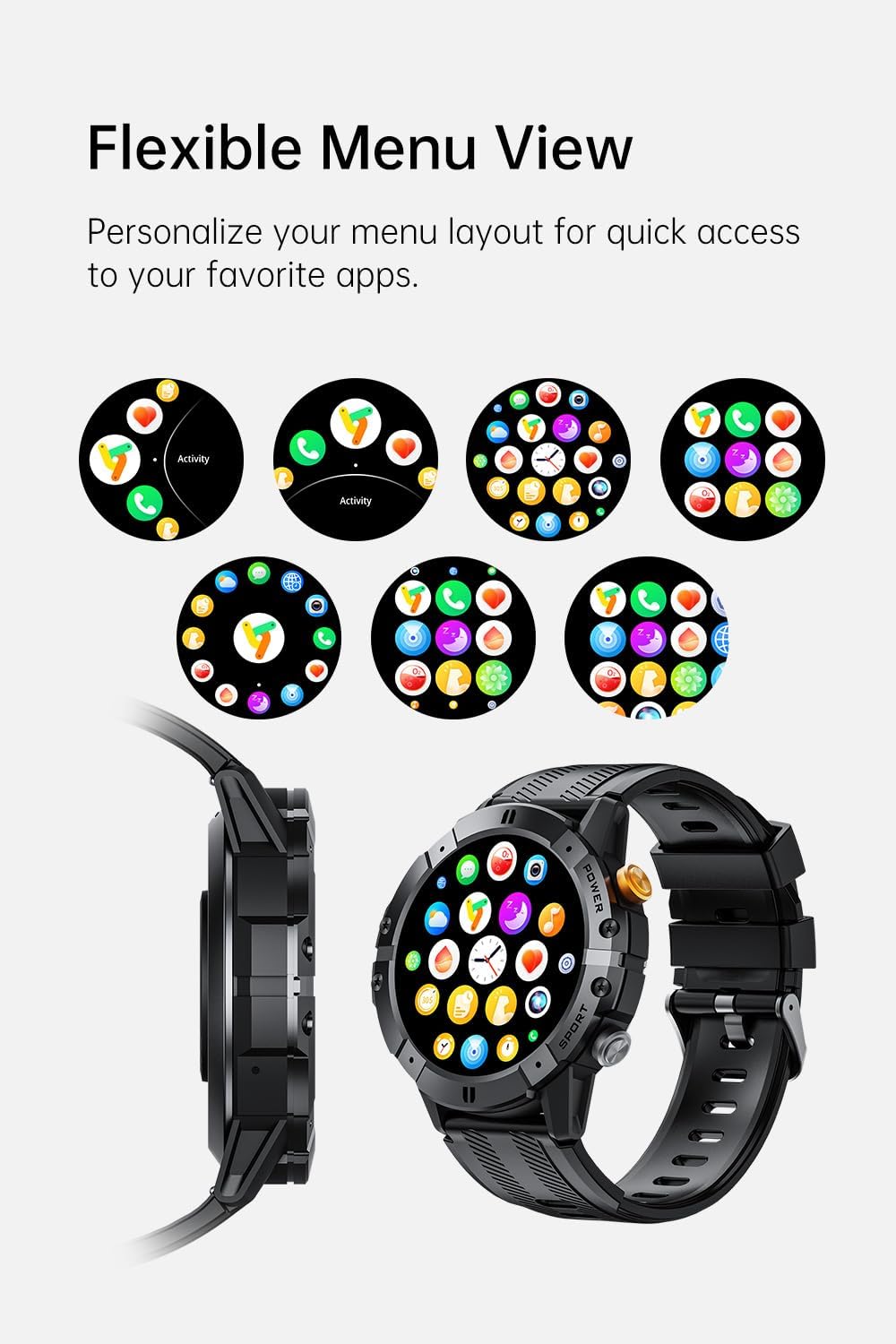
Image: Various menu layouts and app icons displayed on the Gravity C29 Smart Watch screen, demonstrating the flexible menu view.
Bluetooth-званкі і разумныя апавяшчэнні
Once paired, the C29 allows you to make and receive calls directly from your wrist. You will also receive real-time notifications for calls, messages, and app alerts.

Image: A hand wearing the Gravity C29 Smart Watch, showing an incoming call notification and message alerts on the watch screen.
ІІ Галасавы памочнік
Activate the AI Voice Assistant on your watch to perform tasks hands-free, such as setting alarms, checking weather, or controlling music, using simple voice commands.

Image: The Gravity C29 Smart Watch displaying the AI Voice Assistant interface, with examples of voice commands like "Turn on the alarm" and "Call my mom."
Адсочванне здароўя
The C29 monitors your heart rate 24/7 and provides detailed sleep analysis. Access these metrics through the watch interface or the Da Fit app for comprehensive health insights.

Image: The Gravity C29 Smart Watch displaying a heart rate graph, illustrating its precision sensors for accurate health monitoring.
Спартыўныя рэжымы
With over 100 sports modes, the C29 accurately tracks various activities like running, cycling, hiking, and swimming. Select your desired sport mode before starting an activity for precise data collection.

Image: Icons representing various sports activities such as swimming, cycling, running, and hiking, indicating the Gravity C29 Smart Watch's support for over 120 sports modes.
Іншыя разумныя функцыі
The Gravity C29 offers additional functionalities including weather updates, music control, and camera remote control. Access these features through the watch's menu.

Image: The Gravity C29 Smart Watch displaying a weather forecast, surrounded by icons representing other convenient functions like music control, camera remote, and settings.
Тэхнічнае абслугоўванне
Уборка
Рэгулярна працірайце гадзіннік і раменьчык мяккай сурвэткайamp тканінай. Пазбягайце выкарыстання агрэсіўных хімічных рэчываў або абразіўных матэрыялаў. Перад зарадкай пераканайцеся, што зарадныя кантакты чыстыя і сухія.
Воданепранікальнасць
The Gravity C29 is 1 ATM waterproof, meaning it can withstand splashes, rain, and brief immersion. It is suitable for everyday wear and light water activities. Do not use it for diving, hot showers, or prolonged submersion.

Image: The Gravity C29 Smart Watch being splashed with water, illustrating its 1 ATM waterproof rating suitable for handling splashes and rain.
Сыход за батарэяй
To prolong battery life, avoid extreme temperatures. Charge the watch fully before long periods of inactivity. The 410mAh battery provides up to 7-10 days of active use and up to 25 days on standby.
Ліквідацыю непаладак
- Гадзіннік не ўключаецца: Пераканайцеся, што гадзіннік цалкам зараджаны. Падключыце яго да зараднай прылады і пачакайце некалькі хвілін, перш чым спрабаваць уключыць.
- Немагчыма спалучыць з тэлефонам:
- Пераканайцеся, што на вашым тэлефоне ўключаны Bluetooth, і гадзіннік знаходзіцца ў зоне дзеяння.
- Перазагрузіце і гадзіннік, і тэлефон.
- Check if the Da Fit app is updated to the latest version.
- If previously paired, try unpairing from your phone's Bluetooth settings and re-pairing through the app.
- Недакладныя дадзеныя пра здароўе: Пераканайцеся, што гадзіннік шчыльна прылягае да запясця, не занадта туга і не занадта свабодна. Ачысціце датчык на задняй панэлі гадзінніка.
- Апавяшчэнні не з'яўляюцца: Праверце дазволы на апавяшчэнні для праграмы Da Fit у наладах тэлефона. Пераканайцеся, што праграма працуе ў фонавым рэжыме.
Тэхнічныя характарыстыкі
| Асаблівасць | Дэталь |
|---|---|
| Марка | Гравітацыя |
| мадэль | C29 |
| Памер экрана | 1.52 цалі |
| Тып дысплея | HD TFT |
| дазвол | 360x360 |
| Ёмістасць батарэі | 410 мАг |
| Тэрмін службы батарэі (актыўны) | 7-10 дні |
| Тэрмін службы батарэі (у рэжыме чакання) | Да 25 дзён |
| Воданепранікальнасць | 1 ATM (Shockproof, Dustproof) |
| Сувязь | Bluetooth 5.2 |
| Сумяшчальнасць | Android 9.0+ / iOS 9.0+ |
| Спартыўныя рэжымы | 100+ |
| Працоўная тэмпература | -24°C да 60°C |
| Вага прадмета | 4.6 унцыі |
Гарантыя і падтрымка
For product support, troubleshooting assistance, or warranty inquiries, please refer to the contact information provided with your purchase or visit the official Gravity webсайт. Захоўвайце пацвярджэнне пакупкі для прэтэнзій па гарантыі.
Protection plans are available for extended coverage. Please check your purchase details for more information on available protection plans.