
Уводзіны
This manual provides detailed instructions for the Rapoo VH650 Virtual 7.1 Channel RGB Gaming Headset. Please read this guide carefully to ensure proper setup, operation, and maintenance of your headset. This will help you maximize your gaming audio experience and prolong the life of your device.
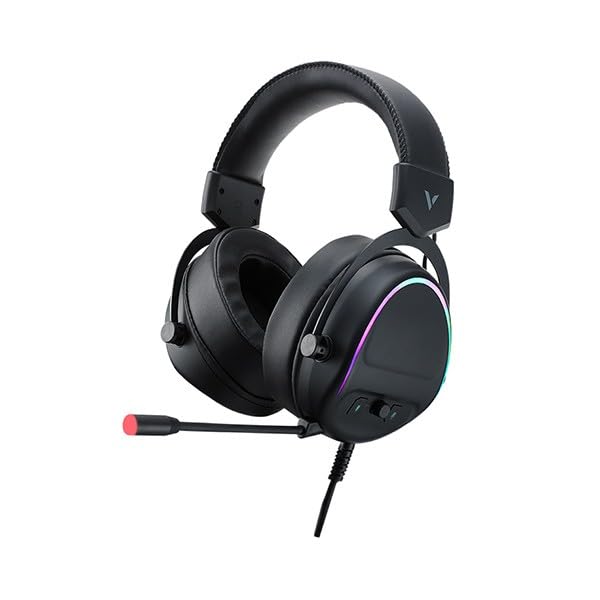
Figure 1: Rapoo VH650 Gaming Headset
Асаблівасці
The Rapoo VH650 Gaming Headset is designed to deliver an immersive audio experience with its advanced features:
- Virtual 7.1 Channel Surround Sound: Experience precise positional audio, crucial for competitive gaming, allowing you to hear every detail from all directions.
- Brilliant RGB LED Backlight: Dynamic RGB lighting on the earcups enhances your gaming setup with vibrant colors and a modern aesthetic.
- Omnidirectional Noise-Canceling Microphone: The 360° adjustable microphone effectively reduces ambient noise, ensuring clear and precise communication with your teammates.
- High-Quality 50mm Sound Drivers: Equipped with powerful 50mm dynamic drivers, the headset delivers rich audio with deep bass and clear highs, optimized for gaming sound effects and music.
- Рэгуляваная металічная павязка на галаву: The retractable single-head metal beam design ensures durability and a comfortable fit for various head sizes.
- Multi-function Ear Controls: Convenient controls located on the earcup allow for quick adjustments to volume and microphone settings.
- Over-Ear Design with Thick Ear Covers: Provides comfort during long gaming sessions and helps isolate external noise.

Figure 2: Virtual 7.1 Surround Sound for enhanced audio positioning.

Figure 3: RGB lighting on the earcups adds a vibrant gaming atmosphere.

Figure 4: The adjustable noise-canceling microphone ensures clear voice chat.

Figure 5: 50mm drivers provide powerful and clear audio.
Інструкцыя па наладзе
- Падключыце гарнітуру: Plug the USB connector of the Rapoo VH650 headset into an available USB port on your computer or game console.
- Driver Installation (for PC):
- For Windows PCs, the operating system will typically install the necessary drivers automatically.
- To enable and customize the Virtual 7.1 Surround Sound and RGB lighting, download the dedicated Rapoo VH650 software from the official Rapoo webсайт.
- Выконвайце інструкцыі на экране, каб завяршыць усталяванне праграмнага забеспячэння.
- Аўдыё канфігурацыя:
- Windows: Go to 'Sound Settings' (right-click the speaker icon in the taskbar). Ensure 'Rapoo VH650' is selected as the default playback and recording device.
- Гульнявыя прыстаўкі: Navigate to the audio settings within your console's system menu and select the Rapoo VH650 as the audio output and input device.
- Наладзіць Fit: Adjust the metal headband to ensure a comfortable and secure fit over your ears. Position the microphone appropriately for clear voice capture.
Інструкцыя па эксплуатацыі
- Рэгулятар гучнасці: Use the volume wheel or buttons located on the left earcup to adjust the audio output level.
- Выключэнне/уключэнне мікрафона: A dedicated button on the earcup or inline control allows you to quickly mute or unmute the microphone. An LED indicator may show the microphone status.
- Кіраванне RGB-падсветкай: If installed, use the Rapoo software on your PC to customize RGB lighting effects, colors, and patterns. Some headsets may have a physical button for cycling through preset lighting modes.
- Virtual 7.1 Surround Sound Activation: Activate and configure the Virtual 7.1 Surround Sound feature through the Rapoo software. This software allows for fine-tuning of audio profiles and positional sound.
Тэхнічнае абслугоўванне
- Уборка: Выкарыстоўвайце мяккую сухую тканіну, каб выцерці амбушуры і агалоўе. Для ўстойлівага бруду злёгкуamp можна выкарыстоўваць тканіну, але пераканайцеся, што вільгаць не трапляе на рашоткі дынаміка або мікрафон. Не выкарыстоўвайце агрэсіўныя хімікаты або абразіўныя ачышчальнікі.
- захоўванне: When not in use, store the headset in a clean, dry place away from direct sunlight and extreme temperatures. Avoid wrapping the cable tightly to prevent damage.
- Сыход за кабелем: Handle the USB cable gently. Avoid pulling on the cable to disconnect the headset; always grasp the plug.
Ліквідацыю непаладак
- Няма гуку з гарнітуры:
- Ensure the USB cable is securely connected to your device.
- Check the headset's volume control and ensure it is not at minimum or muted.
- Verify that the Rapoo VH650 is selected as the default audio output device in your computer's or console's sound settings.
- Праверце гарнітуру на іншай прыладзе, каб выключыць праблему, характэрную для гэтай прылады.
- Мікрафон не працуе:
- Ensure the microphone is not muted via the headset's control or software.
- Check that the Rapoo VH650 is selected as the default recording device in your sound settings.
- Adjust microphone levels in your device's sound settings.
- Пераканайцеся, што штанга мікрафона правільна размешчана каля вашага рота.
- RGB Lighting Not Functioning:
- Пераканайцеся, што гарнітура правільна падключана праз USB.
- If using PC software, verify that the lighting effects are enabled and configured correctly.
- Check for any physical lighting control buttons on the headset.
Тэхнічныя характарыстыкі
| Асаблівасць | Спецыфікацыя |
|---|---|
| Марка | Рапу |
| мадэль | VH650 |
| Колер | Чорны |
| Тэхналогія падлучэння | Wired (USB for 7.1 Virtual Surround Sound) |
| Тып аўдыё драйвера | Дынамічны драйвер |
| Дыяметр драйвера | 50 мм |
| Форм-фактар навушнікаў | Над вухам |
| Размяшчэнне вушэй | Над вухам |
| Імпеданс | 3 Ом |
| Кантроль шуму | None (Microphone features noise-canceling) |
| Мікрафон | Omnidirectional, Noise-Canceling, Rotary |
| Асаблівасці | Virtual 7.1 Channel Sound, RGB Backlight, Gaming-specific sound engine |
| Сумяшчальныя прылады | Desktop Computers, Laptops, Mobile Phones (with adapter, not included), Game Consoles |
| Канкрэтнае выкарыстанне прадукту | Гульнявая |
| Вага прадмета | 150 грамаў |
| Уключаныя кампаненты | Кіраўніцтва карыстальніка |
| Краіна-вытворца | Кітай |
Гарантыя і падтрымка
The Rapoo VH650 Gaming Headset comes with a двухгадовая гарантыя з даты пакупкі, якая пакрывае вытворчыя дэфекты. Калі ласка, захавайце пацвярджэнне пакупкі для прэтэнзій па гарантыі.
For technical support, troubleshooting assistance, or warranty inquiries, please visit the official Rapoo website or contact their customer service department. You can usually find contact information, FAQs, and driver downloads on the support section of their webсайт.
Інтэрнэт-рэсурсы:
- Афіцыйны Rapoo Website (for drivers and support)
- Product registration (if available)