
1. Прадукт скончыўсяview
The Fanvil V60P is a professional IP phone designed for business communication. It features a color display, programmable keys, and Power over Ethernet (PoE) support for simplified installation and operation. This manual provides essential information for setting up, operating, and maintaining your device.
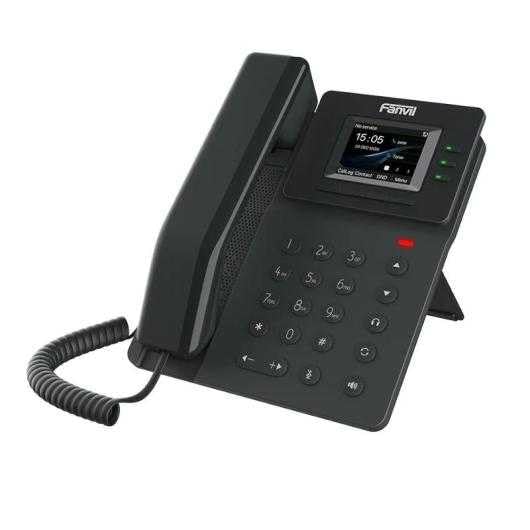
Figure 1: Fanvil V60P Professional IP Phone. This image shows the black IP phone with its handset, color display, and numeric keypad. The display shows "15:05" and menu options.
2. Настройка і ўстаноўка
2.1 Змест пакета
Before installation, verify that all items are present in the package:
- Fanvil V60P IP Phone unit
- Трубка і спіральны шнур
- Кабель Ethernet
- Стаяць
- Кіраўніцтва па хуткай усталёўцы (калі ў камплекце)
2.2 Фізічнае злучэнне
- Прымацаваць падстаўку: Securely attach the desk stand to the back of the phone unit.
- Падключыце тэлефон: Падключыце адзін канец спіральнага шнура да тэлефоннай трубкі, а другі — да порта для тэлефоннай трубкі на базе тэлефона.
- Connect to Network and Power (PoE):
- Падключыце адзін канец кабеля Ethernet да лакальная сетка порт на тэлефоне.
- Connect the other end of the Ethernet cable to a Power over Ethernet (PoE) enabled switch or injector. The phone will power on automatically.
- Падключэнне да ПК (неабавязкова): If you need to connect a computer through the phone, connect an Ethernet cable from your PC to the PC порт на тэлефоне.
Note: If PoE is not available, a separate power adapter (not included) may be required. Refer to the product specifications for compatible power adapter details.
3. Інструкцыя па эксплуатацыі
3.1 Асноўныя функцыі выклікаў
- Здзяйсненне званка:
- Падніміце слухаўку або націсніце кнопку гучнай сувязі.
- Набярыце патрэбны нумар з дапамогай клавіятуры.
- Націсніце Набраць нумар праграмную клавішу або пачакайце тайм-аўту аўтаматычнага набору.
- Адказ на званок:
- Падніміце слухаўку.
- Alternatively, press the Speakerphone button or the Адказ праграмная клавіша.
- Завяршэнне выкліку: Hang up the handset or press the Speakerphone button.
3.2 Using Programmable DSS Keys
The Fanvil V60P features 6 programmable DSS (Direct Station Select) keys. These keys can be configured for various functions such as speed dial, line keys, busy lamp field (BLF), or other custom features as defined by your system administrator.
- To use a programmed DSS key, simply press the corresponding button.
- Configuration of DSS keys is typically done via the phone's web interface or your IP PBX system.
3.3 Local Phonebook
The phone supports a local phonebook with up to 1000 entries.
- Access the phonebook via the Даведнік or Кантакты soft key on the display.
- Use the navigation keys to browse entries.
- Select an entry and press the Набраць нумар soft key to initiate a call.
3.4 Audio Conferencing
The V60P supports local 6-party audio conferencing.
- Establish a call with the first participant.
- Націсніце канф soft key. The first participant will be put on hold.
- Dial the number of the second participant and establish the call.
- Націсніце канф soft key again to merge all participants into a conference.
- Repeat steps 2-4 to add more participants, up to a total of 6.
4. Тэхнічнае абслугоўванне
4.1 Ачыстка прылады
To maintain the appearance and functionality of your Fanvil V60P IP Phone (made of plastic material), follow these cleaning guidelines:
- Disconnect the phone from its power source (PoE) before cleaning.
- Выкарыстоўвайце мяккую, злёгку damp, lint-free cloth to wipe the surfaces.
- Avoid using harsh chemicals, abrasive cleaners, or solvents, as these can damage the plastic and display.
- Do not spray cleaners directly onto the phone.
4.2 Абнаўленне прашыўкі
Firmware updates may be released periodically to improve performance, add features, or fix bugs. Consult your IT administrator or Fanvil's official website for information on available updates and instructions for installation.
5. Выпраўленне непаладак
This section addresses common issues you might encounter with your Fanvil V60P IP Phone.
| праблема | Магчымая прычына | Рашэнне |
|---|---|---|
| Тэлефон не ўключаецца. | Няма падключэння PoE або няспраўны кабель Ethernet. | Ensure the Ethernet cable is securely connected to the LAN port and a PoE-enabled switch/injector. Verify the PoE source is active. |
| Няма нумара набору. | SIP registration failure or network issue. | Check network connectivity. Verify SIP account settings with your IT administrator. Restart the phone. |
| Немагчыма рабіць/прымаць званкі. | Network issues, incorrect SIP configuration, or firewall blocking. | Confirm network connection. Check SIP registration status on the phone's display. Contact your IT administrator for network and SIP configuration verification. |
| Дрэнная якасць гуку. | Network congestion or faulty handset/speaker. | Check network bandwidth and latency. Try using a different handset or speaker mode. If the issue persists, contact support. |
6. Тэхнічныя характарыстыкі
| Асаблівасць | Дэталь |
|---|---|
| мадэль | V60P |
| сістэма | Linux |
| Дысплей | 2.4-inch, 320 x 240 Color Screen |
| Ключы DSS | 6 праграмуемыя клавішы |
| SIP-лініі | 4 |
| Local Phonebook | 1000 запісаў |
| Трубка | Правадная трубка |
| Аўдыёканферэнцыя | 6-party Local Conference |
| Wideband Codecs | G.722, сачыненне |
| Narrowband Codecs | G.711, G.723.1, G.726, G.729, G.729A, G.729B, G.729AB, iLBC |
| PoE | так |
| Сеткавыя парты | 2 парты Ethernet 10/100 Мбіт/с |
| EHS Support | так |
| Падтрымка IPv6 | так |
| Матэрыял | Пластыкавыя |
| Памеры (ДхШхВ) | 15 х 200 х 15 см |
| Вага | 600 грам |
| Ідэнтыфікатар абанента | так |
| Шматлінейная аперацыя | так |
| Conference Call Functionality | Support Multiple Conferences |
| Standby Duration (if applicable) | 10 гадзіны |
7. Гарантыя і падтрымка
7.1 Гарантыя на выраб
The Fanvil V60P IP Phone comes with a трохгадовая гарантыя ад вытворчых дэфектаўГэтая гарантыя распаўсюджваецца на дэфекты матэрыялаў і вырабу пры нармальным выкарыстанні. Калі ласка, захавайце пацвярджэнне пакупкі для прэтэнзій па гарантыі.
7.2 Тэхнічная падтрымка
For technical assistance, troubleshooting beyond this manual, or warranty inquiries, please contact your reseller or Fanvil's official customer support channels. You may need to provide your product model (V60P) and serial number.