
1. Уводзіны
This manual provides essential information for the safe and effective use of your GT POWER AC Adapter, Model 102. This adapter is specifically designed to provide power to the Cadence Blood Pressure Monitor TMB-2092-G. It features built-in protection mechanisms to ensure reliable operation and device safety.
2. Інфармацыя па бяспецы
WARNING: To reduce the risk of electric shock, fire, or injury, always follow these basic safety precautions.
- This adapter is designed for ТОЛЬКІ ДЛЯ ВЫКАРЫСТАННЯ Ў ПАМЯШКАХ. Do not expose to rain, moisture, or extreme temperatures.
- Пераканайцеся, што адаптар падключаны да разеткі з патрэбнай напругайtage as specified on the adapter label.
- Не разбірайце, не мадыфікуйце і не спрабуйце рамантаваць адаптар. Звяртайцеся па любыя паслугі па абслугоўванні да кваліфікаванага персаналу.
- Keep the adapter and its cable away from heat sources, sharp edges, and excessive pressure.
- Unplug the adapter from the power outlet when not in use for extended periods or during electrical storms.
- Do not operate the adapter with a damaged cord or plug.
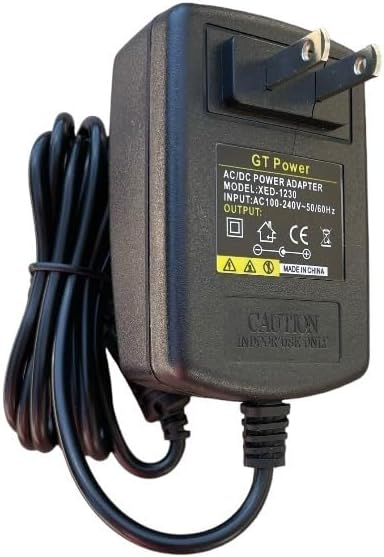
Малюнак 1: Спераду view of the GT POWER AC Adapter. The label indicates "GT Power AC/DC Power Adapter", "MODEL: XED-1230", "INPUT: AC100-240V~50/60Hz", and "OUTPUT: DC". A "CAUTION INDOOR USE ONLY" warning is visible.
3. Настройка
- Праверце адаптар: Before first use, visually inspect the AC adapter and its cable for any signs of damage. Do not use if damaged.
- Падключэнне да прылады: Locate the power input port on your Cadence Blood Pressure Monitor TMB-2092-G. Carefully insert the DC output plug of the GT POWER AC Adapter into this port. Ensure a secure connection.
- Падключыце да разеткі: Plug the two-prong AC input plug of the adapter into a standard wall power outlet (AC 100-240V, 50/60Hz).
- Праверце магутнасць: Once connected, your blood pressure monitor should receive power. Refer to your blood pressure monitor's manual for specific power indicators.

Figure 2: Close-up of the DC output connector, which plugs into the Cadence Blood Pressure Monitor.
4. Інструкцыя па эксплуатацыі
Once properly connected, the GT POWER AC Adapter will continuously supply power to your Cadence Blood Pressure Monitor TMB-2092-G. The adapter is designed for continuous operation within its specified limits.
This adapter incorporates several protection features:
- OVP (над тымtagе абарона): Safeguards your device from damage due to excessive input voltage.
- OCP (абарона ад перагрузкі па току): Прадухіляе пашкоджанні ад празмернага выходнага току.
- SCP (Short Circuit Protection): Automatically shuts down power in case of a short circuit, protecting both the adapter and the connected device.

Малюнак 3: бок view of the adapter, illustrating the compact design and the attached power cord.
5. Тэхнічнае абслугоўванне
- Уборка: Disconnect the adapter from the power outlet and the device before cleaning. Use a soft, dry cloth to wipe the adapter. Do not use liquid cleaners or aerosols.
- захоўванне: Калі адаптар не выкарыстоўваецца, захоўвайце яго ў прахалодным, сухім месцы, удалечыні ад прамых сонечных прамянёў і вільгаці. Не змотвайце кабель туга, каб пазбегнуць пашкоджанняў.
- Сыход за кабелем: Do not pull on the cable to disconnect the adapter. Always grasp the plug firmly. Avoid placing heavy objects on the cable or bending it sharply.

Figure 4: The 48-inch heavy-duty power cable, designed for durability.
6. Выпраўленне непаладак
If you experience issues with your GT POWER AC Adapter, refer to the following common solutions:
- Няма харчавання прылады:
- Ensure the adapter is securely plugged into both the wall outlet and the blood pressure monitor.
- Праверце працаздольнасць разеткі, падключыўшы да яе іншую прыладу.
- Inspect the adapter cable and plugs for any visible damage. If damaged, discontinue use.
- Adapter Feels Warm:
- It is normal for the adapter to feel slightly warm during operation.
- If the adapter becomes excessively hot, unplug it immediately and discontinue use. This could indicate an internal fault or an overloaded circuit.
- Няспраўнасць прылады:
- If the blood pressure monitor is not functioning correctly even with power, consult the monitor's own instruction manual or contact its manufacturer for support.
7. Тэхнічныя характарыстыкі
| Асаблівасць | Дэталь |
|---|---|
| Марка | GT POWER |
| Нумар мадэлі | 102 |
| Уваходны кнtage | Пераменны ток 100-240 В, 50/60 Гц |
| Тып вываду | DC |
| Даўжыня кабеля | 48 цаляў (прыблізна 1.2 метра) |
| Асаблівасці | Над Voltagабарона ад электроннай напругі (OVP), абарона ад перагрузкі па току (OCP), абарона ад кароткага замыкання (SCP) |
| Крыніца харчавання | Правадная электрычная |
| Вага прадмета | 0.4 фунта (прыблізна 181 грамаў) |
| Памеры ўпакоўкі | 8 х 4.5 х 1.5 цалі |
| UPC | 781834739976 |
8. Гарантыя і падтрымка
Your GT POWER AC Adapter Model 102 comes with the following:
- 30-дзённая гарантыя вяртання грошай: Калі вы не задаволены сваёй пакупкай, вы можаце вярнуць яе на працягу 30 дзён для поўнага вяртання грошай.
- Адзін год гарантыі: This product is covered by a one-year warranty against manufacturing defects from the date of purchase.
For technical support or warranty claims, please contact your retailer or the manufacturer, GTPOWER, directly. Please have your purchase information and product model number (102) available.