
1. Уводзіны
This user manual provides comprehensive instructions for the installation, functionality verification, and maintenance of the Generic Laptop USB Interface/Audio Board (Model: 6-71-NP5K8-D02A RTX3050TI). This component is designed as a replacement part for compatible laptops, restoring or upgrading USB and audio functionalities. Please read this manual thoroughly before proceeding with installation to ensure proper handling and operation.
2. Інфармацыя па бяспецы
Always observe the following safety precautions when handling and installing electronic components:
- Адключэнне сілкавання: Always ensure the laptop is completely powered off and disconnected from its power adapter and battery before beginning any installation or removal process.
- Электрастатычны разрад (ESD): Electronic components are sensitive to ESD. Use an anti-static wrist strap or frequently touch a grounded metal object to discharge static electricity from your body.
- Асцярожна звяртайцеся: Avoid touching the gold connectors or integrated circuits on the board. Hold the board by its edges.
- Рэкамендуецца прафесійная ўстаноўка: If you are not comfortable with laptop disassembly and reassembly, seek assistance from a qualified technician.
- Выкарыстанне інструмента: Use appropriate tools for laptop disassembly to prevent damage to screws or components.
3. Змесціва ўпакоўкі
Пасля адкрыцця ўпакоўкі пераканайцеся, што ўсе прадметы наяўныя і ў добрым стане:
- 1x Generic Laptop USB Interface/Audio Board (Model: 6-71-NP5K8-D02A RTX3050TI)
- (Note: Screws or additional cables are typically not included and should be reused from the original laptop or acquired separately if needed.)
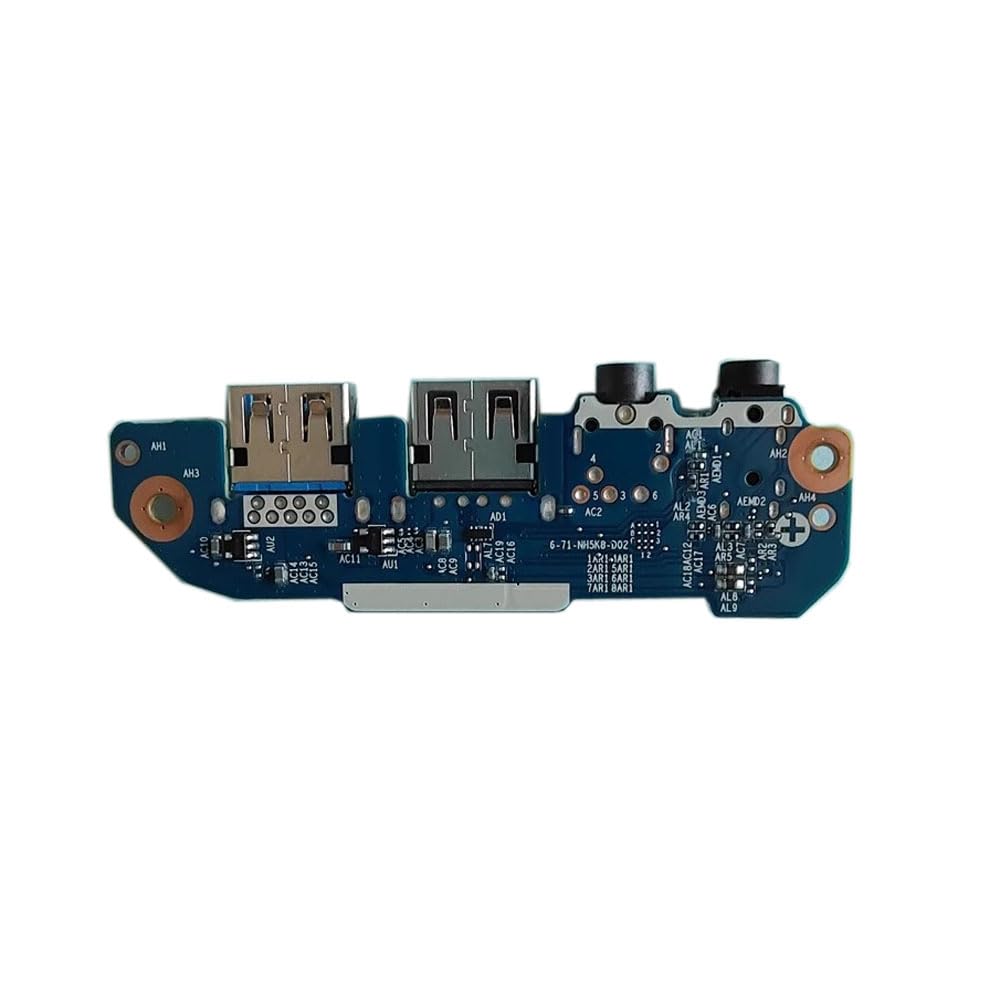
Малюнак 3.1: Generic Laptop USB Interface/Audio Board. This image displays the top view of the replacement board, highlighting its various ports and connectors, including USB ports and audio jacks.
4. Настройка і ўстаноўка
Follow these steps carefully to install the USB Interface/Audio Board. It is highly recommended to consult your laptop's specific service manual for detailed disassembly instructions.
- Падрыхтуйце працоўнае месца: Work on a clean, well-lit, and static-free surface. Gather necessary tools such as small Phillips head screwdrivers, a plastic spudger, and an anti-static wrist strap.
- Выключэнне і адключэнне: Shut down your laptop completely. Disconnect the AC adapter and remove the battery (if removable). Press and hold the power button for 15 seconds to drain any residual power.
- Access the Interior: Асцярожна адкрыйце ноўтбукasing. This usually involves removing screws from the bottom cover and gently prying open the cover using a plastic spudger. Refer to your laptop's service manual for exact steps.
- Locate the Old Board: Identify the existing USB Interface/Audio Board. It is typically located near the side ports of the laptop.
- Адключыце кабелі: Gently disconnect any ribbon cables or wires connected to the old board. Use a plastic spudger to flip up retaining clips on ZIF (Zero Insertion Force) connectors before pulling out ribbon cables.
- Remove the Old Board: Unscrew any retaining screws holding the old board in place. Carefully lift and remove the old board from its slot.
- Install the New Board: Align the new Generic USB Interface/Audio Board with the mounting posts and screw holes. Gently press it into place.
- Secure the New Board: Reinsert and tighten the retaining screws to secure the new board. Do not overtighten.
- Зноў падключыце кабелі: Carefully reconnect all ribbon cables and wires to the new board. Ensure cables are fully seated and retaining clips are closed.
- Зборка ноўтбука: Replace the laptop's bottom cover and secure it with screws. Reinsert the battery (if removed) and connect the AC adapter.
- Першапачатковае ўключэнне: Power on the laptop. The system should automatically detect the new hardware.
5. Functionality Verification
After installation, perform the following checks to ensure the board is functioning correctly:
- Парты USB: Connect various USB devices (e.g., mouse, keyboard, USB drive) to each USB port on the new board to confirm they are recognized and functional.
- Аўдыявыхад: Plug headphones or speakers into the audio output jack. Play audio to verify sound output.
- Мікрафонны ўваход: If applicable, connect a microphone to the microphone input jack and test its functionality using a recording application.
- Дыспетчар прылад: In Windows, open Device Manager (right-click Start button > Device Manager) and check for any unknown devices or error symbols under "Universal Serial Bus controllers" or "Sound, video and game controllers."
6. Тэхнічнае абслугоўванне
The USB Interface/Audio Board requires minimal maintenance. To ensure its longevity and optimal performance:
- Захоўваць у чысціні: Periodically clean the external ports with a soft, dry, lint-free cloth. Avoid using liquid cleaners directly on the ports.
- Прадухіленне назапашвання пылу: Ensure the laptop's ventilation system is clear to prevent dust accumulation inside, which can affect electronic components.
- Далікатнае абыходжанне: Avoid excessive force when plugging or unplugging devices from the USB and audio ports.
7. Выпраўленне непаладак
If you encounter issues after installation, refer to the following troubleshooting tips:
| праблема | Магчымая прычына | Рашэнне |
|---|---|---|
| Парты USB не працуюць | Cables not properly connected; drivers missing/corrupt; board not seated correctly. |
|
| No audio output/input | Audio cables not connected; incorrect audio settings; drivers missing/corrupt. |
|
| Laptop does not power on after installation | Incorrect reassembly; short circuit; battery/power connection issue. |
|
8. Тэхнічныя характарыстыкі
- мадэль: 6-71-NP5K8-D02A RTX3050TI
- Тып: Laptop USB Interface/Audio Board
- Марка: Радавыя
- вытворца: Радавыя
- Вага прадмета: 0.6 кілаграма
- Сумяшчальнасць: Designed for specific laptop models (verify part number 6-71-NP5K8-D02A for compatibility).
9. Гарантыя і падтрымка
This Generic Laptop USB Interface/Audio Board comes with a Гарантыя 90 дзён з даты пакупкі. Гэтая гарантыя распаўсюджваецца на вытворчыя дэфекты і дэфекты матэрыялаў пры нармальным выкарыстанні.
The warranty does not cover damage caused by improper installation, misuse, accidents, unauthorized repairs, or modifications. Please retain your proof of purchase for warranty claims.
Падтрымка кліентаў:
For technical assistance, troubleshooting, or warranty inquiries, please contact your retailer or the manufacturer's support channel. Refer to your purchase documentation for specific contact information.