
1. Уводзіны
1.1 Прадукт скончыўсяview
The Rraycom 5MP Wireless Security Camera is a battery-powered, outdoor-ready surveillance device designed for home security. It features 5MP ultra-HD video, a 130° wide field of view, and dual light source night vision for both full-color and infrared options. Equipped with AI motion detection, two-way audio, a siren alarm, and spotlight, it provides comprehensive monitoring and deterrence. The camera supports both cloud and local SD card storage and is compatible with Amazon Alexa.
1.2 Асноўныя магчымасці
- 2.5K (5MP) Ultra-HD Video: Provides clear and detailed surveillance footage.
- 130° Шырокае поле в View: Minimizes blind spots for broader coverage.
- Full-Color & Infrared Night Vision: Offers versatile night monitoring options.
- Акумулятарная батарэя: Ensures wire-free operation and flexible placement.
- Воданепранікальнасць IP65: Designed to withstand various weather conditions for outdoor use.
- PIR Motion Detection with AI Analysis: Accurately detects human movement and sends real-time notifications.
- Двухбаковы аўдыё: Allows for remote communication with visitors or intruders.
- Siren Alarm & Spotlight: Deters unwanted visitors with audible and visual alerts.
- Cloud/SD Card Storage: Offers flexible options for video recording storage.
- Інтэграцыя Alexa: Enables voice control for live view доступ.

Выява: Зверхуview of the Rraycom 5MP Wireless Security Camera and its main features.
1.3 What's in the Box?
Калі ласка, праверце змесціва вашай упакоўкі. Калі якія-небудзь прадметы адсутнічаюць або пашкоджаныя, звярніцеся ў службу падтрымкі кліентаў.
- Rraycom 5MP Wireless Security Camera (x1)
- Мантажны кранштэйны (x1)
- Mounting Screws and Wall Anchors (x1 set)
- USB-кабель для зарадкі (x1)
- Кіраўніцтва карыстальніка (x1)
2. Пачатак працы: Налада
2.1 Зарадка камеры
Before initial use, fully charge the camera battery. Connect the provided USB charging cable to the camera's charging port and to a standard 5V USB power adapter (not included). The indicator light will show charging status and turn solid when fully charged.
2.2 Усталёўка прыкладання
Download the companion app, VistaFlow, from your mobile device's app store.
- Для прылад iOS: Пошук "VistaFlow" in the Apple App Store.
- Для прылад Android: Пошук "VistaFlow" in the Google Play Store.
Follow the on-screen instructions to create an account and log in.
2.3 Спалучэнне прылад (падключэнне Wi-Fi)
- Пераканайцеся, што ваша мабільная прылада падключана да 2.4GHz Wi-Fi. The camera does not support 5GHz Wi-Fi.
- Open the VistaFlow app and tap the "Add Device" or "+" icon.
- Выберыце мадэль вашай камеры са спісу.
- Follow the in-app instructions to power on the camera and put it into pairing mode (usually indicated by a flashing LED).
- Адсканіруйце QR-код, які адлюстроўваецца на экране тэлефона, з дапамогай аб'ектыва камеры або выканайце альтэрнатыўныя спосабы спалучэння, калі будзе прапанавана.
- Пасля падключэння дайце назву камеры і завяршыце працэс налады.
2.4 Мантаж камеры
Choose a suitable location for your camera, considering Wi-Fi signal strength, desired viewing angle, and power access for occasional recharging. The camera is IP65 waterproof, making it suitable for outdoor installation.
- Mark the drill holes using the mounting bracket as a template.
- Drill holes and insert wall anchors if mounting on masonry or drywall.
- Secure the mounting bracket to the wall or ceiling with screws.
- Attach the camera to the mounting bracket and adjust the angle for optimal coverage.
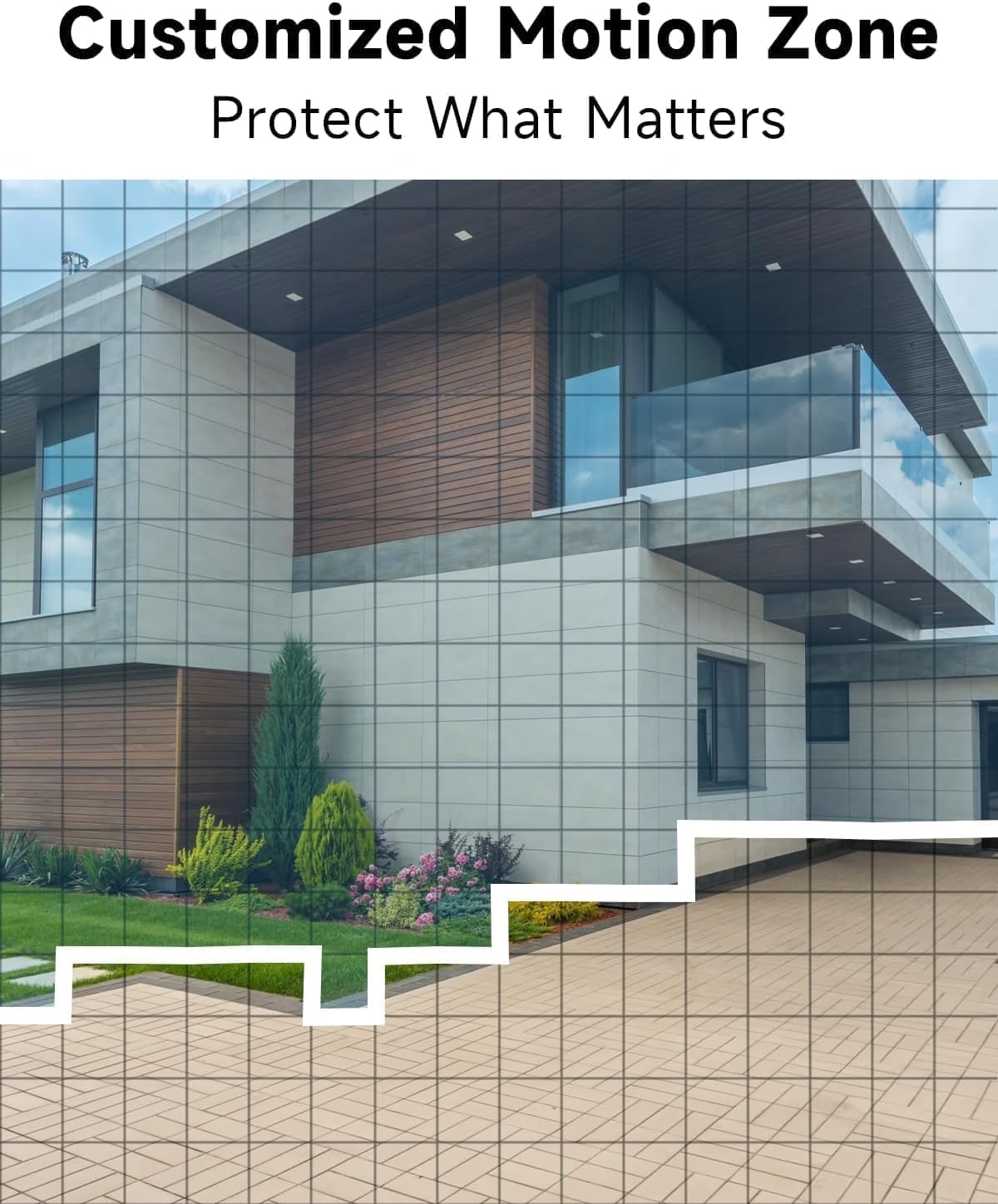
Малюнак: Example of camera placement and customized motion zone setup.
3. Інструкцыя па эксплуатацыі
3.1 У прамым эфіры View
Access the VistaFlow app and select your camera to view the live feed. You can pinch to zoom and pan across the 130° wide-angle view. The 5MP resolution provides clear details.

Image: Visual comparison of 5MP versus 1080P video resolution.
3.2 Motion Detection & AI Analysis
The camera uses a PIR sensor and AI analysis to detect motion, specifically identifying persons to reduce false alarms. When motion is detected, you will receive a notification on your phone.
- Customized Activity Zones: In the app settings, you can define specific areas within the camera's view дзе павінна быць актыўнае выяўленне руху, ігнаруючы іншыя зоны.
- Рэгуляванне адчувальнасці: Adjust the motion detection sensitivity to suit your environment and reduce unwanted alerts.

Image: AI Motion Detection in action, highlighting alert options.
3.3 Двухбаковае аўдыё
The built-in microphone and speaker allow for real-time two-way communication. Tap the microphone icon in the live view гаварыць праз камеру і слухаць аўдыё з месцазнаходжання камеры.

Image: Demonstrating two-way audio communication.
3.4 Начное бачанне
Камера прапануе два рэжымы начнога бачання:
- Поўнакаляровы начны бачанне: Utilizes the built-in spotlight to provide color images in low-light conditions.
- Інфрачырвонае начное бачанне: Uses infrared LEDs for black and white images in complete darkness.
You can switch between these modes or set them to automatic in the app settings.

Image: Comparison of color and infrared night vision modes.
3.5 Siren Alarm & Spotlight
In response to motion detection, or manually activated via the app, the camera can trigger a siren alarm and turn on its spotlight to deter intruders. You can customize the siren sound with pre-recorded messages.
3.6 Варыянты захоўвання
The camera supports two storage methods for recorded video:
- Воблачнае сховішча: A free rolling 3-day cycled cloud storage service is provided. Optional subscription plans may be available for extended cloud storage.
- Micro SD-карта: Insert a micro SD card (up to 256GB, not included) into the camera's SD card slot for local storage.
3.7 Інтэграцыя з Alexa
The Rraycom camera is compatible with Amazon Alexa. To enable this feature:
- Адкрыйце праграму Alexa на сваёй мабільнай прыладзе.
- Go to "Skills & Games" and search for "VistaFlow".
- Enable the skill and link your VistaFlow account.
- Адкрыйце для сябе прылады.
You can then use voice commands such as: "Alexa, show me the [camera name]" to view the live feed on compatible Alexa devices (e.g., Echo Show).
4. Тэхнічнае абслугоўванне
4.1 Кіраванне батарэяй
The camera is powered by a rechargeable battery. Battery life varies based on usage, motion detection frequency, and environmental factors.
- Перазарадка: When the battery level is low, you will receive a notification via the app. Disconnect the camera from its mount and charge it using the provided USB cable.
- Аптымізацыя тэрміну службы батарэі: Reduce motion detection sensitivity, shorten recording duration, and minimize live view access to extend battery life.
4.2 Ачыстка
Periodically clean the camera lens and body to ensure optimal performance.
- Use a soft, dry, lint-free cloth to wipe the lens. For stubborn smudges, a slightly damp можна выкарыстоўваць тканіну, а затым сухую.
- Працярыце корпус камеры рэкламайamp тканіна. Пазбягайце выкарыстання агрэсіўных хімікатаў або абразіўных ачышчальнікаў.
5. Выпраўленне непаладак
5.1 Агульныя праблемы і рашэнні
| выпуск | Магчымае рашэнне |
|---|---|
| Камера не падключаецца да Wi-Fi | Ensure your Wi-Fi is 2.4GHz. Check Wi-Fi signal strength at the camera's location. Restart your router and the camera. Re-attempt pairing in the app. |
| Датчык руху не працуе або занадта шмат ілжывых спрацоўванняў | Check motion detection settings in the app. Adjust sensitivity. Define activity zones to exclude irrelevant areas. Ensure camera lens is clean. |
| Дрэнная якасць выявы | Ensure the camera lens is clean. Check Wi-Fi signal strength. Ensure the camera is set to 5MP resolution in app settings if available. |
| Акумулятар не зараджаецца | Ensure the USB cable is securely connected. Try a different USB power adapter. Check if the charging port is clean and free of debris. |
| Cannot hear or speak through two-way audio | Check volume settings on your phone and in the app. Ensure microphone and speaker permissions are granted to the app. |
6. Тэхнічныя характарыстыкі
| Асаблівасць | Спецыфікацыя |
|---|---|
| дазвол | 5MP (2.5K QHD) |
| Поле в View | 130° |
| Сувязь | Wi-Fi (толькі 2.4 ГГц) |
| Крыніца харчавання | Харчаванне ад батарэі |
| Ўстойлівасць да надвор'я | Воданепранікальны IP65 |
| Начное бачанне | Full-Color, Infrared |
| Аўдыё | 2-баковае аўдыё |
| Дэтэктар руху | PIR with AI Analysis (Person Detection) |
| Параметры захоўвання | Cloud (3-day free rolling), Micro SD Card (up to 256GB) |
| Інтэграцыя разумнага дома | Amazon Alexa |
| Сумяшчальныя прылады | iOS, Android |
| Выкарыстанне ў памяшканні/на вуліцы | На адкрытым паветры |
7. Гарантыя і падтрымка кліентаў
7.1 Інфармацыя аб гарантыі
Rraycom products come with a limited warranty. Please refer to the warranty card included in your package or visit the official Rraycom webсайт для атрымання падрабязных гарантыйных умоў.
7.2 Падтрымка кліентаў
If you encounter any issues or have questions regarding your Rraycom 5MP Wireless Security Camera, please contact our customer support team. Contact information can be found on the Rraycom webсайце або ва ўпакоўцы прадукту.