
1. Уводзіны
This manual provides essential information for the safe and efficient use of your AT&T Cingular Flex 2 Smart Flip Phone (Model 6723D). Please read these instructions carefully before operating your device to ensure optimal performance and longevity.
The Cingular Flex 2 is a compact flip phone designed for reliable communication. It features a vibrant display, a built-in camera for capturing moments, and 4GB of internal storage for essential files and applications. The device operates on KaiOS, offering a streamlined user experience.
2. Што ў скрынцы
Праверце, ці ёсць усе прадметы ў камплекце з вашым прадуктам:
- AT&T Cingular Flex 2 Smart Flip Phone
- Адаптар сілкавання
- Lithium Ion Battery (pre-installed or separate)
3. Прылада скончанаview
Familiarize yourself with the physical components of your AT&T Cingular Flex 2 phone.
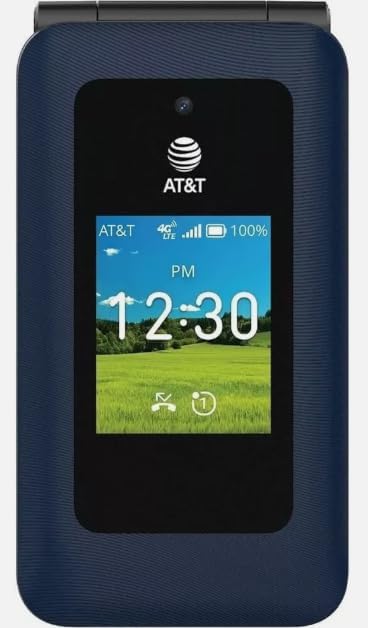
Малюнак 3.1: Фронт view of the AT&T Cingular Flex 2 Smart Flip Phone, showing the main display with time, network signal, and battery indicator.

Малюнак 3.2: Тыл view of the AT&T Cingular Flex 2 Smart Flip Phone, highlighting the textured back cover and the speaker grille at the top.
Ключавыя кампаненты:
- Знешні дысплей: Shows notifications, time, and caller ID when closed.
- Галоўны дысплей: Internal screen for navigation and content.
- Клавіятура: Numeric and navigation buttons for input.
- Камера: Located on the device for capturing photos and videos.
- Кнопкі гучнасці: Адрэгулюйце ўзровень гуку.
- Power/End Call Button: Turns the device on/off and ends calls.
- Порт для зарадкі: Для падлучэння адаптара сілкавання.
4. Настройка
4.1. Устаўка SIM-карты і акумулятара
- Пераканайцеся, што тэлефон выключаны.
- Акуратна зніміце заднюю крышку тэлефона.
- If the battery is installed, remove it by gently lifting it from the notch.
- Locate the SIM card slot, typically beneath the battery compartment. Insert your SIM card with the gold contacts facing down and the notched corner aligned correctly.
- Insert the battery, ensuring the contacts align with those in the phone.
- Зачыніце заднюю крышку, пакуль яна надзейна не зашчоўкнецца.
4.2. Зарадка прылады
- Connect the power adapter to the charging port on your phone.
- Падключыце адаптар сілкавання да стандартнай электрычнай разеткі.
- Перад першым выкарыстаннем дайце тэлефону цалкам зарадзіцца. Індыкатар батарэі на экране будзе паказваць стан зарадкі.
4.3. Уключэнне / выключэнне харчавання
- Каб уключыць: Націсніце і ўтрымлівайце кнопку харчавання/завяршэння выкліку, пакуль не падсвеціцца экран.
- Каб выключыць: Націсніце і ўтрымлівайце кнопку харчавання/завяршэння выкліку, затым выберыце «Выключыць харчаванне» з опцый на экране.
5. Кіраванне тэлефонам
5.1. Базавая навігацыя
The Cingular Flex 2 uses a physical keypad for navigation. Use the directional pad (D-pad) to move between menu items and the center button to select. The left and right soft keys perform actions indicated on the screen above them.
5.2. Здзяйсненне і прыём званкоў
- Каб зрабіць званок: Enter the phone number using the keypad and press the Call button (usually the green button).
- Каб адказаць на званок: When the phone rings, press the Call button.
- Каб завяршыць выклік: Press the Power/End Call button (usually the red button).
5.3. Адпраўка і атрыманне паведамленняў
Перайдзіце ў праграму «Паведамленні» з галоўнага меню.
- To Send a New Message: Select 'New Message', enter the recipient's number or select from contacts, then type your message using the keypad.
- Note on Multimedia Messaging: Sending photos via text message may not be consistently supported. Receiving multimedia messages can also be intermittent.
- Voice to Text: This device does not support voice-to-text input for messaging.
5.4. Выкарыстанне камеры
The phone includes a built-in camera. You can access it via the main menu or by pressing the dedicated camera shortcut button on the side of the device.
- Фотаздымкі: Open the camera app, frame your shot, and press the center button or camera button to capture.
- Запіс відэа: Switch to video mode within the camera app and press the record button.
5.5. Internet and Applications
The Cingular Flex 2 runs on KaiOS. Access the KaiOS store for additional applications. Pre-installed apps include YouTube and a feature-reduced version of Google Maps. Be aware that some utility apps downloaded from the store may display advertisements.
6. Тэхнічнае абслугоўванне
6.1. Сыход за батарэяй
- Пазбягайце ўздзеяння на батарэю экстрэмальных тэмператур.
- Charge the battery using only the provided power adapter.
- Unplug the charger once the battery is fully charged to conserve energy.
6.2. Ачыстка прылады
Use a soft, dry, lint-free cloth to clean the phone's screen and body. Avoid using harsh chemicals or abrasive materials.
6.3. Абнаўленне праграмнага забеспячэння
Periodically check for software updates in the phone's settings menu to ensure your device has the latest features and security enhancements.
7. Выпраўленне непаладак
If you encounter issues with your Cingular Flex 2, refer to the following common problems and solutions:
| праблема | Магчымае рашэнне |
|---|---|
| Slow interface or app loading | Close unused applications. Restart the phone. Consider uninstalling less frequently used apps to free up resources. |
| Operating System crashes | Restart the device. Ensure the software is up to date. If persistent, a factory reset may be necessary (back up data first). |
| Wi-Fi or network connectivity issues | Toggle Wi-Fi/Mobile Data off and on. Restart the phone. Check router or network settings. Ensure notifications for network disconnections are managed in settings to avoid excessive alerts. |
| Keyboard input errors (e.g., double key strokes) | Ensure you are pressing keys firmly and deliberately. If the issue persists, contact customer support. |
| Cannot send photos via text message | This is a known limitation for some devices. Try alternative methods for sharing images if available, or reduce image size if an option. |
| Дрэнны тэрмін службы батарэі | Reduce screen brightness. Close background apps. Limit use of power-intensive features like GPS. Ensure the battery is fully charged. |
7.1. Скід да заводскіх налад
Скід да заводскіх налад сатрэ ўсе даныя з вашага тэлефона і аднавіць яго да зыходных заводскіх налад. Гэта можа вырашыць пастаянныя праблемы з праграмным забеспячэннем. Back up all important data before performing a factory reset. Consult your phone's settings menu for the 'Reset' or 'Erase all data' option.
8. Тэхнічныя характарыстыкі
Detailed technical specifications for the AT&T Cingular Flex 2 Smart Flip Phone (Model 6723D):
| Асаблівасць | Спецыфікацыя |
|---|---|
| Назва мадэлі | Cingular Flex 2 |
| Нумар мадэлі тавару | 6723D |
| Марка | AT&T |
| Аперацыйная сістэма | KaiOS |
| Ёмістасць памяці | 4 ГБ |
| Памер усталяванай аператыўнай памяці | 512 Мб |
| Мадэль працэсара | Mediatek Dimensity 1100 |
| дазвол | 720 х 1520 |
| Тэхналогія падлучэння | 4G LTE |
| Сотавая тэхналогія | 4G |
| Аператар бесправадной сувязі | Адмыкнутая |
| GPS | Праўда |
| Формаў-фактар | Перавярнуць |
| Колер | Classic Navy |
| Ёмістасць батарэі | 1400 Міліamp Гадзіны |
| Намінальная магутнасць батарэі | 2800 Amp Гадзіны |
| Вага прадмета | 7.4 унцыі (0.21 кілаграма) |
| Памеры ўпакоўкі | 4.69 х 2.91 х 2.13 цалі |
| Вытворца | AT&T |
| Дата першай даступнасці | 11 лютага 2025 г |
9. Гарантыя і падтрымка
For warranty information, please refer to the documentation provided with your purchase or visit the official AT&T support website. If you require technical assistance or have questions not covered in this manual, please contact AT&T customer support.
Дадатковыя рэсурсы падтрымкі і кантактную інфармацыю можна знайсці на AT&T Store on Amazon.