
toocki TTWS-YL02
toocki Flip Bluetooth 5.3 Wireless Earbuds Instruction Manual
Model: TTWS-YL02
Уводзіны
This manual provides detailed instructions for the setup, operation, maintenance, and troubleshooting of your toocki Flip Bluetooth 5.3 Wireless Earbuds, Model TTWS-YL02. Please read this manual thoroughly before using the product to ensure optimal performance and longevity.

Image: The toocki Flip Bluetooth 5.3 Wireless Earbuds, black, resting inside their open charging case. A small LED indicator is visible on the front of the case.
Змест пакета
Пераканайцеся, што ўсе прадметы прысутнічаюць у пасылцы:
- toocki Flip Bluetooth 5.3 Wireless Earbuds (Left and Right)
- Чахол для зарадкі
- USB-кабель для зарадкі
- Розныя памеры вушных наканечнікаў (S, M, L)
- Кіраўніцтва карыстальніка
Прадукт скончаныview
Familiarize yourself with the components of your earbuds.

Image: A detailed diagram highlighting various parts of the toocki Flip Wireless Earbuds and their charging case, including touch control area, microphone, charging contacts, and LED indicators.
- Earbud Touch Control Area: For managing playback, calls, and other functions.
- Мікрафон: Інтэграваная функцыя для званкоў і галасавога памочніка.
- Кантакты для зарадкі: Located at the bottom of each earbud for charging within the case.
- Charging Case LED Indicator: Паказвае стан зарадкі і ўзровень зарада батарэі.
- Порт для зарадкі USB-C: Размешчаны на зарадным чахле.
Настройка
1. Зарадка навушнікаў і чахла
Перад першым выкарыстаннем цалкам зарадзіце навушнікі і зарадны футляр.
- Змесціце навушнікі-ўкладышы ў зарадны футляр.
- Падключыце кабель зарадкі USB да порта зарадкі на корпусе і да крыніцы харчавання.
- Святлодыёдны індыкатар на чахле будзе паказваць стан зарадкі. Пасля поўнай зарадкі індыкатар зменіцца або выключыцца.

Image: An illustration showing the earbuds in their charging case, with a visual representation of the 4.5 hours of single-use battery life and the charging case capacity.
2. Спалучэнне з прыладай
Навушнікі аўтаматычна пяройдуць у рэжым спалучэння, калі іх выняць з зараднага футляра.
- Адкрыйце зарадны кейс і дастаньце абодва навушнікі. Яны аўтаматычна ўключацца і пяройдуць у рэжым спалучэння.
- На вашай прыладзе (смартфоне, планшэце і г.д.) уключыце Bluetooth.
- Пошук "toocki Flip" (or similar name) in the list of available Bluetooth devices and select it to connect.
- Пасля падключэння вы пачуеце гук пацверджання, і індыкатары навушнікаў пагаснуць.
Аўтаматычнае падключэнне: After the initial pairing, the earbuds will automatically reconnect to the last paired device when removed from the case, provided Bluetooth is enabled on the device.

Image: A graphic illustrating the earbuds' compatibility with various devices (cell phones, tablets) and the auto-reconnect function shown with a smartphone's Bluetooth settings.
Інструкцыя па эксплуатацыі
The toocki Flip earbuds feature intuitive touch controls. The touch control area is located on the outer surface of each earbud.
Функцыі сэнсарнага кіравання

Image: A visual guide detailing the various touch control gestures for the earbuds, including play/pause, volume, call management, song switching, voice assistant, game mode, and reset.
| Функцыя | Жэст |
|---|---|
| Прайграванне/прыпыненне музыкі | Double-tap Left or Right earbud |
| Павялічыць гучнасць | Single-tap Right earbud |
| Памяншэнне гучнасці | Single-tap Left earbud |
| Наступная песня | Тройчы дотык да правага навушніка |
| Папярэдняя песня | Тройчы націск на левы навушнік |
| Адказаць/пакласці трубку | Double-tap Left or Right earbud |
| Адхіліць выклік | Long press Left or Right earbud for 2 seconds |
| Актывуйце галасавой памочнік | Four taps on the Right earbud |
| Уключэнне/выключэнне гульнявога рэжыму | Long press Left earbud for 2 seconds to enter; long press again for 2 seconds to exit. |
| Скід гарнітуры | Tap the headset 7 times in a row |
Шумапрыглушэнне
The earbuds feature Hybrid Active Noise Cancellation (ANC) with AI, capable of reducing background noise by up to 99% (40dB depth, +4000Hz bandwidth).
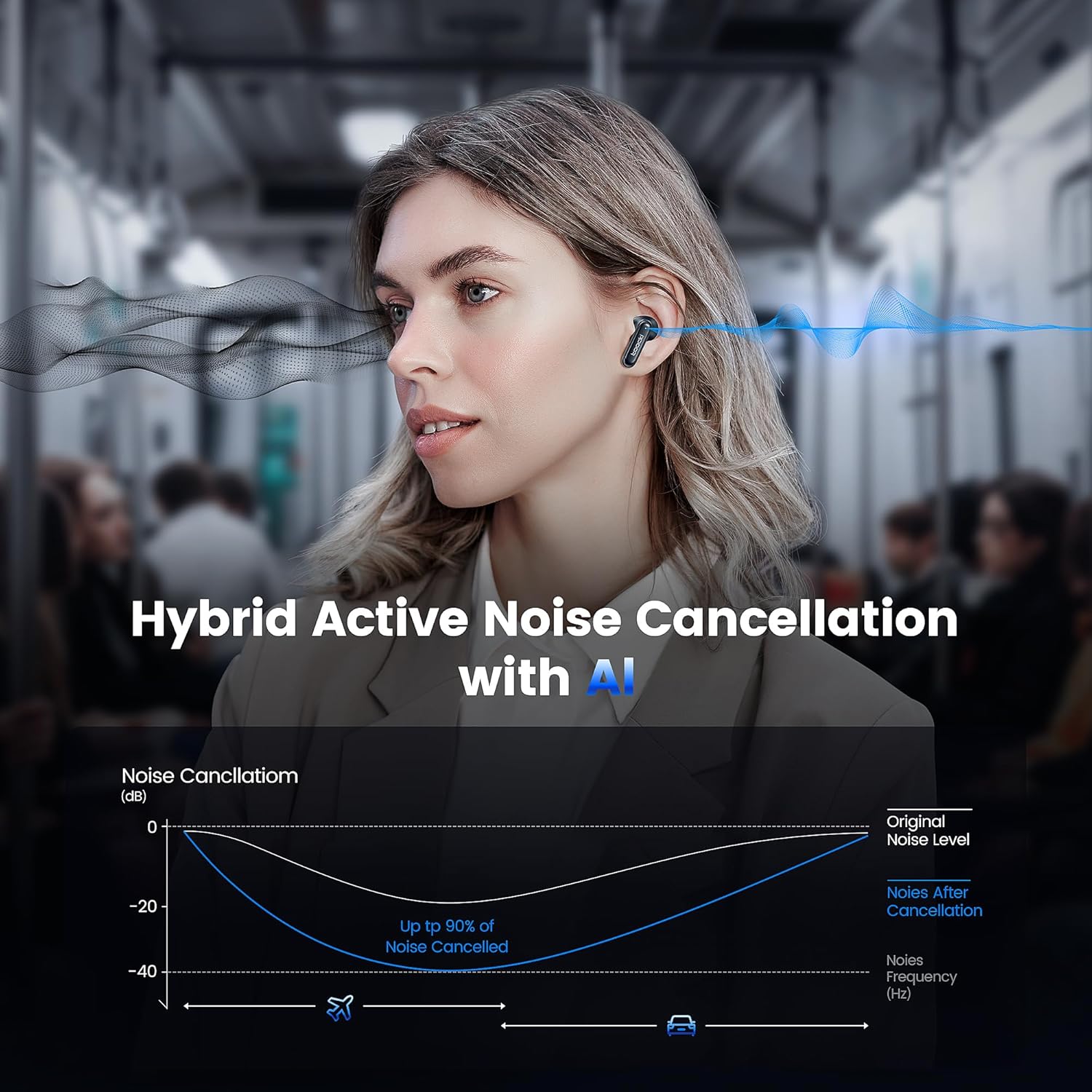
Image: A graph illustrating the effectiveness of Hybrid Active Noise Cancellation with AI, showing a significant reduction in noise levels across various frequencies, applicable in environments like airplanes and cars.
This technology is designed to enhance your listening experience by minimizing distractions from your surroundings, whether you are indoors, outdoors, or commuting.

Image: A person studying indoors with earbuds, illustrating how noise cancellation weakens sounds from turning books, air conditioners, and other machines.

Image: A person walking outdoors with earbuds, demonstrating the ability to block out crowd noise.

Image: A person commuting on public transport with earbuds, showing how noise cancellation blocks out airplane, high-speed train, and subway noise.
Кіраванне званкамі
The earbuds are equipped with 4 microphones and advanced algorithms to enhance call clarity, ensuring your voice is heard clearly even in noisy environments.

Image: A person smiling while holding a smartphone and wearing the earbuds, with an overlay indicating "4 Mic + AI Call Noise Cancellation" to highlight enhanced call quality.
Вопыт гуку
Experience 360° panoramic sound with stereo dual-channel audio and 10mm drivers, delivering rich bass and clear treble for an immersive listening experience.

Image: A visual representation of 360° panoramic sound emanating from an earbud, with text indicating "Stereo Dual-Channel with 10mm Driver."

Image: A cutaway diagram of a 10mm moving coil unit, illustrating its internal components and emphasizing its role in delivering extraordinary sound performance with larger vibration area, pure bass, and treble.
Тэхнічнае абслугоўванне
Правільнае абслугоўванне забяспечвае даўгавечнасць і аптымальную працу вашых навушнікаў-ўкладышаў.
- Уборка: Regularly clean the earbuds, especially the eartips and charging contacts, with a soft, dry, lint-free cloth. Do not use abrasive cleaners or solvents.
- Вушныя наканечнікі: The earbuds come with multiple sizes of eartips (S, M, L). Choose the size that provides the best seal and comfort for your ears. This also helps with noise cancellation effectiveness.
- захоўванне: Калі навушнікі не выкарыстоўваюцца, захоўвайце іх у зарадным чахле, каб абараніць і падтрымліваць зараджанасць.
- Воданепранікальнасць: The earbuds are waterproof. However, avoid prolonged exposure to water and ensure they are dry before placing them back in the charging case to prevent damage to the charging contacts.
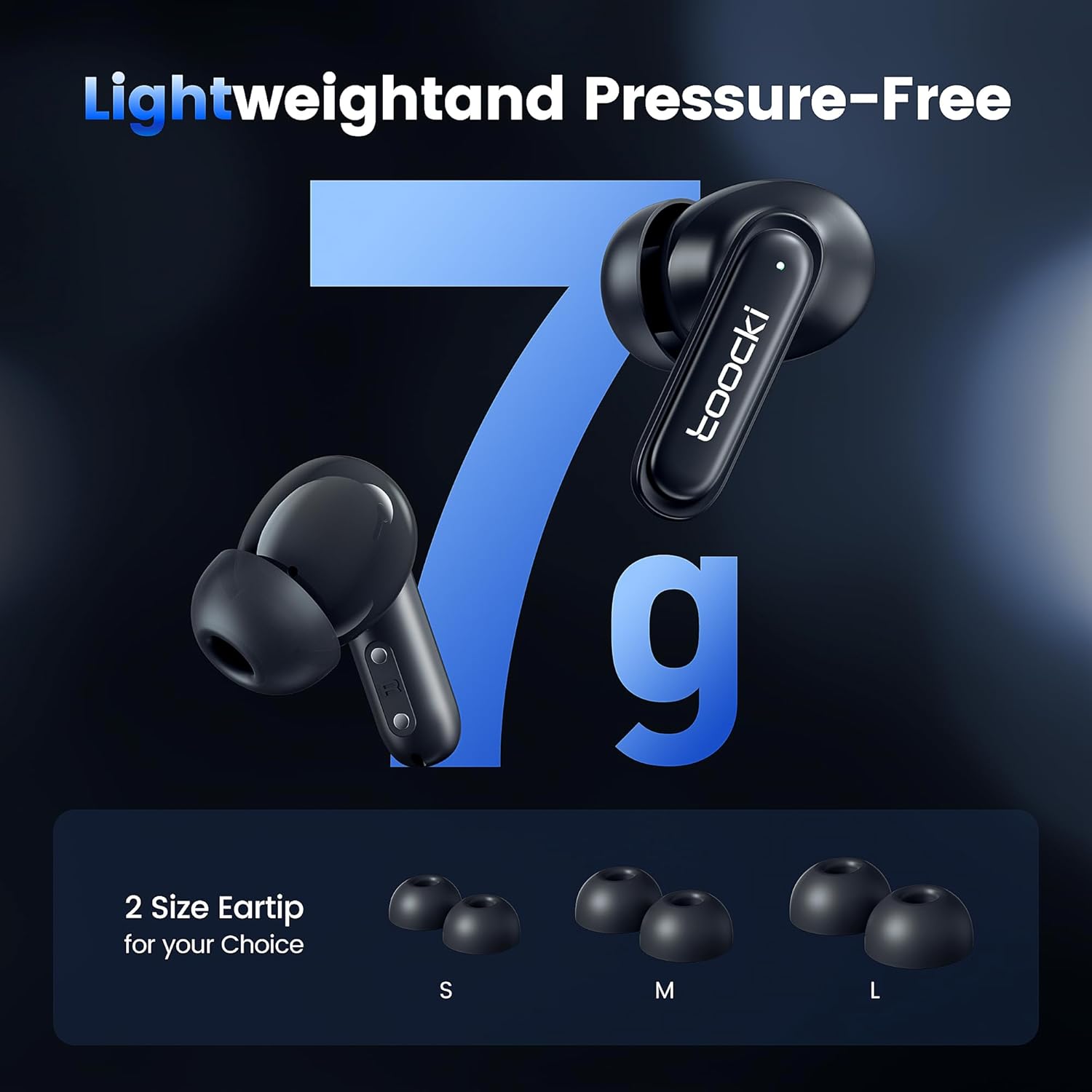
Image: The earbuds displayed alongside three pairs of eartips in small (S), medium (M), and large (L) sizes, emphasizing the lightweight design and choice of eartips for comfort.
Ліквідацыю непаладак
Калі ў вас узніклі праблемы, паспрабуйце наступныя рашэнні:
- Навушнікі не спалучаюцца:
- Пераканайцеся, што абодва навушнікі зараджаны.
- Выключыце Bluetooth на прыладзе і зноў уключыце яго.
- Forget the "toocki Flip" device from your device's Bluetooth settings and try pairing again.
- Perform a headset reset (tap 7 times in a row).
- Працуе толькі адзін навушнік:
- Пераканайцеся, што абодва навушнікі зараджаны.
- Змесціце абодва навушнікі назад у зарадны футляр, зачыніце вечка, пачакайце некалькі секунд, а затым зноў дастаньце іх.
- Паспрабуйце скінуць налады навушнікаў.
- Нізкая гучнасць або дрэнная якасць гуку:
- Адрэгулюйце гучнасць як на прыладзе, так і ў навушніках.
- Ensure the eartips are properly seated in your ear to create a good seal. Try different eartip sizes.
- Ачысціце дынамікі і амбушуры навушнікаў ад смецця.
- Праблемы з зарадкай:
- Check the charging cable and power adapter. Try a different cable or adapter.
- Ensure the charging contacts on both the earbuds and the case are clean and free of obstruction.
Тэхнічныя характарыстыкі
| Назва мадэлі | TTWS-YL02 |
| Марка | Тооцкі |
| Тэхналогія падлучэння | Бесправадная сувязь (Bluetooth 5.3) |
| Размяшчэнне вушэй | Укладышы |
| Формаў-фактар | Укладышы |
| Кантроль шуму | Active Noise Cancellation (up to 40dB depth, 99% background noise reduction) |
| Памер драйвера | 10 мм |
| Playtime (Single Use) | Прыкладна 4.5 гадзіны |
| Ёмістасць зараднага кейса | 400mAh (estimated from image) |
| Метад кантролю | Дакранацца |
| Асаблівасці | Fast Charging, Waterproof, 4 Microphones + AI for Call Noise Cancellation |
| Колер | Чорны |
| Вага (на адзін навушнік) | Прыбл. 7 г |
Гарантыя і падтрымка
For warranty information or technical support, please refer to the documentation included with your purchase or contact toocki customer service through their official webсайт або прадаўца, дзе быў набыты тавар.
Ask a question about this manual
Ask about setup, troubleshooting, compatibility, parts, safety, or missing instructions. Manuals+ will review the question and use this page’s manual context to help answer it.