
1. Уводзіны
Welcome to the MCHOSE ACE68 Magnetic Gaming Keyboard user manual. This guide provides detailed instructions for setting up, operating, maintaining, and troubleshooting your new keyboard. The ACE68 is designed for high-performance gaming, featuring magnetic switches, rapid trigger technology, and a compact 65% layout.
2. Прадукт скончыўсяview
2.1 Змест пакета
- MCHOSE ACE68 Magnetic Gaming Keyboard
- USB-кабель C
- Кіраўніцтва карыстальніка (гэты дакумент)
2.2 Асноўныя магчымасці
- 0.01mm Rapid Trigger Accuracy: Adjustable actuation from 0.005mm to 3.4mm for precise and fast key resets.
- Частата апытання 8000 Гц: Ultra-fast 0.1ms report rate for minimal latency.
- Snap Tap & Dynamic Typing: Assign up to four actions to a single key press for complex maneuvers.
- 65% кампактная кампаноўка: Space-saving design with 68 keys, ideal for gaming setups.
- Каўпачкі клавіш PBT Double-Shot: Durable keycaps with an ergonomic Cherry profile.
- StellarVision 2.0 Magnetic Adjustable Switches: Hot-swappable switches with a lifespan of 100 million clicks.
- M HUB Web Кіроўца: Web-based software for easy configuration and advanced features like RS (Rappy Snappy), DKS (Double KeyStroke), MT (Multi-Tap), TGL (Toggle), and Berserk mode.
- RGB-падсветка: 16 million customizable colors with 22+ preset lighting effects.
2.3 Раскладка клавіятуры
The MCHOSE ACE68 features a 65% layout with 68 keys. This compact design optimizes desk space while retaining essential keys for gaming and general use.

Image: MCHOSE ACE68 Keyboard Layout and Dimensions. This image illustrates the compact 65% layout of the keyboard, showing its dimensions (32cm length, 11.7cm width, 3.5cm height) and the ergonomic Cherry profile of the PBT keycaps.
3. Настройка
3.1 Падключэнне клавіятуры
- Locate the USB-C port on the MCHOSE ACE68 keyboard.
- Падключыце адзін канец кабеля USB-C, які ўваходзіць у камплект, да клавіятуры.
- Connect the other end of the USB-A connector to an available USB port on your computer.
- The keyboard will automatically be detected by your operating system. No additional drivers are typically required for basic functionality.
For advanced customization and features, refer to the "Customization" section for instructions on using the M HUB Web Кіроўца.
4. Інструкцыя па эксплуатацыі
4.1 Асноўнае выкарыстанне
Once connected, the MCHOSE ACE68 functions as a standard QWERTY keyboard. You can begin typing and using it for general computer tasks and gaming.
4.2 Камбінацыі функцыянальных клавіш (Fn Layer)
Due to its compact 65% layout, some functions are accessed via the Fn key in combination with other keys. Specific combinations may vary or be customizable via the M HUB Web Кіроўца.
- Fn + [клавіша]: Access secondary functions printed on keycaps (e.g., F1-F12, Home, End, Page Up, Page Down, media controls).
- Fn + клавішы са стрэлкамі: Often used for navigation or RGB lighting adjustments.
Refer to the keycap legends for specific Fn combinations.
5. Налада
The MCHOSE ACE68 offers extensive customization options through its web-based M HUB driver.
5.1 M HUB Web Кіроўца
The M HUB Web Driver allows you to configure various settings without installing desktop software.
- Пераканайцеся, што клавіятура падключана да кампутара.
- Адкрыйце сумяшчальны web browser (e.g., Opera, Chrome, Firefox) and navigate to the official MCHOSE M HUB webсайт (канкрэтныя URL not provided, refer to product packaging or official MCHOSE website for the exact link).
- The web interface will detect your keyboard, allowing you to adjust settings.
Through the M HUB, you can configure:
- Пункт спрацоўвання: Adjust the actuation distance for each key from 0.005mm to 3.4mm in 0.005mm increments.
- Хуткі запуск: Enable and fine-tune the rapid trigger function for faster key resets, especially useful in FPS games.
- Snap Tap / Dynamic Typing: Program up to four distinct actions per key press based on pressure or depth.
- Пераназначэнне клавіш: Reassign key functions, create macros, and set advanced features like RS (Rappy Snappy), DKS (Double KeyStroke), MT (Multi-Tap), and TGL (Toggle).
- RGB асвятленне: Customize lighting effects, colors, brightness, and speed.
- профіfiles: Create, save, and export multiple configuration profileдля розных гульняў або праграм.
- Абнаўленні прашыўкі: Perform firmware updates directly through the web інтэрфейс.

Image: Rapid Trigger Accuracy and Low Latency. This graphic illustrates the 0.01mm RT accuracy and ultra-low latency features, showing how key presses are registered and reset almost simultaneously compared to fixed actuation points.

Image: 4-In-1 Action Keys. This image demonstrates the "Snap Tap" or "4-In-1 Action Keys" feature, allowing users to assign up to four distinct actions to a single key press based on the depth of the press.
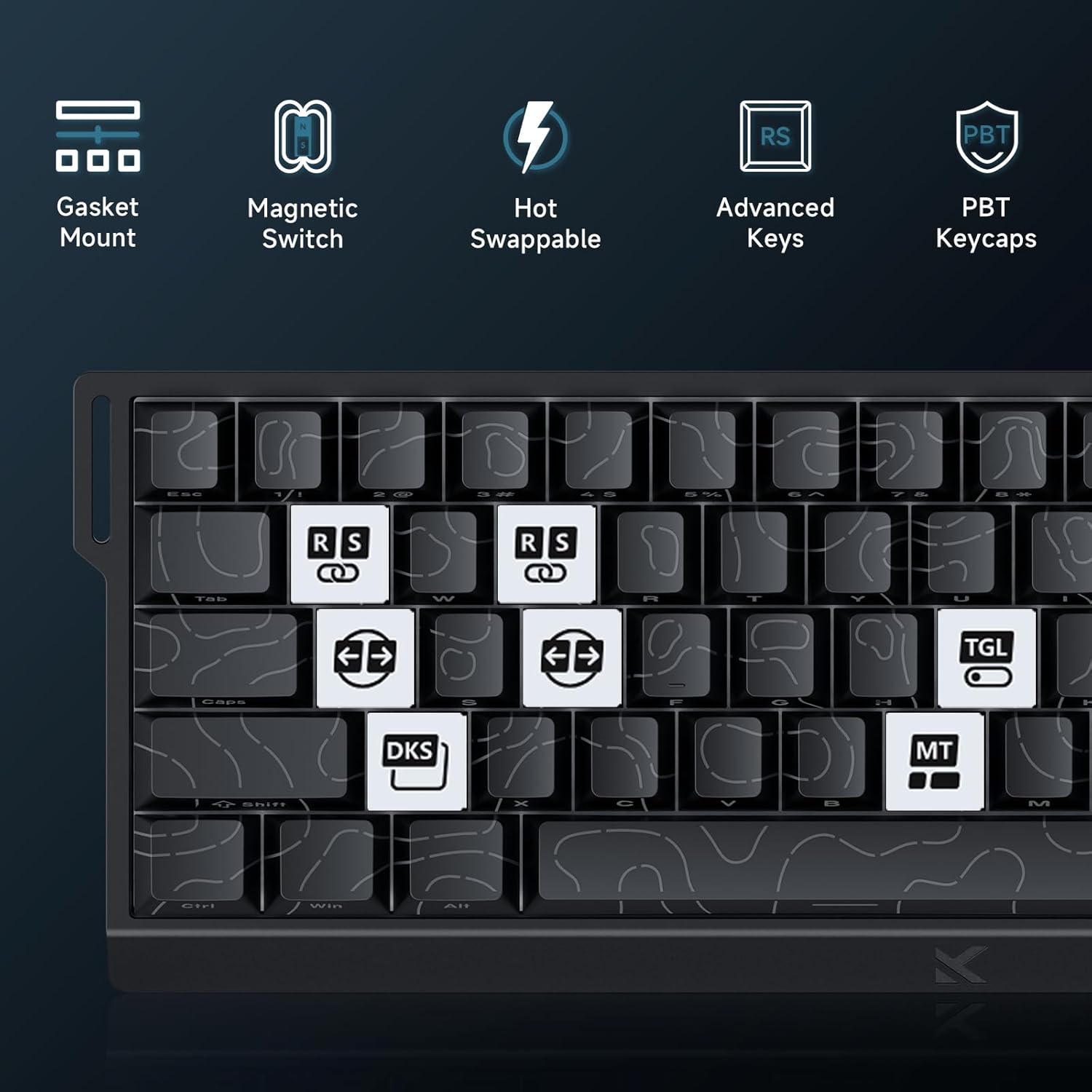
Image: Advanced Key Features. This image highlights various advanced features such as Gasket Mount, Magnetic Switches, Hot-Swappable design, and specific key functions like RS (Rappy Snappy), DKS (Double KeyStroke), MT (Multi-Tap), and TGL (Toggle).
5.2 RGB-асвятленне
The keyboard features per-key RGB backlighting with 16 million colors and over 22 preset lighting effects.
- Убудаваны кантроль: Some basic lighting adjustments (e.g., changing effects, brightness) can be done directly on the keyboard using Fn key combinations. Refer to the keyboard's keycap legends for these shortcuts.
- M HUB Control: For full customization, including per-key lighting, custom effects, and color palettes, use the M HUB Web Кіроўца.

Image: RGB Lighting Effects. This image showcases the vibrant RGB backlighting of the MCHOSE ACE68 keyboard, highlighting its 22+ preset light effects.
6. Тэхнічнае абслугоўванне
6.1 Чыстка клавіятуры
- Генеральная ўборка: Выкарыстоўвайце мяккую безворсовую тканіну, злёгку dampПрацярыце клавішы і корпус вадой або мяккім ачышчальным растворам. Пазбягайце празмернай вільгаці.
- Выдаленне пылу: Выкарыстоўвайце сціснутае паветра, каб выдаліць пыл і смецце паміж клавішамі.
- Глыбокая ачыстка: For thorough cleaning, you can remove the keycaps using a keycap puller. Clean the keycaps separately with mild soap and water, ensuring they are completely dry before reattaching.
6.2 Замена клавіш і перамыкачоў
The MCHOSE ACE68 features hot-swappable switches, allowing you to easily replace switches without soldering.
- Зняцце клавіш: Use a keycap puller to gently pull keycaps straight up.
- Зняцце перамыкачоў: Use a switch puller to carefully grip the top and bottom clips of the switch and pull it straight out.
- Усталёўка выключальнікаў: Align the pins of the new switch with the holes on the PCB. Gently press the switch down until it clicks into place. Ensure the switch is seated correctly and not bent.
- Усталёўка каўпачкоў клавіш: Сумясціце каўпачок клавішы са штокам перамыкача і моцна націсніце, пакуль ён надзейна не замацуецца.

Image: Keyboard Internal Structure and Hot-Swappable Switches. This image provides an exploded view of the keyboard's internal components, including the precision pre-lubricated switches, stability switch plate, and PORON sound dampening, illustrating its hot-swappable design.

Image: Uranus Magnetic eSports Switches. This image details the specifications of the Uranus Magnetic eSports switches, including their actuation range (0.1-3.4mm), total travel (3.4mm), sensitivity (0.005mm), trigger pressure (32 ± 5 gf), and lifespan (100 million clicks).
7. Выпраўленне непаладак
7.1 Агульныя праблемы і рашэнні
| выпуск | Магчымая прычына | Рашэнне |
|---|---|---|
| Клавіятура не адказвае | Слабае падключэнне кабеля, няспраўны порт USB, праблема з драйверам. |
|
| Клавішы не рэгіструюцца або ўводзяцца два разы | Dust/debris under keycap, switch malfunction, incorrect actuation settings. |
|
| RGB-падсветка не працуе або працуе няправільна | Software glitch, incorrect settings, power issue. |
|
| M HUB Web Driver not detecting keyboard | Browser incompatibility, connection issue, firewall. |
|
8. Тэхнічныя характарыстыкі
| Асаблівасць | Дэталь |
|---|---|
| Марка | MCHOSE |
| мадэль | ACE68 |
| Макет | 65% (68 keys), QWERTY |
| Тып перамыкача | Uranus Magnetic Standard (StellarVision 2.0 Magnetic Adjustable Switches) |
| Дыяпазон спрацоўвання | 0.005 mm to 3.4 mm (adjustable) |
| Стаўка апытання | 8000 Гц |
| Стаўка справаздачы | 0.1 мс |
| Клавішы | PBT Double-Shot, Cherry Profile |
| Падсвятленне | RGB (16 million colors, 22+ preset effects) |
| Сувязь | Правадны (USB-C) |
| Сумяшчальныя прылады | Кампутар |
| Памеры (Д х Ш х У) | 32 см x 15 см x 3.5 см (12.6 цалі x 5.9 цалі x 1.4 цалі) |
| Унутраны матэрыял | Алюміній, Пластык |
| Асаблівасці | Ergonomic, Backlit, Customizable Keys, Programmable Keys, Hot-Swappable |

Image: 8000 Hz Polling Rate. This image highlights the keyboard's 8000 Hz polling rate, indicating ultra-fast 0.01ms report rate and significantly faster actuation and response times.
9. Гарантыя і падтрымка
9.1 Гарантыя вытворцы
The MCHOSE ACE68 Magnetic Gaming Keyboard comes with a 2-гадовая гарантыя вытворцыГэтая гарантыя распаўсюджваецца на дэфекты матэрыялаў і вырабу пры нармальным выкарыстанні. Калі ласка, захавайце пацвярджэнне пакупкі для прэтэнзій па гарантыі.
9.2 Падтрымка кліентаў
For technical assistance, troubleshooting, or warranty inquiries, please contact MCHOSE customer support.
- Webсайт: Visit the official MCHOSE website for support resources, FAQs, and contact information. (Канкрэтны URL not provided, refer to product packaging or official MCHOSE webсайт)
- Інтэрнэт-рэсурсы: Check for updated drivers, firmware, and user guides on the MCHOSE support page.
10. Відэарэсурсы
No official product videos from the seller were provided in the product data to embed in this manual. Please refer to the manufacturer's official website or YouTube channel for any available video guides or demonstrations.