
Уводзіны
This manual provides essential information for setting up, operating, maintaining, and troubleshooting your PELADN WI6 N150 Mini PC. Please read this guide thoroughly before using your device to ensure optimal performance and longevity.
The PELADN WI6 N150 Mini PC is a compact and powerful desktop computer designed for various tasks, from office work and online education to home theater and light gaming. It features a 13th Gen Twin Lake N150 processor, 8GB DDR4 RAM, and a 256GB SSD, offering efficient performance in a small form factor.
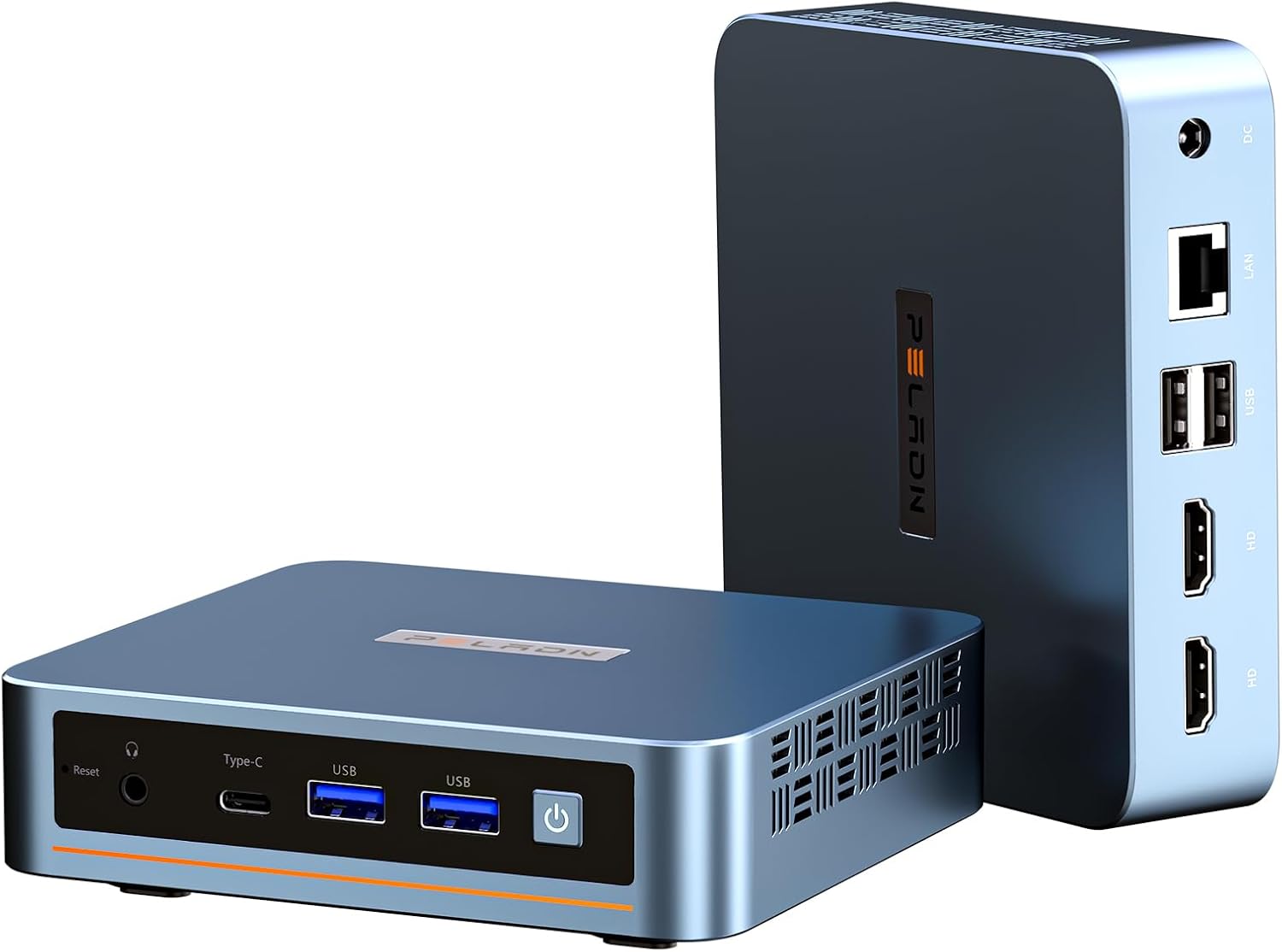
Спераду і ззаду view of the PELADN WI6 N150 Mini PC, showcasinдзякуючы кампактнаму дызайну і розным партам.
Пачатак працы
Змест пакета
Перад тым, як працягнуць наладу, пераканайцеся, што ў камплекце ёсць усе неабходныя рэчы:
- PELADN WI6 N150 Mini PC
- Адаптар сілкавання і кабель
- HD кабель
- Кіраўніцтва карыстальніка (гэты дакумент)
- Мацаванне VESA з дапамогай шруб

Прэзентацыя малюнкаўasing the accessories included in the package: power adapter, HD cable, user manual, and VESA mount with screws.
Падключэнне перыферыйных прылад
Follow these steps to connect your essential peripherals:
- Падключэнне дысплея: Use the provided HD cable to connect your monitor to one of the two HDMI 2.0 ports on the back of the Mini PC. Alternatively, you can use the Type-C port for display output.
- Падключэнне клавіятуры і мышы: Plug your USB keyboard and mouse into the available USB ports (USB 3.2 or USB 2.0) on the Mini PC. For wireless peripherals, ensure their dongles are connected or pair via Bluetooth.
- Падключыце харчаванне: Insert the power adapter cable into the DC Power port on the back of the Mini PC, then plug the adapter into a power outlet.

Detailed diagram of the mini PC's multiple interfaces, including USB 3.2, USB 2.0, HDMI, Type-C, 3.5mm Audio Jack, RJ45 LAN, and DC Power port.
Уключэнне і першапачатковая налада
After connecting all peripherals:
- Націсніце кнопку харчавання, размешчаную на пярэдняй панэлі міні-ПК.
- The system will boot up. The PELADN WI6 N150 Mini PC comes with Windows 11 Pro pre-installed.
- Выконвайце інструкцыі на экране, каб завяршыць пачатковую наладу Windows, у тым ліку мову, рэгіён, сеткавае падключэнне і стварэнне ўліковага запісу карыстальніка.
Аперацыя
Базавае выкарыстанне
The PELADN WI6 N150 Mini PC is suitable for a variety of daily computing tasks:
- Web Прагляд: Enjoy smooth internet browsing with dual-band WiFi 5 and Gigabit Ethernet.
- Прадукцыйнасць: Run office applications, manage documents, and handle emails efficiently.
- Паток: Stream 4K content to your display with ease.
- Лёгкія гульні: The N150 processor with 1000 MHz UHD Graphics supports casual gaming.
Падключэнне да сетак
Your Mini PC offers both wired and wireless network connectivity:
- Правадное злучэнне: Connect an Ethernet cable to the RJ45 LAN port for a stable 1000Mbps wired connection.
- Бесправоднае злучэнне: The Mini PC supports dual-band WiFi 5 (5GHz/2.4GHz) for fast and stable wireless internet access. To connect, navigate to the network settings in Windows and select your desired WiFi network.
- Bluetooth: Bluetooth 4.2 is available for connecting wireless peripherals such as keyboards, mice, and headphones.

Diagram illustrating stable network connections with dual-band WiFi 5 (5GHz/2.4GHz) and Bluetooth 4.2, showing the mini PC wirelessly connected to peripherals.
Multi-Display Setup
The PELADN WI6 N150 Mini PC supports up to three displays simultaneously, enabling enhanced multitasking and productivity:
- Connect up to two monitors using the HDMI 2.0 ports (max 4K 60Hz).
- Connect a third monitor using the Type-C port (which supports DP1.4 output).
- Configure display settings within your operating system to extend or duplicate your desktop across multiple screens.

Visual representation of the 4K triple-screen display capability, showing the mini PC connected to three monitors for office, gaming, and design tasks.
Using USB and Type-C Ports
The Mini PC is equipped with various ports to meet your connectivity needs:
- USB 3.2 (x2): For high-speed data transfer with compatible devices, up to 10Gbps.
- USB 2.0 (x2): For connecting standard USB peripherals like keyboards, mice, and printers.
- Порт тыпу C: This versatile port supports USB 3.2 data transfer (10Gbps), DP1.4 video output, and PD power input.
- 3.5 мм аўдыяраз'ём: Для падлучэння навушнікаў або знешніх дынамікаў.

Close-up of the mini PC's front panel, emphasizing the all-in-one Type-C port for data transmission, power supply, and screen display.
Абсталяванне скончанаview & Upgrades
Працэсар і прадукцыйнасць
The PELADN WI6 N150 Mini PC is powered by the 13th Gen Twin Lake N150 Processor, featuring 4 cores and 4 threads with a max turbo frequency of 3.6GHz. It includes 1000 MHz UHD Graphics, providing a performance boost over previous N-series processors for smooth operation.
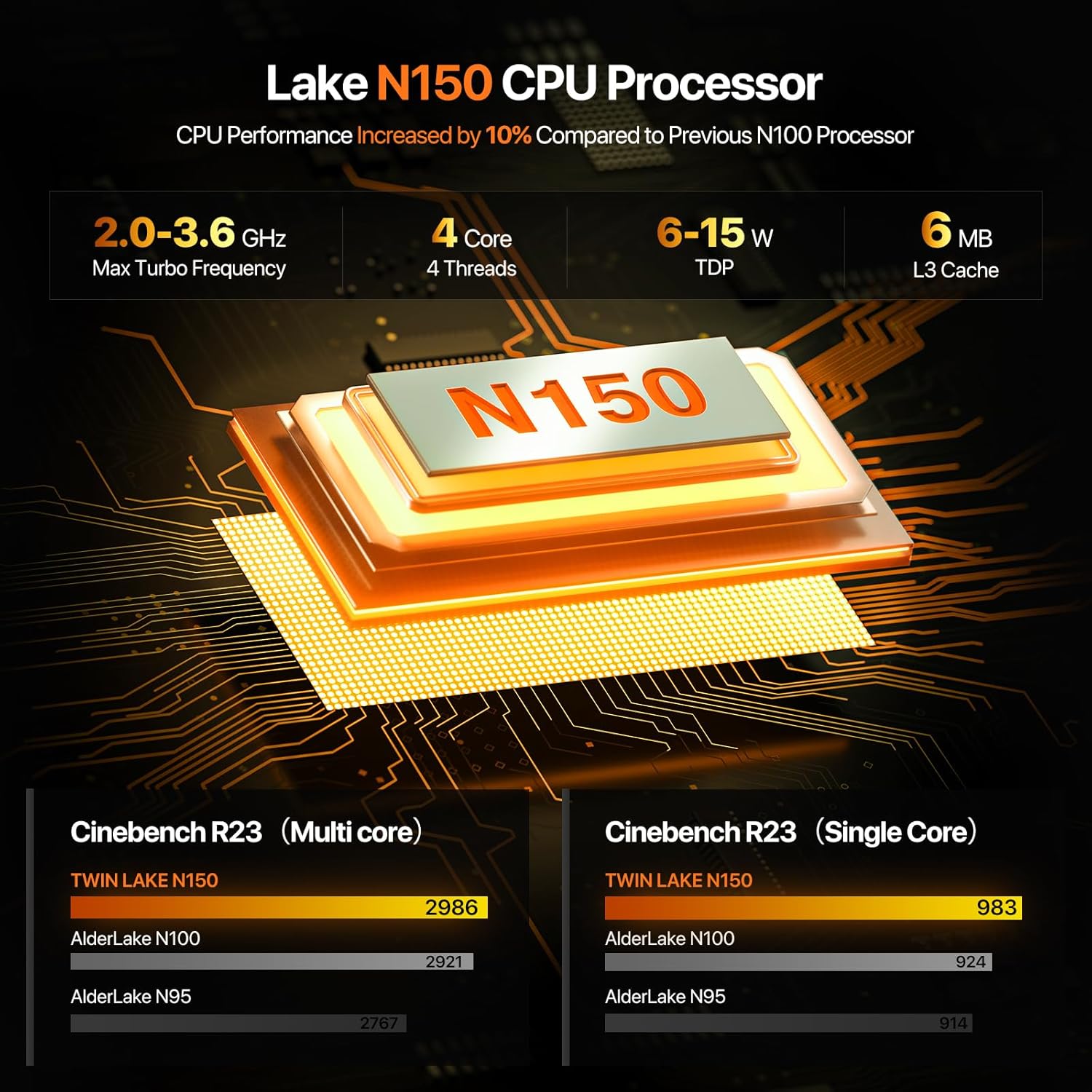
Diagram illustrating the N150 CPU Processor's specifications, including max turbo frequency, cores, threads, TDP, and L3 cache, with performance comparison to N100 and N95.
Memory (RAM) Upgrade
The Mini PC comes with 8GB DDR4 3200MHz RAM pre-installed. The system supports memory expansion up to 32GB. To upgrade, locate the SO-DIMM slot and replace or add compatible DDR4 memory modules.
Storage (SSD) Upgrade
A 256GB M.2 2280 SSD is pre-installed. The Mini PC supports storage expansion via PCIe 3.0 or SATA, with a maximum capacity of 4TB. This allows for significant storage upgrades for movies, photos, and files.

Унутраны view of the mini PC showing the pre-installed 8GB DDR4 RAM and 256GB SSD, highlighting upgradeability up to 32GB RAM and 4TB SSD.
Сістэма астуджэння
The PELADN WI6 N150 Mini PC incorporates an innovative design with a silent cooling fan and strategically placed cooling vents to ensure efficient heat dissipation and stable performance during operation.

Выбухнуў view diagram of the mini PC, highlighting innovative components and design elements like the silent cooling fan, cooling vents, DDR4 RAM, and M.2 SSD.
Тэхнічныя характарыстыкі
| Асаблівасць | Апісанне |
|---|---|
| Працэсар | 13th Gen Twin Lake N150 (4C/4T, 6MB Cache, up to 3.6GHz, 15W TDP) |
| Графіка | 1000 MHz UHD Graphics (24EUs) |
| АЗП | 8GB DDR4 3200MHz SO-DIMM (Expandable up to 32GB) |
| Захоўванне | 256GB M.2 2280 SSD (PCIe 3.0 or SATA, Expandable up to 4TB) |
| Аперацыйная сістэма | Compatible with Windows 11 Pro, 11, 10 Pro, 10, Ubuntu, Linux, Firewall Server |
| Відэавыхад | 2 x HDMI 2.0 (4K@60Hz), 1 x Type-C (DP1.4 output) - Supports Triple Display |
| Парты USB | 2 x USB 3.2 (10Gbps), 2 x USB 2.0 |
| Сетка | Dual-Band WiFi 5 (5GHz/2.4GHz, MU-MIMO), Bluetooth 4.2, 1 x RJ45 Gigabit LAN (1000Mbps) |
| Аўдыё | 1 х 3.5-мм аўдыёраз'ём (HP і MIC) |
| Іншыя асаблівасці | LAN wake-up, PXE boot, RTC wake-up, Auto power-on |
| Памеры (ДхШхВ) | 4.88 х 4.41 х 1.38 цалі |
| Вага | 1.52 фунта |
| Колер | Сіні |
Ліквідацыю непаладак
This section addresses common issues you might encounter with your PELADN WI6 N150 Mini PC.
Няма вываду дысплея
- Пераканайцеся, што манітор уключаны і выбрана правільная крыніца ўваходнага сігналу.
- Check that the HD cable (or Type-C cable) is securely connected to both the Mini PC and the monitor.
- Паспрабуйце іншы кабель дысплея або манітор, каб выключыць няспраўнае абсталяванне.
Няма сілы
- Verify that the power adapter is correctly plugged into the Mini PC and a working power outlet.
- Ensure the power button on the Mini PC has been pressed.
- Праверце адаптар сілкавання на наяўнасць бачных пашкоджанняў.
Праблемы з падключэннем да сеткі
- Wired: Ensure the Ethernet cable is securely connected to the RJ45 port and your router/modem. Check your router's status.
- Бесправадная сувязь: Verify that WiFi is enabled in Windows settings. Ensure you are connecting to the correct network and entering the password accurately. Restart your router/modem.
Павольная прадукцыйнасць
- Зачыніце непатрэбныя праграмы, якія працуюць у фонавым рэжыме.
- Праверце наяўнасць даступных абнаўленняў Windows і ўсталюйце іх.
- Пераканайцеся, што на вашым SSD-назапашвальніку дастаткова вольнага месца.
- Monitor system temperatures to ensure the device is not overheating.
BIOS Settings for Wake-on-LAN (WOL) and Wake-on-Power
The Mini PC supports Wake-on-LAN and Wake-on-Power features. These settings can typically be configured within the BIOS/UEFI interface. Accessing the BIOS usually involves pressing a specific key (e.g., Del, F2) during startup. Consult the BIOS settings for options related to 'Wake on WLAN and BT enable' and 'State after G3' (set to 'S0 State' for auto power-on).
Гарантыя і падтрымка
PELADN is committed to providing reliable products and excellent customer service.
Інфармацыя аб гарантыі
Your PELADN WI6 N150 Mini PC comes with a 12-месячная абмежаваная гарантыя, effective from the date of purchase. This warranty covers defects in design and workmanship. Please retain your proof of purchase for warranty claims.
Палітыка вяртання і абмену
PELADN offers a 30-day return and exchange policy from the date of purchase, allowing you to return the product for any reason within this period.
Тэхнічная падтрымка
Should you encounter any issues or require assistance, PELADN provides a dedicated after-sales team ready to assist you. We aim to respond to all inquiries within 24 гадзіны.
For support, please refer to the contact information provided with your product packaging or visit the official PELADN webсайт.

Icons representing PELADN's customer support: Technical Support, 24 Hours Reply, 30 Days Return, and 12 Months Warranty.