
Abestop AT8520
Abestop AT8520 DC Power Supply User Manual
Model: AT8520 (80V/20A/500W)
1. Уводзіны
The Abestop AT8520 is a high-resolution, variable DC power supply designed for precision applications. It features a 2.8-inch IPS LCD, 10mV/1mA resolution, and multiple protection mechanisms to ensure stable and safe operation. This manual provides essential information for the proper setup, operation, and maintenance of your AT8520 power supply.

Малюнак 1.1: Фронт view of the Abestop AT8520 DC Power Supply, showing the display and control interface.
2. Інструкцыі па тэхніцы бяспекі
To prevent electric shock, injury, or damage to the device, observe the following safety precautions:
- Ensure the power supply is connected to a grounded outlet.
- Не выкарыстоўвайце прыладу ў вільготных або damp умовы.
- Не адчыняйце casing; there are no user-serviceable parts inside. Refer servicing to qualified personnel.
- Праверце ўвод тtage compatibility before connecting to the mains power.
- Always disconnect power before making or changing connections to the output terminals.
- Avoid exceeding the maximum output voltage (80V) or current (20A) ratings. The maximum output power is 500W.
- Забяспечце дастатковую вентыляцыю вакол прылады, каб прадухіліць перагрэў.
3. Што ў скрынцы
The standard package for the Abestop AT8520 includes:
- Abestop AT8520 DC Power Supply Unit
- Шнур харчавання
- Кабель сувязі USB
- Кіраўніцтва карыстальніка (гэты дакумент)
4. Прадукт скончыўсяview і кампаненты
Familiarize yourself with the various parts and controls of the AT8520 power supply.

Малюнак 4.1: Front and rear panel components of the AT8520.
Элементы кіравання і дысплей на пярэдняй панэлі:
- 2.8-inch IPS LCD: Адлюстроўвае тtagіндыкатары е, току, магутнасці і стану.
- Ручка рэгулявання: Used for setting voltage, current, and navigating menus.
- Кнопка V: тtage Setting Button.
- Кнопка I: Current Setting Button.
- Кнопка OVP: Аверволtage Protection Setting.
- Кнопка OCP: Overcurrent Protection Setting.
- Кнопка адлюстравання: Curve Display Switch Button.
- Кнопка памяці: Accesses memory functions for storing and recalling settings.
- Кнопка ўключэння/выключэння: Toggles output power.
- Channel Output Terminals: Red (+) and Black (-) terminals for connecting the load. Green terminal for ground.
Кампаненты задняй панэлі:
- Вентылятар астуджэння: Забяспечвае актыўнае астуджэнне ўнутраных кампанентаў.
- Улада пераменнага току: For connecting the main power cord.
- Выключальнік сілкавання: Галоўны выключальнік сілкавання прылады.
- Трымальнік засцерагальніка: Змяшчае галоўны засцерагальнік для абароны.
- Порт USB: Для сувязі з ПК і дыстанцыйнага кіравання (падтрымка SCPI).
5. Настройка
5.1 Першасны агляд
Upon receiving the unit, inspect it for any signs of physical damage. If damage is found, contact your supplier immediately.
5.2 Падключэнне харчавання
- Ensure the main power switch on the rear panel is in the OFF position.
- Connect the provided power cord to the AC power input on the rear panel.
- Падключыце другі канец шнура харчавання да заземленай разеткі пераменнага току.
5.3 Падключэнне нагрузкі
Before connecting any load, ensure the power supply output is OFF (indicated by the front panel On/Off button). Use appropriate gauge wires for your application.
- Connect the positive (+) terminal of your load to the red output terminal on the power supply.
- Connect the negative (-) terminal of your load to the black output terminal on the power supply.
- For safety, connect the ground terminal (green) of the power supply to the ground of your test setup if required.
6. Інструкцыя па эксплуатацыі
6.1 Powering On and Basic Operation
- Flip the main power switch on the rear panel to the ON position. The display will illuminate.
- Націсніце V кнопка для выбару абtage adjustment. Rotate the adjustment knob to set the desired output voltage.
- Націсніце I button to select current adjustment. Rotate the adjustment knob to set the desired output current limit.
- Аднойчы тtage and current are set, press the Уключэнне/Выключэнне button on the front panel to enable the output. The display will show the actual output voltagе і ток.

Малюнак 6.1: The 2.8-inch IPS LCD displaying set and actual voltagэ/бягучыя значэнні.
6.2 Пастаянны абtage (CV) and Constant Current (CC) Modes
The AT8520 automatically operates in either Constant Voltage (CV) or Constant Current (CC) mode depending on the load and set limits:
- Рэжым рэзюмэ: When the load resistance is high, the output voltage remains constant at the set value, and the output current is determined by the load.
- Рэжым CC: When the load resistance is low, the output current remains constant at the set value, and the output voltagе вызначаецца нагрузкай.
6.3 Функцыі абароны
The unit incorporates multiple protection features:
- ОВП (Overvoltagе абарона): Prevents the output voltage from exceeding a user-defined limit. Press the OVP кнопку, каб усталяваць.
- OCP (абарона ад перагрузкі па току): Prevents the output current from exceeding a user-defined limit. Press the OCP кнопку, каб усталяваць.
- OLP (абарона ад перагрузкі): Protects against excessive output power.
- OTP (Over-temperature Protection): Адключае прыладу, калі ўнутраная тэмпература перавышае бяспечныя межы.
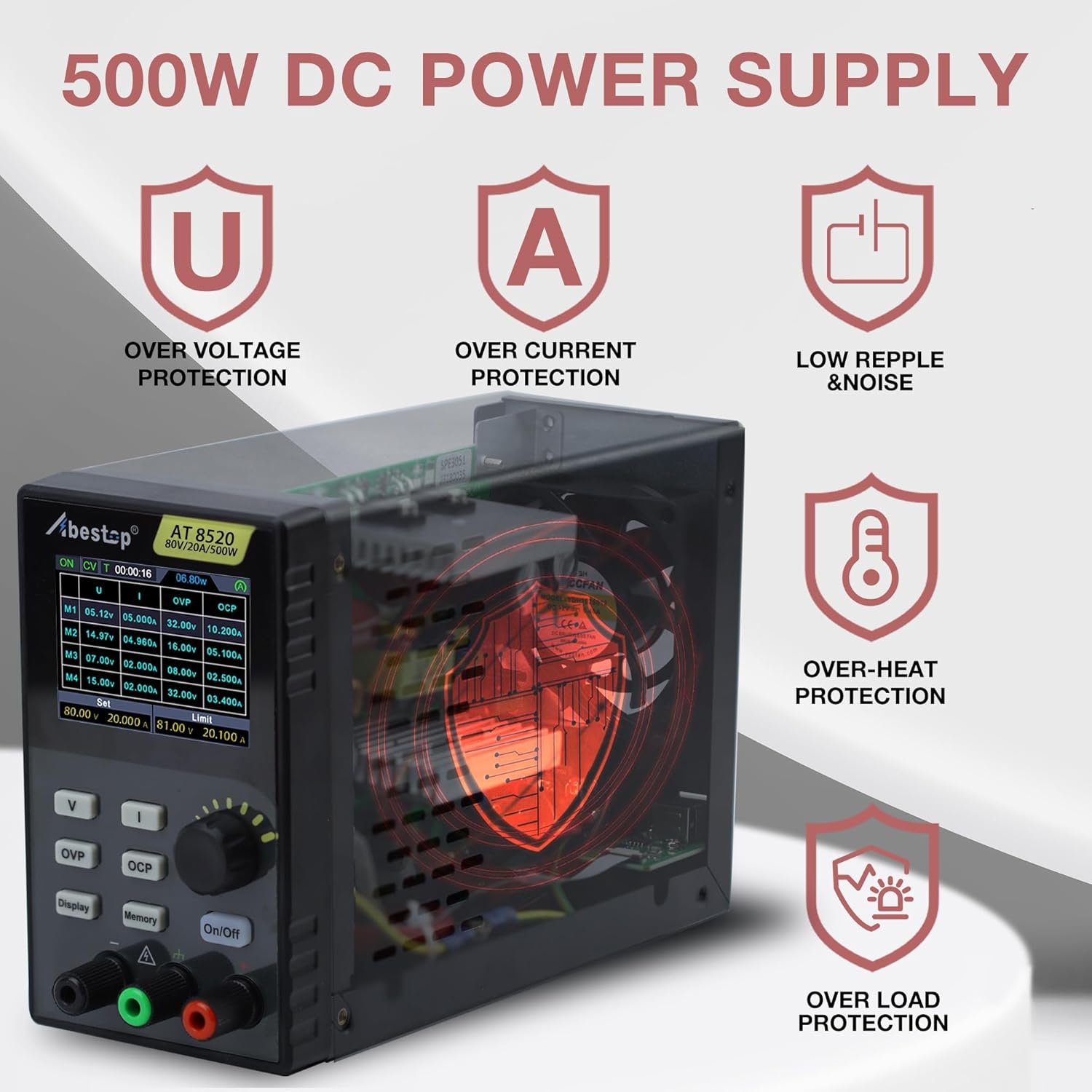
Малюнак 6.2: Visual representation of the AT8520's integrated protection mechanisms.
6.4 Функцыі памяці
The AT8520 allows storage of up to 4 groups of frequently used voltage and current settings for quick recall.
- Усталюйце патрэбную гучнасцьtagе і ток.
- Націсніце і ўтрымлівайце Памяць button to enter the memory save/recall interface.
- Use the adjustment knob to select a memory location (M1-M4).
- Press the adjustment knob to save or recall the settings.

Малюнак 6.3: The display showing the programmable memory interface for quick output settings.
6.5 USB Communication and SCPI Support
The AT8520 supports USB communication for remote control and data logging via a PC. It is compatible with SCPI (Standard Commands for Programmable Instruments) commands. Refer to the separate software manual for detailed instructions on PC connectivity and SCPI command usage.
7. Тэхнічнае абслугоўванне
7.1 Ачыстка
To clean the unit, disconnect it from all power sources. Use a soft, damp cloth with a mild detergent. Do not use abrasive cleaners or solvents. Ensure no liquid enters the device.
7.2 Вентыляцыя
Regularly check that the cooling fan and ventilation openings are free from dust and obstructions. Blocked vents can lead to overheating and reduced performance.
7.3 Замена засцерагальніка
If the unit fails to power on, the fuse may need replacement. Disconnect the power cord, open the fuse holder on the rear panel, and replace the fuse with one of the same type and rating (refer to specifications for fuse type).
8. Выпраўленне непаладак
| праблема | Магчымая прычына | Рашэнне |
|---|---|---|
| Прылада не ўключаецца | Power cord not connected; Main power switch off; Blown fuse | Check power cord connection; Turn on main power switch; Replace fuse (see Section 7.3) |
| Няма аб'ёму вывадуtagэ/ток | Выхад выключаны; спрацоўвае OVP/OCP; нагрузка адключана або няспраўная | Press front panel On/Off button; Check OVP/OCP settings and reset if necessary; Verify load connections |
| Нестабільны выхад | Poor load connection; Overheating; Faulty load | Check and secure load connections; Ensure proper ventilation; Test with a different load |
| Дысплей не працуе | Unit not powered on; Display fault | Check power connection; If unit powers on but display is blank, contact support |
9. Тэхнічныя характарыстыкі
| Параметр | Каштоўнасць |
|---|---|
| Назва мадэлі | AT8520 |
| Выхад Voltagе далёкасць | 0-80В |
| Дыяпазон выхаднога току | 0-20А |
| Выходная магутнасць | 500 Вт |
| тtage Рэзалюцыя | 10mV |
| Дзеючае дазвол | 1 мА |
| Дысплей | 2.8-цалевы IPS LCD |
| Функцыі абароны | OVP, OCP, OLP, OTP |
| Інтэрфейс сувязі | USB (падтрымка SCPI) |
| Памеры прадукту (Д х Ш х У) | 5.6 х 3.23 х 9 цалі |
| Вага прадмета | 3.3 фунта |
| Спосаб астуджэння | паветра |
| Тып засцерагальніка | T10A 250V (for 100-240V AC input) |

Малюнак 9.1: Dimensions of the Abestop AT8520 power supply.

Малюнак 9.2: Constant power wide range specifications, illustrating that 80V and 20A cannot be maximized simultaneously and must be adjusted dynamically based on load power (≤500W).
10. Інфармацыя аб гарантыі
Abestop products are designed and manufactured to high-quality standards. For specific warranty terms and conditions, please refer to the warranty card included with your product or contact Abestop customer support. This warranty typically covers defects in materials and workmanship under normal use.
11. Падтрымка кліентаў
If you encounter any issues or have questions regarding your Abestop AT8520 DC Power Supply that are not covered in this manual, please contact Abestop customer support. You can typically find contact information on the official Abestop webсайце або на ўпакоўцы прадукту.
For the latest information, software updates, and additional resources, please visit the official Abestop webсайт.
Ask a question about this manual
Ask about setup, troubleshooting, compatibility, parts, safety, or missing instructions. Manuals+ will review the question and use this page’s manual context to help answer it.