
1. Уводзіны
This manual provides detailed instructions for the installation, operation, and maintenance of your Acouto 7-Inch TFT LCD VGA Monitor. Please read this manual thoroughly before using the product to ensure proper function and to prevent damage. Keep this manual for future reference.
2. Інфармацыя па бяспецы
- Пераканайцеся, што крыніца сілкавання адпавядае названым аб'ёмамtage (12V) and current (greater than 1A) requirements.
- If using a car power supply, a regulator must be added to prevent interference and voltagе ваганні.
- Пазбягайце ўздзеяння на манітор экстрэмальных тэмператур, вільготнасці або прамых сонечных прамянёў.
- Не спрабуйце разбіраць або рамантаваць прыладу самастойна. Звяртайцеся па любыя паслугі па абслугоўванні да кваліфікаванага персаналу.
- Keep the monitor away from water or other liquids to prevent electric shock.
3. Змесціва ўпакоўкі
Праверце, ці ўсе пералічаныя ніжэй прадметы ўваходзяць у вашу ўпакоўку:
- 1 x 7-Inch LCD Display Screen (1024x600)
- 1 x Driver Board (Control Kit)
- 1 x Flat Cable (for connecting LCD to driver board)
- 1 х USB-кабель харчавання
- 1 х пульт дыстанцыйнага кіравання

Image 3.1: Complete package contents including the LCD screen, driver board, various cables, and a remote control.
4. Прадукт скончыўсяview
The Acouto 7-Inch TFT LCD VGA Monitor is a versatile display solution featuring a 1024x600 resolution. It is designed for various applications, including use with Raspberry Pi 3/2 or as a general computer display. The monitor supports multiple input types and offers image adjustment capabilities.
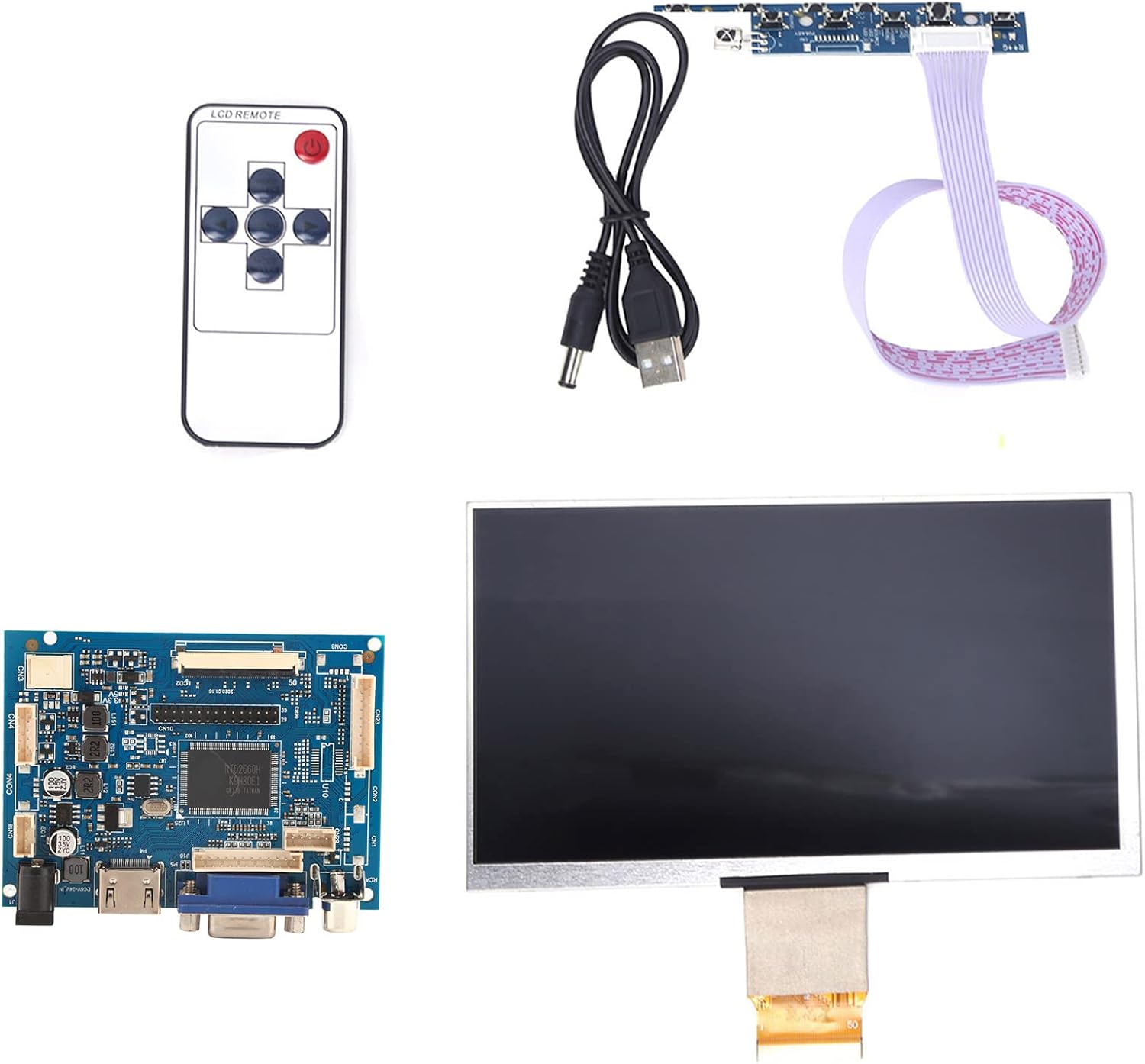
Выява 4.1: Канецview of the Acouto 7-inch TFT LCD VGA Monitor kit components.
4.1. ВК-дысплей
The 7-inch TFT LCD panel provides a clear display with a physical resolution of 1024x600 pixels. It supports various resolutions from 640x480 to 1600x1200 through arbitrary adjustment.

Image 4.2: The 7-inch TFT LCD display screen.
4.2. Driver Board
The driver board serves as the control unit for the LCD, featuring multiple input interfaces including 2 x AV channels, VGA, and 1 x HD input (version 1.2). It also includes buttons for menu navigation and settings adjustment.

Image 4.3: The driver control board with input ports.
4.3. Пульт дыстанцыйнага кіравання
A remote control is included for convenient adjustment of settings and input selection.

Image 4.4: The included remote control.
5. Настройка
Follow these steps to set up your Acouto 7-Inch TFT LCD VGA Monitor:
- Connect the LCD to the Driver Board: Carefully connect the flat cable from the LCD display to the corresponding connector on the driver board. Ensure the connection is secure and correctly oriented.
- Connect Video Input: Choose your desired video input (VGA, HD, AV1, or AV2) and connect the appropriate cable from your source device (e.g., Raspberry Pi, computer, DVD player) to the driver board.
- Падключыце харчаванне: Connect the USB power cord to the driver board's power input, and then connect it to a 12V power source (greater than 1A). If using a car power supply, ensure a regulator is in place.
- Уключэнне: Once all connections are secure, power on the monitor and your source device.

Image 5.1: LCD screen connected to the driver board.
6. Інструкцыя па эксплуатацыі
6.1. Уключэнне/выключэнне харчавання
Press the power button on the driver board or the remote control to turn the monitor on or off.
6.2. Выбар уводу
Use the 'Input' button on the driver board or remote control to cycle through available video inputs (AV1, AV2, VGA, HD).
6.3. Навігацыя па меню
Access the On-Screen Display (OSD) menu by pressing the 'Menu' button. Use the arrow buttons to navigate and the 'OK' or 'Enter' button to select options. Adjust settings such as brightness, contrast, color, and aspect ratio.
6.4. Image Flip and Convert
The monitor supports image flipping (up/down, left/right) and display format conversion (4:3 / 16:9). These functions can be accessed through the OSD menu or dedicated buttons on the remote control, providing a customizable viewвопыту.
Note: AV2 video input is designed for automatic camera screen display, typically used in automotive applications for reverse cameras.
7. Тэхнічнае абслугоўванне
Каб забяспечыць даўгавечнасць і аптымальную прадукцыйнасць вашага манітора, выконвайце наступныя рэкамендацыі па тэхнічным абслугоўванні:
- Ачыстка экрана: Акуратна працярыце экран мяккай тканінай без ворса. Для выдалення ўстойлівых плям злёгкуampПрамыйце тканіну вадой або неабразіўным сродкам для чысткі экранаў. Не распыляйце вадкасць непасрэдна на экран.
- Ачыстка Casing: Выкарыстоўвайце мяккую сухую тканіну для чысткі манітораasinг. Пазбягайце выкарыстання моцных мыйных сродкаў або растваральнікаў.
- захоўванне: When not in use for extended periods, store the monitor in a cool, dry place, away from direct sunlight and dust.
8. Выпраўленне непаладак
Калі ў вас узнікнуць якія-небудзь праблемы з маніторам, звярніцеся да наступнага кіраўніцтва па ліквідацыі непаладак:
| праблема | Магчымая прычына | Рашэнне |
|---|---|---|
| No display / Black screen |
|
|
| Image distorted / Poor quality |
|
|
| Пульт дыстанцыйнага кіравання не працуе |
|
|
9. Тэхнічныя характарыстыкі
Detailed technical specifications for the Acouto 7-Inch TFT LCD VGA Monitor:
| Асаблівасць | Спецыфікацыя |
|---|---|
| Марка | Акута |
| Назва мадэлі | Acouto536ocyn8e0 |
| Памер экрана | 7 цаляў |
| Тып дысплея | TFT LCD |
| Фізічнае дазвол | 1024 х 600 |
| Падтрымліваюцца дазволы | 640x480 да 1600x1200 |
| Суадносіны бакоў | 4:3 (convertible to 16:9) |
| Абсталяванне інтэрфейсу | VGA, HD (version 1.2), 2 x AV channels |
| Увод чалавечага інтэрфейсу | Кнопкі, пульт дыстанцыйнага кіравання |
| Аперацыйная Voltage | 12V (Power supply > 1A required) |
| Намінальная магутнасць | 6-7 Вт |
| Памеры прадукту | 30 х 19 х 4 см |
| Вага прадукту | 323 г |
10. Гарантыя і падтрымка
For warranty information and technical support, please refer to the documentation provided at the time of purchase or contact your retailer. Keep your purchase receipt as proof of purchase for any warranty claims.