
Уводзіны
The VTech PAW Patrol Light-Up Missions Pup Pad is an interactive electronic learning toy designed for children aged 3 years and up. This device features 26 light-up letter buttons and offers various activities to help children learn letters, words, spelling, and counting, all while engaging with their favorite PAW Patrol characters.

Фронт view of the VTech PAW Patrol Light-Up Missions Pup Pad, displaying its interactive screen and character details.
Што ў скрынцы
- PAW Patrol Light-Up Missions Pup Pad
- Кароткае кіраўніцтва
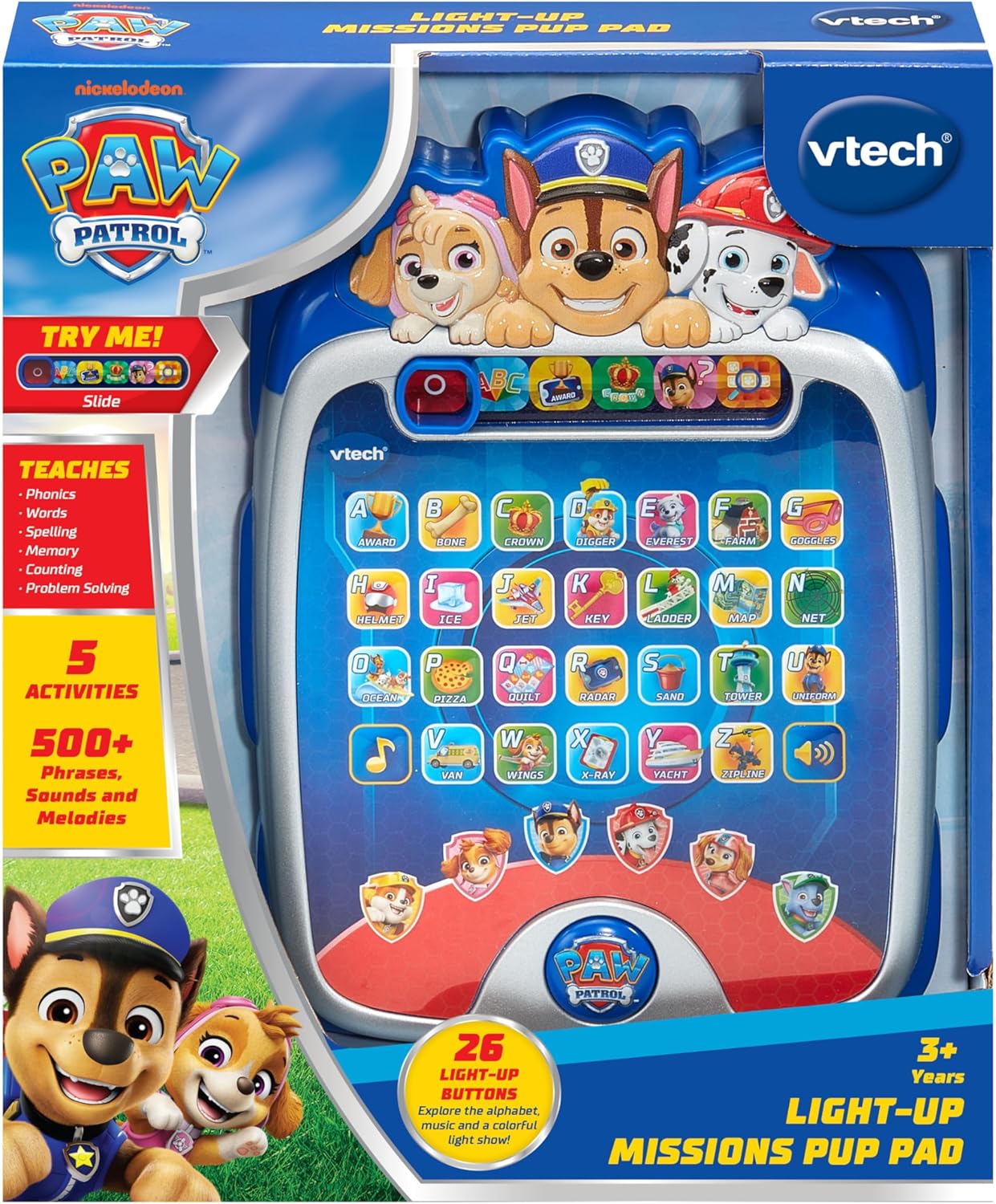
The PAW Patrol Light-Up Missions Pup Pad as it appears in its packaging.
Ўстаноўка акумулятара
The Pup Pad requires 3 AA batteries for operation. Batteries are included for demonstration purposes only. For regular use, new batteries are recommended.
- Знайдзіце батарэйны адсек на задняй частцы прылады.
- З дапамогай адвёрткі адкруціце шрубу на вечку батарэйнага адсека.
- Зніміце вечка.
- Устаўце 3 новыя батарэйкі тыпу АА, сачыце за правільнай палярнасцю (+/-).
- Замяніце крышку батарэйнага адсека і закруціце шрубу.
Заўсёды выкарыстоўвайце новыя батарэйкі рэкамендаванага тыпу. Не змешвайце старыя і новыя батарэйкі або батарэйкі розных тыпаў.
Пачатак працы
To power on the Pup Pad, locate the On/Off switch, typically found on the side or top of the device. Slide the switch to the 'On' position. The device will greet you and prompt you to begin an activity.

The Pup Pad screen with all letter buttons lit up, indicating it is ready for play.
Operating Modes and Activities
The Pup Pad offers several interactive learning activities. Use the mode selector buttons at the top of the screen to switch between activities.
1. Explore Letters and Words
Press any of the 26 light-up letter buttons to hear the letter's name, its phonetic sound, and a word starting with that letter. The device will also provide a fun fact about the word.
2. Spelling Practice
In this mode, the Pup Pad will prompt you to spell a word. Press the light-up letter buttons in the correct sequence to spell the word. The device provides guidance and positive reinforcement.
3. Counting Game
Follow the light-up sequence of the letter buttons to practice counting. The device will guide you through the numbers.
4. Guessing Game
Ryder will give clues, and you need to press the correct letter button on the Pup Pad to guess the word or object. This activity encourages problem-solving skills.
5. Pup Character Buttons
Press the six character buttons featuring PAW Patrol pups (Chase, Marshall, Skye, Rubble, Rocky, Liberty) to hear their special skills and learn how to spell their names.

A child engaging with the Pup Pad on the floor.

A child playing with the Pup Pad while seated on a couch.
Афіцыйнае відэа пра прадукт
This official video demonstrates the various interactive features and learning activities of the VTech PAW Patrol Light-Up Missions Pup Pad.
Тэхнічнае абслугоўванне
- Уборка: Пратрыце прыладу злёгку damp тканіна. Не выкарыстоўвайце агрэсіўныя хімікаты або абразіўныя ачышчальнікі.
- захоўванне: Store the Pup Pad in a cool, dry place away from direct sunlight and moisture when not in use.
- Сыход за батарэяй: Выміце батарэйкі, калі прылада не будзе выкарыстоўвацца працяглы час, каб прадухіліць іх уцечку.
Ліквідацыю непаладак
| праблема | Рашэнне |
|---|---|
| Прылада не ўключаецца і не рэагуе. | Check battery installation. Ensure batteries are fresh and correctly inserted. Replace if necessary. |
| Sound is distorted or too low/high. | While there is no dedicated volume button, ensure the speaker is not obstructed. Replace batteries if sound issues persist. |
| Lights are not working correctly. | Replace batteries. If the issue continues, contact customer support. |
Тэхнічныя характарыстыкі
- Памеры прадукту: 7.24 х 9.84 х 1.8 цалі
- Вага прадмета: 1 фунт
- Нумар мадэлі: 80-582400
- Рэкамендаваны вытворцам узрост: 3 гады і вышэй
- батарэі: 3 AA batteries (included for demo purposes)
- вытворца: VTech
- Дата выпуску: 5 чэрвеня 2025 г
Гарантыя і падтрымка
For warranty information or technical support, please refer to the contact details provided in the Quick Start Guide or visit the official VTech webсайт. Захоўвайце чэк аб куплі як пацвярджэнне пакупкі ў выпадку любых гарантыйных прэтэнзій.