
1. Уводзіны
The Fanvil V66-Pro is a professional IP phone designed for modern business communication. It features a 7-inch adjustable touch screen, supports 20 SIP lines, and includes built-in 2.4G/5G Wi-Fi (Wi-Fi 6) and a wireless Bluetooth handset. This manual provides detailed instructions for the proper installation, configuration, and operation of your Fanvil V66-Pro IP Phone.
2. Змесціва ўпакоўкі
Verify that all items are present in your package. If any item is missing or damaged, contact your vendor immediately.
- Fanvil V66-Pro IP Phone Unit
- Бесправадная трубка Bluetooth
- Шнур слухаўкі
- Кабель Ethernet
- Адаптар сілкавання
- Настольная падстаўка
- Кіраўніцтва па хуткай ўстаноўцы
3. Фізічны канецview
Familiarize yourself with the components of your Fanvil V66-Pro IP Phone.
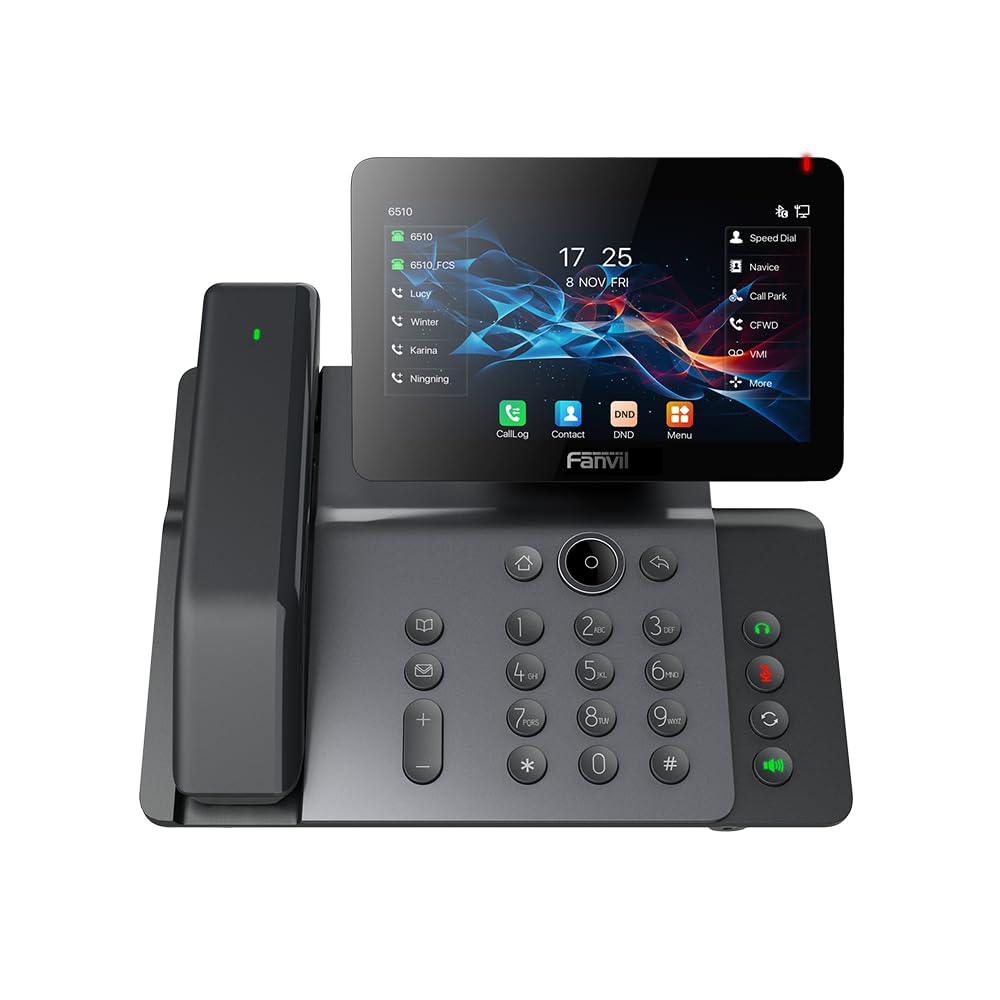
Figure 3.1: Fanvil V66-Pro IP Phone with its wireless Bluetooth handset shown separately.
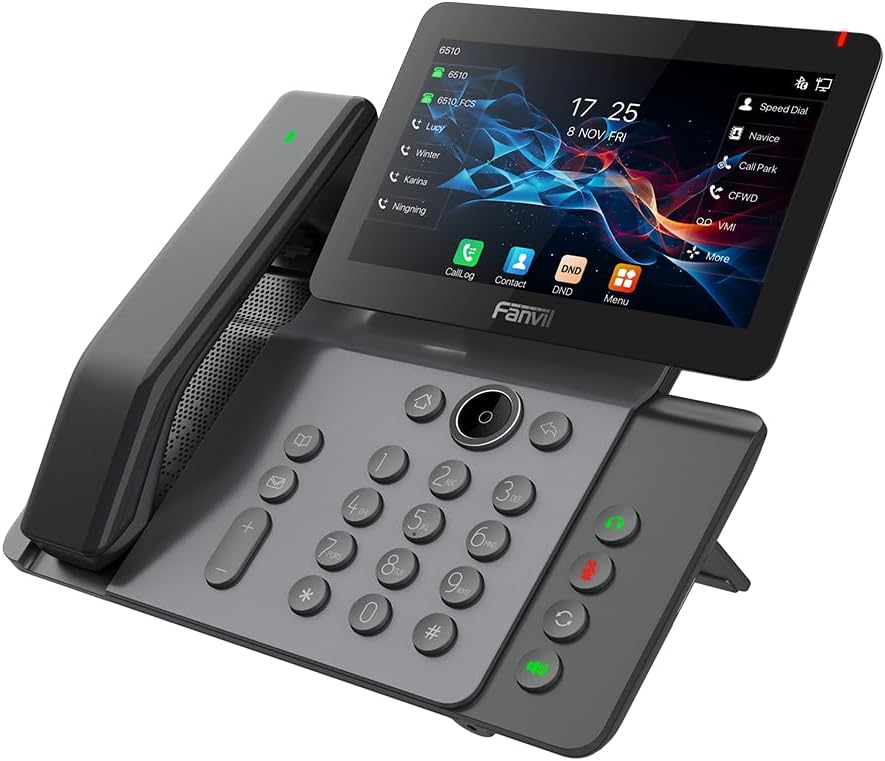
Малюнак 3.2: Спераду view of the Fanvil V66-Pro IP Phone with the handset attached to the main unit.
3.1 Асноўныя кампаненты
- Adjustable Touch Screen: 7-inch color display for navigation and information.
- Клавіятура: Standard numeric and function keys for dialing and control.
- Wireless Bluetooth Handset: For cordless communication.
- Гучная сувязь: Integrated speaker and microphone for hands-free calls.
- Функцыянальныя клавішы: Dedicated buttons for common features like message, hold, transfer, and conference.
- парты: Ethernet ports (LAN/PC), Power port, USB port, Headset port.
4. Настройка
4.1 Зборка тэлефона
- Attach the desk stand to the main phone unit.
- Connect the coiled handset cord to the main unit and the wired handset (if using a wired handset). For the wireless Bluetooth handset, ensure it is placed on the charging cradle.
4.2 Connecting to Network and Power
- Падключэнне да сеткі: Connect one end of the Ethernet cable to the LAN port on the back of the phone and the other end to your network switch or router. If connecting a PC, use the PC port on the phone.
- Падключэнне сілкавання: Connect the power adapter to the power port on the phone and then plug it into an electrical outlet. The phone will automatically power on.
4.3 Initial Boot-Up and Configuration
Upon first power-up, the phone will display a boot-up sequence. Once complete, it will attempt to obtain network settings via DHCP. If your network requires static IP configuration or specific SIP server details, these can be configured via the phone's menu or a web interface. Consult your network administrator for specific settings.
5. Інструкцыя па эксплуатацыі
5.1 Здзяйсненне і прыём выклікаў
- Каб зрабіць званок: Pick up the handset, press the speakerphone button, or press a line key. Dial the number and press the Dial soft key or #.
- Каб адказаць на званок: Pick up the handset, press the speakerphone button, or press the Answer soft key.
- Каб завяршыць выклік: Hang up the handset, press the speakerphone button again, or press the End Call soft key.
5.2 Выкарыстанне сэнсарнага экрана
The 7-inch touch screen allows for intuitive navigation. Tap icons to access features like Call Log, Contacts, DND (Do Not Disturb), and Menu. Swipe gestures may be supported for additional screens or options.
5.3 асноўных функцый выкліку
- Трымайце: Падчас актыўнага выкліку націсніце Трымай soft key. Press it again to resume the call.
- Перадача: Падчас актыўнага выкліку націсніце Трансфер soft key. Dial the number to transfer to, then press the Трансфер soft key again (blind transfer) or wait for the party to answer and then press Трансфер (прысутнічаў на перасадцы).
- Канферэнцыя: Падчас актыўнага выкліку націсніце Канферэнцыя soft key. Dial the second party's number and wait for them to answer. Press the Канферэнцыя зноў націсніце праграмную клавішу, каб аб'яднаць усіх удзельнікаў.
5.4 Налада Wi-Fi і Bluetooth
- Wi-Fi: Navigate to the phone's menu, select 'Settings' > 'Wi-Fi'. Enable Wi-Fi, scan for available networks, select your network, and enter the password if required.
- Bluetooth: Navigate to the phone's menu, select 'Settings' > 'Bluetooth'. Enable Bluetooth. For the wireless handset, ensure it is charged and in pairing mode. Select the handset from the discovered devices list to pair.
6. Тэхнічнае абслугоўванне
6.1 Ачыстка прылады
Use a soft, dry cloth to clean the phone's surface and screen. Avoid using liquid cleaners or abrasive materials, as they may damage the device. For stubborn marks, a slightly damp cloth with water may be used, ensuring no moisture enters openings.
6.2 Абнаўленне праграмнага забеспячэння
Periodically check for firmware updates to ensure optimal performance and access to new features. Updates can typically be performed via the phone's web interface or through your service provider's provisioning system. Consult your network administrator or service provider for guidance on updates.
7. Выпраўленне непаладак
7.1 Няма гудка
- Check all cable connections (Ethernet, power, handset).
- Ensure the phone is powered on and the screen is active.
- Праверце падключэнне да сеткі.
- Contact your service provider to confirm SIP registration status.
7.2 Cannot Connect to Network
- Ensure the Ethernet cable is securely connected to the LAN port and your network.
- Check if your network switch or router is functioning correctly.
- If using Wi-Fi, verify the correct network is selected and the password is entered accurately.
- Restart the phone and your network equipment.
7.3 Праблемы з адлюстраваннем
- If the screen is blank, ensure the phone is powered on.
- Adjust screen brightness settings in the phone's menu.
- Перазагрузіце тэлефон.
8. Тэхнічныя характарыстыкі
| Асаблівасць | Дэталь |
|---|---|
| Памеры прадукту | 9 х 7 х 5.6 цалі |
| Вага прадмета | 3.3 фунта |
| ASIN | B0DYKWF779 |
| Вытворца | Фанвіл |
| Колер | чорны |
| Тып тэлефона | рубчатая |
| Матэрыял | Метал, пластык |
| Крыніца харчавання | Правадная электрычная |
| Тып аўтаадказчыка | Лічбавы |
| Сумяшчальныя прылады | VoIP Services, Traditional Phone Networks |
| Магчымасць канферэнц-сувязі | Базавы |
| Шматлінейная аперацыя | Шматлінейная аперацыя |
9. Інфармацыя аб гарантыі
Fanvil products are typically covered by a limited manufacturer's warranty. The specific terms and duration of the warranty may vary by region and retailer. Please refer to the warranty card included with your product or visit the official Fanvil website for detailed warranty information. Keep your purchase receipt as proof of purchase for warranty claims.
10. Падтрымка
For technical assistance, product inquiries, or further support, please contact your vendor or visit the official Fanvil support webсайт:
Афіцыйны прадстаўнік Фанвіла Webсайт: www.fanvil.com
You may find FAQs, firmware downloads, and additional documentation on their support pages.