
1. Уводзіны
This manual provides detailed instructions for the installation, operation, and maintenance of your ANNKE AU-DT81DX200-V1 4K 8-Channel Digital Video Recorder (DVR). This DVR is designed for security surveillance systems, offering 4K (8MP) high-definition live viewing and recording capabilities. It features advanced H.265+ video compression, AI human/vehicle detection, and supports various camera types for flexible integration.

Image 1.1: The ANNKE 4K 8CH DVR connected to a display, illustrating its 4K Ultra HD video capability.
2. Змесціва ўпакоўкі
Verify that all items listed below are included in your package. If any items are missing or damaged, contact ANNKE customer support.
- 1x ANNKE 4K 8CH DVR with 2TB Hard Drive
- 1x 5.9 ft/1.8 m HDMI Cable
- 1x 3.2 ft/1 m Ethernet Cable
- 1x адаптар сілкавання
- 1x USB-мыш
- 1x Кіраўніцтва карыстальніка (гэты дакумент)
- 1x Налепка на сцяну

Image 2.1: Visual representation of all components included in the ANNKE 4K 8CH DVR package.
3. Сістэма скончанаview
The ANNKE AU-DT81DX200-V1 DVR is a hybrid 5-in-1 system, supporting various camera technologies. It can operate in two primary modes:
- Рэжым DVR: Supports up to 8 BNC (TVI/AHD/CVI/CVBS) cameras and an additional 4 IP cameras.
- NVR Mode: Can be configured to support up to 12 IP cameras exclusively.
This flexibility allows for integration with existing analog systems while providing options for future IP camera expansion.
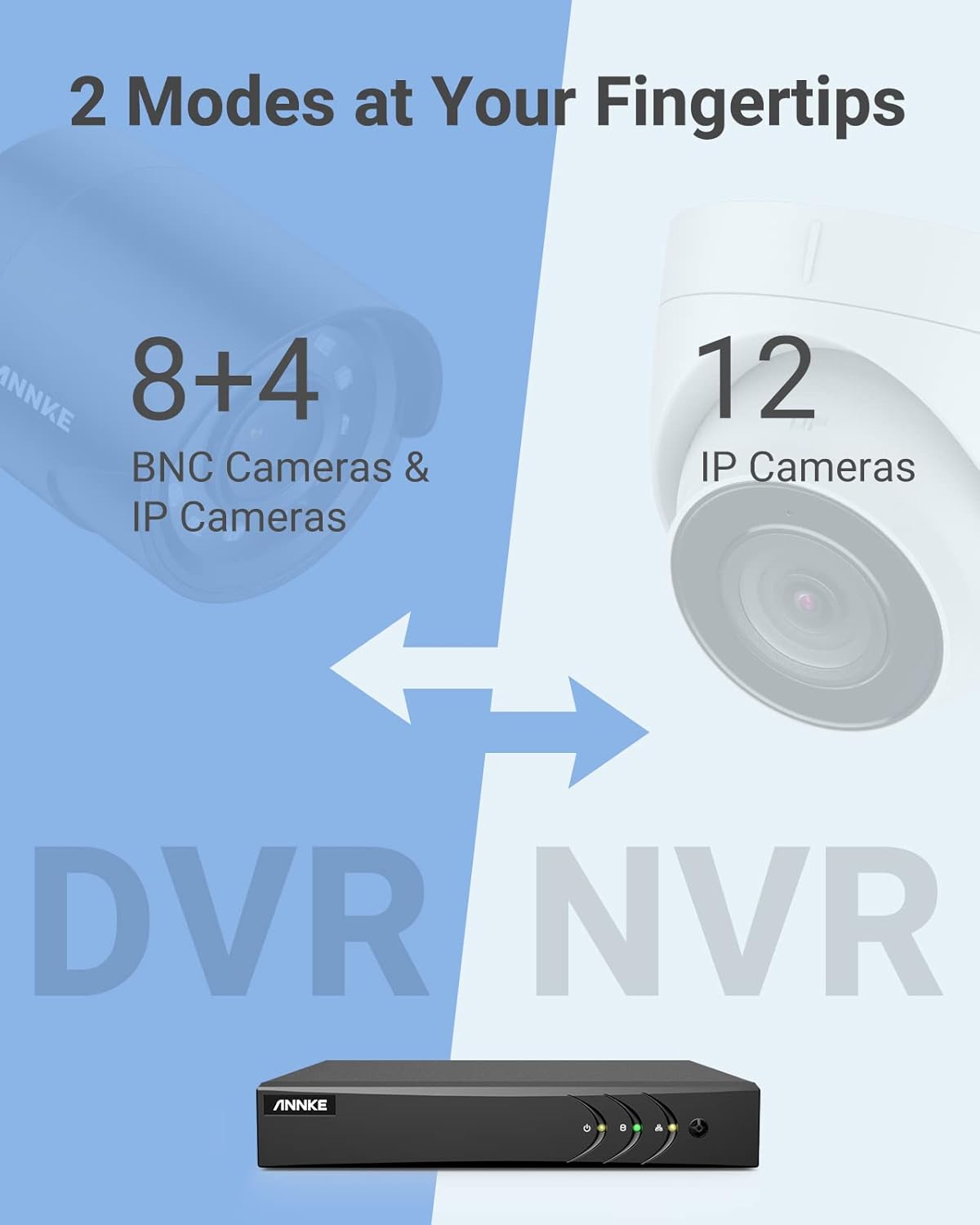
Image 3.1: Illustration of the DVR's dual operational modes, supporting both BNC and IP cameras or IP cameras exclusively.
4. Кіраўніцтва па ўстаноўцы
4.1 Фізічная ўстаноўка
- Падключэнне камер: Connect your security cameras to the BNC video input ports on the back of the DVR. For IP cameras, connect them to your network switch/router, and ensure the DVR is also connected to the same network via the Ethernet cable.
- Падключэнне манітора: Connect a monitor to the DVR's HDMI or VGA output port using the provided HDMI cable or a VGA cable (not included).
- Падключэнне USB-мышы: Падключыце мыш USB да аднаго з USB-портаў на відэарэгістратары.
- Падключыце харчаванне: Падключыце адаптар сілкавання да ўваходу сілкавання відэарэгістратара, а затым падключыце яго да разеткі. Відэарэгістратар уключыцца аўтаматычна.
4.2 Пачатковая канфігурацыя
Upon first boot, the DVR will guide you through an initial setup wizard. Follow the on-screen prompts to:
- Set up a strong password for the administrator account.
- Configure network settings (DHCP is recommended for most users).
- Усталюйце дату і час.
- Scan and add IP cameras if applicable.
5. Эксплуатацыя відэарэгістратара
5.1 У прамым эфіры View
Пасля першапачатковай налады відэарэгістратар пакажа жывую трансляцыю view from connected cameras. Use the USB mouse to navigate the interface. Right-click to access the main menu.
5.2 Запіс
The DVR is pre-configured for continuous recording. You can customize recording schedules, motion-triggered recording, or alarm-triggered recording via the main menu under Record > Schedule.
5.3 Прайграванне
Каб паўторнаview запісана footage:
- З прамога эфіру view, пстрыкніце правай кнопкай мышы і выберыце Прайграванне.
- Select the desired camera(s) and date.
- Use the timeline to navigate through recordings. Events (like motion detection) are often marked on the timeline for quick access.

Image 5.1: The DVR's playback interface, demonstrating how to locate and review recorded events on a timeline.
6. Пашыраныя магчымасці
6.1 AI Human/Vehicle Detection
The DVR incorporates deep learning-based motion detection 2.0, which can differentiate between human and vehicle movements. This significantly reduces false alarms caused by environmental factors such as leaves or light changes.
- Канфігурацыя: Enable and configure AI detection for each analog channel via the main menu under AI > Motion Detection 2.0.
- Smart Events: Supports line crossing and intrusion detection for specific areas.
- Абвесткі: Configure the DVR to send app push notifications, email alerts, or trigger a buzzer when human or vehicle motion is detected.
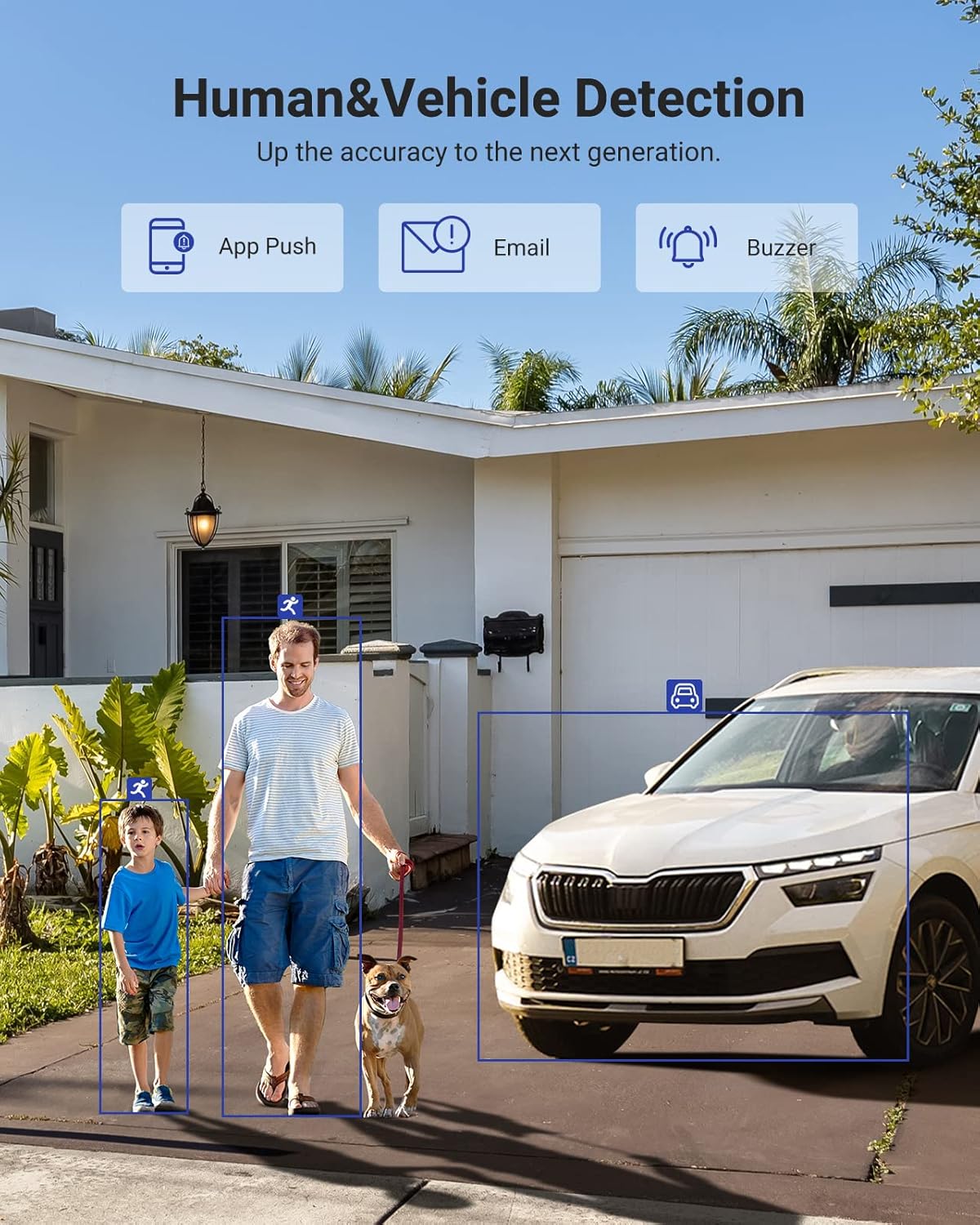
Image 6.1: Visual demonstration of the AI human and vehicle detection capability, showing how the system identifies and distinguishes between people and vehicles.
6.2 Аддалены доступ
Access your DVR remotely from anywhere using the ANNKE Vision App or a web браўзер.
- Праграма ANNKE Vision: Download the app from the App Store (iOS) or Google Play Store (Android). Register an account and add your DVR by scanning the QR code or entering its serial number.
- Web Браўзэр: Access the DVR's web інтэрфейс, увёўшы яго IP-адрас у a web браўзэр на вашым кампутары.
- Сумяшчальнасць: The system is compatible with various devices including smartphones, tablets, laptops, and personal computers. It also supports integration with Alexa for voice control.

Image 6.2: Remote access via the ANNKE Vision App, showing compatibility with mobile devices and Alexa.
7. Video Management
7.1 Відэасцісканне H.265+
The DVR utilizes advanced H.265+ video compression technology. This technology significantly reduces file sizes, saving up to 80% of storage space compared to H.264 compression, while maintaining video quality. This allows for longer recording durations on the same 2TB hard drive.

Image 7.1: Comparison illustrating the storage efficiency of H.265+ compression versus H.264.
8. Сумяшчальнасць
The ANNKE AU-DT81DX200-V1 is a versatile 5-in-1 hybrid DVR, designed to be compatible with a wide range of security cameras:
- HD TVI Input: Supports 8 MP@15 fps, 5 MP@20 fps, 3K@20 fps, 4 MP@30 fps.
- AHD Input: Supports 5 MP@20 fps, 4 MP@30 fps, 1080p@25 fps, 1080p@30 fps.
- HD CVI Input: Supports 4 MP@30 fps, 4 MP@25 fps, 1080p@25 fps, 1080p@30 fps.
- Уваход CVBS: Supports PAL/NTSC standards.
- IPC Input: Supports up to 8MP IP cameras.
This broad compatibility ensures that the DVR can integrate with both older analog cameras and modern IP cameras, providing a flexible upgrade path for existing surveillance systems.

Image 8.1: The DVR's compatibility with various camera technologies, including TVI, CVI, AHD, and IP cameras.
9. Тэхнічныя характарыстыкі
| Асаблівасць | Спецыфікацыя |
|---|---|
| Марка | АННКЕ |
| Нумар мадэлі | AU-DT81DX200-V1 |
| Тэхналогія падлучэння | Правадная |
| Дазвол відэазахопу | 4K (8 МП) |
| Колькасць каналаў | 8 (Analog) + 4 (IP) or 12 (IP) |
| Кампрэсія відэа | H.265 Pro+/H.265 Pro/H.265/H.264+/H.264 |
| Падтрымліваемыя тыпы камер | TVI, AHD, CVI, CVBS, IPC |
| Асаблівасці AI | Human Detection, Vehicle Detection, Line Crossing, Intrusion Detection |
| Ёмістасць памяці | 2 TB HDD (Up to 10 TB supported) |
| Аддалены доступ | ANNKE Vision App, Web Браўзэр |
| Сумяшчальныя прылады | Cameras, Laptops, Personal Computers, Smartphones, Tablets |
| Крыніца харчавання | Правадная электрычная |
| Колер | Чорны |
| Памеры прадмета | 17.13 х 12.4 х 3.86 цалі |
10. Тэхнічнае абслугоўванне
Рэгулярнае тэхнічнае абслугоўванне забяспечвае аптымальную прадукцыйнасць і даўгавечнасць вашай сістэмы відэарэгістратара.
- Уборка: Keep the DVR free from dust. Use a soft, dry cloth to clean the exterior. Do not use liquid cleaners.
- Вентыляцыя: Ensure the DVR is placed in a well-ventilated area to prevent overheating. Do not block ventilation openings.
- Абнаўленні прашыўкі: Перыядычна правярайце афіцыйныя дадзеныя ANNKE website for firmware updates. Keeping your DVR's firmware updated can improve performance, add new features, and enhance security.
- Рэзервовае капіраванне даных: Рэгулярна рабіце рэзервовыя копіі важных відэаtage to an external storage device.
- Стан жорсткага дыска: The DVR's menu may offer options to check the health status of the installed hard drive. Monitor this periodically.
11. Выпраўленне непаладак
У гэтым раздзеле разглядаюцца распаўсюджаныя праблемы, з якімі вы можаце сутыкнуцца пры выкарыстанні відэарэгістратара.
- Няма відэавыхаду:
- Check HDMI/VGA cable connections to both the DVR and the monitor.
- Пераканайцеся, што манітор настроены на правільную крыніцу ўваходнага сігналу.
- Verify the DVR is powered on (power indicator light should be active).
- No Camera Display:
- Check camera power supply and video cable connections.
- For IP cameras, ensure they are on the same network as the DVR and properly added in the DVR's camera management settings.
- Verify camera compatibility with the DVR (refer to Section 8).
- Аддалены доступ не працуе:
- Пераканайцеся, што відэарэгістратар падключаны да Інтэрнэту.
- Check network settings on the DVR (e.g., DHCP enabled, correct IP address).
- Verify the ANNKE Vision App is updated to the latest version.
- Ensure the DVR is properly added to your ANNKE Vision account.
- Ілжывыя сігналы трывогі:
- Adjust the sensitivity of motion detection in the DVR settings.
- Utilize the AI Human/Vehicle Detection feature (Section 6.1) to filter out irrelevant movements.
- Define specific detection zones to exclude areas with frequent non-threatening movement.
If you continue to experience issues, please contact ANNKE customer support.
12. Гарантыя і падтрымка
ANNKE products typically come with a limited warranty. Please refer to the warranty card included in your package or visit the official ANNKE webпадрабязныя гарантыйныя ўмовы для вашага рэгіёна глядзіце на сайце.
Па пытаннях тэхнічнай падтрымкі, запытаў па прадукце або гарантыйных прэтэнзіях звяртайцеся ў службу падтрымкі кліентаў ANNKE праз іх афіцыйную website or the contact information provided in your product documentation. Have your model number (AU-DT81DX200-V1) and purchase details ready when contacting support.
Афіцыйны прадстаўнік ANNKE Webсайт: www.annke.com