
Уводзіны
This manual provides detailed instructions for the proper use and maintenance of your 82Ms-A Scientific Calculator. Designed for students and professionals, this calculator features a 2-line display, multi-function keys, and supports up to 240 functions, including trigonometric calculations. Please read this manual thoroughly to ensure optimal performance and longevity of your device.
Што ў скрынцы

Image: The 82Ms-A Scientific Calculator as packaged, indicating one unit is included.
- 82Ms-A Scientific Calculator (1 unit)
- Кіраўніцтва карыстальніка (гэты дакумент)
Настройка
Ўстаноўка акумулятара

Выява: Падрабязны view showing the open battery compartment of the calculator, revealing two AAA batteries.
The 82Ms-A Scientific Calculator is powered by a long-lasting battery. To install or replace batteries:
- Пераканайцеся, што калькулятар уключаны ВЫКЛ.
- Знайдзіце вечка батарэйнага адсека на задняй панэлі калькулятара.
- Зніміце вечка ў кірунку, паказаным стрэлкай (калі яна ёсць).
- Insert new batteries, ensuring correct polarity (+/-) as marked inside the compartment.
- Зачыніце вечка батарэйнага адсека, пакуль яна надзейна не зашчоўкнецца.
Інструкцыя па эксплуатацыі
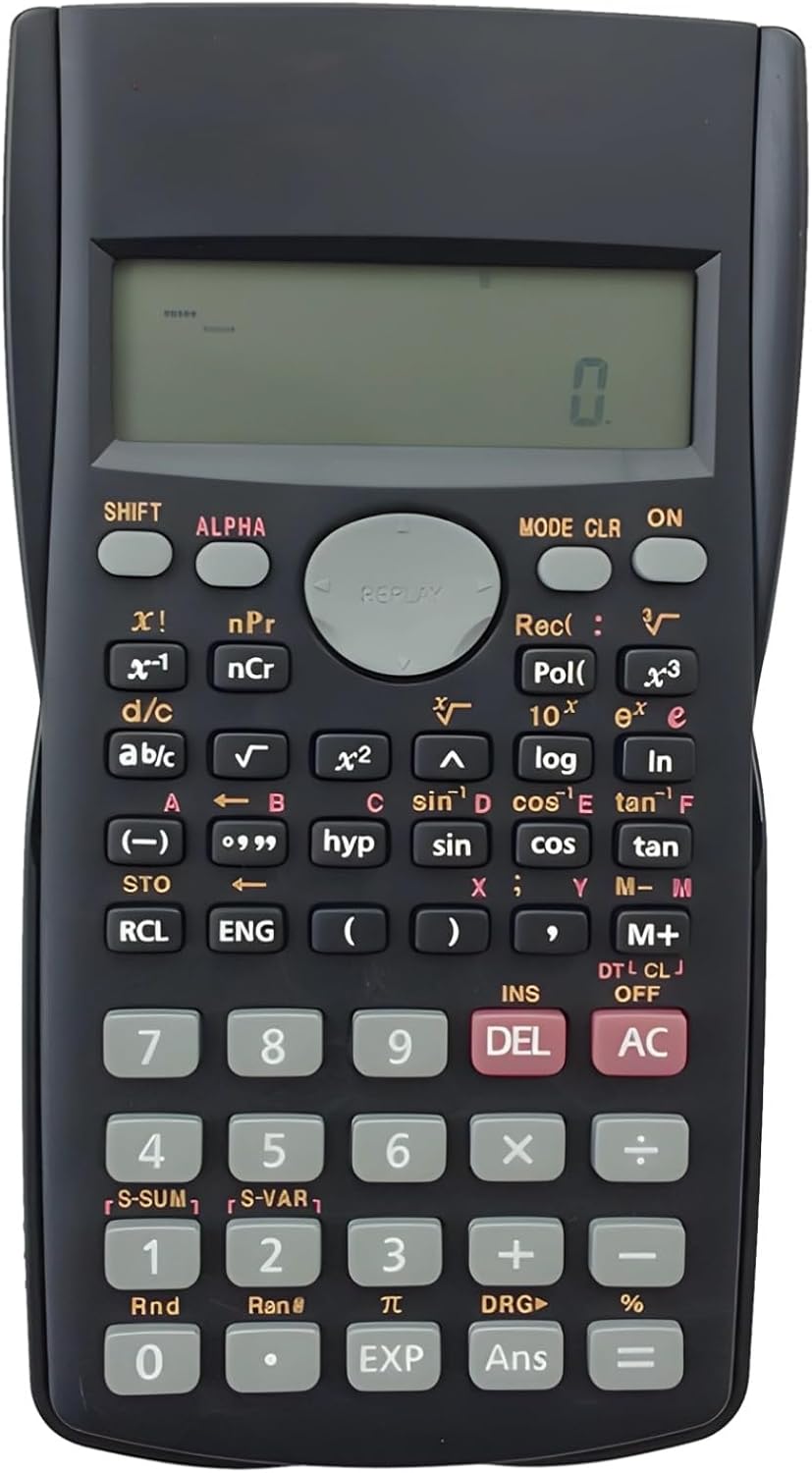
Image: The full layout of the 82Ms-A Scientific Calculator, highlighting its 2-line display and various function keys.
Уключэнне/выключэнне харчавання
- Каб уключыць: націсніце кнопку ON ключ.
- To turn off: Press ЗРУХ затым AC (ВЫКЛ.).
Асноўныя разлікі
Уводзьце лічбы з дапамогай лічбавай клавіятуры. Выкарыстоўвайце +, -, ×, і ÷ keys for standard arithmetic operations. Press = для адлюстравання выніку.
Multi-Function Keys and 2-Line Display
The calculator features a 2-line display, showing both the input expression and the result simultaneously. Many keys have multiple functions, indicated by colored labels above or below them. These functions are accessed using the ЗРУХ і АЛЬФА ключы.
- ЗРУХ: Activates the yellow-labeled functions. Press ЗРУХ, then the desired key.
- АЛЬФА: Activates the red-labeled functions (variables, constants). Press АЛЬФА, then the desired key.
- РЭЖЫМ: Changes the calculator's mode (e.g., COMP, STAT, EQN). Press РЭЖЫМ repeatedly to cycle through options.
- CLR: Clears specific data or settings. Press ЗРУХ затым CLR to access clear options.
- DEL: Deletes the character at the cursor position.
- AC: Clears all input and returns to the initial state.
Пашыраныя функцыі
The 82Ms-A supports 240 functions, including trigonometric (sin, cos, tan), logarithmic (log, ln), power (x², x³), roots (√, ³√), fractions (a b/c), and statistical calculations. Refer to the specific key labels and their SHIFT/ALPHA functions for detailed usage.
- Trigonometric Functions: Выкарыстоўвайце грэх, cos, загар keys. For inverse functions (sin⁻¹, cos⁻¹, tan⁻¹), use ЗРУХ with these keys.
- Logarithmic Functions: Выкарыстоўвайце часопіс (дзясяткавая сістэма злічэння) і ln (natural logarithm) keys.
- Power and Root Functions: Выкарыстоўвайце x² для ўзвядзення ў квадрат, ЗРУХ затым x² for square root (√). For other powers and roots, use x³ or ЗРУХ затым x³ (³√).
- Дробы: Выкарыстоўвайце аб/к key to input and convert fractions.
Тэхнічнае абслугоўванне
Уборка
Для чысткі калькулятара выкарыстоўвайце мяккую сухую тканіну. Для ўстойлівага бруду злёгкуampen the cloth with water or a mild, non-abrasive cleaner. Do not use strong solvents, alcohol, or abrasive cleaners, as these can damage the casinг і дысплей.
Захоўванне
Store the calculator in a cool, dry place away from direct sunlight and extreme temperatures. If storing for an extended period, it is recommended to remove the batteries to prevent leakage.
Ліквідацыю непаладак
| праблема | Магчымая прычына | Рашэнне |
|---|---|---|
| Калькулятар не ўключаецца. | Разраджаныя або няправільна ўсталяваныя батарэйкі. | Заменіце батарэйкі новымі, выконваючы палярнасць. |
| Дысплей цьмяны або пусты. | Нізкі зарад батарэі. | Заменіце батарэі. |
| Няправільныя вынікі разлікаў. | Incorrect mode setting or previous calculation error. | Прэса AC to clear. Check the current mode using the РЭЖЫМ key and adjust if necessary. |
| Клавішы не рэагуюць. | Dust or debris under keys; internal malfunction. | Gently clean around the keys. If problem persists, contact support. |
Тэхнічныя характарыстыкі

Image: The 82Ms-A Scientific Calculator with its length, width, and thickness measurements indicated.
| Асаблівасць | Дэталь |
|---|---|
| Нумар мадэлі | 71T71524TQPRRJC1J26SKQF |
| Тып дысплея | 2-радковы дысплей |
| Колькасць функцый | Да 240 функцый |
| Крыніца харчавання | Харчаванне ад батарэі |
| Памеры (Д х Ш х У) | 6.1 х 3.27 х 0.39 цалі |
| Вага прадмета | 5.3 унцыі |
| Колер | Чорны |
| Матэрыял | Пластыкавыя |
Гарантыя і падтрымка
Specific warranty information for this product is not provided within this manual. For warranty details, technical support, or service inquiries, please refer to the product packaging or contact the retailer from whom the product was purchased. Keep your purchase receipt as proof of purchase.