
1. Уводзіны
This manual provides essential information for the safe and efficient use of your Motorola Razr 60 Ultra smartphone. Please read this guide thoroughly before operating your device to ensure optimal performance and longevity. The Motorola Razr 60 Ultra is a foldable smartphone designed for advanced mobile computing and communication.
2. Што ў скрынцы
Праверце, ці ёсць усе прадметы ў ўпакоўцы вашага прадукту:
- Motorola Razr 60 Ultra Smartphone
- Кабель USB
- Чахол для тэлефона
- Інструмент выцягвання SIM-карты
3. Прылада скончанаview
The Motorola Razr 60 Ultra features an iconic foldable design with premium materials and advanced technology.
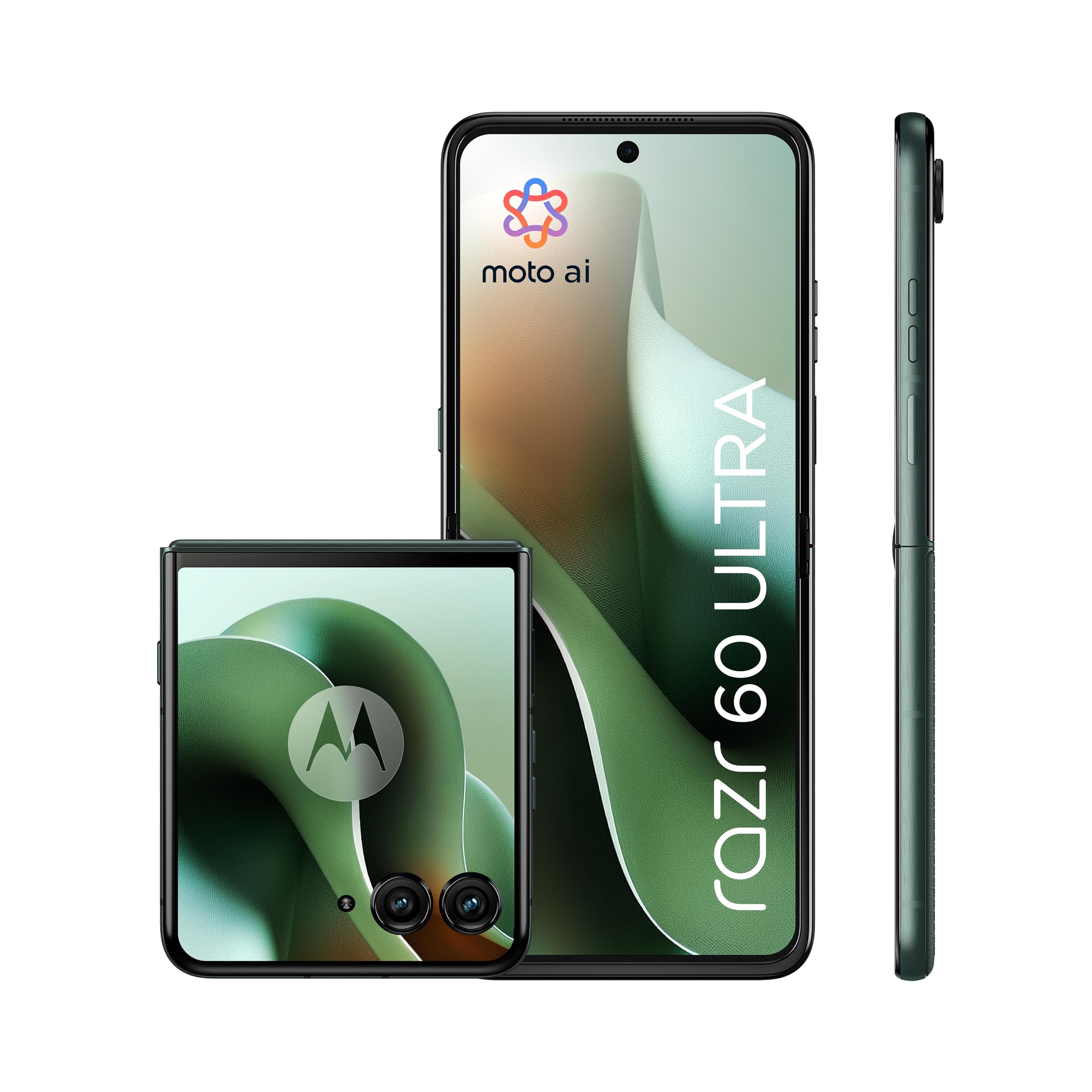
Figure 3.1: Motorola Razr 60 Ultra, folded view.
3.1 Дысплеі
- Знешні дысплей: A 4.0-inch pOLED display with up to 165Hz refresh rate, allowing access to functions without unfolding the phone.
- Унутраны дысплей: A 7.0-inch Super HD pOLED display with 165Hz refresh rate, Dolby Vision, and HDR10+ for an immersive visual experience.

Figure 3.2: External display functionality.

Figure 3.3: Internal display view.
3.2 Design and Durability
The device features a high-quality Alcantara finish and a durable titanium hinge. It is rated IP48 for dust and water resistance.

Figure 3.4: Design elements and durability features.
4. Настройка
4.1 Устаўка SIM-карты
- Знайдзіце латок для SIM-карты на бакавой панэлі прылады.
- Устаўце інструмент для выцягвання SIM-карты ў невялікую адтуліну побач з латком і акуратна націсніце, пакуль латок не выскочыць.
- Place your Nano SIM card(s) into the tray with the gold contacts facing down. This device supports Dual SIM.
- Асцярожна ўстаўце латок назад у слот, пакуль ён не зафіксуецца пачуўшы пстрычку.
4.2 Пачатковае ўключэнне і налада
- Націсніце і ўтрымлівайце кнопку харчавання, пакуль не з'явіцца лагатып Motorola.
- Выконвайце падказкі на экране, каб выбраць мову, падключыцца да сеткі Wi-Fi і наладзіць свой уліковы запіс Google.
- You will be guided through setting up security features such as fingerprint recognition and a screen lock (PIN, pattern, or password).
5. Кіраванне прыладай
5.1 Асноўная навігацыя
- Разгортванне/Складванне: Gently unfold the device to access the main internal display. Fold it to use the external display for quick interactions.
- External Display Usage: The 4.0-inch external display allows you to check notifications, control media, take quick photos, and interact with certain apps without opening the phone.
5.2 Moto AI Features
Your Motorola Razr 60 Ultra is enhanced with Moto AI, offering intelligent assistance and optimized performance. This includes features like Google Gemini for content creation and personalized smartphone experiences.

Figure 5.1: Interacting with Moto AI (Google Gemini) on the external display.
5.3 Quick Gestures
- Хуткі захоп: Twist your wrist twice quickly to open the camera from any screen.
- Хуткі ліхтарык: Make two chopping motions with your phone to turn the flashlight on or off.
6. Асаблівасці камеры
The Motorola Razr 60 Ultra is equipped with a versatile camera system for high-quality photography and videography.

Малюнак 6.1: Закончанаview of the camera system.
- Dual Rear Cameras: Two 50MP sensors, including a main camera with OIS (Optical Image Stabilization) and an ultrawide/macro lens.
- Пярэдняя камера: A 50MP selfie camera with Quad Pixel technology for enhanced low-light performance.
- Moto AI Integration: Utilizes AI for improved image processing, dynamic range, and detail capture, even in challenging lighting conditions.
- Флекс View & Camcorder: Use the foldable design to position the phone for unique shooting angles and hands-free video recording.
7. Акумулятар і зарадка
The device is powered by a 4700mAh battery, supporting multiple charging methods.

Figure 7.1: Battery and charging capabilities.
- Ёмістасць батарэі: 4700 Міліamper-hour (mAh).
- Зарадка TurboPower: Supports ultra-fast 68W wired charging, providing significant power in minutes.
- Бесправадная зарадка: Supports 30W wireless charging.
- Зваротная бесправадная зарадка: Capable of 5W reverse wireless charging to power compatible accessories.
- Сярэдні тэрмін службы батарэі: Up to 36 hours of usage on a single charge, depending on usage patterns.
8. Прадукцыйнасць
The Motorola Razr 60 Ultra delivers robust performance for demanding applications and multitasking.

Figure 8.1: Performance specifications.
- Працэсар: Qualcomm Snapdragon 8 Elite, providing high-speed processing and intelligent performance.
- Аператыўная памяць: 16GB installed RAM for smooth multitasking.
- Унутраная памяць: 512GB of internal memory for applications, media, and files.
- Аперацыйная сістэма: Android 15.0, offering the latest features and security updates.
- Падключэнне: Supports 5G for fast downloads and seamless streaming.
9. Тэхнічнае абслугоўванне і догляд
9.1 Ачыстка прылады
- Выкарыстоўвайце мяккую тканіну без ворса для чысткі экрана і корпуса тэлефона.
- Avoid using harsh chemicals or abrasive materials, which can damage the finish or screen.
- Для ўстойлівых плям злёгку працярыцеampпрацярыце тканіну вадой або спецыяльным ачышчальнікам для экранаў.
9.2 Screen Care for Foldable Display
- Avoid pressing hard on the screen, especially near the crease.
- Keep the screen free from sharp objects or debris when folding the device.
- Do not apply screen protectors not specifically designed for foldable displays.
9.3 Воданепранікальнасць і пыланепранікальнасць
The device has an IP48 rating, indicating resistance to dust and splashes. It is not designed for submersion in water. Avoid exposing the device to pressurized water or liquids.
9.4 Абнаўленне праграмнага забеспячэння
Regularly check for and install software updates to ensure your device has the latest features, security patches, and performance improvements. You can usually find this option in the device's Settings menu under "System" or "Software Update."
10. Выпраўленне непаладак
10.1 Агульныя праблемы і рашэнні
- Прылада не ўключаецца: Ensure the battery is charged. Connect the device to the charger for at least 15 minutes, then try powering it on.
- Экран не рэагуе: Restart the device by pressing and holding the Power button for about 10-15 seconds until it reboots.
- Акумулятар хутка разраджаецца: Check background app usage, reduce screen brightness, disable unnecessary features like GPS or Bluetooth when not in use. Ensure software is up to date.
- Праблемы з падключэннем (Wi-Fi/5G): Toggle Wi-Fi or mobile data off and on. Restart the device. For Wi-Fi, try forgetting the network and reconnecting.
- Збоі ў праграмах: Ачысціце кэш і даныя праблемнай праграмы ў раздзеле «Налады» > «Праграмы». Калі праблема не знікне, выдаліце і пераўсталюйце праграму.
10.2 Скід да заводскіх налад
If persistent software issues occur, a factory reset may be necessary. Папярэджанне: This will erase all data on your device. Back up important data before proceeding. Navigate to Settings > System > Reset options > Erase all data (factory reset).
11. Тэхнічныя характарыстыкі
Key technical specifications for the Motorola Razr 60 Ultra:
| Асаблівасць | Спецыфікацыя |
|---|---|
| Марка | Motorola |
| Назва мадэлі | Razr 60 Ultra |
| Аперацыйная сістэма | Android 15.0 |
| Тып працэсара | Qualcomm Snapdragon 8 Elite |
| Хуткасць працэсара | 4320 МГц |
| Усталяваная аператыўная памяць | 16 ГБ |
| Ёмістасць захоўвання дадзеных | 512 ГБ |
| Памер галоўнага экрана | 7.0 цалі |
| External Screen Size | 4.0 цалі |
| Тып экрана | pOLED |
| Частата абнаўлення | 165 Гц |
| Ёмістасць батарэі | 4700 мАг |
| Хуткая зарадка | 68 Вт турбамагутнасць |
| Бесправадная зарадка | 30 Вт |
| Зваротная бесправадная зарадка | 5W |
| Раздзяленне задняй камеры | 50 MP (Main) + 50 MP (Ultrawide/Macro) |
| Раздзяленне франтальнай камеры | 50 МП |
| Слоты для SIM-карт | Дзве SIM |
| Тэхналогія падлучэння | 5G, GSM, LTE, Wi-Fi |
| Узровень воданепранікальнасці | IP48 (воданепранікальнасць) |
| біяметрычная ідэнтыфікацыя | Распазнаванне адбіткаў пальцаў |
| Вага прадмета | 200 грам |
| Памеры прадмета | 17.1 х 0.7 х 7.4 см (у разгорнутым выглядзе) |
12. Гарантыя і падтрымка
12.1 Гарантыя на выраб
The Motorola Razr 60 Ultra comes with a 2-гадовая гарантыя вытворцыГэтая гарантыя распаўсюджваецца на дэфекты матэрыялаў і вырабу пры нармальным выкарыстанні. Калі ласка, захавайце пацвярджэнне пакупкі для прэтэнзій па гарантыі.
12.2 Наяўнасць запасных частак
Spare parts for this device are available for a duration of 3 гады within the EU, ensuring long-term support for repairs and maintenance.
12.3 Падтрымка кліентаў
Каб атрымаць дадатковую дапамогу, тэхнічную падтрымку або прэтэнзіі па гарантыі, наведайце афіцыйны сайт падтрымкі Motorola. website or contact their customer service. Refer to the documentation included with your device for specific contact details in your region.
You can also visit the Motorola store on Amazon for additional product information and support resources: Крама Motorola