
1. Уводзіны
This manual provides essential instructions for the proper installation, operation, and maintenance of your HP Mounting Sleeve (Model 99T55AA). This sleeve is designed to securely mount HP Mini PCs, power supplies, or other compatible devices to a display or VESA-compatible surface, optimizing workspace and organization. Please read this manual thoroughly before proceeding with installation.
2. Інфармацыя па бяспецы
- Пераканайцеся, што ўсе мацавальныя элементы надзейна замацаваны, каб прадухіліць выпадковае адлучэнне.
- Do not exceed the weight capacity of the mounting sleeve or the VESA mount it is attached to. Refer to the specifications section for weight limits.
- Трымайце дробныя дэталі і ўпаковачныя матэрыялы далей ад дзяцей.
- If you encounter any difficulties during installation, consult a qualified technician.
3. Змесціва ўпакоўкі
Перад пачаткам усталёўкі пераканайцеся, што ўсе кампаненты наяўныя:
- HP Mounting Sleeve (1 unit)
- Mounting Hardware (screws, washers, etc. - specific quantities may vary by region)
- Кароткае кіраўніцтва карыстальніка (калі ўключана)
4. Настройка і ўстаноўка
Follow these steps to install your HP Mounting Sleeve:
- Вызначыць месца мантажу: Determine where you will mount the sleeve. It is designed for VESA 100 x 100 mm patterns, typically found on the back of computer monitors or dedicated VESA mounts.
- Attach Sleeve to VESA Mount: Align the mounting holes on the sleeve's VESA plate with the corresponding holes on your display or VESA arm. Use the provided screws to secure the sleeve firmly. Do not overtighten.
- Уставіць прыладу: Carefully slide your HP Mini PC, power supply, or other compatible device into the sleeve's enclosure. Ensure it fits snugly and is properly seated.
- Secure Device (if applicable): Some devices may have additional securing mechanisms within the sleeve. Follow any specific instructions provided with your device for final securing.
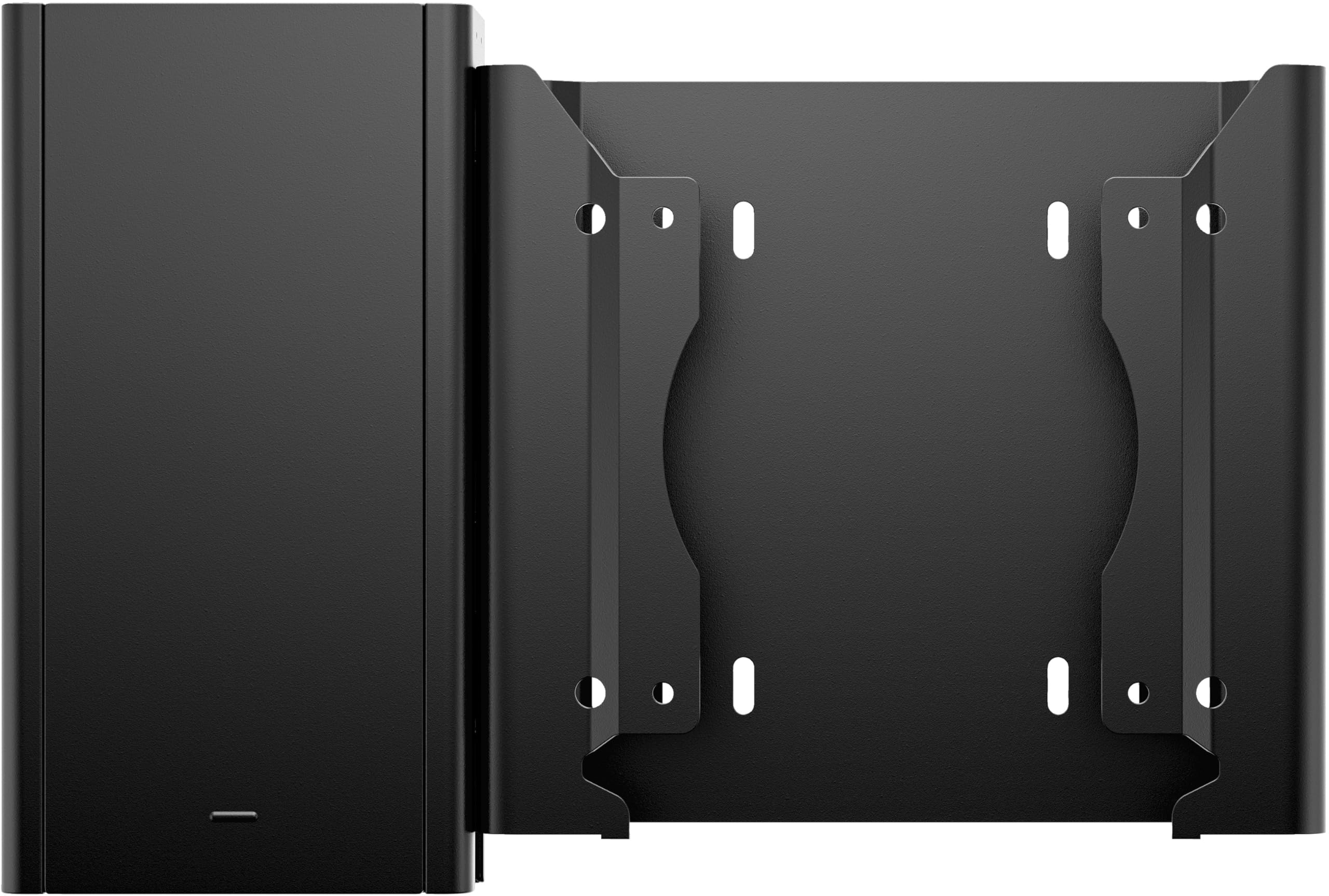
This image displays the HP Mounting Sleeve, featuring its two primary components: the enclosure for a mini PC or power supply on the left, and the VESA mounting plate on the right. The mounting plate includes multiple screw holes for attachment to a display or other VESA-compatible surface.
5. Operating the Mounting Sleeve
The HP Mounting Sleeve is a passive accessory designed to hold and organize your devices. Once installed and the device is secured, no further operational steps are typically required. Ensure that all cables connected to the mounted device have sufficient slack to prevent strain or damage.
6. Тэхнічнае абслугоўванне
To maintain the appearance and functionality of your mounting sleeve:
- Уборка: Use a soft, dry cloth to wipe down the sleeve. For stubborn marks, a slightly damp Можна выкарыстоўваць тканіну з мяккім мылам, а затым высушыць. Пазбягайце абразіўных ачышчальнікаў або растваральнікаў.
- агляд: Periodically check all mounting screws to ensure they remain tight. If any screws feel loose, gently tighten them.
7. Выпраўленне непаладак
If you encounter issues with your mounting sleeve, consider the following:
- Sleeve feels loose: Re-check all mounting screws. Ensure they are properly tightened to the VESA mount and that the VESA mount itself is secure.
- Прылада не падыходзіць: Verify that your device's dimensions are compatible with the sleeve. Refer to the product specifications for internal dimensions.
- Sleeve is damaged: If the sleeve is physically damaged, discontinue use and contact HP support for assistance.
8. Тэхнічныя характарыстыкі
| Нумар мадэлі | 99T55AA |
| Вытворца | Кампанія HP Inc. |
| Вага прадмета | 14.2 унцыі (прыблізна 0.4 кг) |
| Памеры прадукту | 1.7 х 6.4 х 7.3 цалі (4.3 х 16.3 х 18.5 см) |
| Сумяшчальнасць VESA | 100 х 100 мм |
| Матэрыял | Information Not Available |
9. Інфармацыя аб гарантыі
This HP product is covered by a limited warranty. For detailed information regarding warranty terms, conditions, and duration, please refer to the warranty documentation included with your original purchase or visit the official HP support webсайт. Захоўвайце пацвярджэнне пакупкі для прэтэнзій па гарантыі.
10. Падтрымка
For technical assistance, product information, or to report issues, please visit the official HP support webна сайце або звярніцеся ў службу падтрымкі кліентаў HP праз каналы, указаныя на іх website. Have your product model number (99T55AA) and serial number (if applicable) ready when contacting support.
- Служба падтрымкі HP Webсайт: www.hp.com/support
- Кантактная інфармацыя: Звярніцеся ў службу падтрымкі HP website for regional phone numbers and chat options.