
1. Уводзіны
This manual provides essential information for the safe and effective operation of your ION Audio Retro Glow Boombox. This device combines classic audio playback with modern connectivity, featuring an AM/FM radio, cassette player/recorder, Bluetooth 5.3, USB, and SD card playback capabilities. Please read this manual thoroughly before use and retain it for future reference.
2. Інфармацыя па бяспецы
- Не падвяргайце прыладу ўздзеянню вады ці вільгаці.
- Пазбягайце размяшчэння прылады побач з крыніцамі цяпла або пад прамымі сонечнымі прамянямі.
- Забяспечце належную вентыляцыю; не закрывайце вентыляцыйныя адтуліны.
- Выкарыстоўвайце толькі насадкі/аксэсуары, указаныя вытворцам.
- Адключайце прыладу ад сеткі падчас навальніцы або калі яна не выкарыстоўваецца на працягу доўгага часу.
- Звяртайцеся да кваліфікаванага абслугоўваючага персаналу.
3. Што ўваходзіць у камплект
Пасля распакавання пераканайцеся, што ўсе пералічаныя ніжэй прадметы наяўныя і знаходзяцца ў добрым стане:
- ION Audio Retro Glow Boombox
- Сілавы кабель
- Quickstart Кіраўніцтва
4. Прадукт скончыўсяview
The Retro Glow Boombox features a translucent housing with multi-colored LED lights that synchronize with music. It includes dual full-range speakers for robust audio output.
Пярэдняя панэль

Малюнак 1: Спераду view of the Retro Glow Boombox, showcasing the cassette deck, radio tuner, and illuminated dual speakers.
Верхнія элементы кіравання

Малюнак 2: падрабязна view of the top panel, including volume, bass, treble controls, cassette function buttons (Pause, Stop/Eject, F.FWD, REW, Play, REC), and mode selectors (Tape, Aux, Radio, Bluetooth/USB/SD).
Side Panel and Rear
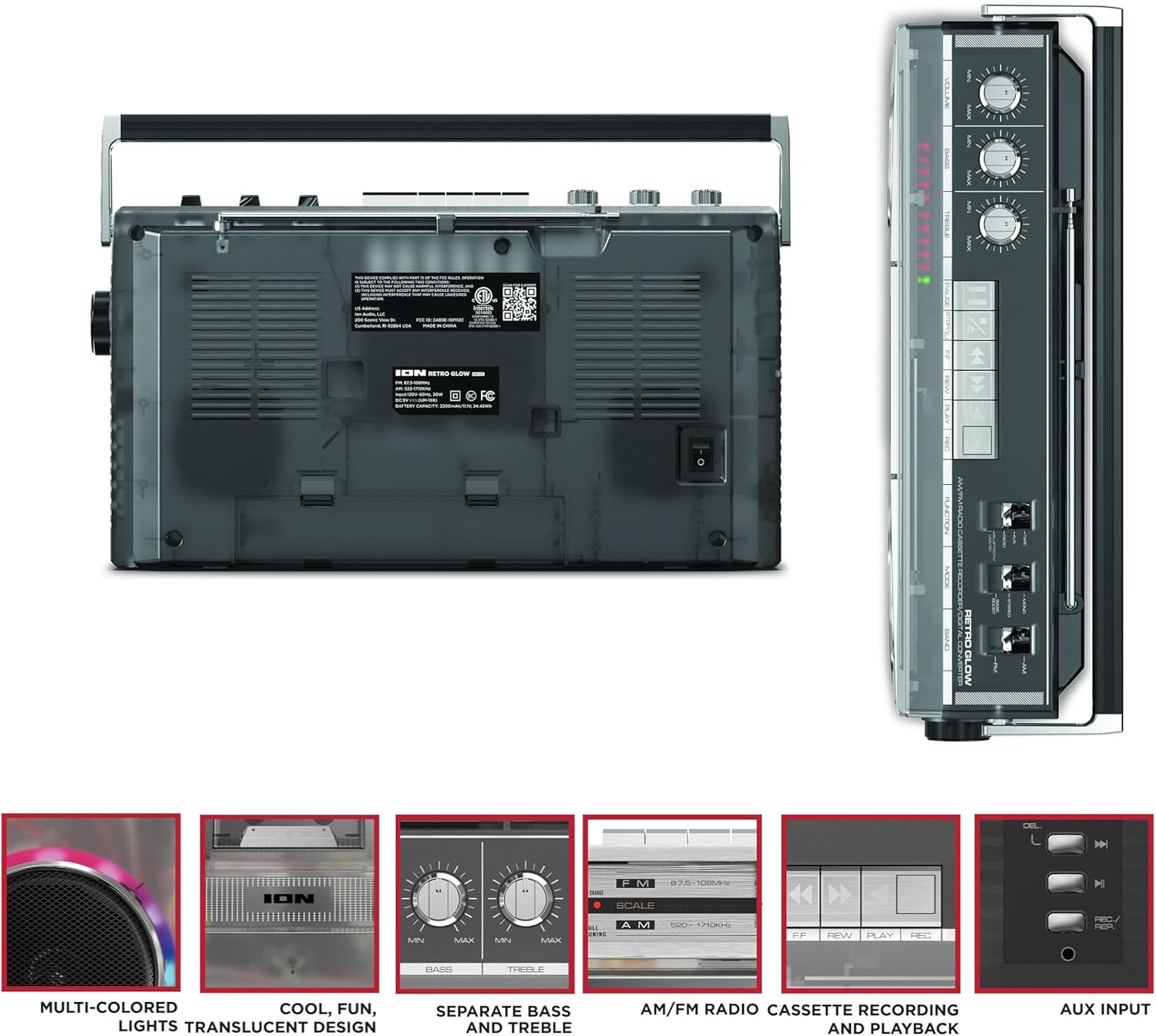
Figure 3: Side panel illustrating the USB port, SD card slot, and playback control buttons. The rear panel includes the power input and battery compartment.
5. Настройка
Powering the Boombox
The Retro Glow Boombox can be powered via the included AC power cable or by batteries for portable use.
- Магутнасць пераменнага току: Connect the power cable to the AC input on the rear of the unit and then to a wall outlet.
- Магутнасць батарэі: Open the battery compartment on the rear and insert the required batteries (type and quantity specified in specifications).

Малюнак 4: Задняя частка view of the boombox, highlighting the power input and the battery compartment for portable operation.
6. Інструкцыя па эксплуатацыі
Агульная аперацыя
- Уключэнне/выключэнне харчавання: Use the power switch to turn the unit on or off.
- Рэгулятар гучнасці: Adjust the 'VOLUME' knob on the top panel to increase or decrease the sound level.
- Упраўленне тонам: Use the 'BASS' and 'TREBLE' knobs to customize the audio output to your preference.
- Святлодыёдныя ліхтары: The multi-colored LED lights around the speakers dance in sync with the music. Refer to the Quickstart Guide for specific controls to change light modes or turn them off.
Функцыянальнасць радыё
- Switch the 'FUNCTION' selector to 'RADIO'.
- Select 'AM' or 'FM' using the 'BAND' switch.
- Для аптымальнага прыёму FM-дыяпазону выцягніце тэлескапічную антэну. Для прыёму AM-дыяпазону павярніце прыладу.
- Use the 'TUNING' knob to scan for stations.
Касетны прайгравальнік/магнітафон
- Прайграванне: Press the 'STOP/EJ' button to open the cassette door. Insert a cassette tape and close the door. Press 'PLAY' to begin playback.
- Запіс: To record from the radio, built-in microphone, or an external source (via Aux input), ensure a blank cassette is inserted. Select the desired source using the 'FUNCTION' switch. Press the 'REC' button (often simultaneously with 'PLAY') to start recording.
- Перамотка наперад/назад: Use the 'F.FWD' and 'REW' buttons for tape navigation.
Злучэнне Bluetooth
- Switch the 'FUNCTION' selector to 'BLUETOOTH/USB/SD'. The unit will enter pairing mode.
- On your Bluetooth-enabled device, search for 'Retro Glow Boombox' and select it to pair.
- Once paired, you can stream audio wirelessly to the boombox.
Прайграванне з USB і SD-карты
- Insert a USB drive or SD card into the respective slot on the side panel.
- Switch the 'FUNCTION' selector to 'BLUETOOTH/USB/SD'. The unit should automatically detect and begin playing audio fileз устаўленага носьбіта.
- Use the playback control buttons (play/pause, skip forward/backward) on the side panel to manage your audio.
Дапаможны ўваход
- Connect an external audio device (e.g., smartphone, MP3 player) to the 'AUX' input using a 3.5mm audio cable (not included).
- Switch the 'FUNCTION' selector to 'AUX'. Audio from your external device will play through the boombox speakers.
7. Тэхнічнае абслугоўванне
- Уборка: Для чысткі вонкавых паверхняў прылады выкарыстоўвайце мяккую сухую тканіну. Не выкарыстоўвайце абразіўныя ачышчальнікі або растваральнікі.
- Сыход за касетнай дэкай: Regularly clean the tape heads and pinch rollers with a cotton swab lightly dampпрацякаюць ізапрапілавым спіртам, каб забяспечыць аптымальную якасць гуку і прадухіліць пашкоджанне стужкі.
- захоўванне: When not in use, store the boombox in a cool, dry place away from direct sunlight and extreme temperatures.
8. Выпраўленне непаладак
Няма сілы
- Пераканайцеся, што кабель харчавання надзейна падключаны як да прылады, так і да спраўнай разеткі.
- Калі карыстаецеся батарэйкамі, праверце, ці яны правільна ўстаўлены і ці не разрадзіліся.
Без гуку
- Check the volume level on the boombox and the connected audio source (if applicable).
- Ensure the correct function mode (Radio, Tape, Bluetooth, USB/SD, Aux) is selected.
- For cassette playback, verify the tape is inserted correctly and the heads are clean.
Праблемы спалучэння Bluetooth
- Make sure the boombox is in Bluetooth pairing mode.
- Ensure your Bluetooth device is within range (typically 30 feet or 10 meters).
- Паспрабуйце адлучыць прыладу і зноў падлучыць яе.
9. Тэхнічныя характарыстыкі
| Памеры прадукту | 9.25 х 16.25 х 5.25 цалі |
| Вага прадмета | 8.93 фунта |
| Тэхналогія падлучэння | Bluetooth 5.3, USB, SD Card, Aux Input |
| Тып дынаміка | Stereo, Full-Range |
| Крыніца харчавання | AC Power Cable, Rechargeable Battery (approx. 10-hour life) |
| Асаблівасці | AM/FM Radio, Cassette Player/Recorder, Multi-colored LED Lights, Retro VU Meters, Separate Bass and Treble Controls |
10. Гарантыя і падтрымка
For warranty information or technical support, please refer to the Quickstart Guide included with your product or visit the official ION Audio website. Keep your purchase receipt as proof of purchase may be required for warranty claims.