
6189411163239
Q57H-AD Motherboard User Manual
Мадэль: 6189411163239
1. Уводзіны
This manual provides detailed instructions for the installation, setup, operation, and maintenance of the Q57H-AD Motherboard. Please read this manual thoroughly before beginning installation to ensure proper functionality and to prevent damage to the components.
The Q57H-AD Motherboard is designed for LGA 1156 processors and supports DDR3 memory, offering a robust foundation for various computing needs.
2. Прадукт скончыўсяview
The Q57H-AD Motherboard features a standard form factor and includes essential ports and slots for a complete system build.
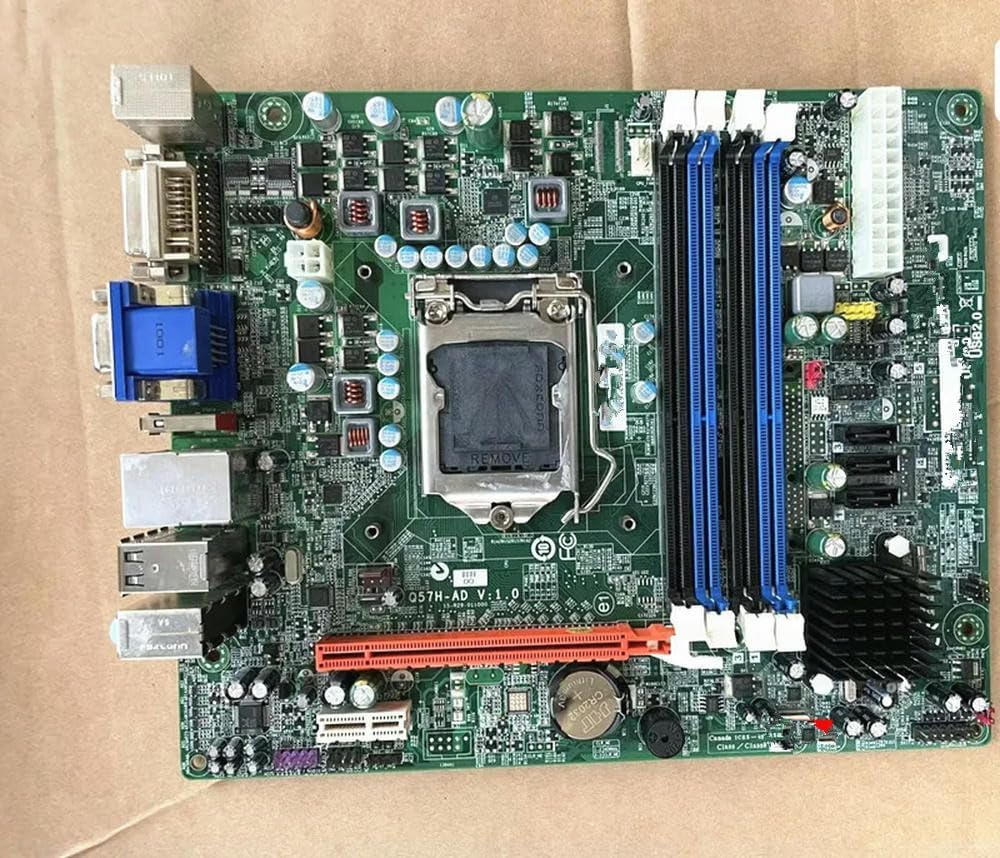
Малюнак 2.1: Q57H-AD Motherboard Layout. This image displays the full layout of the Q57H-AD motherboard, highlighting the central LGA 1156 CPU socket, four DDR3 RAM slots (two blue, two black), multiple PCIe expansion slots, and various I/O ports including VGA, DVI, USB, and Ethernet. Key components like the chipset heatsink and power connectors are also visible.
2.1 Асноўныя кампаненты
- Раз'ём працэсара LGA 1156: For Intel Core i3/i5/i7 (1st Gen) and Xeon 3400 series processors.
- Слоты для DDR3 DIMM: Чатыры слоты з падтрымкай двухканальнай памяці DDR3.
- Слоты PCIe: Various Peripheral Component Interconnect Express slots for graphics cards and other expansion cards.
- Парты SATA: For connecting storage devices like HDDs and SSDs.
- Панэль уводу/вываду: Includes USB ports, audio jacks, Ethernet port, and video outputs (VGA, DVI).
- Батарэя CMOS: A CR2032 battery for maintaining BIOS settings and system time.
3. Настройка і ўстаноўка
Before installation, ensure your system is powered off and unplugged. Wear an anti-static wrist strap to prevent electrostatic discharge (ESD) damage.
3.1 Усталёўка працэсара
- Знайдзіце раз'ём працэсара LGA 1156 на матчынай плаце.
- Акуратна націсніце на рычаг нагрузкі ўніз і пацягніце яго ўбок, каб адкрыць рамку фіксацыі раздыма працэсара.
- Сумясціце трохкутную адзнаку на працэсары з адпаведнай адзнакай на сокеце. Асцярожна ўстаўце працэсар у сокет, не прыкладаючы сілы.
- Зачыніце фіксуючую раму і зафіксуйце яе, націснуўшы на рычаг нагрузкі назад на месца.
- Нанесці тонкі, роўны пласт цеплапасты на верхнюю частку працэсара.
- Усталюйце кулер працэсара ў адпаведнасці з інструкцыямі вытворцы.
Малюнак 3.1: CPU Socket Area. This detailed view focuses on the LGA 1156 CPU socket, showing the
Ask a question about this manual
Ask about setup, troubleshooting, compatibility, parts, safety, or missing instructions. Manuals+ will review the question and use this page’s manual context to help answer it.