
1. Уводзіны
This manual provides detailed instructions for the proper use and maintenance of your Oakcastle HIFI500 Remote Control. This remote is designed as a replacement or spare for the Oakcastle HIFI500 audio system, ensuring seamless control over its functions. Please read this manual thoroughly before use to ensure optimal performance and longevity of your remote control.
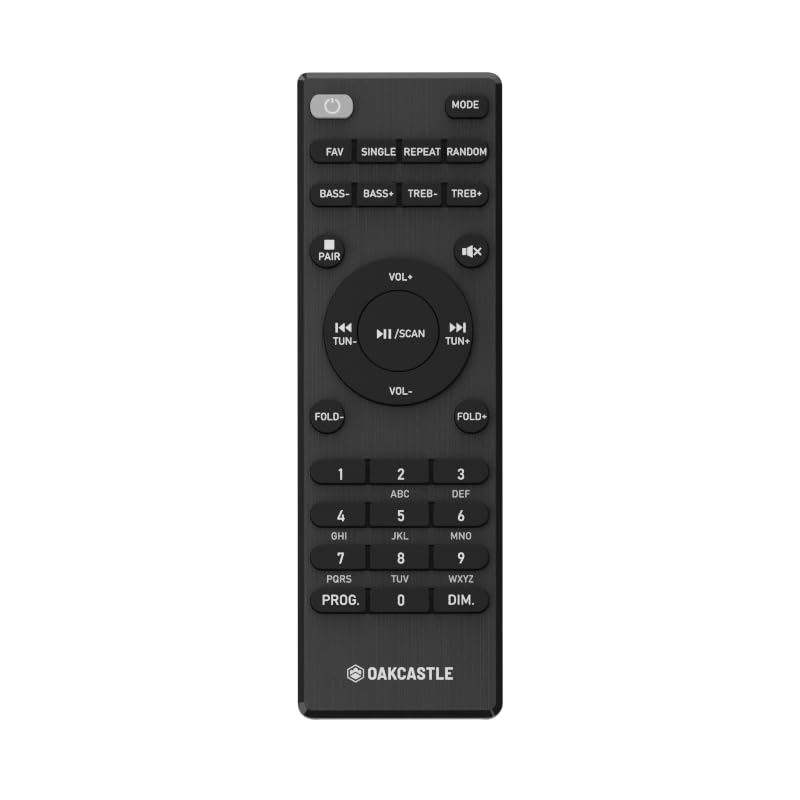
Малюнак 1.1: Фронт view of the Oakcastle HIFI500 Remote Control. This image displays the compact design and button layout, including power, volume, source selection, and playback controls, typical for operating the HIFI500 audio system.
2. Настройка
2.1. Устаноўка батарэі
The Oakcastle HIFI500 Remote Control requires two AAA batteries (not included) for operation. Follow these steps to install the batteries:
- Знайдзіце батарэйны адсек на задняй частцы пульта дыстанцыйнага кіравання.
- Націсніце на язычок і зрушце вечка батарэйнага адсека ўніз, каб адкрыць яго.
- Устаўце дзве батарэйкі тыпу AAA, пераканаўшыся, што станоўчая (+) і адмоўная (-) клемы правільна сумяшчаюцца з пазнакамі ўнутры адсека.
- Адсуньце крышку батарэйнага адсека на месца, пакуль яна не зашчоўкнецца.
Заўвага: Always use new batteries and dispose of old batteries responsibly. Do not mix old and new batteries, or different types of batteries.
2.2. Першапачатковае выкарыстанне
Once batteries are installed, the remote control is ready for use with your Oakcastle HIFI500 audio system. Point the remote directly at the infrared (IR) receiver on your HIFI500 system. No additional pairing is typically required for this replacement remote.
3. Кіраванне пультам дыстанцыйнага кіравання
The Oakcastle HIFI500 Remote Control provides full functionality for your HIFI500 audio system. Below is a general guide to common button functions:
- Кнопка харчавання (⏻): Turns the HIFI500 system on or off.
- Павялічыць/паменшыць гучнасць (Vol+ / Vol-): Рэгулюе ўзровень выхаднога гуку.
- Выключыць гук (🔇): Часова адключае гук.
- Source/Input (Крыніца): Cycles through available audio inputs (e.g., CD, FM, Bluetooth, AUX).
- Элементы кіравання прайграваннем (▶ / ⏸ / ⏹ / ⏪ / ⏩): Controls media playback (Play, Pause, Stop, Rewind, Fast Forward) for compatible sources like CD or USB.
- Кнопкі навігацыі (▲ / ▼ / ◀ / ▶): Used to navigate menus and selections on the HIFI500 system display.
- Кнопка OK/Enter: Пацвярджае выбар.
- Лічбавая клавіятура (0-9): For direct input of radio frequencies, track numbers, or other numerical data.
Refer to your Oakcastle HIFI500 audio system's main user manual for specific functions and advanced operations.
4. Тэхнічнае абслугоўванне
4.1. Уборка
To clean your remote control, gently wipe the surface with a soft, dry cloth. For stubborn dirt, slightly dampПрацярыце тканіну вадой або мяккім неабразіўным ачышчальнікам. Пазбягайце выкарыстання агрэсіўных хімікатаў, растваральнікаў або абразіўных матэрыялаў, бо яны могуць пашкодзіць пакрыццё пульта дыстанцыйнага кіравання або ўнутраныя кампаненты.
4.2. Замена батарэі
Replace batteries when the remote's response becomes sluggish or stops working. Follow the battery installation steps outlined in Section 2.1. Always replace both batteries simultaneously with new ones.
4.3. Захоўванне
When not in use for extended periods, it is recommended to remove the batteries from the remote control to prevent leakage, which can cause damage. Store the remote in a cool, dry place away from direct sunlight and extreme temperatures.
5. Выпраўленне непаладак
If you encounter issues with your Oakcastle HIFI500 Remote Control, please refer to the following common problems and solutions:
- Пульт не адказвае:
- Праверце, ці правільна ўсталяваныя батарэйкі з захаваннем палярнасці.
- Заменіце батарэі на новыя.
- Ensure there are no obstructions between the remote control and the HIFI500 system's IR receiver.
- Make sure you are within the effective range and pointing the remote directly at the HIFI500 system.
- Intermittent function:
- Гэта часта сведчыць аб нізкім узроўні зараду батарэі. Заменіце батарэі.
- Ensure the remote's IR emitter is clean and free from dirt or smudges.
If the problem persists after trying these solutions, please contact Oakcastle customer support.
6. Тэхнічныя характарыстыкі
| Асаблівасць | Спецыфікацыя |
|---|---|
| мадэль | HIFI500 Remote Control |
| Марка | Дубовы замак |
| Тэхналогія падлучэння | Інфрачырвоны (ВК) |
| Крыніца харчавання | 2 х ААА батарэі (не ўключаны) |
| Максімальная колькасць падтрымоўваных прылад | 1 (Oakcastle HIFI500 Audio System) |
| Асаблівасць | Лёгкі |
| Вага прадмета | 2.82 унцыі (прыблізна 80 грамаў) |
| Памеры ўпакоўкі | 8 х 3.2 х 2.5 цалі (прыблізна 20.3 х 8.1 х 6.3 см) |
| Вытворца | БОЛЬШАСЦЬ |
7. Гарантыя і падтрымка
7.1. Інфармацыя аб гарантыі
This Oakcastle HIFI500 Remote Control is covered by a manufacturer's warranty. Please refer to the warranty card included with your original Oakcastle HIFI500 audio system or visit the official Oakcastle webпадрабязныя ўмовы гарантыі глядзіце на сайце. Захоўвайце пацвярджэнне пакупкі для прэтэнзій па гарантыі.
7.2. Падтрымка кліентаў
For technical assistance, troubleshooting beyond this manual, or warranty inquiries, please contact Oakcastle customer support. You can typically find contact information, including phone numbers, email addresses, and support portals, on the official Oakcastle webсайт.
Please have your product model (HIFI500 Remote Control) and purchase details ready when contacting support.