
Shinco B0DZX4B1MK
Shinco 120 Pints Energy Star Dehumidifier User Manual
Model: B0DZX4B1MK | Brand: Shinco
1. Уводзіны
This manual provides essential information for the safe operation, installation, maintenance, and troubleshooting of your Shinco 120 Pints Energy Star Dehumidifier. Please read this manual thoroughly before using the appliance and retain it for future reference. Proper use ensures optimal performance and extends the lifespan of your dehumidifier.
Інфармацыя па бяспецы
- Always operate the unit on a level surface to prevent water spillage.
- Пераканайцеся, што разетка адпавядае магутнасціtagе патрабаванням адз.
- Не блакуйце ўваходныя і выхадныя адтуліны для паветра. Пакіньце вакол прылады не менш за 20 см (8 цаляў).
- Адключыце асушальнік паветра ад сеткі перад чысткай або любым тэхнічным абслугоўваннем.
- Трымайце дзяцей і хатніх жывёл далей ад прылады падчас працы.
2. Прадукт скончыўсяview
The Shinco 120 Pints Energy Star Dehumidifier is designed to efficiently remove excess moisture from large spaces up to 6,000 Sq.Ft, helping to create a healthier and more comfortable environment. It features Wi-Fi connectivity for remote control, auto defrost, and continuous drainage options.

Figure 2.1: Shinco Dehumidifier with Wi-Fi connectivity and smartphone app interface.
Асноўныя характарыстыкі
- Высокая ёмістасць: Removes up to 120 pints of moisture per day (under 95°F, 90%RH conditions).
- Вялікая зона пакрыцця: Suitable for spaces up to 6,000 Sq.Ft.
- Wi-Fi Smart Control: Remote operation via smartphone app.
- Adjustable Humidity: Settings from 30% to 80% in 5% increments.
- Некалькі варыянтаў дрэнажу: Manual water tank (5L/1.32Gal) or continuous drainage with included hose.
- 24-гадзінны таймер: Programmable operation for energy efficiency.
- Аўтаматычнае размарожванне: Прадухіляе замярзанне шпулькі пры нізкіх тэмпературах.
- Блакіроўка ад дзяцей: Disables control panel buttons to prevent accidental changes.
- Мыйны фільтр: Лёгка чысціць і абслугоўваць.
3. Настройка
Распакоўка і размяшчэнне
- Асцярожна дастаньце асушальнік паветра з упакоўкі.
- Пастаўце прыладу ў вертыкальным становішчы на цвёрдую роўную паверхню.
- Пераканайцеся, што вакол прылады ёсць не менш за 20 см (8 цаляў) прасторы для належнай цыркуляцыі паветра. Не стаўце прыладу каля сцяны або мэблі, якія могуць перашкаджаць уваходу або выхаду паветра.
- Пазбягайце размяшчэння прылады побач з крыніцамі цяпла або пад прамымі сонечнымі прамянямі.
Падключэнне сілкавання
Plug the power cord into a grounded electrical outlet. The unit will beep once, and the display will illuminate briefly.
Варыянты дрэнажу
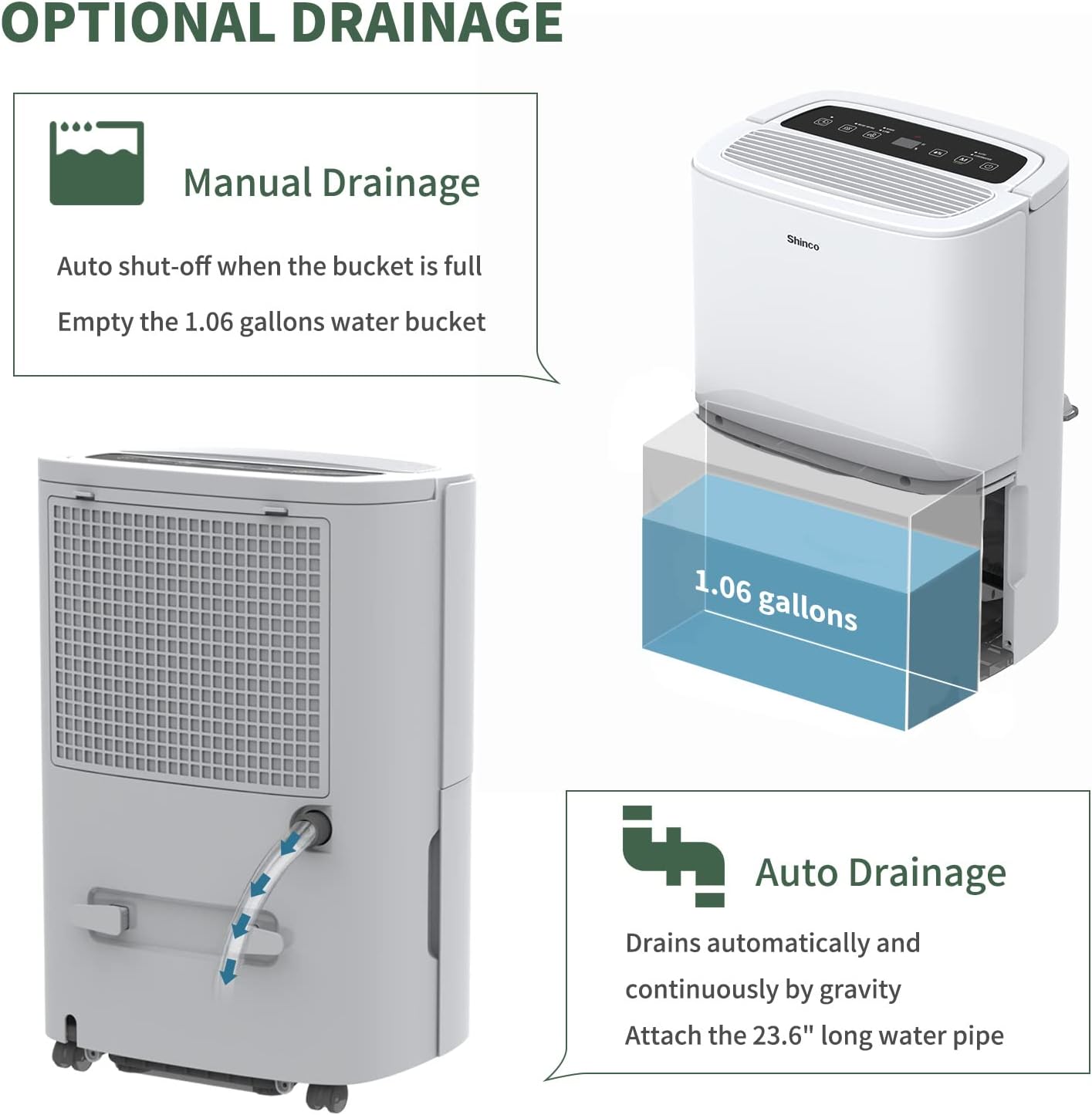
Figure 3.1: Manual and continuous drainage methods.
Ваш асушальнік паветра прапануе два спосабы выдалення вады:
- Ручны дрэнаж (вадзяны бак): The unit collects water in its internal 5-liter (1.32-gallon) water tank. When the tank is full, the unit will automatically shut off, display "FL" (Full) on the screen, and an alarm will sound. The tank must be manually emptied.
- Бесперапынны дрэнаж (зліўны шланг): For extended operation without manual emptying, attach the included 23.6-inch drain hose to the continuous drain port on the back of the unit. Ensure the hose is sloped downwards to a suitable floor drain or larger container to allow gravity drainage. Do not elevate the hose above the drain port.
4. Інструкцыя па эксплуатацыі
Панэль кіравання скончыласяview

Figure 4.1: Digital control panel layout.
- Кнопка харчавання: Уключае або выключае прыладу.
- Кнопка рэжыму: Cycles through operating modes (Auto, Continuous). Press and hold for 3 seconds to activate/deactivate Child Lock.
- Humidity Setting Buttons (%): Рэгулюе патрэбны ўзровень вільготнасці (ад 30% да 80%).
- Кнопка хуткасці вентылятара: Выбар хуткасці вентылятара (высокая, нізкая).
- Кнопка таймера: Усталёўвае таймер аўтаматычнага ўключэння або аўтаматычнага выключэння (1-24 гадзіны).
- Inside Drying Button: Activates the internal drying function, useful before storage.
Устаноўка патрэбнай вільготнасці
- Націсніце кнопку харчавання, каб уключыць прыбор.
- Use the Humidity Setting buttons (%) to select your desired humidity level. The display will show the target humidity. The unit will operate until the room humidity reaches this level, then cycle on and off to maintain it.
Рэгуляванне хуткасці кручэння вентылятара
Press the Fan Speed button to toggle between High and Low fan speeds. Higher fan speed results in faster dehumidification.
Функцыя таймера

Figure 4.2: 24-hour programmable timer function.
The timer allows you to set a specific duration (1-24 hours) for the unit to either turn on or turn off automatically.
- Таймер аўтаматычнага выключэння: While the unit is running, press the Timer button and use the Humidity Setting buttons to set the desired number of hours until the unit turns off.
- Таймер аўтаматычнага ўключэння: While the unit is off, press the Timer button and use the Humidity Setting buttons to set the desired number of hours until the unit turns on.
Рэжымы працы

Figure 4.3: Available operating modes and child lock feature.
- Auto Dehumidify Mode: The unit automatically senses the room's humidity and adjusts its operation to maintain the preset humidity level. If the humidity drops more than 5% below the target, the compressor and fan will stop. If it rises more than 5% above, they will resume.
- Continuous Dry Mode: The unit runs continuously regardless of the humidity level, providing maximum dehumidification. This mode is suitable for drying clothes or in very damp умовы.
Блакіроўка ад дзяцей
To prevent accidental changes to settings, press and hold the Mode button for 3 seconds to activate or deactivate the Child Lock function. When active, all other buttons on the control panel will be unresponsive.
Разумнае кіраванне Wi-Fi

Малюнак 4.4: Падключэнне да Wi-Fi для дыстанцыйнага кіравання.
The dehumidifier can be controlled remotely using a smartphone app. Refer to the separate Wi-Fi setup guide for detailed instructions on connecting your device to your home Wi-Fi network and using the app to adjust settings, monitor humidity, and schedule operations.
5. Тэхнічнае абслугоўванне
Regular maintenance ensures the efficient and long-lasting operation of your dehumidifier.
Ачыстка паветранага фільтра

Figure 5.1: Washable air filter location and other design elements.
Паветраны фільтр варта чысціць кожныя два тыдні або часцей у залежнасці ад выкарыстання і якасці паветра.
- Адключыце асушальнік паветра ад разеткі.
- Зніміце фільтр з задняй панэлі прылады.
- Памыйце фільтр цёплай вадой з мылам. Старанна прамыйце.
- Allow the filter to air dry completely before reinstalling it. Do not use a dryer or direct heat.
Апаражненне рэзервуара для вады
When the water tank is full, the unit will stop operating and display "FL".
- Акуратна выцягніце рэзервуар для вады з пярэдняй часткі прылады.
- Carefully empty the collected water.
- Slide the empty water tank back into the unit until it clicks into place. The unit will resume operation if not in continuous drainage mode.
Ачыстка вонкавых паверхняў прылады
Працярыце знешнюю частку асушальніка мяккім, damp тканінай. Не выкарыстоўвайце агрэсіўныя хімікаты, абразіўныя рэчывы або растваральнікі, бо яны могуць пашкодзіць паверхню.
Захоўванне
Калі прылада не будзе выкарыстоўвацца працяглы час:
- Empty the water tank and ensure it is clean and dry.
- Press the "Inside Drying" button to run the internal drying function, which helps prevent mold and mildew growth inside the unit.
- Ачысціце паветраны фільтр і ўсталюйце яго нанова.
- Адключыце шнур харчавання і акуратна згарніце яго.
- Cover the unit with a plastic bag or its original packaging to protect it from dust.
- Захоўвайце асушальнік паветра ў вертыкальным становішчы ў прахалодным, сухім месцы.
6. Выпраўленне непаладак
Перад тым, як звяртацца ў службу падтрымкі кліентаў, азнаёмцеся з наступным кіраўніцтвам па ліквідацыі распаўсюджаных праблем.
| праблема | Магчымая прычына | Рашэнне |
|---|---|---|
| Асушальнік паветра не ўключаецца. | No power; Power cord not plugged in; Child Lock active. | Ensure unit is plugged into a working outlet; Check circuit breaker; Deactivate Child Lock by pressing and holding Mode button for 3 seconds. |
| Вада не збіраецца або асушванне недастатковае. | Humidity level already low; Air filter clogged; Room temperature too low; Air inlets/outlets blocked; Unit too small for space. | Adjust desired humidity lower; Clean air filter; Ensure room temperature is above 41°F (5°C); Clear obstructions; Consider a larger capacity unit if space exceeds 6,000 Sq.Ft. |
| "FL" code displayed and unit stops. | Water tank is full or improperly installed. | Empty the water tank; Reinstall the water tank correctly until it clicks into place. |
| Unit freezing up (ice on coils). | Low room temperature; Air filter clogged. | The unit has an Auto Defrost function. If freezing persists, ensure room temperature is not too low (below 41°F/5°C) and clean the air filter. You can also manually activate the "Inside Drying" function to help defrost. |
| Агрэгат шумны. | Прылада не стаіць на роўнай паверхні; паветраны фільтр забіты; дэталі няспраўныя. | Ensure unit is on a stable, level surface; Clean air filter; Check for any loose components. |
| Праблемы з падключэннем да Wi-Fi. | Няправільны пароль Wi-Fi; маршрутызатар занадта далёка; праграма не абноўлена. | Verify Wi-Fi password; Move unit closer to router; Update smartphone app; Refer to Wi-Fi setup guide. |
7. Тэхнічныя характарыстыкі
Technical specifications for the Shinco 120 Pints Energy Star Dehumidifier (Model B0DZX4B1MK).
| Асаблівасць | Дэталь |
|---|---|
| Марка | Шынко |
| Назва мадэлі | B0DZX4B1MK |
| Ёмістасць абязводжвання | 120 Pints/Day (under 95°F, 90%RH) / 50 Pints per Day (DOE Standard) |
| Пакрыццё плошчы падлогі | Да 6,000 квадратных футаў |
| Аб'ём бака | 5 літра (1.32 галона) |
| Памеры прадукту | 9.45" Г x 13.5" Ш x 20.1" У |
| Вага прадмета | 30.8 фунта |
| Колер | Белы |
| Матэрыял | Пластыкавыя |
| Колькасць хуткасцяў | 2 (Высокі, Нізкі) |
| Рэжым працы | Бесперапынны, Аўто |
| Асаблівасці | Adjustable Humidity Control, Anti-Spill, Automatic Defrost, Automatic Moisture Removal, Automatic Restart, Automatic Shutoff, Bucket Storage, Child Lock, Continuous Draining, Detachable, Digital Display, Ergonomic Handle, Portable, Quiet Operation, Removable Tank, Timer, Washable Filter, Wi-Fi |
| Уключаныя кампаненты | Dehumidifier, Drain hose |
8. Гарантыя і падтрымка
For warranty information and customer support, please refer to the documentation included with your product or contact Shinco customer service directly. Keep your purchase receipt as proof of purchase for warranty claims.
Ask a question about this manual
Ask about setup, troubleshooting, compatibility, parts, safety, or missing instructions. Manuals+ will review the question and use this page’s manual context to help answer it.