
virtavo XM1
virtavo Cam XM1 Solar Wireless Security Camera User Manual
Model: XM1 | Brand: virtavo
Уводзіны
The virtavo Cam XM1 is a solar-powered wireless security camera designed for outdoor surveillance. It features a dual-lens system for a 160° panoramic view, 1080p Full HD resolution, color night vision, PIR motion detection, two-way audio, and flexible storage options. This manual provides detailed instructions for setting up, operating, and maintaining your camera to ensure optimal performance.
Прадукт скончаныview
Асноўныя характарыстыкі
- 160° панарамны View: Dual-lens stitching technology provides a seamless, distortion-free 160° field of view, covering more area than traditional single-lens cameras.
- Solar Powered & Long Battery Life: Equipped with a solar panel for continuous charging and a built-in 4400 mAh lithium battery, offering 1 to 3 months of operation even without sunlight.
- Clear Day and Color Night Vision: 1080p Full HD resolution with an F1.6 Starlight lens and 2 IR LEDs (850 nm) ensures sharp images day and night. Color night vision provides precise details in low-light conditions.
- PIR Motion Detection & Two-Way Audio: Detects motion and sends instant alarms and notifications to your smartphone. The two-way audio feature allows real-time communication.
- Гнуткія параметры захоўвання: Supports local storage via Micro SD card (up to 256GB) and optional cloud storage with AI detection for distinguishing people, cars, and pets.
Змест пакета
The virtavo Cam XM1 package includes the following components:
- virtavo Cam XM1 Camera
- Кабель Type-C
- Мантажныя дэталі
- Кіраўніцтва карыстальніка
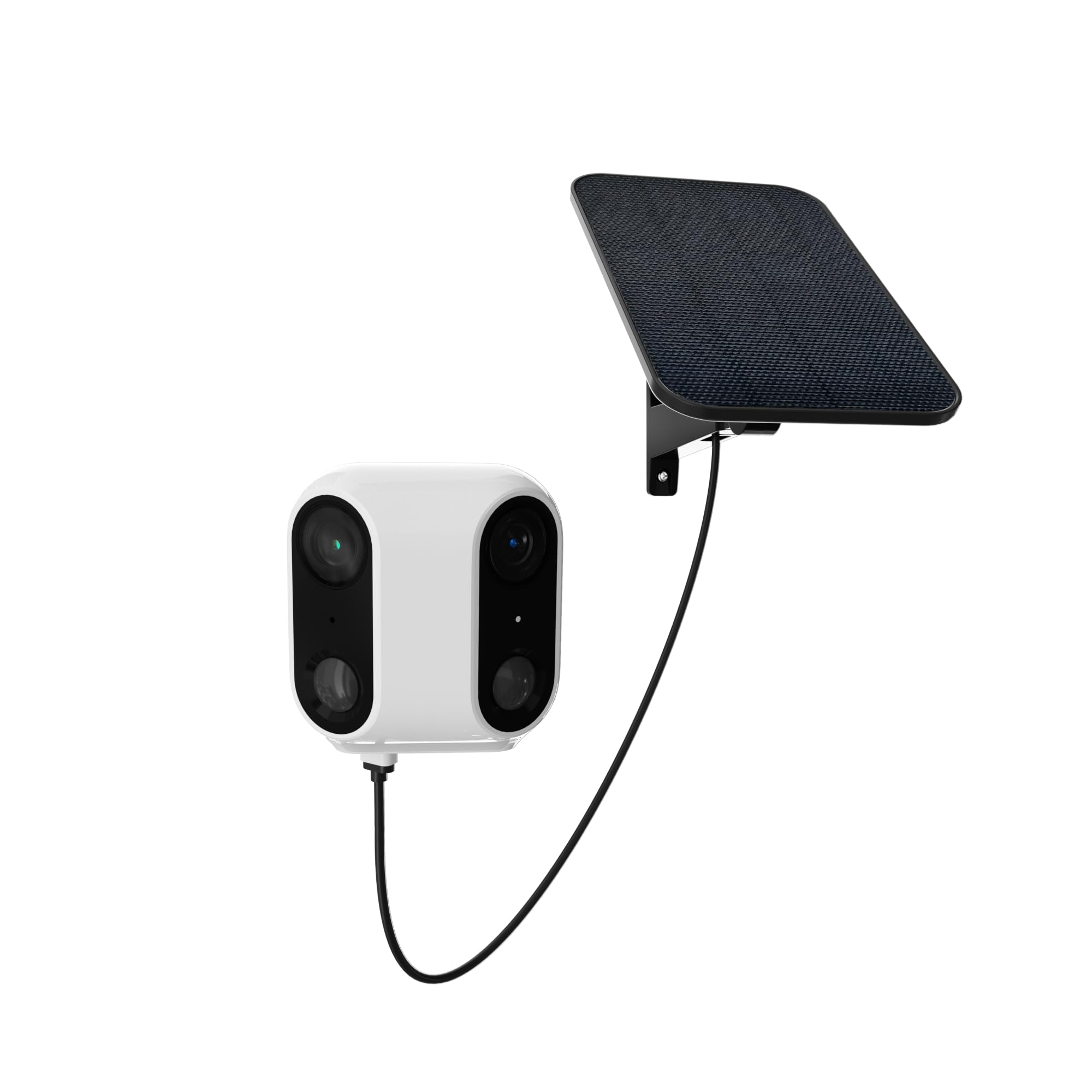
Image: The virtavo Cam XM1 camera, showing its main body, integrated solar panel, and mounting bracket. This image illustrates the complete product as it appears out of the box.
Настройка
1. Пачатковая зарадка
Before initial use, fully charge the camera's built-in 4400 mAh lithium battery using the provided Type-C cable. This ensures the camera has sufficient power for setup and operation, especially if solar charging is not immediately optimal.
2. Усталёўка праграмы і стварэнне ўліковага запісу
Download the dedicated mobile application for the virtavo Cam XM1 from your smartphone's app store (iOS or Android). Follow the on-screen instructions to create an account and log in.
3. Спалучэнне камеры
- Уключыце камеру.
- Open the app and select "Add Device" or a similar option.
- Follow the in-app prompts to connect the camera to your Wi-Fi network. This typically involves scanning a QR code displayed on your phone with the camera or entering Wi-Fi credentials.
- Ensure the camera is within range of your Wi-Fi router for a stable connection.
4. Мантаж камеры
The virtavo Cam XM1 is designed for wall mounting. Choose a location that provides the desired surveillance coverage and receives adequate sunlight for the integrated solar panel. Use the provided mounting parts to securely attach the camera to a wall or suitable surface. Ensure the solar panel is positioned to maximize sun exposure throughout the day.
Інструкцыя па эксплуатацыі
жыць View і запіс
Once connected, open the app to access the live video feed from your camera. You can manually initiate recordings or capture screenshots directly from the live view інтэрфейс.
Выяўленне руху і абвесткі
The camera utilizes Passive Infrared (PIR) motion detection to identify movement. When motion is detected, the camera will:
- Send an alarm notification to your smartphone.
- Initiate recording of the event.
- Activate an audible alarm (if enabled in settings).
Adjust motion detection sensitivity and alert preferences within the camera's settings in the mobile app.
Двухбаковае аўдыё
Каб выкарыстоўваць функцыю двухбаковай аўдыёсувязі, націсніце значок мікрафона ў рэжыме рэальнага часу view interface of the app. You can then speak through your phone, and your voice will be broadcast through the camera's speaker. Similarly, you can hear audio from the camera's surroundings through your phone.
Кіраванне сховішчам
The virtavo Cam XM1 offers two storage options:
- Micro SD-карта: Insert a Micro SD card (up to 256GB, not included) into the designated slot on the camera. Recordings will be stored locally. Videos can be accessed via the app even if the camera is temporarily offline, and will sync once reconnected to Wi-Fi.
- Воблачнае сховішча: An optional subscription-based cloud storage service is available. This service typically offers 7 or 30 days of recording history and includes intelligent AI detection to differentiate between people, vehicles, and pets. Refer to the app for subscription details and pricing.
Тэхнічнае абслугоўванне
Кіраванне батарэяй
The camera's integrated solar panel continuously charges the internal battery. For optimal performance, ensure the solar panel remains clean and free from obstructions (e.g., leaves, dirt) that could block sunlight. In periods of prolonged low sunlight, the battery may require manual charging via the Type-C port.
Уборка
Перыядычна чысціце аб'ектыў камеры і сонечную панэль мяккай губкайamp тканінай. Пазбягайце выкарыстання агрэсіўных хімічных рэчываў або абразіўных матэрыялаў, якія могуць падрапаць паверхні.
Ліквідацыю непаладак
- Камера не падключаецца да Wi-Fi: Ensure the camera is within Wi-Fi range. Verify your Wi-Fi password. Try restarting your router and the camera.
- Няма папярэджанняў аб выяўленні руху: Check the app settings to ensure motion detection is enabled and notification permissions are granted for the app on your smartphone. Adjust PIR sensitivity if necessary. Ensure the "Actuation" mode is active in the app's work mode settings, as noted by some users.
- Дрэнная якасць выявы: Ачысціце аб'ектыў камеры. Пераканайцеся, што ў полі зроку камеры няма перашкод. viewПраверце сілу сігналу Wi-Fi.
- Акумулятар не зараджаецца: Ensure the solar panel is clean and receiving direct sunlight. Check the Type-C cable connection if charging manually.
- Двухбаковая аўдыёсувязь не працуе: Check microphone and speaker permissions for the app on your smartphone. Ensure the camera's microphone and speaker are not obstructed.
Тэхнічныя характарыстыкі
| Асаблівасць | Дэталь |
|---|---|
| Назва мадэлі | XM1 |
| Марка | віртава |
| Пратакол злучэння | Wi-Fi |
| Крыніца харчавання | Solar Powered (with 4400 mAh Lithium-ion battery) |
| Дазвол запісу відэа | 1080p Full HD |
| Выкарыстанне | Ахова на адкрытым паветры |
| Тып мацавання | Насценнае мацаванне |
| Памеры (Д х Ш х У) | 9 х 9 х 5.5 см |
| Вага | 810 грамаў |
| Уключаныя кампаненты | Camera, Type-C cable, Mounting parts, User manual |
| Тып батарэі | Lithium-ion (4400 mAh integrated) |
| Max SD Card Capacity | 256 ГБ |
Гарантыя і падтрымка
Information regarding specific warranty terms and availability of spare parts for the virtavo Cam XM1 is not provided. For technical support or further assistance, please refer to the contact information provided with your purchase or visit the official virtavo webсайт.
Ask a question about this manual
Ask about setup, troubleshooting, compatibility, parts, safety, or missing instructions. Manuals+ will review the question and use this page’s manual context to help answer it.