
FUWANG A3354 A3355 A3356 A2696 A2757 A2777
FUWANG Keyboard Case for iPad A16 11th/10th Generation User Manual
Model: A3354, A3355, A3356, A2696, A2757, A2777
1. Прадукт скончыўсяview
The FUWANG Keyboard Case is designed to enhance your iPad experience, transforming it into a versatile laptop-like device. It features a detachable wireless Bluetooth keyboard with 7-color backlighting, multiple viewing angles, and a protective case with an integrated pencil holder. The case is crafted from durable synthetic leather with a unique marble pattern and a soft TPU inner shell for comprehensive protection.
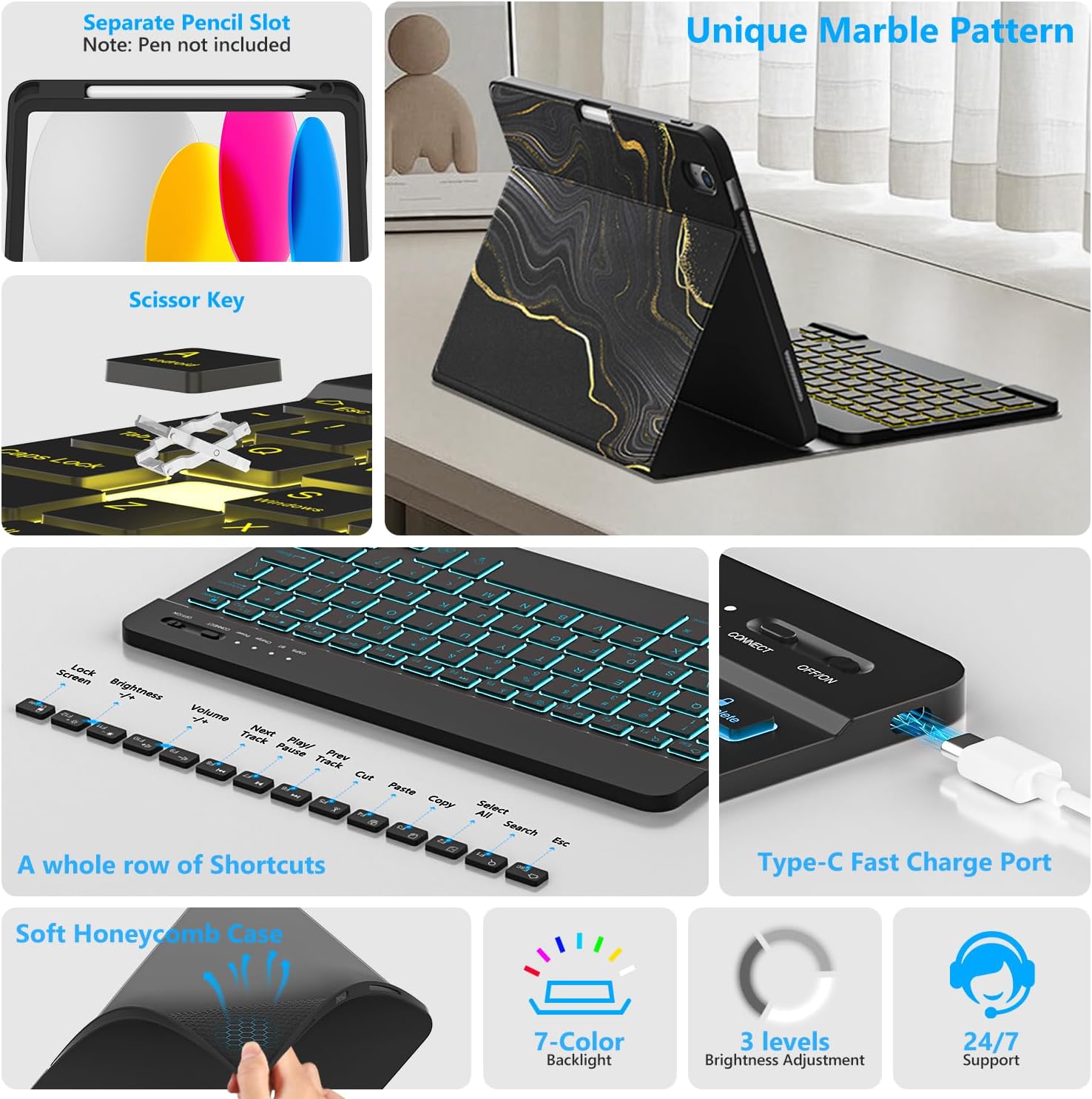
Малюнак 1.1: Скончанаview of FUWANG Keyboard Case features, highlighting the pencil slot, scissor-key mechanism, keyboard shortcuts, Type-C charging port, and the soft honeycomb case for heat dissipation.
2. Змесціва ўпакоўкі
- 1 x FUWANG iPad Case (for A16 11th/10th Generation)
- 1 x Wireless Backlit Bluetooth Keyboard
- 1 х зарадны кабель Type-C
- 1 х Кіраўніцтва карыстальніка
Note: iPad tablet and stylus are not included.
3. Сумяшчальнасць
Гэты чахол-клавіятура спецыяльна распрацаваны для наступных мадэляў iPad:
- iPad A16 11th Generation 11" 2025: Model Numbers A3354, A3355, A3356
- iPad 10th Generation 10.9" 2022: Model Numbers A2696, A2757, A2777, A3162
To verify your iPad model, please check the back of your tablet for a model number starting with "A". This case is not compatible with other iPad models.
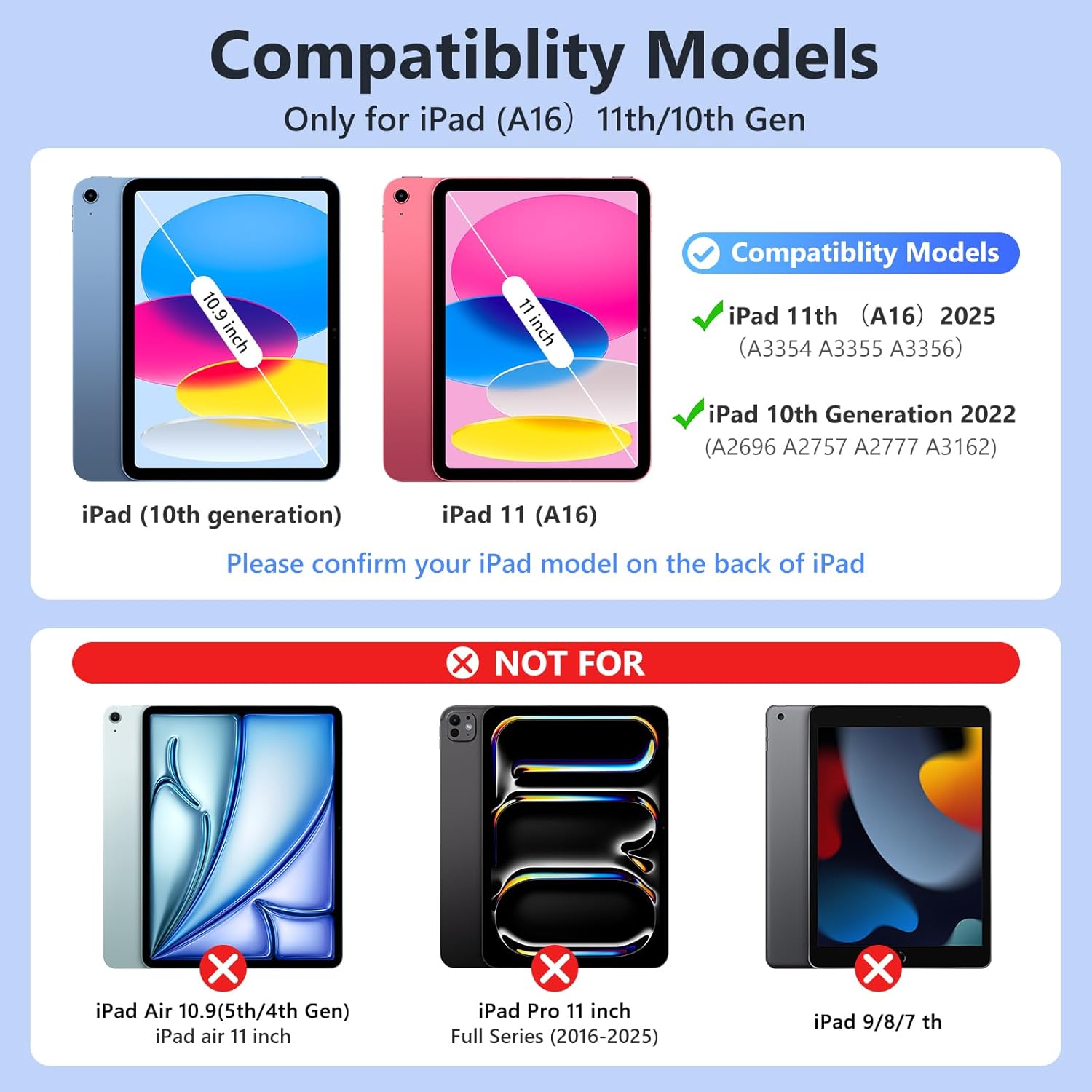
Малюнак 3.1: Visual guide for iPad model compatibility. Please confirm your iPad model number on the back of your device.
4. Інструкцыі па ўсталёўцы
4.1 Initial Charging of the Keyboard
Before first use, fully charge the keyboard for 2 to 3 hours using the provided Type-C charging cable. Connect the cable to the keyboard's Type-C port and a USB power source. The power indicator light will flash during charging and turn off when fully charged.

Малюнак 4.1: Keyboard charging via Type-C port. Initial charge takes 2-3 hours.
4.2 Спалучэнне клавіятуры Bluetooth
- Пераканайцеся, што клавіятура зараджана.
- Turn on the keyboard by sliding the power switch to the "ON" position. The power indicator will flash for approximately 3 seconds and then turn off.
- На вашым iPad перайдзіце па спасылцы Налады > Bluetooth and turn Bluetooth ON.
- The iPad will search for available devices. Select "Bluetooth Keyboard" (or similar name) from the list.
- If prompted, enter the pairing code displayed on your iPad onto the keyboard and press Увайдзіце.
- Once paired, the keyboard's indicator light will turn off, and your iPad will show the keyboard as "Connected".
For subsequent uses, simply turn on your iPad's Bluetooth and the keyboard's power. Press any key on the keyboard, and it should automatically reconnect.
4.3 Installing the iPad into the Case
Gently insert your iPad into the soft TPU inner shell of the case. Ensure all cutouts for the camera, speakers, and volume buttons align perfectly. The case provides full protection against drops and scratches.
5. Інструкцыя па эксплуатацыі
5.1 Выкарыстанне падсветленай клавіятуры
Клавіятура мае 7-каляровую падсветку з 3 рэгуляванымі ўзроўнямі яркасці.
- To change backlight colors: Press the Light bulb icon key (often next to the Spacebar or Function keys).
- Каб адрэгуляваць яркасць: націсніце кнопку Light bulb icon ключ + Клавішы са стрэлкамі ўверх/уніз or a dedicated brightness key (if available).

Малюнак 5.1: Demonstrating the 7-color backlit keyboard with adjustable brightness settings.
5.2 Рэгуляванне Viewвуглавыя куты
The case is designed with three anti-slip grooves, allowing you to adjust your iPad to multiple viewing angles (e.g., 110°, 120°, 130°) for comfortable typing, viewінг або маляванне.
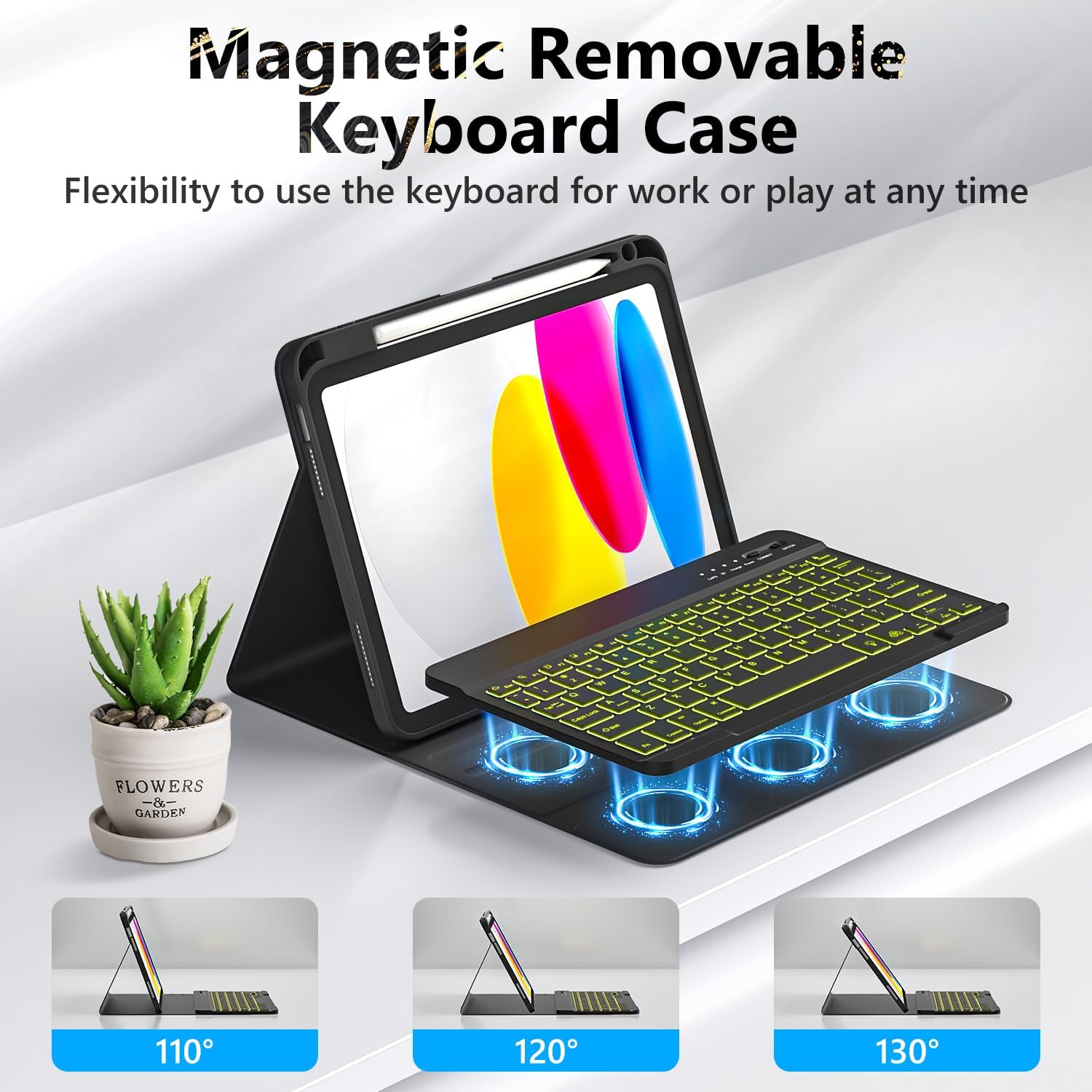
Малюнак 5.2: The magnetic removable keyboard case offers flexible viewвуглы нахілу для розных задач.
5.3 Keyboard Shortcuts
The keyboard includes a row of dedicated function keys and shortcuts for quick access to iPad features:
- Экран блакіроўкі
- Рэгуляванне яркасці
- Рэгулятар гучнасці
- Элементы кіравання прайграваннем мультымедыя (Previous Track, Play/Pause, Next Track)
- Copy, Cut, Paste
- Выбраць усе
- пошук
- дадому
5.4 Функцыя аўтаматычнага пераходу ў рэжым сну/абуджэння
The case supports the iPad's automatic sleep/wake function, preserving battery life. When closing the case, the iPad will go to sleep; opening it will wake the iPad. For optimal performance of this feature, it is recommended to remove the wireless Bluetooth keyboard from the case, as the keyboard's magnetic components can interfere with the iPad's magnets.
5.5 Using the Pencil Holder
The integrated pencil holder securely stores your stylus, keeping it accessible and preventing loss. Simply slide your stylus into the designated slot.
6. Тэхнічнае абслугоўванне
- Ачыстка корпуса: Wipe the synthetic leather case with a soft, damp тканінай. Пазбягайце агрэсіўных хімічных рэчываў або абразіўных ачышчальнікаў.
- Чыстка клавіятуры: Для чысткі клавіш клавіятуры выкарыстоўвайце мяккую сухую тканіну. Для ўстойлівага бруду злёгкуamp можна выкарыстоўваць тканіну, сачыце за тым, каб вільгаць не трапляла на клавіятуру.
- Сыход за батарэяй: To prolong battery life, avoid fully discharging the keyboard frequently. Charge it regularly, especially if not used for extended periods.
7. Выпраўленне непаладак
- Клавіятура не падключаецца:
- Пераканайцеся, што клавіятура цалкам зараджана.
- Make sure the keyboard's power switch is ON.
- Праверце, ці ўключаны Bluetooth на вашым iPad.
- Забудзьцеся пра прыладу ў наладах Bluetooth вашага iPad і паспрабуйце зноў падключыць яе.
- Перазагрузіце і iPad, і клавіятуру.
- Backlight Not Working/Changing:
- Пераканайцеся, што клавіятура ўключана.
- Press the backlight control key (light bulb icon) to cycle through colors and brightness levels.
- If the battery is low, backlighting may be disabled to conserve power. Charge the keyboard.
- Клавішы не рэагуюць:
- Check if the keyboard is connected via Bluetooth.
- Пераканайцеся, што клавіятура зараджана.
- Ачысціце смецце вакол клавіш.
- Auto Sleep/Wake Function Issues:
- Ensure the iPad is correctly seated in the case.
- Remove the detachable keyboard from the case when closing the cover, as its magnets can interfere with the auto sleep/wake feature.
8. Тэхнічныя характарыстыкі
| Марка | ФУВАНГ |
| Нумары мадэляў | A3354, A3355, A3356, A2696, A2757, A2777 |
| Сувязь | Bluetooth |
| Тып клавіятуры | Detachable, Backlit (7 colors, 3 brightness levels) |
| Ёмістасць батарэі | 500 mAh Lithium-ion (rechargeable) |
| Час зарадкі | 2-3 гадзін |
| Час працы | Approx. 120 hours (without backlight) |
| Час чакання | > 130 дзён |
| Дыстанцыя дзеяння | Да 3 метраў |
| Матэрыял | Premium Synthetic Leather, Thermoplastic Polyurethane (TPU) |
| Асаблівасці | Pencil holder, Full protection, Multiple viewing angles, Auto sleep/wake function |
9. Гарантыя і падтрымка
For any questions or issues regarding your FUWANG Keyboard Case, please refer to the contact information provided with your purchase or reach out to the seller directly. Specific warranty details may vary by region and retailer.
Ask a question about this manual
Ask about setup, troubleshooting, compatibility, parts, safety, or missing instructions. Manuals+ will review the question and use this page’s manual context to help answer it.