
Blusafe CT01
Blusafe Contour V Smart Lock Instruction Manual
Models: CT01, CT001
1. Уводзіны
This manual provides comprehensive instructions for the installation, setup, operation, and maintenance of your Blusafe Contour V Smart Lock. Please read this manual thoroughly before installation and use to ensure proper function and security.
The Blusafe Contour V Smart Lock offers multiple unlocking methods including biometric fingerprint recognition, passcodes, RFID keycards, mechanical keys, and app control. It features an auto-lock function, anti-prying alarm, and a doorbell camera for enhanced security and convenience.
2. Змесціва ўпакоўкі
Перад пачаткам усталёўкі пераканайцеся, што ўсе кампаненты наяўныя:
- 1 x External Panel
- 1 x Internal Panel
- 1 х мантажная пласціна
- 1 х зашчапка
- 1 х запорная пласціна
- 1 x Strike Box
- 3 х механічныя ключы
- 2 x RFID Keycards
- 1 х адвёртка
- 1 x USB кабель харчавання
- 1 x Gateway
- 1 х Інструкцыя па эксплуатацыі
- Various Screws (ST 3.9 x 20mm, M4 x 35mm, M4 x 50mm, M4 x 10mm)
- 1 x Screw Pillar

3. Тэхнічныя характарыстыкі
| Асаблівасць | Дэталь |
|---|---|
| Марка | Blusafe |
| Назва мадэлі | CT01 |
| Нумар мадэлі тавару | CT001 |
| Тып замка | Контур V |
| Матэрыял | Сплаў цынку |
| Памеры (Д х Ш х У) | 7.64 х 6.65 х 9.33 цалі |
| Вага прадмета | 6.78 фунта (3.08 кілаграма) |
| Асаблівасці | Auto-Lock, Biometric Fingerprint Sensor, Doorbell Camera, Keyless Entry |
| Метад кантролю | Remote (App), Touch (Keypad), Fingerprint, Keycard, Mechanical Key |
| Ёмістасць адбіткаў пальцаў | Да 100 |
| Крыніца харчавання | 8 батарэйкі АА (не ўключаны) |
| Аварыйнае харчаванне | Micro-USB (5V power bank) |
| Сумяшчальнасць таўшчыні дзвярэй | 1-2/5 inch to 2-1/8 inch (35-54 mm) |
| Сумяшчальнасць з задняй часткай | 2-3/8 inch or 2-3/4 inch (60 mm or 70 mm) |
| Абарона ад надвор'я | IP65 Waterproof, -4 to 140°F Operating Temperatures |
4. Ўстаноўка
The Blusafe Contour V Smart Lock is designed for easy installation on both right-hand and left-hand doors. A screwdriver is the primary tool required. Ensure to check your door's orientation and dimensions before starting.
4.1 Сумяшчальнасць з дзвярыма
This lock fits most standard residential doors with a thickness between 1-2/5 inches and 2-1/8 inches (35-54 mm). The backset should be 2-3/8 inches or 2-3/4 inches (60 mm or 70 mm). The minimum width of the installable area is 98mm.

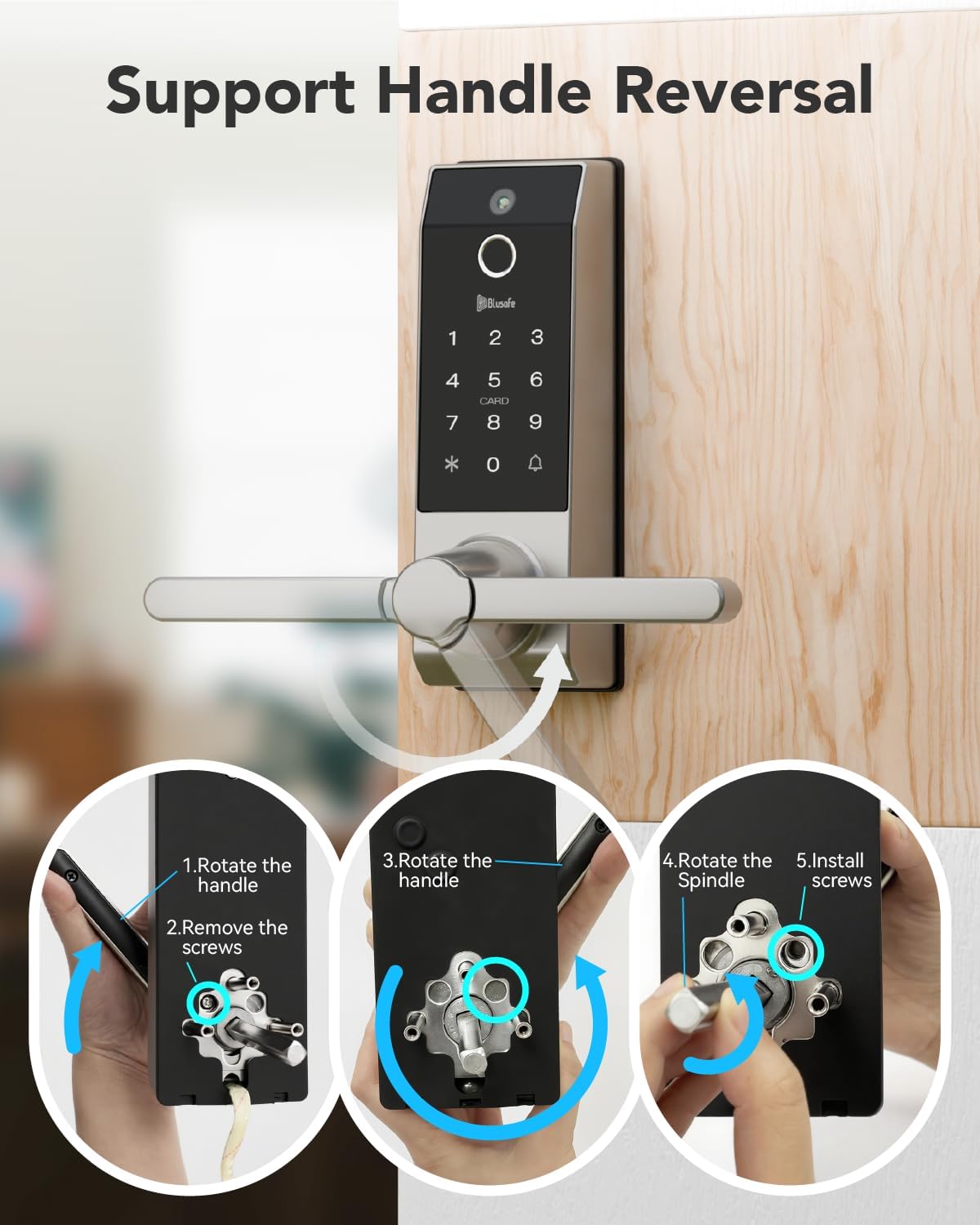
4.2 Handle Reversal (if needed)
The handle can be reversed to accommodate your door's opening direction. Follow the steps below if your handle orientation needs adjustment:
- Rotate the handle.
- Выдаліце шрубы.
- Rotate the spindle.
- Усталюйце шрубы.
4.3 Агульныя этапы ўстаноўкі
For detailed, step-by-step visual guidance on installation, please refer to the official setup video provided by Blusafe. It is highly recommended to follow the instructions carefully to avoid any issues.
5. Пачатковая налада і кіраванне карыстальнікамі
After physical installation, you will need to configure the lock's settings and add users. The lock supports up to 100 fingerprints and 300 users.
5.1 функцыянальных клавіш
- *: Адмяніць
- 🔔: Пацвердзіць
5.2 Sleep Mode and Wakeup
- Прачнуцца: Touch the 🔔 (bell icon) or swipe your hand across the front of the lock to activate the keypad.
- Рэжым сну: Press * twice.
5.3 Initializing the Lock (First Time Use)
For initial setup, any fingerprint, keycard, or passcode can be used to set up the first administrator. This process is crucial for establishing the primary access credentials.
5.4 Adding an Administrator
To add an administrator (fingerprint, keycard, or passcode):
- Wake up the keypad.
- Прэса * + 🔔 + registered admin fingerprint/keycard/passcode + 🔔.
- Прэса 1.
- Прэса 1 зноў.
- Add the new fingerprint, keycard, or passcode as instructed by the lock's voice prompts.
5.5 Removing an Administrator
To remove an administrator:
- Wake up the keypad.
- Прэса * + 🔔 + registered admin fingerprint/keycard/passcode + 🔔.
- Прэса 1.
- Прэса 2.
- Enter the user ID (e.g., 001) + 🔔.
5.6 Даданне карыстальніка
To add a regular user (fingerprint, keycard, or passcode):
- Wake up the keypad.
- Прэса * + 🔔 + registered admin fingerprint/keycard/passcode + 🔔.
- Прэса 2.
- Прэса 1.
- Add the new fingerprint, keycard, or passcode as instructed by the lock's voice prompts.
5.7 Removing a User
Каб выдаліць карыстальніка:
- Wake up the keypad.
- Прэса * + 🔔 + registered admin fingerprint/keycard/passcode + 🔔.
- Прэса 2.
- Прэса 2 зноў.
- Enter the user ID + 🔔.
For a visual guide on adding/removing users and initial fingerprint settings, please watch the following video:
6. Інструкцыя па эксплуатацыі
The Blusafe Contour V Smart Lock offers multiple convenient ways to unlock your door.
6.1 Спосабы разблакіроўкі
- адбіткаў пальцаў: Place your registered finger on the sensor. The lock will unlock in approximately 0.5 seconds.
- Код доступу: Enter your registered 6-8 digit passcode on the keypad followed by 🔔.
- Keycard: Swipe your registered RFID keycard across the card reader area.
- Механічны ключ: Insert the mechanical key into the hidden keyhole and turn to unlock. This is a backup method for emergencies.
- Мабільнае прыкладанне: Use the dedicated Blusafe app to remotely unlock the door. This function is passively triggered by someone pressing the doorbell on the smart lock.

6.2 Функцыя аўтаматычнай блакіроўкі
The smart lock automatically locks when the door is closed, eliminating the need for manual operation or setup. This feature provides continuous security.

6.3 Anti-Peeking Passcode
As a security feature, you can add random numbers before or after your valid passcode. The lock will still unlock as long as the correct passcode sequence is embedded within the entered numbers. For example, if your passcode is "909090" and you enter "216909090876", the lock will open.

6.4 Passage Mode Setup
To set up Passage Mode:
- Wake up the keypad.
- Прэса * + 🔔 + registered admin fingerprint/keycard/passcode + 🔔.
- Прэса 3.
- Прэса 3 зноў.
Once turned on, use a registered fingerprint, passcode, or card to unlock the lock, and Passage Mode will remain turned on. The lock will remain unlocked until Passage Mode is manually deactivated.
7. Тэхнічнае абслугоўванне
7.1 Battery Replacement and Low Power Warning
The Blusafe Smart Lock requires 8 AA batteries (not included) which can provide at least 6 months of run time, depending on usage frequency and battery quality. A low power voice alert is activated when the battery level falls below 20%. Please change all batteries immediately when you hear this warning.
7.2 Emergency Charging (Backup Power)
In the event of a power failure or completely drained batteries, the lock remains locked. You can use a 5V power bank to connect to the Micro-USB port located at the bottom of the external panel for emergency power. After unlocking the lock, replace the batteries immediately.

7.3 Абарона ад надвор'я
The lock is designed with IP65 waterproof rating and can operate in temperatures ranging from -4°F to 140°F, ensuring durability in various weather conditions.
8. Выпраўленне непаладак
8.1 System Lockout
To prevent unauthorized access, the system will lock for 90 seconds if:
- An incorrect fingerprint is used 15 times within any 5-minute period.
- An incorrect passcode is input 5 times within any 5-minute period.
- An incorrect keycard is used 5 times within any 5-minute period.
8.2 Аднаўленне сістэмы
Using a mobile power bank to power the lock will automatically trigger a system recovery. The lock system will be recovered to a previous workable version once triggered.
8.3 Скід да заводскіх налад
Performing a factory reset will clear all user data and return the lock to its default settings. There are two methods:
- Method 1 (via Keypad):
Wake up keypad.
Прэса * + 🔔 + registered admin fingerprint/keycard/passcode + 🔔.
Прэса 4.
Прэса 1 + 🔔. - Method 2 (via SET button):
Open the internal panel to access the battery compartment.
Press and hold the "SET" button for 5 seconds.
8.4 Anti-Prying Function
If the anti-prying function is activated ("ON"), the lock will trigger an alarm when a physical attack is detected. To turn off the alarm, use a registered fingerprint/keycard or power off the lock. The anti-prying function is set to "OFF" by default; please activate it after installation if desired.
8.5 Функцыя дзвярнога званка
When someone presses the doorbell on the smart lock, it takes a picture and sends a notification to your phone. You can then send a one-time code or slide to unlock the door via the app. Note that the camera does not have video call or recording functions, and the lock is not compatible with smart home systems like Alexa or Google Assistant.
9. Гарантыя і падтрымка
The Blusafe Contour V Smart Lock is backed by professional customer support with a 1-year warranty and technical assistance. For any inquiries or issues, please contact our 24/7 expert service to ensure a worry-free experience from installation to long-term use.
10. Важныя заўвагі
- Always ensure correct door orientation and dimensions are verified before installation.
- Battery runtime is dependent on the frequency of use and the quality of the batteries.
- The doorbell camera function sends still images and notifications; it does not support live video calls or recording.
- This smart lock is not compatible with smart home systems such as Alexa and Google Assistant.
Ask a question about this manual
Ask about setup, troubleshooting, compatibility, parts, safety, or missing instructions. Manuals+ will review the question and use this page’s manual context to help answer it.