
1. Уводзіны
This manual provides instructions for the FONGWAH Desktop Gen 2 UHF RFID Reader/Writer, Model U6-CU-91. This device is designed for reading and writing UHF RFID tags compliant with EPC C1G2 and ISO18000-6C protocols. It offers keyboard emulation output, a configuration tool for settings, and an SDK for custom software development. The reader is suitable for various RFID application systems.
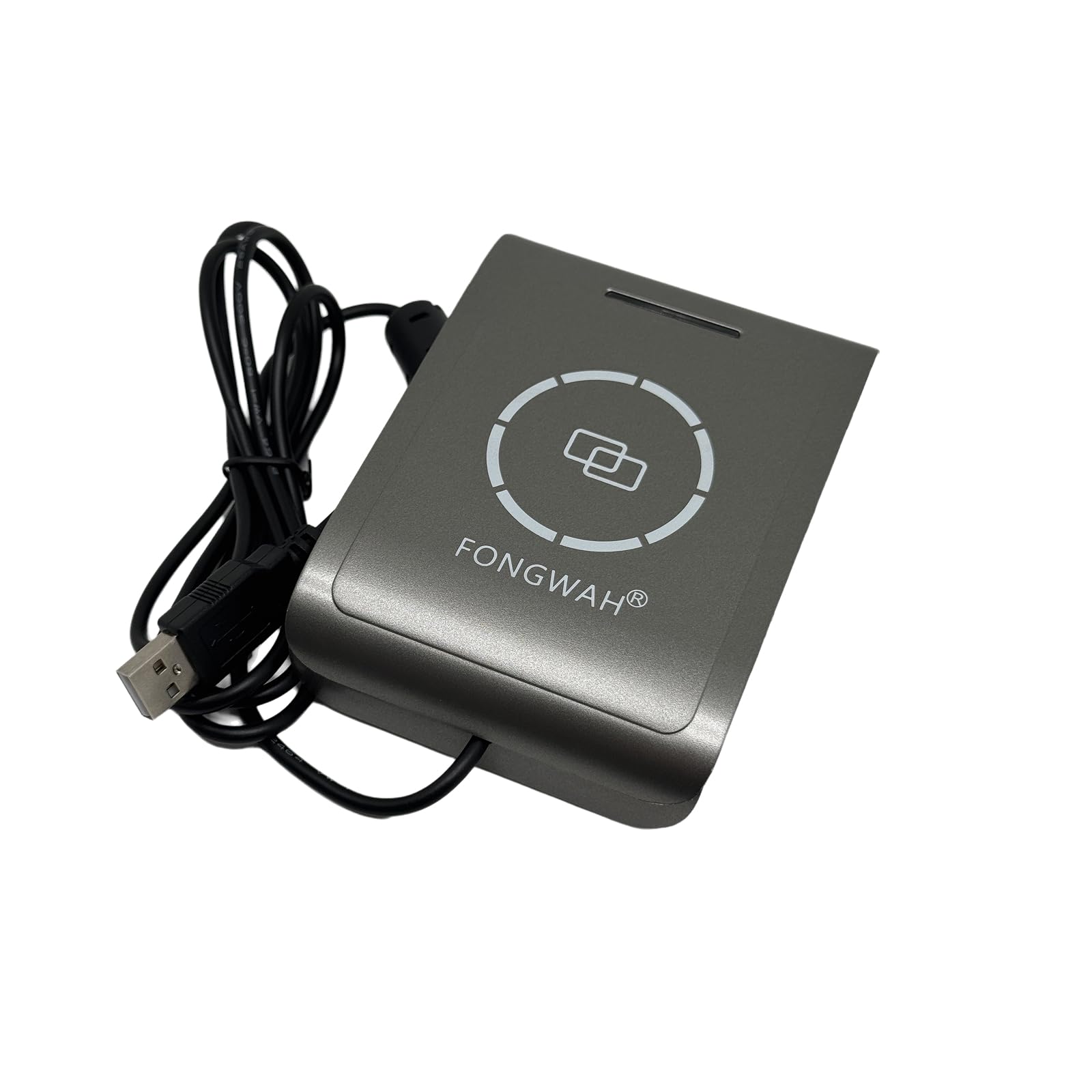
Image: FONGWAH Desktop Gen 2 UHF RFID Reader/Writer, a compact grey device with a USB cable.
2. Асаблівасці прадукту
- Адлегласць чытання: Up to 39 inches (depending on tag and environment).
- Эмуляцыя клавіятуры: Reads UHF tags and outputs data directly as keyboard input.
- Configuration Tool: Allows users to easily set frequency range, data output format, and write tags.
- Набор для распрацоўкі праграмнага забеспячэння (SDK): Includes DLL files and programming examples for custom software applications.
- Адпаведнасць пратаколу: Supports EPC C1G2 and ISO18000-6C standards.
- Падключэнне: USB interface for PC connection.

Image: Diagram illustrating UHF reader functionality, including keyboard emulation output, configuration tool, and SDK for development.
3. Тэхнічныя характарыстыкі
| Параметр | Каштоўнасць |
|---|---|
| мадэль | U6-CU-91 (updated from WRD-130-U1) |
| Частата | Set frequency on demand (US 902-928MHz, EU 865-868MHz, JP 916-921MHz, TW 922-928MHz, etc.) |
| Выхадныя магутнасць | 0-26 дБм |
| Антэна | 3dBi |
| Дыстанцыя чытання | Да 39 цаляў (100 см) |
| Пратаколы | EPC C1 Gen 2 / ISO 18000-6C |
| Пастаўка Voltage | USB port 3-7V DC |
| Працоўная тэмпература | +32°F да +122°F (0°C да +50°C) |
| Вымярэнне | 4.72 * 3.35 * 0.9 inch (120 * 85 * 23 mm) |
| Вага | 250 грамаў |
| Тэхналогія падлучэння | USB |
| Аперацыйная сістэма | Windows, Linux, Android |

Image: Detailed product parameters for the FONGWAH U6-CU-91 UHF Reader.
4. Настройка
4.1 Змест пакета
Пераканайцеся, што ваш пакет змяшчае наступныя элементы:
- FONGWAH Desktop Gen 2 UHF RFID Reader/Writer (U6-CU-91)
- SDK (Software Development Kit) disk
- 2 УВЧ tags (Alien 9662 H3)

Image: Contents of the product package, including the smart card reader, SDK disk, and two UHF tags.
4.2 Падключэнне прылады
- Connect the USB cable from the UHF RFID Reader/Writer to an available USB port on your PC.
- The device is plug-and-play and should be recognized automatically by your operating system (Windows, Linux, Android).
- The indicator light on the reader will illuminate upon successful connection.

Image: The UHF reader connected to a laptop via its USB cable, illustrating compatible systems.
5. Інструкцыя па эксплуатацыі
5.1 Чытанне Tags via Keyboard Emulation
The FONGWAH UHF Reader's default setting is to read EPC codes via keyboard emulation. This means the reader acts like a keyboard, typing the tag's EPC code directly into any active text field on your computer.
- Ensure the reader is connected to your PC.
- Open a text editor, spreadsheet, or any application with a text input field.
- Place a compatible UHF tag on the reader's sensing area.
- The EPC code of the tag will be automatically typed into the active text field.
Video: Demonstration of reading UHF tags effortlessly with the FONGWAH reader using keyboard emulation.
5.2 Using the Configuration Tool (for advanced settings)
For changing advanced settings such as frequency range, data output format, or writing tags, use the provided configuration tool.
- Insert the SDK disk into your computer or download the latest software from the official FONGWAH webсайт.
- Navigate to the SDK folder and open the file названы 'UHF Reader Config V1.1'.
- In the configuration software, select 'USB' mode and click 'Connect' to establish communication with the reader.
- Adjust settings such as 'Auto read UID', 'Read card mode' (LED, Beep, Check UID), 'Scan Time', 'Same Card' delay, and 'Set frequency range' as needed. Click 'Set' after each change.
- To read or write EPC data, navigate to the 'UHF/EPC' tab.
- Месца tag on the reader. To read, click 'Read Tag'. To write, enter the desired data in the 'Write Tag' field and click 'Write Tag'.
Video: Instructions on how to write EPC data to UHF tags using the FONGWAH UHF reader's configuration tool.
5.3 камплект распрацоўкі праграмнага забеспячэння (SDK)
The SDK provides DLL files and programming examples for users with programming skills to integrate the reader with their own software applications. Refer to the SDK documentation for detailed programming guides.
6. Supported Cards/Tags
The FONGWAH Desktop Gen 2 UHF RFID Reader/Writer supports a variety of UHF chips, including:
- Alien-H3/H4/H9
- Impinj M4/M5
- UCODE G2iL, UCODE G2iM
- UCODEG2 XL, UCODEG2 XM
- And other UHF chips compliant with EPC C1G2 and ISO18000-6C.
Image: List of supported UHF card and tag types compatible with the reader.
7. Дадаткі
The UHF reader is widely applied in various RFID application systems, including but not limited to:
- Smart warehouse inventory management
- Logistics and supply chain tracking
- Automatic weighting systems
- Access control systems (door control, car parking control, hotel access control)
- Anti-counterfeit solutions
- Assembly line management
- Retail and apparel management
- Transportation systems


Выявы: Былыamples of application scenarios including supply chain, warehouse management, and parking access control.
8. Тэхнічнае абслугоўванне
To ensure the longevity and optimal performance of your FONGWAH UHF RFID Reader/Writer, follow these maintenance guidelines:
- Уборка: Для чысткі прылады выкарыстоўвайце мяккую сухую тканіну. Пазбягайце выкарыстання агрэсіўных хімічных рэчываў, растваральнікаў або абразіўных ачышчальнікаў.
- захоўванне: Захоўвайце прыладу ў прахалодным, сухім месцы, удалечыні ад прамых сонечных прамянёў і экстрэмальных тэмператур.
- Апрацоўка: Асцярожна звяртайцеся з прыладай, каб пазбегнуць фізічных пашкоджанняў. Пазбягайце падзення або моцных удараў.
- Сыход за кабелем: Do not bend or crimp the USB cable excessively. Ensure the cable is not under tension.
9. Выпраўленне непаладак
If you encounter issues with your FONGWAH UHF RFID Reader/Writer, consider the following troubleshooting steps:
- Прылада не распазнана:
- Ensure the USB cable is securely connected to both the reader and the PC.
- Паспрабуйце падключыцца да іншага USB-порта на вашым ПК.
- Перазагрузіце кампутар.
- Check Device Manager (Windows) to see if the device is listed and if there are any driver issues.
- Tags Не чытае:
- Забяспечце tag is a compatible UHF tag (EPC C1G2, ISO18000-6C).
- Месца tag directly on the reader's sensing area.
- Verify that the configuration tool settings are correct, especially the frequency range.
- Check for any metallic objects or strong electromagnetic interference near the reader that might affect performance.
- Keyboard Emulation Not Working:
- Ensure a text input field is active and focused in your application.
- Confirm that the 'USB keyboard disable' option is not enabled in the configuration tool if you intend to use keyboard emulation.
- Напісанне Tags Fails:
- Забяспечце tag is writable and not locked.
- Verify the data entered in the configuration tool is in the correct format.
- Check the RF Power Output setting in the configuration tool.
10. Гарантыя і падтрымка
FONGWAH products are designed for reliability and performance. For technical support, including assistance with integrating the reader with your software or updating library files, please contact us directly through Amazon's messaging system. Our support team is available to assist with any product-related inquiries.
Калі ласка, звярніцеся да дакументацыі па куплі, каб даведацца пра канкрэтныя ўмовы гарантыі.