
1. Уводзіны
Thank you for choosing the ZUMIMALL Dual Lens 2K Wireless Outdoor Security Camera. This manual provides detailed instructions for setting up, operating, and maintaining your camera to ensure optimal performance and security for your home or property. Please read this manual thoroughly before use and retain it for future reference.
2. Інфармацыя па бяспецы
- Пераканайцеся, што камера ўсталявана ў месцы, абароненым ад экстрэмальных умоў надвор'я, якія перавышаюць клас абароны IP65.
- Use only the specified power adapter or solar panel for charging.
- Не разбірайце і не спрабуйце адрамантаваць прыладу самастойна. Звярніцеся ў службу падтрымкі па дапамогу.
- Трымайце камеру і яе аксэсуары ў месцах, недаступных для дзяцей.
- Пазбягайце размяшчэння камеры побач з моцнымі магнітнымі палямі або крыніцамі перашкод.
- Утылізуйце выраб і батарэю адказна ў адпаведнасці з мясцовымі правіламі.
3. Змесціва ўпакоўкі
Калі ласка, праверце наяўнасць і спраўнасць усіх кампанентаў:
- ZUMIMALL Dual Lens 2K Wireless Outdoor Security Camera
- Сонечная панэль магутнасцю 5 Вт
- Мантажны кранштэйн і шрубы
- USB-кабель для зарадкі
- Кіраўніцтва карыстальніка
4. Прадукт скончыўсяview
The ZUMIMALL Dual Lens 2K Wireless Outdoor Security Camera offers advanced surveillance features with a focus on wide-area coverage and intelligent detection.

Image: The ZUMIMALL Dual Lens 2K Wireless Outdoor Security Camera, featuring a main PTZ camera unit, a separate smaller camera, and a solar panel for continuous power.
Асноўныя характарыстыкі:
- Сістэма падвойных лінзаў: Combines a fixed lens and a rotating lens for simultaneous viewing of two different areas.
- Разрозненне 2K HD: Provides clear and detailed images and videos (3MP+3MP for a total of 6MP effective resolution).
- Wide Angle & PTZ: Offers a 220° ultra-wide-angle view from the fixed lens and 360° pan/tilt/zoom (PTZ) capabilities for comprehensive coverage.
- Поўнакаляровы начны бачанне: Equipped with white and infrared lamps, offering full-color, infrared, or smart night vision modes.
- На сонечнай энергіі: Includes a 5W solar panel and a built-in 10000mAh battery for continuous, uninterrupted operation.
- Разумнае выяўленне AI: Advanced AI can identify people, vehicles, pets, and packages, reducing false alerts.
- Двухбаковая размова: Убудаваны мікрафон і дынамік дазваляюць мець зносіны ў рэжыме рэальнага часу.
- Падключэнне да Wi-Fi 2.4 ГГц: Ensures a stable and reliable wireless connection.
- Устойлівасць да надвор'я IP65: Распрацаваны, каб вытрымліваць розныя ўмовы надвор'я на вуліцы.
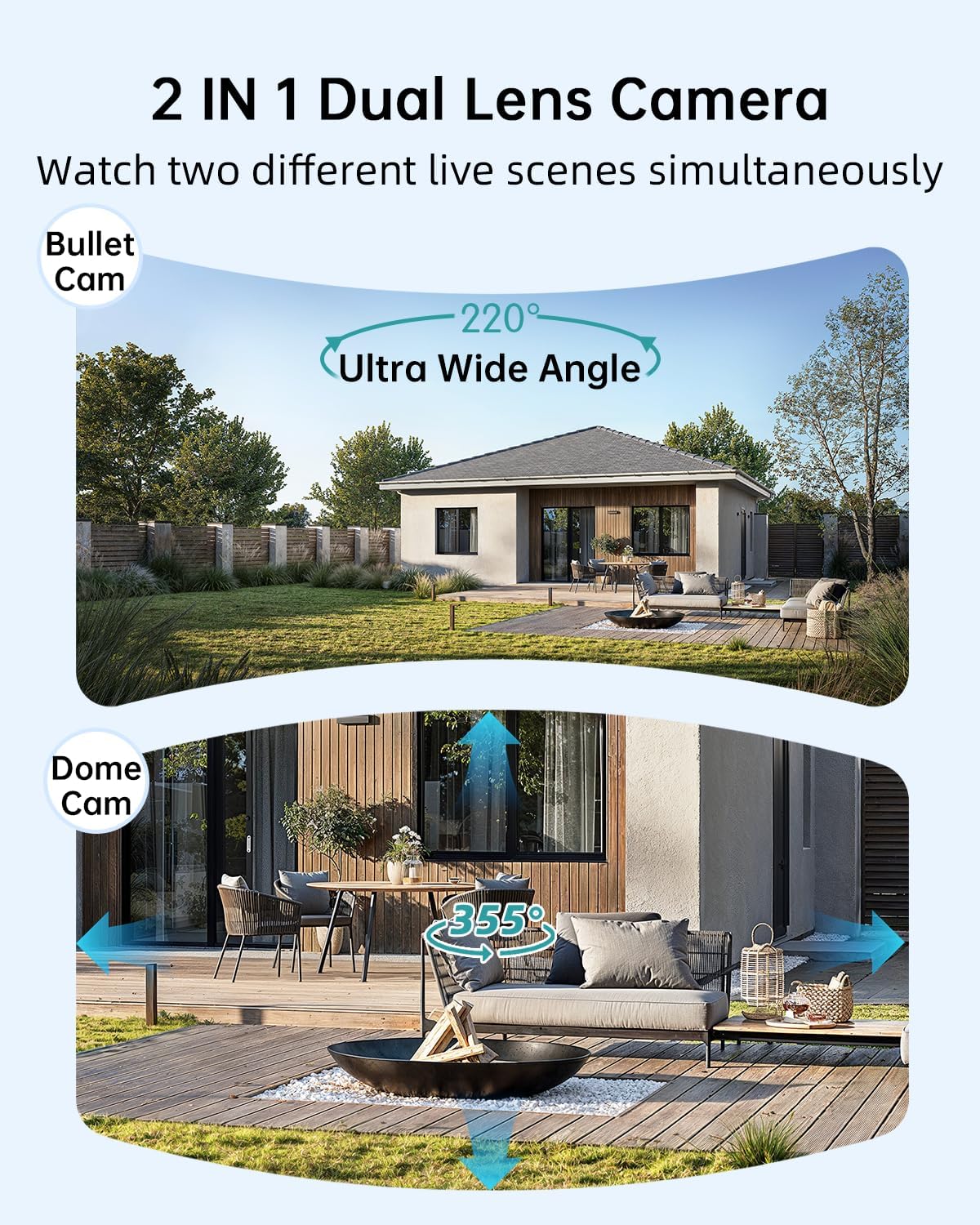
Image: Illustration of the dual-lens functionality, displaying a wide-angle 'Bullet Cam' view and a pan-tilt-zoom 'Dome Cam' view адначасова.

Image: The ZUMIMALL camera connected to its 5W solar panel, highlighting its non-stop solar power capability and IP66 water resistance (note: product specification is IP65).

Image: A demonstration of the 2K ultra-colorful image quality, showing a clear view of a car's license plate at night, with indicators for 3MP FHD Image, 4X Digital Zoom, and 55FT Night Vision Range.

Image: The ZUMIMALL camera shown enduring heavy rain and snow, illustrating its IP65 waterproof rating and suitability for outdoor use in various weather conditions.
5. Настройка
5.1 Першапачатковая зарадка
Before first use, fully charge the camera's built-in 10000mAh battery using the provided USB cable and a 5V/2A power adapter (not included). A full charge typically takes several hours.
5.2 Загрузка праграмы і рэгістрацыя ўліковага запісу
- Scan the QR code on the packaging or search for 'ZUMIMALL' in your mobile app store (iOS or Android).
- Download and install the ZUMIMALL app.
- Адкрыйце праграму і зарэгіструйце новы ўліковы запіс або ўвайдзіце ў сістэму, калі ў вас ужо ёсць уліковы запіс.
5.3 Падключэнне да Wi-Fi
- Ensure your smartphone is connected to a 2.4GHz Wi-Fi network. The camera does not support 5GHz Wi-Fi.
- In the ZUMIMALL app, tap '+' to add a new device.
- Follow the on-screen instructions to power on the camera and enter Wi-Fi configuration mode.
- Адсканіруйце QR-код, які адлюстроўваецца на экране тэлефона, з дапамогай аб'ектыва камеры.
- Wait for the camera to connect to your Wi-Fi network. Once connected, you will hear a confirmation sound.
5.4 Мантаж камеры і сонечнай панэлі
The camera offers flexible installation options, including magnetic support and bracket support.

Image: Demonstrates two installation methods for the ZUMIMALL camera: a compact magnetic mount for easy placement and a more robust bracket mount for secure, permanent installation.
- Выберыце месца: Выберыце месцазнаходжанне, якое забяспечвае жаданае viewing angle, is within Wi-Fi range, and receives ampпрамых сонечных прамянёў для сонечнай панэлі.
- Усталюйце кранштэйн: Use the provided screws to securely attach the mounting bracket to a wall or ceiling.
- Прымацаваць камеру: Secure the camera to the bracket. For magnetic support, simply attach the camera to the magnetic base.
- Размесціце панэль сонечных батарэй: Mount the 5W solar panel in a location that receives maximum direct sunlight throughout the day. Connect the solar panel cable to the camera's charging port.
- Наладзіць кут: Adjust the camera's angle to cover the desired surveillance area.
6. Інструкцыя па эксплуатацыі
6.1 У прамым эфіры View and Dual Lens Control
Open the ZUMIMALL app and select your camera to access the live view. The app will display two video feeds simultaneously from the fixed and PTZ lenses. You can switch between views or control the PTZ lens by swiping on the screen or using the directional controls within the app.
6.2 Рэжымы начнога бачання
The camera offers three night vision modes, configurable in the app settings:
- Поўнакаляровы начны бачанне: Utilizes the built-in white light to provide color images in low-light conditions.
- Інфрачырвонае начное бачанне: Uses infrared LEDs for black and white images in complete darkness.
- Разумнае начное бачанне: Automatically switches between infrared and full-color based on detected motion or ambient light.

Image: A comparison of night vision modes, showing a scene with a spotlight on (color night vision) and a spotlight off (infrared night vision), demonstrating the camera's ability to capture clear images in various low-light conditions.
6.3 Smart AI Detection
Configure AI detection settings in the app to receive alerts for specific events.

Image: An illustration of the camera's Intelligent AI Analysis feature, highlighting its capability to detect and differentiate between humans, packages, vehicles, and pets within the surveillance area.
- Тыпы выяўлення: The camera can identify humans, vehicles, pets, and packages.
- Абвесткі: When motion is detected, an alert notification will be sent to your smartphone.
- Адчувальнасць: Адрэгулюйце адчувальнасць выяўлення руху, каб мінімізаваць ілжывыя спрацоўванні.
6.4 Двухбаковая размова
Use the two-way talk feature to communicate with visitors or deter intruders.

Image: Depicts scenarios where the two-way voice intercom is used, showing a user communicating with a delivery person at the door and a parent speaking to a child playing outside.
- У прамым эфіры view, націсніце значок мікрафона, каб гаварыць праз дынамік камеры.
- Release the icon to listen.
6.5 Запіс і прайграванне
The camera records events triggered by motion detection. Recordings are stored on a local SD card (not included) or in cloud storage (subscription may be required).
- Прайграванне: Access recorded videos through the 'Playback' section in the ZUMIMALL app.
- Спампаваць: Download important video clips to your phone.
7. Тэхнічнае абслугоўванне
- Уборка: Перыядычна чысціце аб'ектыў камеры і сонечную панэль мяккай губкайamp cloth to ensure clear images and efficient solar charging. Do not use harsh chemicals.
- Сыход за батарэяй: For optimal battery life, avoid prolonged exposure to extreme temperatures. Ensure the solar panel is free from obstructions to maintain consistent charging.
- Абнаўленні прашыўкі: Check the ZUMIMALL app regularly for firmware updates. Keeping your camera's firmware updated ensures the latest features and security enhancements.
8. Выпраўленне непаладак
8.1 Камера не падключаецца да Wi-Fi
- Пераканайцеся, што ваша сетка Wi-Fi працуе на частаце 2.4 ГГц.
- Праверце ўзровень сігналу Wi-Fi ў месцы, дзе знаходзіцца камера.
- Праверце, ці правільна ўведзены пароль Wi-Fi.
- Перазагрузіце маршрутызатар і камеру.
8.2 Хуткая разрадка батарэі
- Пераканайцеся, што сонечная панэль атрымлівае прамыя сонечныя прамяні на працягу некалькіх гадзін штодня.
- Reduce motion detection sensitivity or frequency of recordings.
- Check for excessive live view streaming, which consumes battery.
8.3 Нізкая якасць выявы
- Ачысціце аб'ектыў камеры.
- Пераканайцеся, што ў полі зроку камеры няма перашкод view.
- Праверце хуткасць падключэння да Wi-Fi.
8.4 False Motion Alerts
- Адрэгулюйце адчувальнасць выяўлення руху ў дадатку.
- Utilize AI detection filters (human, vehicle, pet, package) to ignore irrelevant motion.
- Ensure the camera is not pointing at busy public areas or moving foliage.
9. Тэхнічныя характарыстыкі
| Асаблівасць | Спецыфікацыя |
|---|---|
| мадэль | B0F189QLFH |
| дазвол | 2K (3MP + 3MP Dual Lens) |
| Поле в View | 220° Ultra Wide Angle (fixed lens), 360° PTZ (rotating lens) |
| Ёмістасць батарэі | 10000 мАг |
| Магутнасць сонечных батарэй | 5W |
| Падключэнне да Wi-Fi | 2.4 ГГц (IEEE 802.11b/g/n) |
| Ўстойлівасць да надвор'я | IP65 |
| Начное бачанне | Full-Color, Infrared, Smart |
| Выяўленне | Smart AI (Human, Vehicle, Pet, Package) |
| Аўдыё | Двухбаковая размова |
| Вытворца | ЗУМІМАЛЬ |
| Першая даступная дата | 12 сакавіка 2025 г |
10. Інфармацыя аб гарантыі
ZUMIMALL products are covered by a limited warranty from the date of purchase. Please refer to the warranty card included with your product or visit the official ZUMIMALL webсайт для атрымання падрабязных гарантыйных умоў.
11. Падтрымка кліентаў
If you encounter any issues or have questions regarding your ZUMIMALL camera, please contact our customer support team:
- электронная пошта: support@zumimall.com (Exampле)
- Webсайт: ZUMIMALL Official Store
Please have your model number (B0F189QLFH) and purchase information ready when contacting support.