1. Прадукт скончыўсяview
The TABWEE T20 is a versatile 10-inch Android tablet designed for both productivity and entertainment. It features a high-resolution Incell display, a powerful Octa-Core processor, and ample memory and storage, making it suitable for a wide range of applications from content creation to multimedia consumption.
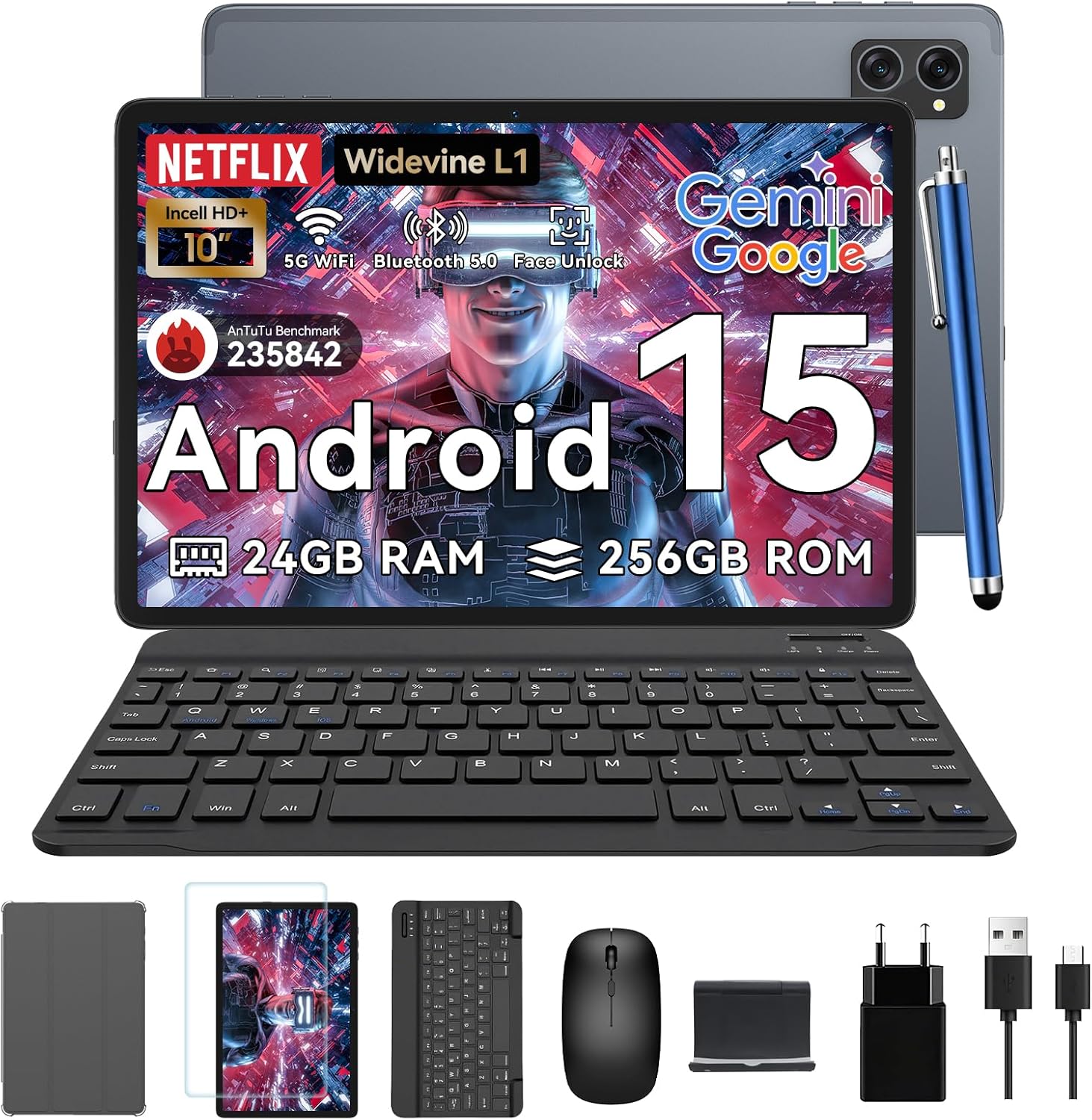
Figure 1.1: TABWEE T20 Tablet and its complete accessory package, including a Bluetooth keyboard, mouse, stylus, protective case, screen protector, charger, and USB cable.
Што ў скрынцы
Upon unboxing your TABWEE T20 Tablet, verify that all components are present:

Figure 1.2: Contents of the TABWEE T20 Tablet retail package.
- 1x TABWEE T20 Tablet
- 1x клавіятура Bluetooth
- 1x мыш
- 1x Stylus
- 1x ахоўны чахол
- 1x ахоўная плёнка для экрана
- 1x Падстаўка для планшэта
- 1x зарадная прылада
- 1x кабель USB
2. Усталёўка і першае выкарыстанне
Зарадка планшэта
Before first use, fully charge the tablet using the provided charger and USB cable. Connect the charger to a power outlet and the USB cable to the tablet's charging port. The charging indicator will illuminate.
Уключэнне/выключэнне
- Каб уключыць: Press and hold the Power button until the TABWEE logo appears on the screen.
- Каб выключыць: Націсніце і ўтрымлівайце кнопку харчавання, пакуль не з'явіцца меню параметраў харчавання. Выберыце «Выключыць харчаванне» і пацвердзіце.
- Каб перазапусціць: У меню параметраў харчавання абярыце «Перазагрузка» і пацвердзіце.
Майстар пачатковай налады
Пры першым уключэнні планшэт правядзе вас праз майстар пачатковай налады. Выконвайце падказкі на экране, каб:
- Выберыце сваю мову.
- Падключыцеся да сеткі Wi-Fi.
- Увайдзіце ў свой уліковы запіс Google або стварыце новы.
- Наладзьце блакаванне экрана (PIN-код, узор, пароль або разблакіроўка па твары).
- Review і прыняць умовы.
Падключэнне аксесуараў
The TABWEE T20 comes with a Bluetooth keyboard and mouse for enhanced productivity.
- Bluetooth-клавіятура:
- Пераканайцеся, што клавіятура зараджана і ўключана.
- На планшэце перайдзіце да Налады > Падлучаныя прылады > Bluetooth.
- Turn on Bluetooth and tap "Pair new device".
- Select the keyboard from the list of available devices and follow pairing instructions.
- Bluetooth Mouse:
- Пераканайцеся, што мыш уключана і знаходзіцца ў рэжыме спалучэння.
- На планшэце перайдзіце да Налады > Падлучаныя прылады > Bluetooth.
- Tap "Pair new device" and select the mouse from the list.
- Стылус: The included stylus can be used directly on the screen for navigation, drawing, and note-taking. It features palm-rejection precision.
3. Кіраванне планшэтам
Аперацыйная сістэма Android 15
The TABWEE T20 runs on Android 15, offering enhanced privacy controls, seamless cross-device collaboration, and improved multitasking capabilities.

Figure 3.1: Key features of the Android 15 operating system.
Gemini AI Integration
The tablet integrates Google Gemini AI, which intelligently optimizes tasks, from photo editing to document formatting, while prioritizing security with a dedicated encrypted privacy space.

Малюнак 3.2: Закончанаview of Gemini AI capabilities on the tablet.
Display and Multimedia
The 10.1-inch Incell HD+ display (1280x800 resolution) provides vivid colors and crisp details. With Widevine L1 certification, you can enjoy 1080P streaming on platforms like Netflix, Disney+, and Hulu.

Figure 3.3: Display features and eye-friendly modes.
The tablet also features Dual Smart-K Box Speakers for an immersive audio experience.

Figure 3.4: Dual Smart-K Box Speakers for enhanced audio.
Асаблівасці камеры
Equipped with an 8MP rear camera and a 5MP front camera, the tablet supports Google Lens integration for smart scanning and object recognition. Face Unlock is also supported for convenient security.

Figure 3.5: Camera specifications and features.

Figure 3.6: Smart Google Lens functionalities.
Сувязь
The TABWEE T20 supports dual-band 5G WiFi and Bluetooth 5.0 for fast and stable connections.
- Wi-Fi: Connect to 2.4GHz or 5GHz networks for seamless streaming and quick downloads.
- Bluetooth 5.0: Pair with wireless earbuds, speakers, or other Bluetooth-enabled devices with 20% faster data transfer speed.
- Падтрымка OTG: Allows for easy transfer of files to and from external storage devices.

Figure 3.7: Advanced Bluetooth 5.0 connectivity.

Figure 3.8: Lightning Fast WiFi 5 Technology.
4. Тэхнічнае абслугоўванне і догляд
Proper maintenance ensures the longevity and optimal performance of your TABWEE T20 Tablet.
Кіраванне батарэяй
The 5000mAh battery provides extended usage times. To maximize battery life:
- Пазбягайце экстрэмальных тэмператур.
- Use the provided charger.
- Enable smart power-saving modes in settings.
- Зачыніце невыкарыстоўваныя праграмы, якія працуюць у фонавым рэжыме.

Figure 4.1: 5000mAh Mega Battery performance metrics.
Ачыстка планшэта
- Для чысткі экрана і корпуса выкарыстоўвайце мяккую тканіну без ворса.
- Для ўстойлівых плям злёгкуampпрацярыце тканіну вадой або сродкам для чысткі экранаў.
- Пазбягайце выкарыстання агрэсіўных хімікатаў або абразіўных матэрыялаў.
Захоўванне і кіраванне памяццю
The tablet comes with 256GB of internal storage and supports up to 2TB TF card expansion. It also features 24GB RAM (8GB physical + 16GB virtual) for smooth multitasking.

Figure 4.2: Storage and RAM expansion capabilities.
To optimize performance and storage:
- Рэгулярна чысціце кэш і часовыя files.
- Выдаліце невыкарыстоўваныя праграмы.
- Utilize the 2TB TF card slot for large files like 4K videos and design documents.
5. Выпраўленне непаладак
This section addresses common issues you might encounter with your TABWEE T20 Tablet.
| праблема | Магчымая прычына | Рашэнне |
|---|
| Планшэт не ўключаецца. | Нізкі зарад батарэі; збой сістэмы. | Зараджайце планшэт не менш за 30 хвілін. Калі ён усё яшчэ не рэагуе, націсніце і ўтрымлівайце кнопку харчавання на працягу 10-15 секунд, каб прымусова перазагрузіць яго. |
| Праблемы з падключэннем да Wi-Fi. | Incorrect password; router issues; out of range. | Verify Wi-Fi password. Restart your router. Ensure tablet is within Wi-Fi range. Forget the network and reconnect. |
| Bluetooth accessories not pairing. | Accessory not in pairing mode; Bluetooth off on tablet. | Ensure accessory is in pairing mode. Turn Bluetooth off and on again on the tablet. Restart both devices. |
| Павольная прадукцыйнасць або збоі праграмы. | Занадта шмат запушчаных праграм; мала месца для захоўвання; састарэлае праграмнае забеспячэнне. | Close background apps. Clear app caches. Free up storage space. Check for system updates in Налады > Сістэма > Абнаўленне сістэмы. |
| Экран не рэагуе. | Часовы збой праграмнага забеспячэння. | Force restart the tablet by holding the Power button for 10-15 seconds. |
Калі праблема не знікне пасля спробы гэтых рашэнняў, звярніцеся ў службу падтрымкі кліентаў.
7. Гарантыя і падтрымка
TABWEE is committed to providing excellent customer service and support for your T20 Tablet.
Інфармацыя аб гарантыі
Your TABWEE T20 Tablet is covered by a Гарантыя 2 год from the date of purchase. This warranty covers manufacturing defects and ensures risk-free ownership.
Падтрымка кліентаў
For any technical assistance, troubleshooting, or warranty claims, please contact our support team:
- Падтрымка па электроннай пошце: serviceplus.linda@gmail.com
- Online Call Support: Available 24/7 for US/CA customers.
- Падтрымка па рамонце: 2-Year Repair Support is provided.

Figure 7.1: TABWEE Customer Support Services.
Please have your purchase details and tablet model number ready when contacting support to expedite the process.

