
ASD A-LFM12D20SRGBW-N-4p
ASD 12 Inch Smart RGBW Flush Mount Ceiling Light Instruction Manual
Марка: ASD | мадэль: A-LFM12D20SRGBW-N-4p
1. Уводзіны
Thank you for choosing the ASD 12 Inch Smart RGBW Flush Mount Ceiling Light. This fixture combines a stylish minimalist design with efficient, versatile lighting solutions. Featuring multicolor RGBW capabilities, smart app control, and remote operation, it offers a wide range of lighting effects for your space. This manual provides essential information for safe installation, effective operation, and proper maintenance of your new lighting fixture.

Figure 1.1: ASD 12 Inch Smart RGBW Flush Mount Ceiling Light with accessories.
2. Інфармацыя па бяспецы
Калі ласка, уважліва прачытайце ўсе інструкцыі перад устаноўкай і выкарыстаннем. Захоўвайце гэтую інструкцыю для далейшага выкарыстання.
- Электрабяспека: Always turn off power at the circuit breaker before installing, cleaning, or servicing the fixture. Consult a qualified electrician if you are unsure about wiring.
- Толькі для выкарыстання ў памяшканні: This fixture is designed for indoor use in dry and damp locations. Do not expose to direct water spray or immerse in water.
- тtage: Пераканайцеся, што аб'ём блока харчаванняtage matches the fixture's requirements (120V).
- Мантаж: Mount the fixture securely to a standard electrical outlet box.
- Апрацоўка: Handle the fixture with care to avoid damage to components.
3. Змесціва ўпакоўкі
Перад пачаткам усталёўкі пераканайцеся, што ўсе кампаненты наяўныя:
- ASD 12 Inch Smart RGBW Flush Mount Ceiling Light Fixture (4 units)
- Пульт дыстанцыйнага кіравання
- Мантажныя элементы (шрубы, гайкі)
- Кіраўніцтва па эксплуатацыі
4. Тэхнічныя характарыстыкі
| Асаблівасць | Дэталь |
|---|---|
| Марка | РАС |
| Назва мадэлі | ЛОФТ |
| Нумар дэталі | A-LFM12D20SRGBW-N-4p |
| Колер | 12" | Nickel | RGBW |
| Матэрыял | Alloy Steel, Acrylic |
| стыль | Сучасны |
| Памеры прадукту | 11.3 см Д х 11.3 см Ш х 3.4 см В |
| Канкрэтнае выкарыстанне | Толькі для выкарыстання ў памяшканнях |
| Крыніца харчавання | Праводная |
| Тып крыніцы святла | святлодыёд |
| Тып аздаблення | Пафарбаваны |
| Абажур Матэрыял | Пластыкавыя |
| тtage | 120 вольт |
| Ватtage | 20 ват |
| Тып мацавання | Скрытае мацаванне |
| Сярэдняя жыццё | 50,000 гадзін |
| Асаблівасці | 1064/1220LM, Remote Control, RGBW, Smart App, CCT Adjustable 2700-6500K |

Малюнак 4.1: Памеры і асноўныя характарыстыкі прадукту.
5. Ўстаноўка
Follow these steps to install your ASD Smart RGBW Flush Mount Ceiling Light:
- Падрыхтоўка да ўстаноўкі: Turn off power at the circuit breaker before starting. Ensure the mounting surface is clean and stable.
- Remove the Lens: Gently remove the lens from the fixture by rotating it clockwise. This will expose the mounting holes and wiring connections.
- Устанавіце свяцільня: Attach the fixture's base to the electrical outlet box using the provided screws. Ensure it is securely fastened.
- Правадныя злучэнні: Connect the wires: Black to Black (Live), White to White (Neutral), and Ground to Ground. Secure all connections with wire nuts. Carefully tuck all wires back into the outlet box.
- Прымацуйце аб'ектыў: Once wiring is complete and secure, attach the lens by aligning it with the fixture and rotating it counter-clockwise until it locks into place.
- Аднавіць сілу: Зноў уключыце сілкаванне на аўтаматычным выключальніку.
- Download ASD SMART App: For smart control features, download the "ASD SMART" application from your smartphone's app store. Scan the QR codes below or click the links to download.
Крама Google Play (Android)
Apple App Store (iOS) - Add Fixture to App: Follow the in-app instructions to add your new ceiling light to the ASD SMART app. This typically involves putting the light into pairing mode and connecting it to your Wi-Fi network.

Figure 5.1: Initial installation steps: removing the lens and wiring.
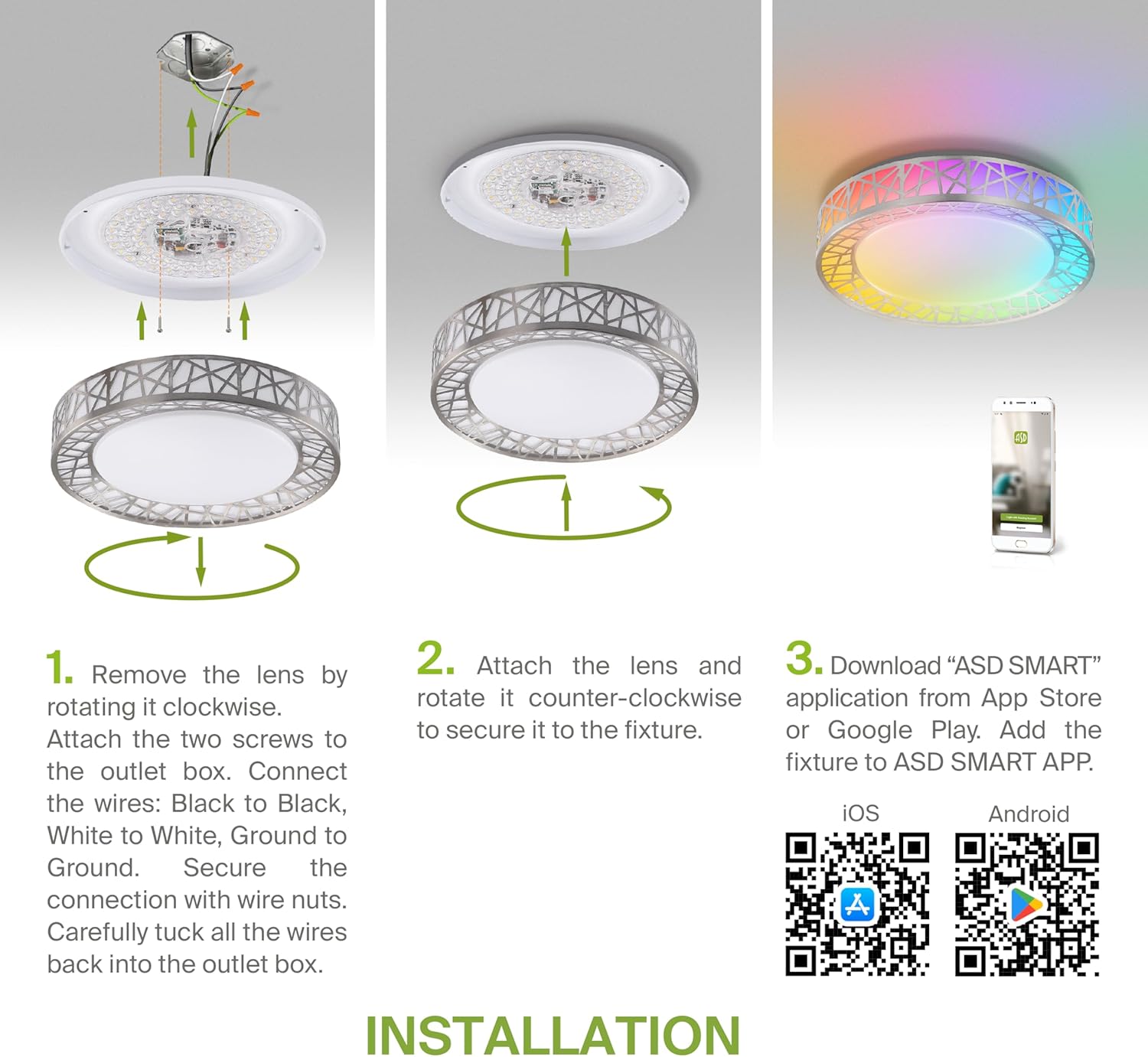
Figure 5.2: Complete installation overview including app download.
6. Інструкцыя па эксплуатацыі
Your ASD Smart RGBW Flush Mount Ceiling Light offers multiple control methods:
6.1 Пульт дыстанцыйнага кіравання
The included remote control allows for basic functions:
- Укл/Выкл: Уключыць або выключыць святло.
- Зацямненне: Adjust brightness levels smoothly.
- Карэкціроўка CCT: Change color temperature (e.g., from warm white to cool white).
- Выбар колеру RGB: Cycle through or select specific RGB colors.
6.2 ASD SMART App Control
The ASD SMART app provides full control and advanced features:
- 16.7 мільёнаў колераў: Choose any color from the full RGBW spectrum.
- Smooth Dimming & CCT: Precisely adjust brightness and color temperature (2700K-6500K).
- Lighting Patterns: Select pre-set or custom lighting scenes and effects.
- Групоўка: Control multiple fixtures simultaneously.
- Планаванне: Set timers for lights to turn on/off or change settings automatically.

Figure 6.1: RGBW color capabilities.

Figure 6.2: Control via remote and smart app.

Figure 6.3: Seamless dimming functionality.
6.3 Галасавое кіраванне (Alexa і Google Assistant)
The fixture is compatible with Amazon Alexa and Google Assistant for convenient voice commands:
- Ensure your ASD SMART app is linked to your Alexa or Google Home account.
- Use commands such as "Alexa, turn on the living room light" or "Hey Google, set the bedroom light to blue."

Figure 6.4: Compatibility with Alexa and Google Assistant.
7. Тэхнічнае абслугоўванне
To ensure the longevity and optimal performance of your ceiling light:
- Уборка: Адключыце сілкаванне перад чысткай. Працярыце прыбор мяккай сухой тканінай. Не выкарыстоўвайце абразіўныя ачышчальнікі або растваральнікі.
- Замена лямпачкі: This fixture uses integrated LED technology and does not require bulb replacement.
8. Выпраўленне непаладак
Калі ў вас узніклі праблемы са свяцільняй на столі, звярніцеся да наступных распаўсюджаных праблем і рашэнняў:
| праблема | Магчымая прычына | Рашэнне |
|---|---|---|
| Не гарыць святло | No power, loose wiring, faulty switch | Праверце аўтаматычны выключальнік. Пераканайцеся, што ўсе правадныя злучэнні надзейныя. Праверце насценны выключальнік. |
| Пульт дыстанцыйнага кіравання не працуе | Dead battery, out of range, interference | Replace remote battery. Ensure you are within range. Remove any obstructions. |
| Праграма не можа падключыцца да святла | Incorrect Wi-Fi password, light not in pairing mode, 5GHz Wi-Fi network | Verify Wi-Fi password. Reset light to pairing mode (refer to app instructions). Ensure you are on a 2.4GHz Wi-Fi network. |
| Галасавое кіраванне не рэагуе | App not linked to voice assistant, incorrect device name | Check linking in ASD SMART app and voice assistant app. Verify device name in voice assistant app. |
9. Гарантыя і падтрымка
ASD забяспечвае 5-гадовая абмежаваная гарантыя for this product, guaranteeing top quality and safety. The fixture is ETL certified, ensuring compliance with North American safety standards.
For technical support, warranty claims, or any questions not covered in this manual, please contact ASD customer service. Refer to the product packaging or the official ASD webсайт для кантактнай інфармацыі.