
1. Уводзіны
This manual provides detailed instructions for the Symcode Wearable Glove Barcode Scanner. This device is designed for efficient, hands-free barcode scanning, featuring dual wireless connectivity (Bluetooth 6.0 & 2.4G) and a long-lasting battery. It is suitable for various applications including warehouses, retail, and logistics, offering fast decoding of 1D, 2D, and QR codes.
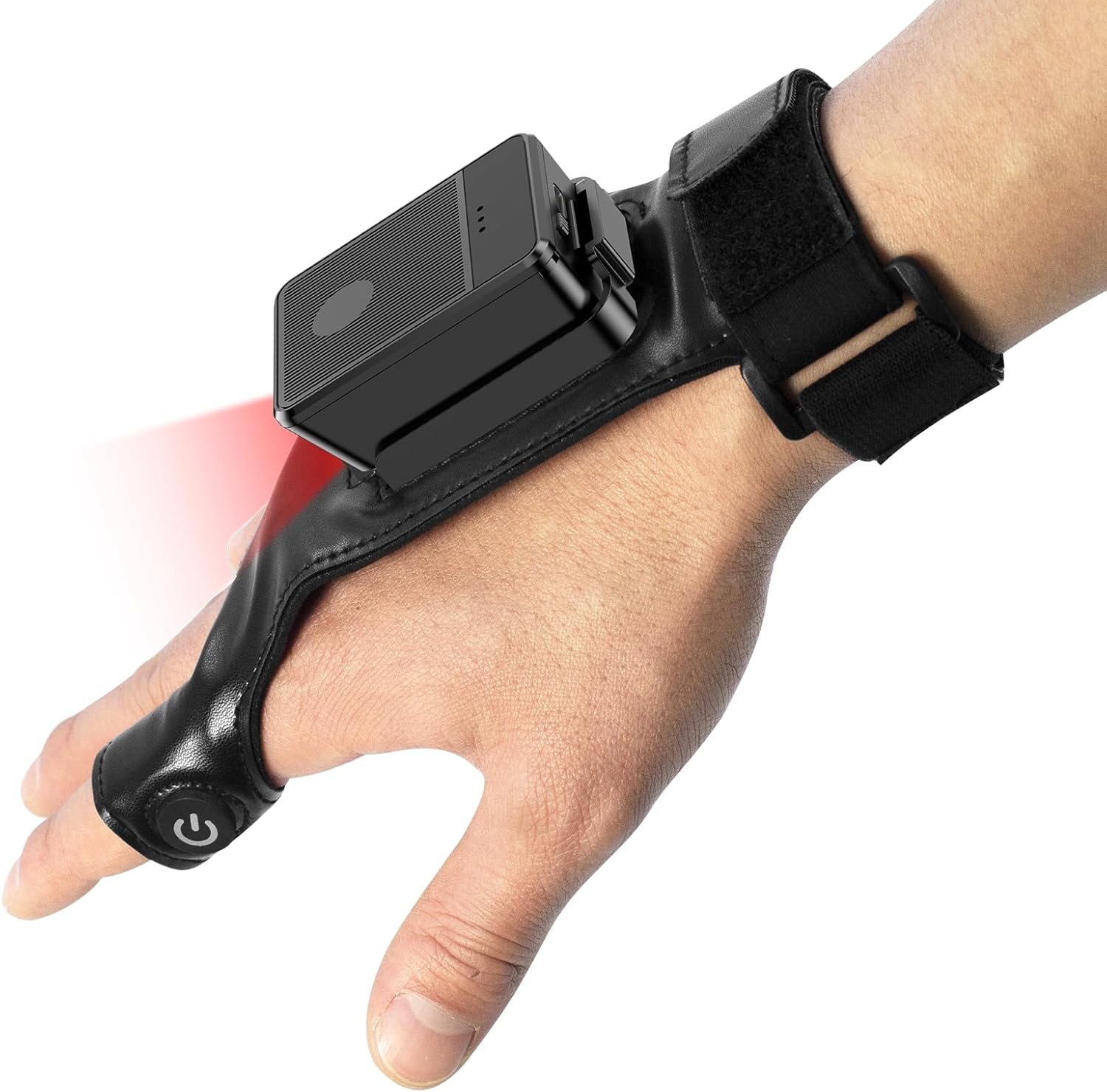
This image shows the Symcode Wearable Glove Barcode Scanner attached to a user's hand, demonstrating its ergonomic, hands-free design. The scanner unit is positioned on the back of the hand, with the scanning beam visible.
2. Інфармацыя па бяспецы
- Do not expose the device to extreme temperatures, moisture, or corrosive substances.
- Пазбягайце прамога траплення ў вочы святла сканавання.
- Не спрабуйце разбіраць або рамантаваць прыладу самастойна. Звярніцеся да кваліфікаванага персаналу для абслугоўвання.
- Use only the provided charging cable and adapter to prevent damage.
3. Змесціва ўпакоўкі
Калі ласка, праверце змесціва пасылкі пасля атрымання. Калі якія-небудзь прадметы адсутнічаюць або пашкоджаныя, звярніцеся да прадаўца.
- Symcode Wearable Glove Barcode Scanner
- USB-кабель для зарадкі
- Бесправадны адаптар 2.4G
- Кіраўніцтва карыстальніка
4. Прадукт скончыўсяview
The Symcode Wearable Glove Barcode Scanner consists of a compact scanning unit and an adjustable glove-style strap. The scanning unit features a durable trigger button, indicator lights, and a charging port. The glove is designed for comfort and secure fit, allowing for hands-free operation.

Буйны план view of the scanner on a hand, highlighting the red scanning beam and the durable resin material of the trigger button located on the index finger. The image also shows a roll of barcode labels, indicating its primary function.
5. Настройка
5.1 Зарадка прылады
Before first use, fully charge the scanner. Connect the USB charging cable to the scanner's charging port and to a power source (e.g., computer USB port or USB wall adapter). The charging indicator light will show charging status. A full charge takes approximately 5 hours.
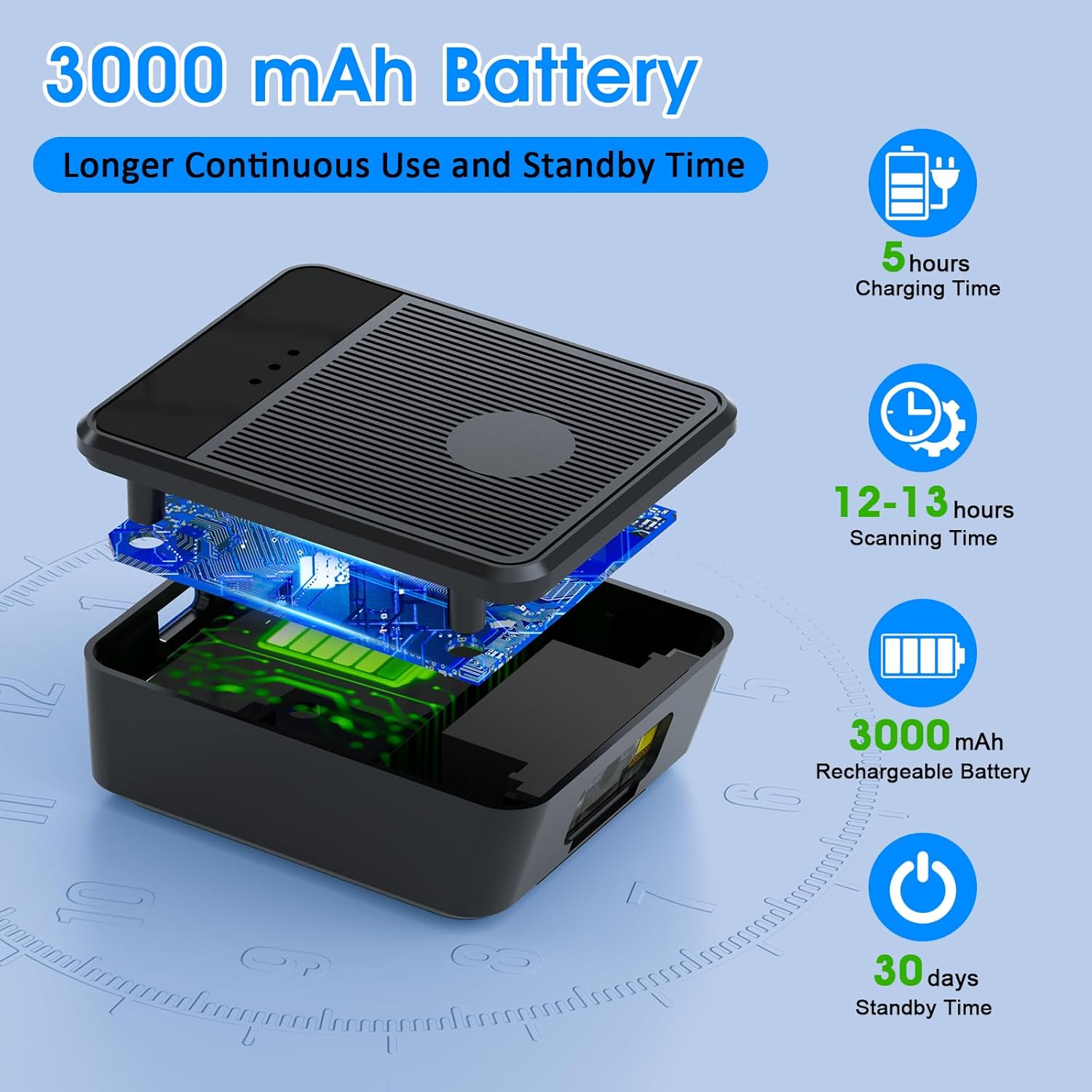
Выбухнуў view diagram of the scanner unit, emphasizing its 3000 mAh rechargeable battery. Accompanying text indicates a 5-hour charging time, 12-13 hours of continuous scanning, and 30 days of standby time.
5.2 Нашэнне сканера
Slide your hand into the glove, ensuring the scanner unit is positioned comfortably on the back of your hand. Adjust the strap for a secure fit. The trigger button should align with your index finger for easy access.

Two workers are shown in a warehouse environment, handling boxes. One worker is actively using the wearable barcode scanner on their hand to scan a package, demonstrating the hands-free benefit of the device during logistics operations.
5.3 Падключэнне да прылады
The scanner supports two wireless connection methods:
5.3.1 2.4G Wireless Dongle Connection
- Plug the 2.4G wireless dongle into a USB port on your computer or compatible device.
- Уключыце сканер. Ён павінен аўтаматычна падключыцца да электроннай мадыфікацыйнай прылады.
- A successful connection is indicated by a specific light pattern or sound (refer to device indicators).
5.3.2 Bluetooth 6.0 Падключэнне
- Уключыце сканер.
- Уключыце Bluetooth на вашай прыладзе (напрыклад, смартфоне, планшэце, камп'ютары).
- Пошук available Bluetooth devices and select the Symcode scanner from the list.
- Pairing may require a confirmation or a default PIN (check device documentation for specific PIN if required).
6. Інструкцыя па эксплуатацыі
6.1 Асноўнае сканаванне
To scan a barcode, point the scanner's beam at the barcode and press the trigger button located on your index finger. A successful scan will typically be indicated by a beep, a vibration, or a change in the indicator light.
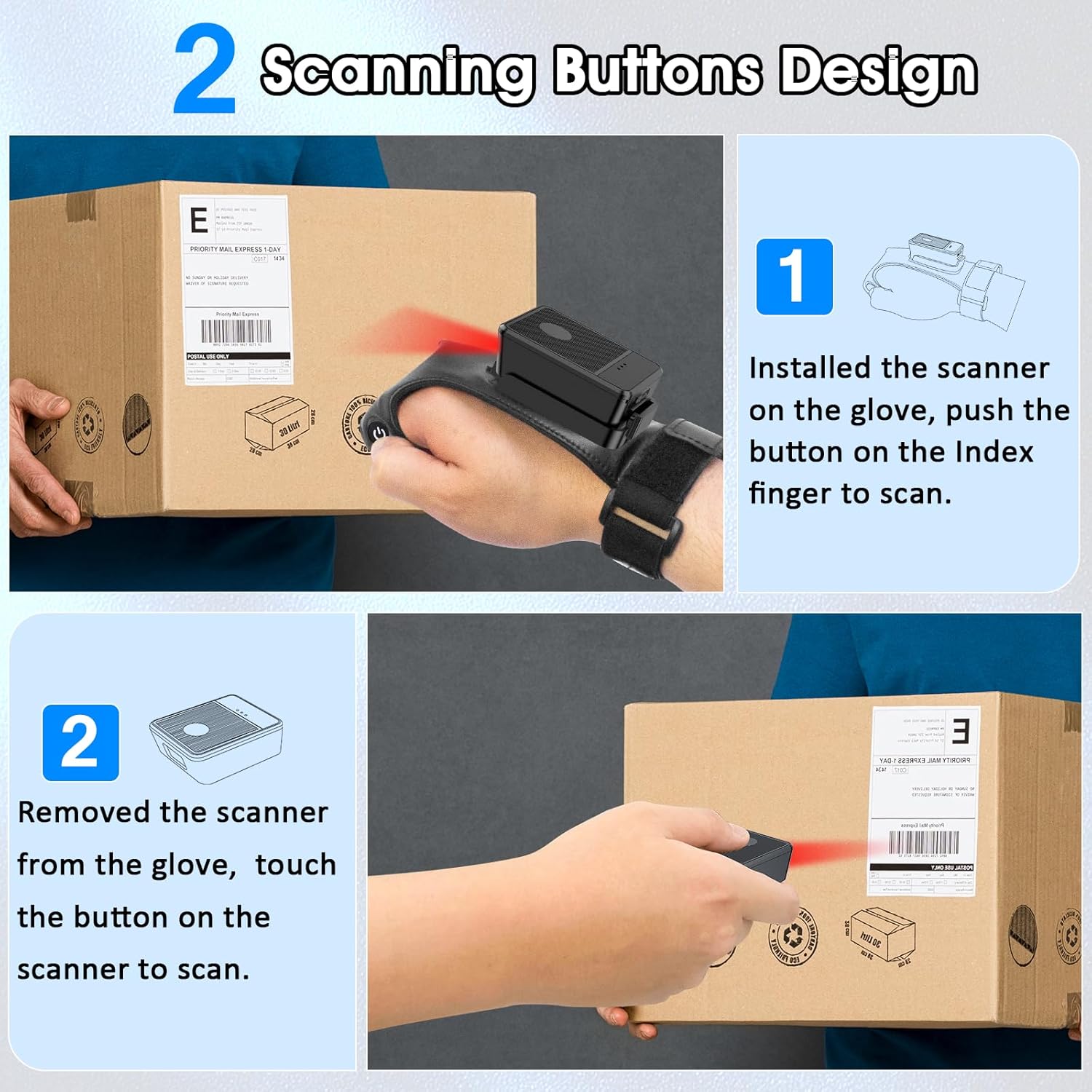
This diagram illustrates two ways to use the scanner: 1) installed on the glove, scanning with the index finger button, and 2) removed from the glove, scanning by touching the button directly on the scanner unit. Both methods are shown with the scanner pointed at a package.
6.2 рэжыму працы
The scanner supports two operational modes:
6.2.1 Рэжым імгненнай загрузкі
In this mode, scanned barcode data is immediately transmitted to the connected host device. This is ideal for real-time inventory updates or point-of-sale transactions.
6.2.2 Offline Storage Mode
This mode allows the scanner to store up to 50,000 barcodes internally when not connected to a host device or when connectivity is intermittent. Data can then be uploaded to a computer or POS system at a later time.
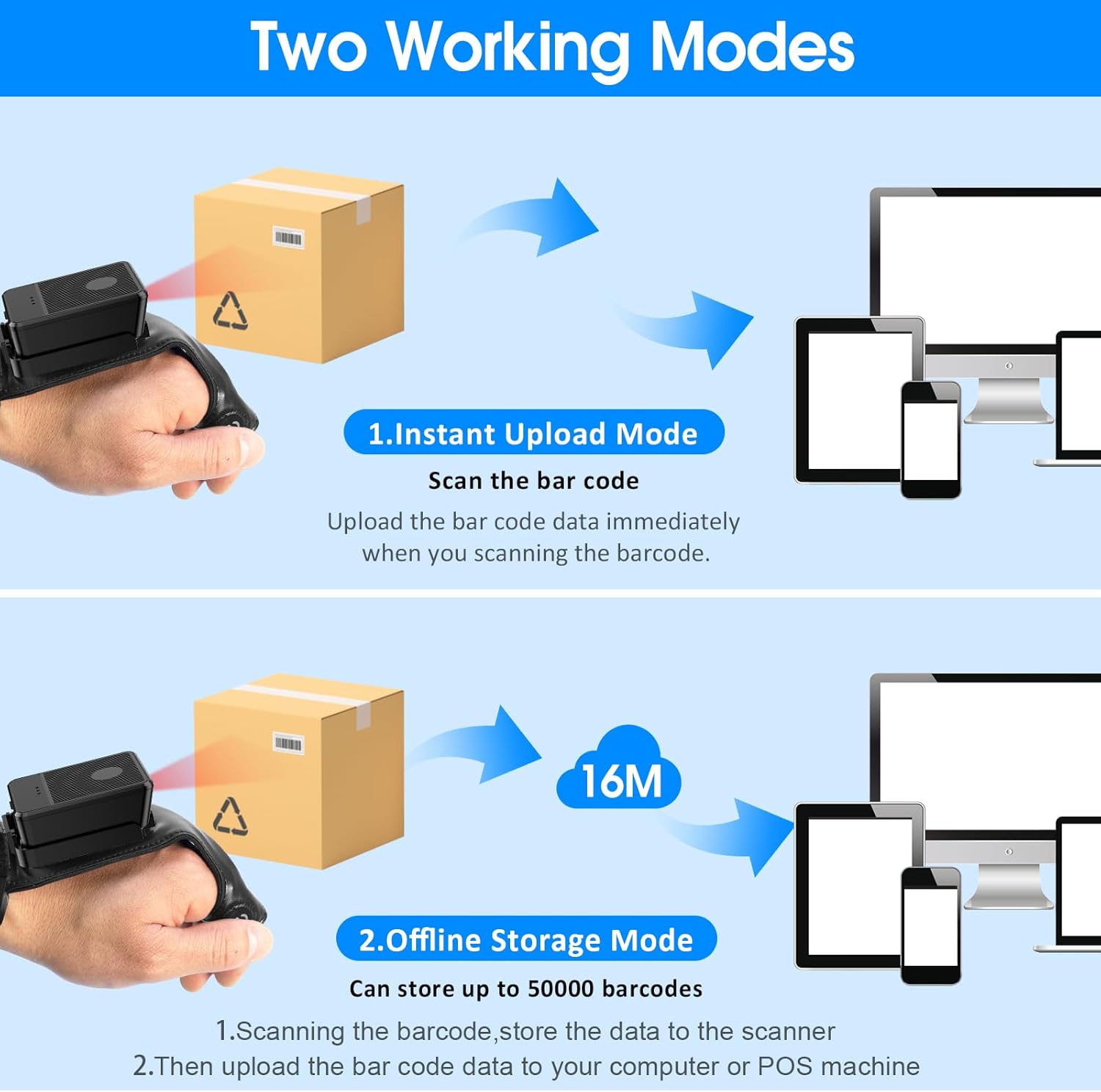
This image explains the two operational modes: Instant Upload Mode, where scanned data is immediately sent to a connected device, and Offline Storage Mode, which allows storing up to 50,000 barcodes internally before uploading them to a computer or POS system.
6.3 Налада параметраў
The scanner allows for customization of various settings, including:
- Гук: Enable or disable the audible beep for successful scans.
- Вібрацыя: Enable or disable vibration alerts for successful scans, useful in quiet environments.
- Функцыі клавіятуры: Add keyboard functions such as TAB or Enter after each scan for seamless data entry into applications.
Refer to the quick setup guide or manufacturer's website for specific programming barcodes to adjust these settings.
7. Тэхнічнае абслугоўванне
- Уборка: Use a soft, dry cloth to clean the scanner's exterior. For stubborn dirt, slightly dampпрацярыце тканіну вадой. Не выкарыстоўвайце агрэсіўныя хімікаты або абразіўныя ачышчальнікі.
- захоўванне: Захоўвайце сканер у прахалодным, сухім месцы, удалечыні ад прамых сонечных прамянёў і экстрэмальных тэмператур, калі ён не выкарыстоўваецца.
- Сыход за батарэяй: Каб падоўжыць тэрмін службы батарэі, пазбягайце частай поўнай разрадкі. Рэгулярна зараджайце прыладу, нават калі яна не выкарыстоўваецца пастаянна.
8. Выпраўленне непаладак
8.1 Сканер не ўключаецца
- Ensure the battery is charged. Connect the scanner to a power source and allow it to charge for at least 30 minutes before attempting to turn it on again.
8.2 Unable to Connect Wirelessly
- Падключэнне 2.4G: Verify the 2.4G dongle is securely plugged into the host device. Try plugging it into a different USB port. Ensure the scanner is within range of the dongle.
- Злучэнне Bluetooth: Ensure Bluetooth is enabled on your host device. Delete any previous pairings for the scanner and attempt to pair again. Ensure the scanner is in pairing mode (refer to device indicators).
- Restart both the scanner and the host device.
8.3 Сканер не счытвае штрых-коды
- Пераканайцеся, што штрых-код чысты, непашкоджаны і разборліва надрукаваны.
- Адрэгулюйце адлегласць і вугал паміж сканерам і штрых-кодам.
- Check if the scanner is in the correct working mode (Instant Upload or Offline Storage).
- Verify that the barcode type is supported by the scanner (1D, 2D, QR codes are supported).
9. Тэхнічныя характарыстыкі
| Марка | сімвалічны код |
| мадэль | Wearable Glove Barcode Scanner (B0F1FSMWCD) |
| Тэхналогія падлучэння | 2.4G, Bluetooth 6.0 |
| Сумяшчальныя прылады | Desktop, Laptop, Tablet, Smartphone (Windows XP/7/8/10, Android, iOS) |
| Крыніца харчавання | Харчаванне ад батарэі |
| Тып батарэі | 1 літый-палімерная батарэя (у камплекце) |
| Ёмістасць батарэі | 1100mAh (Product Description) / 3000mAh (Image) - Note: Discrepancy in source data, refer to product packaging for accurate capacity. |
| Час бесперапыннай працы | Up to 10 hours (Product Description) / 12-13 hours (Image) - Note: Discrepancy in source data, refer to product packaging for accurate time. |
| Час зарадкі | Прыбл. 5 гадзіны |
| Час чакання | Да 30 дзён |
| Хуткасць сканавання | Да 300 сканаванняў у секунду |
| Дыяпазон сканавання | Ад 2 да 4.9 XNUMX футаў |
| Ёмістасць аўтаномнага сховішча | Up to 50,000 barcodes |
| Вага прадмета | 5 унцыі |
| Памеры ўпакоўкі | 7.48 х 3.74 х 2.44 цалі |
10. Інфармацыя аб гарантыі
This Symcode product is covered by a manufacturer's warranty. For specific warranty terms, duration, and conditions, please refer to the warranty card included with your product or visit the official Symcode webсайт. Захоўвайце пацвярджэнне пакупкі для прэтэнзій па гарантыі.
11. Падтрымка кліентаў
If you encounter any issues or have questions regarding your Symcode Wearable Glove Barcode Scanner, please contact Symcode customer support. Contact details can typically be found on the product packaging, the official Symcode webсайце або праз вашага прадаўца.