
1. Настройка
1.1 Распакаванне
Carefully unpack all components from the box. Ensure all items listed in the package contents are present.

Пакет звычайна ўключае:
- 1 x Quieter 4C Mini PC
- 1 х адаптар сілкавання (12 В/2 А)
- 1 x VESA Mount
- 1 х Кіраўніцтва карыстальніка
- 1 x UL Plug
1.2 Падключэнне перыферыйных прылад
Connect your monitor, keyboard, and mouse to the MeLE Quieter 4C Mini PC. The device supports triple 4K display output via two HDMI ports and one full-function USB-C port.

The Mini PC features:
- USB-A 3.2 Gen1 (5Gbps) ports
- USB-A 3.2 Gen2 (10Gbps) ports
- USB-A 2.0 (480Mbps) ports
- Full-function USB-C port (Power Input, USB 10Gbps, DisplayPort)
- 2x HDMI 2.0 ports (4K@60Hz)
- порт Gigabit Ethernet
- Камбінаваны аўдыяраз'ём 3.5 мм
- Micro-SD (TF) Slot
- Слот для замка бяспекі Kensington
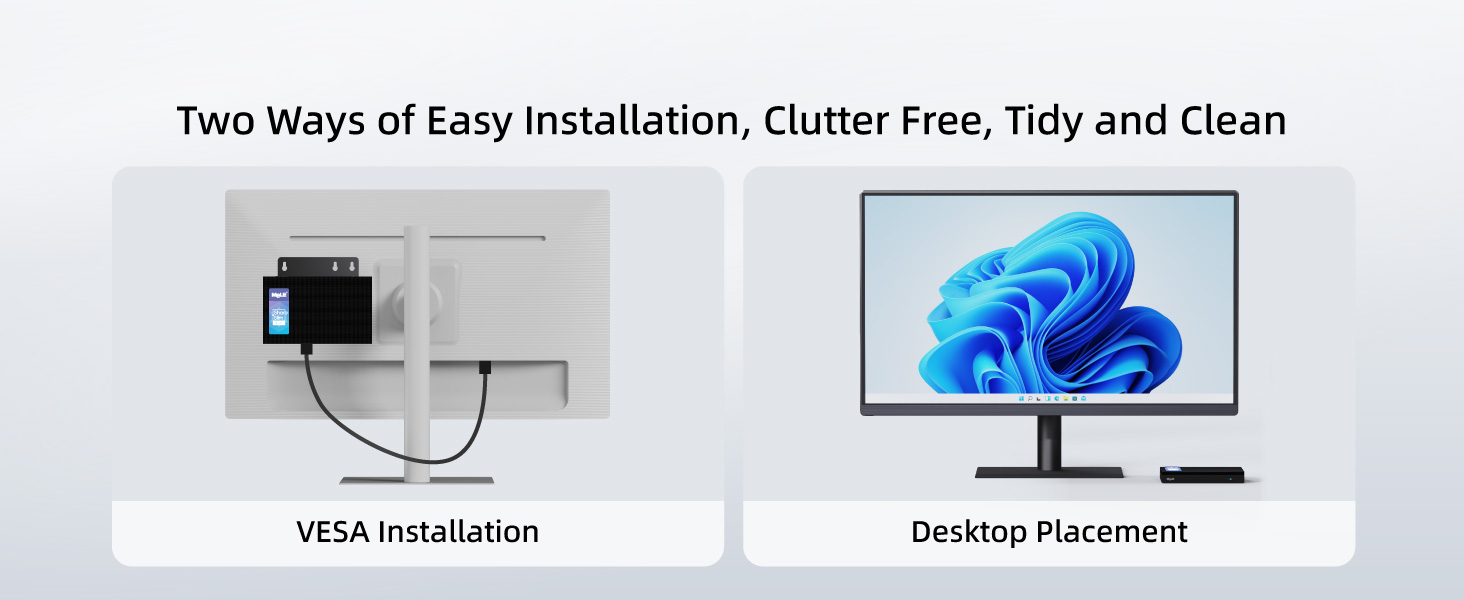
1.3 Усталёўка мацавання VESA
The MeLE Quieter 4C Mini PC can be installed in two ways: desktop placement or VESA mounting. For VESA mounting, follow these steps:
- Attach the VESA mount to the back of your monitor using the provided screws.
- Secure the Mini PC to the VESA mount.
2. Інструкцыя па эксплуатацыі
2.1 Уключэнне/выключэнне сілкавання
To power on the Mini PC, press the power button located on the front panel. The power button will illuminate when the device is on. To power off, use the standard Windows shutdown procedure.
2.2 Налады BIOS
The BIOS allows for advanced configuration, including enabling Auto Power On. To access and modify BIOS settings:
- Turn on your Mini PC and repeatedly press F7 to open the boot menu, or Выдаліць to enter the BIOS directly.
- Select "Enter Setup" and press Увайдзіце.
- Navigate to "Advanced" → "Customer Exclusive Functions" → "Auto Power On" and set it to "Enabled".
- Select "Save & Exit" → "Save Changes and Exit" → "Yes" (or press F4 to save and exit quickly).
2.3 Аперацыйная сістэма
The MeLE Quieter 4C Mini PC comes pre-installed with Windows 11 Pro. It also supports other operating systems such as Linux and Ubuntu.

2.4 Налада некалькіх дысплеяў
The Mini PC supports up to three 4K displays simultaneously. Connect your monitors to the two HDMI ports and the full-function USB-C port for an extended desktop experience.

3. Тэхнічнае абслугоўванне
3.1 Ачыстка
The MeLE Quieter 4C features a fanless design, which helps prevent dust accumulation. To clean the exterior, use a soft, dry cloth. Avoid using liquid cleaners directly on the device.
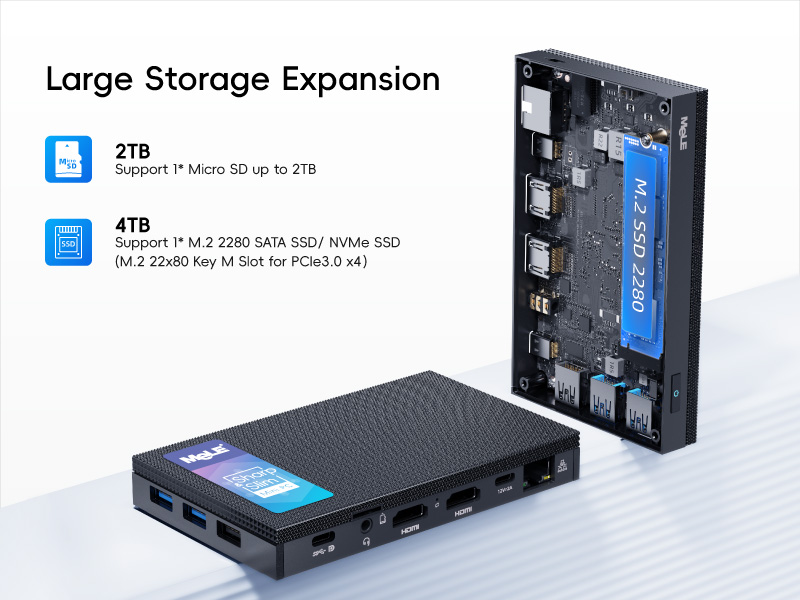
3.2 Пашырэнне сховішча
The Mini PC offers expandable storage options:
- Micro SD card slot: Supports up to 2TB.
- Internal M.2 2280 SSD slot: Supports up to 4TB (both NVMe and SATA M.2 SSD).
4. Выпраўленне непаладак
4.1 Праблемы з падключэннем да сеткі
If you experience problems with network connectivity, you may need to reset your network settings. This will reinstall all network adapters and reset networking components to their original settings.
- Click Start, then select Settings.
- Go to Network & Internet.
- Click Advanced network settings.
- Click Network reset.
- Click Reset now, then choose Yes to confirm. Your computer will restart automatically.
After the restart, you will need to reconnect to your Wi-Fi network.
4.2 Праблемы перагрэву
The MeLE Quieter 4C features a fanless passive cooling system. While this ensures silent operation and dust resistance, the surface temperature of fanless Mini PCs can reach 55°C to 70°C. This is normal and meets safety standards (IEC62368-1:2018). Ensure adequate airflow around the device and avoid placing it in enclosed spaces.
5. Тэхнічныя характарыстыкі
| Асаблівасць | Дэталь |
|---|---|
| Працэсар | Intel Celeron N150 (4 ядры, 4 патокі, да 3.6 ГГц) |
| АЗП | 16 ГБ аператыўнай памяці DDR5 |
| Жорсткі дыск | 512 ГБ M.2 Цвёрдацельны назапашвальнік |
| Графіка | Убудаваная Intel UHD Graphics |
| Максімальны дазвол экрана | 3840x2160 (4K) |
| Бесправадны тып | 802.11ac (Wi-Fi 5), Bluetooth 5.1 |
| Аперацыйная сістэма | Windows 11 Pro (also supports Linux, Ubuntu) |
| Парты | USB-A 3.2 Gen1, USB-A 3.2 Gen2, USB-A 2.0, Full-function USB-C, 2x HDMI 2.0, Gigabit Ethernet, 3.5mm Audio Jack, Micro-SD Slot |
| Увод магутнасці | 12V/2A (PD 3.0 technology, 12V to 20V) |
| Астуджэнне | Пасіўнае астуджэнне без вентылятара |
| Вага прадмета | 16 унцыі |
| Памеры ўпакоўкі | 6.5 х 4.2 х 2.5 цалі |
6. Гарантыя і падтрымка
6.1 Інфармацыя аб гарантыі
MeLE offers a lifetime guarantee on its products, ensuring quality and reliability. For specific terms and conditions, please refer to the warranty card included with your product or visit the official MeLE webсайт.
6.2 Падтрымка кліентаў
For technical assistance, troubleshooting, or any product-related inquiries, please contact MeLE customer support. Contact information can typically be found in the included user manual or on the official MeLE webсайт.